
PitBull Unit Frames 4.0
PitBull Unit Frames 4.0
Woof. Arf. Yip.
Getting Started:
You can help translate PitBull for your language with the localization tool.
Classic
PitBull works with WoW Classic! Classic Era/Vanilla is supported in
v4.3.x-vanilla releases. Other Classic versions are supported in v4.2.x releases
(the same releases retail use).
Download
CurseForge: https://www.curseforge.com/wow/addons/pitbull-unit-frames-4-0
Wago: https://addons.wago.io/addons/pitbull4
WoWInterface: https://www.wowinterface.com/downloads/info20021


-
View User Profile
-
Send Message
Posted Sep 2, 2012@Shefki
Re: Aura anchoring frame. Understandable about not wanting to take out that optimization. It's still something I wouldn't mind having in the future, but for now I've come up with a different solution.
Another request, though. Can you add the ability to set the anchor to/from into the options for Groups? I'd like to offset my party and raid frames from the bottom center of the screen rather than the center.
Thanks for your work and consideration of my requests. :)
-
View User Profile
-
Send Message
Posted Sep 1, 2012Sharedmedia library doesn't seem to work, any suggestions?
-
View User Profile
-
Send Message
Posted Sep 2, 2012That's really not much to work on. Are you getting an error, fonts just not showing up, what is actually happening?
My bet would be that since the SharedMedia addon hasn't been updated you simply don't have load out of date addons checked.
-
View User Profile
-
Send Message
Posted Sep 2, 2012Move the frame or adjust the strata or level of PitBull or the cast bar?
-
View User Profile
-
Send Message
Posted Sep 2, 2012i cant get dominos cast working when i use pitbull
-
View User Profile
-
Send Message
Posted Sep 1, 2012i Got this prob that i cant see another cast bar cuz pitbull is going to block for other cast bar
-
View User Profile
-
Send Message
Posted Sep 1, 2012I have a Question regarding Ghoul Pet as Frost-DK. When I summon my temporary ghoul a timer appears above my unitframe. I like this, but I haven't found anything in "Indicators" where stuff like this usually is, can you quickly tell me where i find that so i can move it to another location?
-
View User Profile
-
Send Message
Posted Sep 1, 2012For whatever reason Blizzard implemented the Ghoul for non-unholy DK's as a Totem. So you can adjust it under the setting for the Totems module.
-
View User Profile
-
Send Message
Posted Sep 1, 2012It may not be confined to Direct X 9. That's just what I've heard. It's not just happening in PitBull4, e.g. here's the exact same thing happening to SUF: http://www.wowace.com/addons/shadowed-unit-frames/?page=2#c624
There may be other considerations beyond just your video card and Direct X version. There's been a bug since 5.0.4 causing models in the game world not to render properly for some players. Based on a blue response on the forum that issue seems to be related to the CPU: http://us.battle.net/wow/en/forum/topic/6413133758?page=5#87
If you don't believe me go ahead and download beta30, take the PitBull4_Portrait module out of it and replace the one you have now. The only MoP issue in it is a taint of the glyph UI which shouldn't stop you from confirming if any of the changes I've made changes anything for you.
If I could fix this I would. I'm way beyond tired of telling people I can't fix it. It should be obvious to everyone that 3d portraits is driving largely by Blizzard code.
-
View User Profile
-
Send Message
Posted Aug 31, 2012I'm getting a very annoying bug regarding 3D unit frames that started today, before and after the update. All day yesterday it was fine, about an hour after playing today, my 3D unit frames, became full body unit frames that extended well beyond the little box they should be confined to.
*Edit SS Uploaded*....but it has happened with my personal frame, targets and pet frames. Instead of the target face being confined to the small box for the portrait, the whole body of the target seems like it triples in size and clips over the portrait box. I tried both side and bottom mounted portraits, nothing seems to work. After todays update, I hoped it would fix the problem, but nothing yet. It just doesn't quite make sense how sometimes it works other times it doesn't...my SS is proof of that. My personal frame is fine, but the target and pet frame is bugged out.
I've removed the portrait box and replaced it with a blank space in the mean time, but please address this issue soon, my UI looks quite bland without the 3D frames.
Edit - Now looking at previous posts, you say it is a problem is DX9/DX11. I'm running a XFX Radeon HD 47850 1gb-256bit DDR3 GPU, not capable of running DX11, but DX10.1. I've never had this issue in the past and I know multiple people running this card as well and can run other 3d frames, both Blizz and other add-ons just fine. I've never had this issue in the past...please roll back whatever changes you made for this error to happen. I love Pitbull frames and really don't feel like using another frame add-on as pitbull suits my custom UI very well.
-
View User Profile
-
Send Message
Posted Aug 31, 2012Here's the SS, since I couldn't edit it into my OP.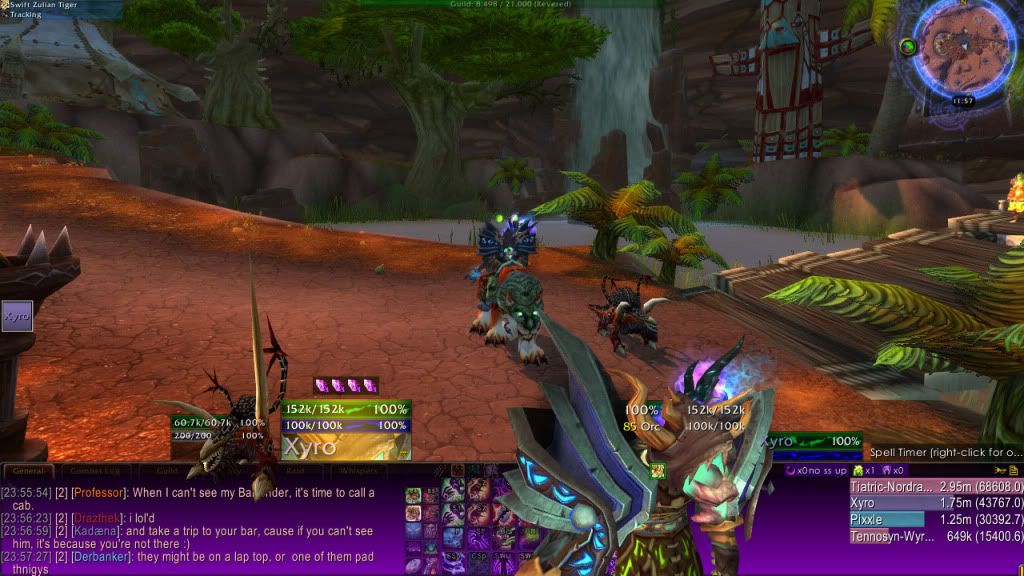
-
View User Profile
-
Send Message
Posted Aug 31, 2012Having a problem with the bars not working properly. Sometimes when I use the map by pushing M, with full screen mode on, it will bug out and not show my bars or my portrait.
I just got done doing a dungeon and this problem occurred. My health says i'm at 200k but I'm at 127k and almost dead.
175x PitBull4_HolyPowerBar-1.0.4\HolyPowerBar.lua:65: attempt to perform arithmetic on global "MAX_HOLY_POWER" (a nil value)
PitBull4_HolyPowerBar-1.0.4\HolyPowerBar.lua:65: in function "GetValue"
PitBull4-v4.0.0-beta32\ModuleHandling\BarModules.lua:41: in function <PitBull4\ModuleHandling\BarModules.lua:31>
PitBull4-v4.0.0-beta32\ModuleHandling\BarModules.lua:407: in function <PitBull4\ModuleHandling\BarModules.lua:402>
(tail call): ?
PitBull4-v4.0.0-beta32\ModuleHandling\Module.lua:319: in function "Update"
PitBull4-v4.0.0-beta32\UnitFrame.lua:801: in function "Update"
PitBull4-v4.0.0-beta32\UnitFrame.lua:689: in function "RecheckConfigMode"
PitBull4-v4.0.0-beta32\Options\ConfigMode.lua:58: in function "RecheckConfigMode"
PitBull4-v4.0.0-beta32\Main.lua:1260: in function "OnProfileChanged"
PitBull4-v4.0.0-beta32\Main.lua:1319: in function <PitBull4\Main.lua:1286>
(tail call): ?
<in C code>
<string>:"safecall Dispatcher[1]":9: in function <string>:"safecall Dispatcher[1]":5
(tail call): ?
Ace3-Release-r1061\AceAddon-3.0\AceAddon-3.0-11.lua:543: in function "EnableAddon"
Ace3-Release-r1061\AceAddon-3.0\AceAddon-3.0-11.lua:636: in function <Ace3\AceAddon-3.0\AceAddon-3.0.lua:621>
<in C code>
FrameXML\UIParent.lua:299: in function "UIParentLoadAddOn"
FrameXML\UIParent.lua:322: in function "CombatLog_LoadUI"
FrameXML\UIParent.lua:692: in function <FrameXML\UIParent.lua:657>
Locals:
nil
-
View User Profile
-
Send Message
Posted Sep 1, 20121) Note able to replicate the issue with the map, can you replicate this with no other addon loaded? Is there anything in particular you have to do to trigger this or is it random. More details will help.
2) You're using two versions back, before posting issues please upgrade to the currently released version.
3) The error you posted is from another addon. PitBull4_HolyPowerBar is not part of the core PitBull4 package. I don't think it's been updated for 5.0.4 yet. So it's possible all your issues are caused by this.
-
View User Profile
-
Send Message
Posted Sep 1, 2012Confirmed. I'll figure this out and get it fixed.
-
View User Profile
-
Send Message
Posted Sep 2, 2012Resolved in beta35.
-
View User Profile
-
Send Message
Posted Sep 2, 2012Excellent :)
-
View User Profile
-
Send Message
Posted Aug 31, 2012Holy Power indicator bugs out when you swap profile. Been like this for a while. Works again if you disable/enable it in the options.
-
View User Profile
-
Send Message
Posted Aug 31, 2012Is there current code to show the value of the Demonic Fury bar for Demo locks?
-
View User Profile
-
Send Message
Posted Aug 31, 2012Yes.
-
View User Profile
-
Send Message
Posted Aug 31, 2012Derp, I found it. Thanks :)