
PitBull Unit Frames 4.0
PitBull Unit Frames 4.0
Woof. Arf. Yip.
Getting Started:
You can help translate PitBull for your language with the localization tool.
Classic
PitBull works with WoW Classic! Classic Era/Vanilla is supported in
v4.3.x-vanilla releases. Other Classic versions are supported in v4.2.x releases
(the same releases retail use).
Download
CurseForge: https://www.curseforge.com/wow/addons/pitbull-unit-frames-4-0
Wago: https://addons.wago.io/addons/pitbull4
WoWInterface: https://www.wowinterface.com/downloads/info20021


-
View User Profile
-
Send Message
Posted Nov 8, 2014Pitbull causing errors with clicking quest items on the Quest Tracker. This specific one was from Darkmoon quest to throw frogs in the cooking pot (Putting the Crunch in the Frog).
Here's the swatter report:
-
View User Profile
-
Send Message
Posted Nov 7, 2014@danszczerba
You'll have to wait until those addons are updated, doesn't have anything to do with the main PitBull4 addon
-
View User Profile
-
Send Message
Posted Nov 7, 2014Well I guess I can just turn OFF buffs and debuff or just downgrade to the older verson that worked before this thing with the buffs started.
-
View User Profile
-
Send Message
Posted Nov 7, 2014Nothing has changed with auras except filter spells and disabling the blizzard count down number. Plus I have no idea what you're talking about.
-
View User Profile
-
Send Message
Posted Nov 8, 2014Config mode, the dropdown on the top-left of the options panel.
-
View User Profile
-
Send Message
Posted Nov 8, 2014Thank you for the response and thank you for the help :D
-
View User Profile
-
Send Message
Posted Nov 7, 2014Anyway you would be able to implement being able to move the bars while being in combat? I have tried to move my pet's target bar everyway I could possibly think of and it just stays in the middle of my screen where I do no want it. Or if there is a way to move the pet's target bar could you inform me?
-
View User Profile
-
Send Message
Posted Nov 6, 2014@nebula169: it was unchecked for the purpose of the picture showing the out-of-date modules. BUT, even with the "load out of date addons" button checked i still have no names on my bars, as shown in the pic below:
plus, i can't find anything about names or nameplate in the config menu. i also disabled all out-of-date addons, except "Pitbull 4 Nameplate", to check for conflicts, but with all disabled i still have no names :-(
-
View User Profile
-
Send Message
Posted Nov 6, 2014Thank you very much for the help Paquin!
-
View User Profile
-
Send Message
Posted Nov 7, 2014My pleasure :)
If you do ever want to configure your pet's target, assign it a Layout, and then edit that Layout with the Layout Editor. Additionally, you should be able to move it if you set "Locked" at the top to "Unlocked" with or without snap; or by manually changing its Horizontal and Vertical offsets in the Units menu.
-
View User Profile
-
Send Message
Posted Nov 27, 2014did you figure out what the border is in pvp? i'm having the same issue and i can't pinpoint what is causing it.
-
View User Profile
-
Send Message
Posted Nov 6, 2014Just wondering how i can disable my Pet's target. Seeems to stay locked in the midddle of the screen and have tried some of the options found in the add on but cant get it to work.
Also having an issue when target frame in Pvp has some wierd border outside of their class color.
Thanks for the help!
-
View User Profile
-
Send Message
Posted Nov 6, 2014Units > Player's pet's target* > Enable?
-
View User Profile
-
Send Message
Posted Nov 6, 2014beta54 should fix all the issues with texts and indicators not showing on bars as well as the cooldown spiral on auras not updating when the frame opacity changes
-
View User Profile
-
Send Message
Posted Nov 6, 2014@danszczerba
you need to check the load out of date addons button (those aren't part of the main pb4 addon)
@Mejjmejj
should be better in v4.0.0-beta54-2
-
View User Profile
-
Send Message
Posted Nov 6, 2014When you lower the strata of bars, auras that show a spiral timer flicker. Have to lower strata to be used with LoseControl.
-
View User Profile
-
Send Message
Posted Nov 5, 2014hi, i'm have a problem-names are missing from my unit frames and in settings i can find no option for "name plate/bar". in the character log-in screen, under addons, the Pitbull 4 Name Plate and Raid Role Icon is shown as out-dated, the rest is shown as currently updated. using version -any ideas?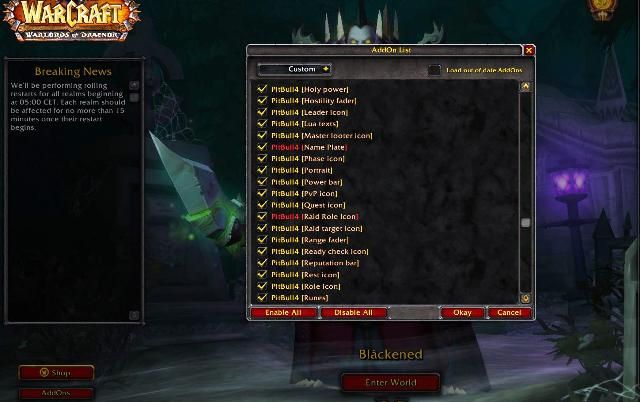
p.s.-updated to v4.0.0-beta53-2-g3bf212d and seen that the Name Plate and Raid Role Icon module are not included...and no, after update still no names :-(
-
View User Profile
-
Send Message
Posted Nov 5, 2014hi, i'm have a problem-names are missing from my unit frames and in settings i can find no option for "name plate/bar". in the character log-in screen, under addons, the Pitbull 4 Name Plate and Raid Role Icon is shown as out-dated, the rest is shown as currently updated-any ideas?
p.s. deleted, downloaded, and installed newest version-NO Name Plate or Raid Role Icon included in addon :-(
-
View User Profile
-
Send Message
Posted Nov 6, 2014Editing a unit frame from scratch is a two-step process:
1. Create a new layout in the Layout editor, for example "Target layout"
2. Go into Units (under Layout editor on the left), select a unit in Current unit (Target), and assign it a Layout (Target layout).
Now, when you edit your "Target layout" in the Layout editor, your Target frame will be changed. Similarly, if you assign a Player layout to your Player frame, when you edit your new Player layout, your Player frame will be changed.
Groups (Party, Raid, etc.) are a bit different and found under Groups, but you still create and assign a layout in the same way.
-
View User Profile
-
Send Message
Posted Nov 5, 2014Hi!
When im in the Layout editor i can only choose the "Normal" layout in the Current layout folder. When i create a new layout, for example "Player" I can edit the Unit Frames. I can only edit in the "Normal" layout.
I want to be able to configure the different Unit Frames individually! Please help me!