ArkInventory
ArkInventory (for The War Within)
:boom: Please ensure you are using the latest alpha version if you have the War Within client.
ArkInventory (for Retail, Classic, and Cataclysm)
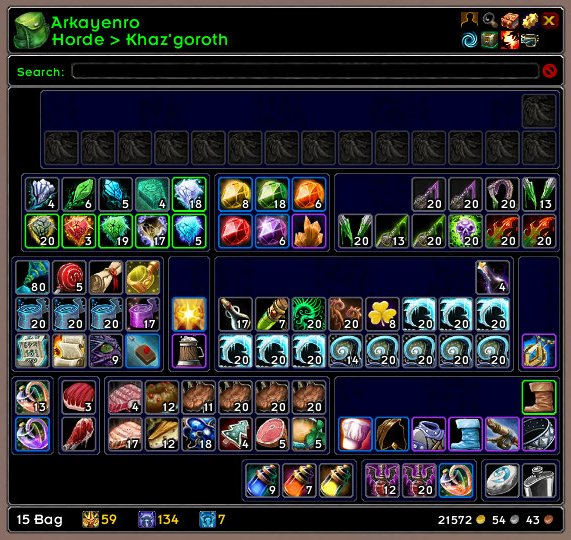
ArkInventory's display windows are built from "virtual bars", you assign categories to bars so that items in that category are displayed on the specific bars you want. There is no limit to the number of bars you can have inside a window but obviously you only have so much screen real estate before it becomes "too many".
ArkInventory uses several methods to assign a default category to an item such as what professions you have, tooltip scanning, basic type/subtype and PeriodicTable. You then assign those categories to a virtual bar.
You can also over-ride the default category by creating a rule that matches either a single or multiple items.
Overview:
- user configurable window width and height
- separate keybindings for each location for easy viewing
- assign items to a category of your choice (overrides the default assignment)
- assign categories to the bar of your choice
- unlimited number of bars (there are practical limits though before your screen becomes full)
- sort each bar differently if required
- user configurable bars per row
- sell junk items automatically or manually (delete available via a keybinding or right clicking when at a vendor)
- random pet and mount summons. can also assign a group of them to select from
Key Bindings:
- Press ESCAPE to bring up the blizzard menu
- click on Key Bindings
- scroll down to AddOns > ArkInventory
- bind the keys you want to use
Need Help?
:memo: Wiki
:memo: Frequently Asked Questions
:memo: Sorting
:memo: Rules
:memo: If you are having an issue the first step is to disable all other mods and test with only ArkInventory loaded
:memo: If the issue is still there, please check for an existing issue and create a new issue if required.
:memo: If the issue is gone, re-enable your other mods one by one until the issue comes back, then note the last mod you enabled in your issue as well as notifying the author of the other mod
See ChangeHistory.md for changes to the latest version. See VersionHistory.md for all previous changes.
:boom: The NoLib variant
it seems quite a few people are somehow getting the NoLib variant from their download client when they didn't specifically ask for it, instead of the full variant, and its causing issues as they don't have the required libraries installed separately. Please ensure you are downloading the full. if you see nolib in the filename then its the wrong variant, unless you are actually installing all of the required libraries separately as well. If you have to you can manually download the full variant from CurseForge, WoWInterface, or Wago.
:boom: Junk Sell getting blocked
While auto-destroy remains blocked, From 30960 onwards you can setup a Key Binding to manually sell and destroy your items. Note that blizzard require one keypress per item deletion, so if you have multiple items that need to be deleted you will need to press the Key Binding multiple times. A message will be output if you have remaining items that can still be deleted.
:warning: Ensure you have backup copies of your saved variables file
Sometimes you cannot revert back to a previous version without a backup, especially alpha or beta versions, so before upgrading please make sure you have made a backup of your saved variables file
Your saved variables file is normally located at ...\World of Warcraft\_client_\WTF\Account\yourwowaccountname\SavedVariables\ArkInventory.lua
It is your responsibility to ensure you have adequate backups of your saved variables file. You dont have to do them frequently, just after you've made major changes to your config is probably fine for most people, but you should get into the habit of making backups because when it does corrupt you wont have to reconfigure everything from scratch.
If you have your download client set to automatically download alpha/beta versions you should definitely have backups.
A simple way to back up the saved variables file is to just do a copy and paste then rename the new file (using the version number of ArkInventory or the date is a good idea), eg ArkInventory-30900.lua, or ArkInventory-20191228.lua
Comments

-

Arkayenro Owner
-
View User Profile
-
Send Message
Posted Nov 24, 2022In reply to Arkayenro:Alrighjt will ignore it then, thanks for the reply chief
-
View User Profile
-
Send Message
Posted Nov 23, 2022is there an option to turn off flash new items?
-
View User Profile
-
Send Message
Posted Nov 23, 2022In reply to tacoeater909:
You can disable New Item Glow in the settings (General > New Item Glow)
-
View User Profile
-
Send Message
Posted Nov 23, 2022please upgrade to 3.10.07 alpha 6 and test again
specifically the long term additional lag, loot lag, and ui crashes
i dont think it will fix anything else but if it does fix those then it should help overall anyway
-
View User Profile
-
Send Message
Posted Nov 23, 2022In reply to Arkayenro:
I went into Molten Core to do big some pulls. With all my addons enabled the FPS drops were pretty bad on looting (60FPS>20FPS) for a couple of seconds (on the 3.10.07 Alpha 6). I disabled all addons except ArkInventory - no FPS drops at all (rock steady on 60FPS). I haven't been able to work through all my 60 addons yet, but so far ArkInventory isn't causing any FPS drops at all with ELVUI / Altoholic / All The Things.
EDIT: About 90% sure the culprit (for me at least) is CanIMogIt, but it seems like it's a conflict with another addon as on its own it doesn't cause any issue. I went to Blackrock Mountain and started piling up dwarves. Looting with all addons + CanIMogIt enabled cratered FPS, but hardly at all with all addons and disabled CanIMogIt. I dropped a Guild Bank and tested transferring items in and out. FPS was dipping 60>20s with CanIMogIt + ELVUI and hardly dipping at all with AI and ELVUI. Re-entering the world, the FPS takes a much bigger and longer hit with all addons than all addons minus CanIMogIt.
EDIT2: I see there's an FPS Issue ticket on the CanIMogIt addon page. Not sure if that's related.
EDIT3: No reply expected.....
-
View User Profile
-
Send Message
Posted Nov 23, 2022In reply to Incandio:
For me it is definitely AddOnSkins because i dont use CanIMogIt right now.
maybe you can try that also?
Just disable AddOnSkins or disable the Arkinventory Module
-
View User Profile
-
Send Message
Posted Nov 23, 2022In reply to fuba82:
I don't use AddOnSkins. Do they have shared functions? CanIMogIt (afaik - I'm not technical) applies a skin overlay to bags and it sounds like AddOnSkins also does.
-
View User Profile
-
Send Message
Posted Nov 23, 2022In reply to Incandio:
No it's a totally different problem then, i will install and CanIMogIt later and report.
But my Lags are gone now because AddOnSkins hooks at the wrong function i think
-
View User Profile
-
Send Message
Posted Nov 24, 2022In reply to fuba82:
I also noticed that CanIMogIt messes up with my bars that have equipment categories assigned to them. I have one bar for Equipment (Soulbound) and one for Equipment. If CanIMogIt is enabled all the Soulbound items are put into the Equipment bar (edit - not immediately, it seems to happen after a few minutes of playing).
-
View User Profile
-
Send Message
Posted Nov 24, 2022In reply to Incandio:
Well i "tried" to test CanIMogIt.
First thing that happens after i installed CanIMogIt -> "Broken Database" Message on every Login... :D
CanIMogIt broke my interface years ago so i deleted it and seems it's not better now. ^^
-
View User Profile
-
Send Message
Posted Nov 25, 2022In reply to fuba82:
It worked fine prior to these new Dragonflight changes. Their github says they haven't updated for compatibility yet so I'm keeping my fingers crossed. Edit: I mean for me it basically works, it just seems to muddle with categories in the bags occasionally.
-
View User Profile
-
Send Message
Posted Nov 23, 2022In reply to Arkayenro:
With Arkinventory enabled but ALL other Addons disabled, Arkinventory still have a little FPS drop, about 15-30 FPS if open/close the inventory repeatedly fast!
This is almost "intercepted" by my Hardware so it's not hardly "noticeable" (for me)!
BUT here we are now...
My testes now shows me that "AddOnSkins" or be more specific -> the Skin Module of AddOnSkins for Arkinventory cause the MEGA lag and FPS drop!
Disable AddOnSkins or just the Arkinventory Skin Module will fix it for me!
It seems it's not your fault @Arkayenro !
Edit:
Ok tested now a few Hours "non intensive" but until now, i dont got any problems...
It was definitely AddonSkins's broken Module in my case!
-
View User Profile
-
Send Message
Posted Nov 23, 2022In reply to Arkayenro:
for me the lag is completely gone. in this alpha. and still no UI problems goin to report if i find any other problems.
-
View User Profile
-
Send Message
Posted Nov 23, 2022The current Alpha has improved the FPS drops for me. Running Magister's Terrace previously and looting large piles of dead elves created FPS drops of between 25-50% for about 3 seconds. Same thing today it's not really noticeable, 60FPS > 45FPS for a second or so.
-
View User Profile
-
Send Message
Posted Nov 22, 2022first of all thank you for your great work
Unfortunately it seems that this addon generates fps drops. also when looting the enemies. can you please fix this
5031x Usage: self:SetNormalTexture(asset)
[string "=[C]"]: in function `SetNormalTexture'
[string "@AddOnSkins/SkinsArkInventory.lua"]:83: in function <...faceAddOnSkins/SkinsArkInventory.lua:73>
[string "=[C]"]: in function `Frame_Item_Update_Border'
[string "@ArkInventory/Core/ArkInventory.lua"]:9437: in function `Frame_Item_Update_Instant'
[string "@ArkInventory/Core/ArkInventoryStorage.lua"]:504: in function <...aceArkInventory/Core/ArkInventoryStorage.lua:494>
[string "=[C]"]: ?
[string "@ArkInventory/Externals/Ace3/AceBucket/AceBucket-3.0-4.lua"]:69: in function <...Inventory/Externals/Ace3/AceBucket/AceBucket-3.0.lua:67>
[string "@ArkInventory/Externals/Ace3/AceBucket/AceBucket-3.0-4.lua"]:83: in function `func'
[string "@ElvUI_Libraries/Core/Ace3/AceTimer-3.0-17/AceTimer-3.0.lua"]:57: in function <...UI_Libraries/Core/Ace3/AceTimer-3.0/AceTimer-3.0.lua:50>
Locals:
(*temporary) = "Usage: self:SetNormalTexture(asset)"
-
View User Profile
-
Send Message
Posted Nov 22, 2022sure, let me get on that. not like im doing anything about it.
i dont fix addonskins issues, take it up with them
what version are you even running?
-
View User Profile
-
Send Message
Posted Nov 21, 2022Some big issues are arising lately. I encourage others to reply to this with any of the following similar issues.
Posting my own comment for visibility:
Since Pre-Expansion phase 2 (10.0.2), ArkInventory has been really unstable. I am keeping it up to date, and have ran a few test sessions with ArkInventory as the only addon running (alongside BugGrabber). A note that as soon as I disable ArkInventory all the following described issues cease to exist.
Like quite a few others posting below (you'll see they have multiple replies claiming same issues), I am seeing FPS frame drops to a crawl pace when doing anything that involves the addon. Such as: loading into the game, looting, opening the inventory (just by hotkey or accessing a vendor/bank), moving items within the inventory, or moving items from the inventory (into bank or vendoring). Any task that involves access/updates from the addon is met with frame rate dropping to near standstill for about 1-3 seconds. Accessing an entire new character or one that hasn't been logged into in a long time, the game locks up for about 60 seconds, which is scary.
On top of the jarring FPS issues, after a certain amount of time (for me its been around 20-30 minutes of a sessions that involves accessing the inventory a few times), the entire UI will simply shut off, as if one is pressing ALT + Z to hide it. At this point the UI is gone until you type /reload. Visually you can't see it, but the function still works, and once the reload completes the UI is refreshed and fine. Continuing on, about 10-20 minutes later, the UI ends up disappearing once again.
It feels as if ArkInventory is having some sort of memory access issues or something. It's like it's strangling the resources on the back end and crashing the entire UI system. I'm by no means a developer, just a user. But from my time around computer software... that's how it seems to be acting.
Much appreciation to you Arkayenro. I understand it's likely a lot of work, and I'm in no means begging or rushing you. I hope you're able to figure it out though.
Please let us know if we can do anything at all to help assist you. Maybe there is a way for us to log errors or something and send them to you? Some sort of special addon that collects errors? I'm happy to help if I am able to in some way, since maybe you are unable to recreate this issue yourself. ArkInventory is thee number 1 addon I use. I have used it for as long as I can remember, and its a huge staple in my comfort within the game. It's always the first addon I download on a fresh install, and I absolutely tell everyone about it every chance I get. I would love to assist if I can.
Cheers!
-
View User Profile
-
Send Message
Posted Nov 21, 2022In reply to sushileafbeats:
Are you able to (if you haven't already) try the newest 3.10.07-alpha-3? These are the changes made in that build:
I have done some preliminary testing and the loot lag seems better. I'd be interested to know if you're seeing a similar improvement.
-
View User Profile
-
Send Message
Posted Nov 22, 2022In reply to dmeister406:
Just installed ne newest Alpha. Seems better with this Version, still some lags, but not like before.
-
View User Profile
-
Send Message
Posted Nov 21, 2022In reply to sushileafbeats:
I've had the FPS problems and the disappearing UI (exactly as you report it - after about 30 mins of play. Reloading seems to reset the "timer".....). I'll try with the latest alpha. You can download BugGrabber & BugSack (you need BugGrabber for BugSack) to grab errors.
EDIT: With the latest Alpha build I'm still getting the UI disappearing after about 30 minutes of play. Also FPS drops by about 25-75% for 3 seconds whenever looting anything except gold. Looting more items causes bigger drops.