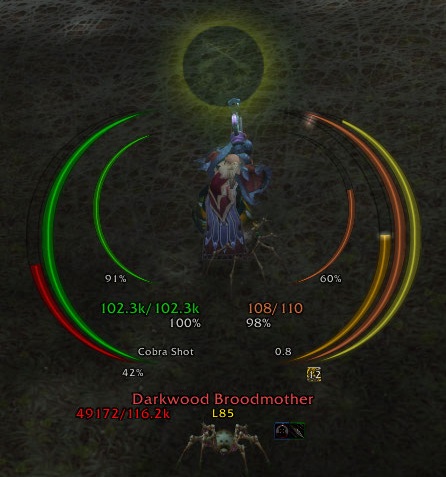
ArcHUD3
Midnight Changes: I have created a version of ArcHUD3 that is compatible with Midnight!! With the API changes in 12.0, it is no longer possible to create the exact smooth arcs used here, but I've made the closest approximation I could. There is some polish that is no longer possible for arcs that rely on secret values (health, power, etc), like the spark, smooth animations, angled tips, etc. If you notice any issues (there are likely several), feel free to open an issue on GitHub.
ArcHUD displays smooth arcs around your character in the middle of the screen to inform you about the health and power (mana, rage, ...) of you, your pet, and your target. In addition, it shows casts, combo points, holy power, soul shards, and a couple of other things. It discretely fades when you are out of combat and at full health/power.
This is a continuation of ArcHUD2 which managed to survive various patches... until the Cataclysm. Thanks to Nenie, the original author of ArcHUD2, for supporting me with this new version.
Please report any bugs or feature requests via the ticket system.
These arcs are currently supported:
- Health and power (mana, rage, focus, energy, runic power) for player, pet, target, and focus target
- Player's secondary power (Holy Power, Soul Shards, Chi etc.)
- Casting/channelling progress for player, target, and focus target
- Fatigue/breath (mirror timer)
- Combo points (including unconsumed combo points on previous target, e.g. on dead corpses)
- Custom (de)buff arcs: Ever wanted to keep track of the stacks and/or remaining times of some specific (de)buffs such as Evangelism, Savage Roar, Beacon of Light, Weakened Soul, etc? Then just create your own custom (de)buff arc for it!
In addition, some additional target information is displayed:
- Current target (name, class, guild, 3D model)
- Current (de)buffs on target
- Target-of-target and target-of-target-of-target
Small warning: Using this addon apparently bears a high risk of getting addicted to it, as these user comments suggest. I received those after taking over the development of ArcHUD when the Cataclysm happened:
- "...nothing ever quite matched the smooth, clean simplicity of ArcHUD's graceful rings."
- "Great job!! I've used this addon for years! None of the other HUDs come close to the functionality and elegance of ArcHUD."
- "Thanks for the work on it so far, much more lightweight than IceHud!"
- "Was staring at the various icehud/metahud alternatives with discomfort and sadness right after the patch [4.0]."
- "Awesome! Thank you so much for that miracle!"
- "Thank you so much for continuing this fantastic addon."
- "...nothing could compare to ArcHUD..."
- "For a whole 4years I had this mod and I missed it so much in the passed few weeks. I tried other HUD mods but they were too in my face >.< . Best HUD mod IMO! Thanks for resurrecting an old friend :D"
- "Loving the new ArcHUD my favorite HUD by far :)"
- "I don't think I could play wow without this addon :)"
- "I've actually grown kind of dependent on it because I'll occasionally run out of Mana/ die without this."
- "Hey mate, just came to thank You again for taking over this beauty, awesome job!"
- "THAT addon! So long I have been searching for a replacement when the development stopped, thanks for bringing it back to live!"
So use it at your own risk ;)
Frequently Asked Questions
- How do I add a arc for a specific buff/debuff (remaining time & stacks)?
- Where is my Combo Point/Soul Shard Numeric Indicator?


-
View User Profile
-
Send Message
Posted Sep 29, 2014Any news on the homefront regarding ArcHud? Seems like everyone's got the addons they want... but this one still isn't ready to use for Beta/PTR? Just inquiring! Thanks!
-
View User Profile
-
Send Message
Posted Sep 30, 2014Yes, see the comments here: http://www.wowace.com/addons/archud3/
Edit: Or, better, use the last version listed here: http://www.wowace.com/addons/archud3/files/
-
View User Profile
-
Send Message
Posted Sep 25, 2014You just made my morning. I'll let you know what/if any errors I get or bugs I see.
So far no issues at all. Happy Druid.
-
View User Profile
-
Send Message
Posted Sep 22, 2014@Spennig
I will prepare a version for 6.0. If you want to use it on Beta, try the instructions here: http://us.battle.net/wow/en/forum/topic/13506740664
Bug reports are welcome since I'm rarely on beta/ptr due to lack of time.
-
View User Profile
-
Send Message
Posted Sep 22, 2014I'm hoping you'll continue this into WoD.
-
View User Profile
-
Send Message
Posted Aug 7, 2014Great addon, love it, probs one of the best huds I've seen 10/10
Edit: I want to move my health and power text around, is there any way to do that?
-
View User Profile
-
Send Message
Posted Jul 22, 2014Any idea when/if we'll see this updated for use on the Beta? Would be real swell!
-
View User Profile
-
Send Message
Posted Jul 24, 2014External textures are currently not loaded by the WoW Beta, so there is nothing I can do at the moment.
-
View User Profile
-
Send Message
Posted Jul 24, 2014No rush! Just glad to see this addon will still be around! Been using this one since I started playing the game all the way back in Wrath, so it basically IS WoW to me lol....
-
View User Profile
-
Send Message
Posted Mar 29, 2014yes, you can disable it in the options ([ESC] / Interface / Addons / ArcHUD)
-
View User Profile
-
Send Message
Posted Feb 22, 2014Gotta say,I really love this! I couldnt imagine playing without ArcHud ever again. :3
I just have a question:
Is it possible to turn off the 3d target thingy (where you see a 3d model of your current target. And the buffs on that.) under the HUD? I use a custom action bar & frame setting and the buffs are really distracting 'cause they're there twice in my case and yeah the 3d model always merges into my action bars.
Is that possible?
Other than that it's the greatest HUD out there. Keep up the work!
-
View User Profile
-
Send Message
Posted Mar 29, 2014Have you disabled the target HUD (i.e., the 3d model, target name, buffs etc)?
-
View User Profile
-
Send Message
Posted Feb 22, 2014I cannot get the "show X as combo points" to work on anything. Tried it on spirit shards, embers, and holy power. I've enabled combo points and all settings already work on my rogue by default.
-
View User Profile
-
Send Message
Posted Jan 11, 2014Is there a way to make the arcs unclickable? I move with my mouse and I've found the arcs intercepting my clicks as I try to turn. This happens out of combat, when the bars are invisible, as well. I have none of the boxes ticked in either the Display or the Nameplates tabs of the configuration. Am I doing something wrong?
-
View User Profile
-
Send Message
Posted Jan 11, 2014The arcs (rings) are not clickable at all. Do you have some addon installed, that allows you to move frames freely? Try to disable all addons except for ArcHUD and see if it still happens.
-
View User Profile
-
Send Message
Posted Apr 1, 2016For me this happens when Clique is installed. For some reason not *all* the ARChud frames seems to show up in it's Frame Blacklist options... Or it's Clique's fault and it doesn't handle ARChud very well...
Pics:
Clique options
What happens when I mouseover the target frame of my target (which is my pet atm)
-
View User Profile
-
Send Message
Posted Nov 28, 2013anyway you coudl add burnign embers to teh combo points counter ? I prefere that display to the ring and right nwo it appears as though it only tracks soul shards. Thanks in advance.
-
View User Profile
-
Send Message
Posted Dec 16, 2013I don't like the counter, but it seems popular. So yeah, I will add this in the future. Feel free to create a ticket to track it mir easily ;)
-
View User Profile
-
Send Message
Posted Oct 29, 2013After the 5.4.1 update that came out today, Blizzard now throws this error now when trying to use this addon: "ArcHUD3 has been blocked from an action only available to the Blizzard UI. You can disable this addon and reload the UI."
Could you please update the addon to remove whatever it is that the addon is trying to do that Blizzard does not like? Because right now I just hit the ignore button, but that message pops up everytime I go into a new instance... Thank you!
-
View User Profile
-
Send Message
Posted Oct 30, 2013This is most likely caused by a library and/or by another addon. Please add follow-ups here: http://www.wowace.com/addons/archud3/tickets/70-blizzard-wants-to-disable-addon/