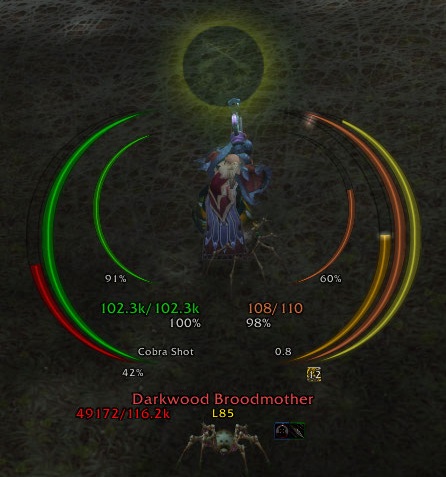
ArcHUD3
Midnight Changes: I have created a version of ArcHUD3 that is compatible with Midnight!! With the API changes in 12.0, it is no longer possible to create the exact smooth arcs used here, but I've made the closest approximation I could. There is some polish that is no longer possible for arcs that rely on secret values (health, power, etc), like the spark, smooth animations, angled tips, etc. If you notice any issues (there are likely several), feel free to open an issue on GitHub.
ArcHUD displays smooth arcs around your character in the middle of the screen to inform you about the health and power (mana, rage, ...) of you, your pet, and your target. In addition, it shows casts, combo points, holy power, soul shards, and a couple of other things. It discretely fades when you are out of combat and at full health/power.
This is a continuation of ArcHUD2 which managed to survive various patches... until the Cataclysm. Thanks to Nenie, the original author of ArcHUD2, for supporting me with this new version.
Please report any bugs or feature requests via the ticket system.
These arcs are currently supported:
- Health and power (mana, rage, focus, energy, runic power) for player, pet, target, and focus target
- Player's secondary power (Holy Power, Soul Shards, Chi etc.)
- Casting/channelling progress for player, target, and focus target
- Fatigue/breath (mirror timer)
- Combo points (including unconsumed combo points on previous target, e.g. on dead corpses)
- Custom (de)buff arcs: Ever wanted to keep track of the stacks and/or remaining times of some specific (de)buffs such as Evangelism, Savage Roar, Beacon of Light, Weakened Soul, etc? Then just create your own custom (de)buff arc for it!
In addition, some additional target information is displayed:
- Current target (name, class, guild, 3D model)
- Current (de)buffs on target
- Target-of-target and target-of-target-of-target
Small warning: Using this addon apparently bears a high risk of getting addicted to it, as these user comments suggest. I received those after taking over the development of ArcHUD when the Cataclysm happened:
- "...nothing ever quite matched the smooth, clean simplicity of ArcHUD's graceful rings."
- "Great job!! I've used this addon for years! None of the other HUDs come close to the functionality and elegance of ArcHUD."
- "Thanks for the work on it so far, much more lightweight than IceHud!"
- "Was staring at the various icehud/metahud alternatives with discomfort and sadness right after the patch [4.0]."
- "Awesome! Thank you so much for that miracle!"
- "Thank you so much for continuing this fantastic addon."
- "...nothing could compare to ArcHUD..."
- "For a whole 4years I had this mod and I missed it so much in the passed few weeks. I tried other HUD mods but they were too in my face >.< . Best HUD mod IMO! Thanks for resurrecting an old friend :D"
- "Loving the new ArcHUD my favorite HUD by far :)"
- "I don't think I could play wow without this addon :)"
- "I've actually grown kind of dependent on it because I'll occasionally run out of Mana/ die without this."
- "Hey mate, just came to thank You again for taking over this beauty, awesome job!"
- "THAT addon! So long I have been searching for a replacement when the development stopped, thanks for bringing it back to live!"
So use it at your own risk ;)
Frequently Asked Questions
- How do I add a arc for a specific buff/debuff (remaining time & stacks)?
- Where is my Combo Point/Soul Shard Numeric Indicator?


-
View User Profile
-
Send Message
Posted Aug 11, 2013I have been looking for an addon like this for ages, and finally gave up... I stumbled across this yesterday, and couldnt be happier.. its so smooth, all the other addons like this feel.. clunky.. and hard to handle.. THANK YOU!
The only difference I wish is that I could turn the cast bar, so that the name of the spell being cast is over the bar, and the bar (arc) is horizontal...
But, this mod, so good.
EDIT: TO that note, I like this mod so much that I have had this curse account since 2010.. and this is the only mod I have ever left a comment for.. I normally dont even bother..
-
View User Profile
-
Send Message
Posted Aug 31, 2013Thank you ;)
Regarding the cast bar: It is not currently planned to add additional bar-styles, but you are welcome to add feature request on the project page (link above, same login as your curse login). If I should happen to get bored, I might add it at some point in the future.
-
View User Profile
-
Send Message
Posted Jul 5, 2013So, so happy to see that you are keeping this going! THANK YOU! It is my favorite HUD, it's pretty darn easy to set up compared to the others and looks WAY better. Keep up the awesome work!
-
View User Profile
-
Send Message
Posted Jul 6, 2013Thank you ;)
-
View User Profile
-
Send Message
Posted May 4, 2013I can not get the standard rune bar to disappear with archud. The one with the addon itself loads fine (and looks awesome btw, really, really good work) but the one that normally is under the standard ui frame stays just kinda chillin in the upper left hand corner all by itself. Ive looked for an option to disable it, but can't find one. Ive tried reloading ui, deleting and reinstalling the addon but have had no luck. Any ideas on how to fix it?
-
View User Profile
-
Send Message
Posted May 5, 2013Thanks for the report. Could you check out r144 from the project site (or switch your curse client to download alpha versions for ArcHUD)? It should be fixed.
-
View User Profile
-
Send Message
Posted May 5, 2013Regarding the right click: Check out the "Nameplate" settings in ArcHUD. It might be what you are looking for.
Regarding EDIT 2: Thanks, I'll look into it. Meanwhile, you can set a separate Scaling Factor for this (ArcHUD / Misc / Blizzard Spellactivation Overlays)
Edit: Just checked on the Spell Activation Overlay: This is intentional if the option "Center Blizzard's spell activation overlays on ArcHUD" is checked (which is the default). If you uncheck this, ArcHUD scaling should not influence the Activation Overlay (you might need to reset the scale if changing the option).
-
View User Profile
-
Send Message
Posted May 1, 2013I absolutely love this HUD. It's very clean and customizable. It's practically all I need instead of a different UI. Just pop on party raid frames and I'm set.
Although, I would like to see one thing implemented: Text and Frame scaling/fade options. As it is, I play with my HUD at 1.5 scale, but it makes the target frames absolutely massive and unsitely. I would love to see some way to shrink it down without shrinking the rest of my HUD.
-
View User Profile
-
Send Message
Posted May 1, 2013Thanks ;-)
I just added an option in the latest alpha (r143). You can set your Curse client to install alpha versions for ArcHUD or download it manually from the project site. Is this about what you imagined?
-
View User Profile
-
Send Message
Posted May 1, 2013Perfect! Just gotta move it back to where I had it (since it shrinks to the bottom left) and we're good! Having it at 0.5 makes it much better!
EDIT: But that can be fixed IMMEDIATELY by resetting it's position or even toggling attach to top!
The only thing that could make it more useful is if you could right click on it like a normal target window, but that's not 100% necessary. :D Thank you so much for this edit.
EDIT 2: Found an interesting bug with it. When you shrink the target frame it shrinks the vanilla in game HUD for spells (Such as when using Tiger Palm to proc a free Surging Mist as a Mist Weaver Monk).
-
View User Profile
-
Send Message
Posted Mar 30, 2013Hallo,
warum kann ich mir den proc der Waffenverzauberung Jadegeist nicht anzeigen lassen?
Grüße
-
View User Profile
-
Send Message
Posted Mar 30, 2013Dies sollte eigentlich möglich sein. Bitte prüfe nochmal, ob der Buff-Name und die Einheit (player) richtig sind und das Häkchen bei Debuff nicht gesetzt ist. Zur Not nach den Einstellungen noch einmal /reloadui eingeben.
-
View User Profile
-
Send Message
Posted Feb 13, 2013@nyyr
Thanks a lot.
I was searching for a global option :)
-
View User Profile
-
Send Message
Posted Feb 12, 2013@Khisanth
You can do that by changing the anchors (left or right): [ESC] / Interface / Addons / ArcHUD / Arc Options.
-
View User Profile
-
Send Message
Posted Feb 12, 2013Hi, I have a simplistic request.
I like yours very much but there's an option I miss a lot : displaying player's bars on a side ans target's one on the other. I'm always confused with heatlh bars on the same side, especially when I foght against packs, wondering if my health is low or not.
-
View User Profile
-
Send Message
Posted Feb 1, 2013Is there a way to move the combopoints?
regards
-
View User Profile
-
Send Message
Posted Feb 3, 2013You can move the combo-points ring, but not the number (which you can switch off if you use the ring).
-
View User Profile
-
Send Message
Posted Feb 17, 2013Just tested it with a Mistweaver and could not reproduce it. Could you make a screenshot?
-
View User Profile
-
Send Message
Posted Jan 25, 2013I adore ArcHud and I have a slight but persistent and distracting problem. When I play my (mistweaver) monk, the bar on the right where I assume chi is displayed continually flashes a dull grey regardless of how many chi points I have. This happens both in and out of combat.
Please excuse me if I'm missing something completely obvious, but is there a way to fix this? I've been using ArcHud for years and the game just isn't the same without it so I have to try to ignore this playing my monk.
Thank you for keeping this fantastic addon going for so long!
-
View User Profile
-
Send Message
Posted Jan 26, 2013Thanks, I will look into it. Meanwhile, you can disable the Chi-Bar entirely in the addon's configuration.