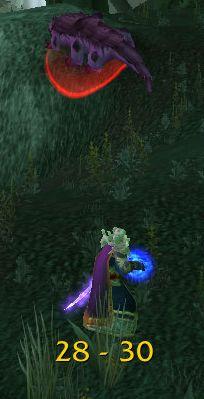
RangeDisplay
Estimated range display. Type /rangedisplay for configuration or /rangedisplay locked to lock/unlock the frames.

RangeDisplay is a simple range display addon. It is using spell range, item range and interact-distance based checks to determine the approximate range to your current target. Due to the whackyness of interact-distance based checks, recent versions only use those when spell/item based checks are not possible . The display can be configured in many ways (displaying only the max range, adding border and background, etc).
Currently you can set up RangeDisplay to show your current range to your target, focus, pet and mouseover units. The mouseover unit range can be anchored to the mouse or placed at a fixed position.
New in v3.8.0: It is possible to add sound notifications to "range sections" (similar to color setting). The sound will be played when entering the section. If two sections have the same sound file attached to them, then the sound is not played again if switching between the two sections.
This sound notification is enabled by default for the target unit's close range section.
Displaying max range only: if you want to display only the maxRange, you need to set Text to "%d" and tick the Reverse option for the section(s).
Comments

-

mitchnull Owner
-
View User Profile
-
Send Message
Posted Apr 21, 2025is not working fire 24, cold 27 talelnt include gives more yard fire and cold talent
plz help~
-
View User Profile
-
Send Message
Posted Apr 21, 2025is not working when classic 20th mage talent flame throwing that gives a 6 yard spell range increase 36~41,30
~36
-
View User Profile
-
Send Message
Posted Apr 10, 2025The addon works great except now when I have the vanilla mage talent flame throwing that gives a 6 yard spell range increase, Rangedisplay no longer accurately shows the 40-35 yard distance. The addon just displays 35-30 when the target is anywhere between 40-30 yards. Been using Rangedisplay for a while and it always worked well until now. When I don’t have the spell range increase talent the 40-35 yard range works right
-
View User Profile
-
Send Message
Posted Apr 22, 2025In reply to gamer100: me too!
-
View User Profile
-
Send Message
Posted Mar 30, 2025Is it normal that addon shows more ranges if weakaura is installed? For example, without weakaure, addon does not display 40-41.
-
View User Profile
-
Send Message
Posted Apr 1, 2025In reply to PixelBazaar:
Probably there was an update to LibRangeCheck. I've built a new version with updated dependencies, please check it (v6.1.5)
-
View User Profile
-
Send Message
Posted Apr 2, 2025In reply to mitchnull:
https://imgur.com/a/mJEU3jg
Latest RangeDisplay and WeakAura. WeakAura empty.
I also checked with all addons disabled.
-
View User Profile
-
Send Message
Posted Apr 2, 2025In reply to PixelBazaar:
pushed v6.1.6, hopefully that fixes it...
-
View User Profile
-
Send Message
Posted Dec 1, 2024I just started using this addon and I really love it except I have a problem. I when I try to set my mouseover range to be attached to my mouse, the numbers display several inches above the actual mouse pointer. When i was messing around setting it up I accidentally made it work properly once and I cannot recreate it for my life. Any idea what my issue is?
-
View User Profile
-
Send Message
Posted Dec 2, 2024In reply to Diabolist_WaR:
Unlock the range-display frames then move the mouseover fame relative to the "hand" in the center of the screen. If it's all messed up, you can start by resetting your range-display settings for the broken profile
-
View User Profile
-
Send Message
Posted Dec 7, 2024In reply to mitchnull: OMG Thank you so much! Never crossed my mind that I had moved it around while I was messing with settings before I decided I wanted it anchored.
-
View User Profile
-
Send Message
Posted Nov 21, 2024Range display does not display ranges beyond 35, specifically the Out of Range, can someone help?
-Close range section is Range limit 5
-Short range section is Enabled, Range limit is 20
-Medium range section is Enabled, Range limit is 30
-Long range section is Enabled, Range limit is 35
-Out of Range section is Enabled, Range limit is 40
-Range limit is 60, Over limit display is off
-
View User Profile
-
Send Message
Posted Aug 24, 2024Can you clarify that I misunderstand something with the range checks in addon/wow or its an issue/quirkiness with rangecheck please?
My setup on a character (example wizard):
-Close range (White color), range limit 4, melee range
-Short range (Blue color), range limit 13, example spell: frost nova, 12 yards distance to freeze enemies
-Medium range (Green color), range limit 19, example spell: Shiftinf Power, AOE dmg distance 18 yards
-Not using long rande display, its off
-Default range (Yellow color), default 200 distance
-Out of range (Red color), range limit 41 yards.
My issue is this, example with target range display text, but of course all does the same, since I use the same settings for mouseover too):
-At 10yards game colors the text to green. Why? Shouldn't it be blue?
-Then 15 and 20 yards shows next if I distance myself from enemy, but then its yellow, not green, why? Shouldn't it be green, since I set medium to 19yrds
-The next is merely a question, Red OOR starts from 45 which should be fine, 40 is still yellow which is the standard color so no issues here. Though would be good to see a red 41, after 40 or its not doable?
Thanks in advance!
Regdards,
H0PE
-
View User Profile
-
Send Message
Posted Sep 5, 2024In reply to 40PE: i set mine to - 5-19 green, 20-29 orange, 30-45 red, and copy over to focus and mouse over at the bottom of the config, i only use 3 colors and distances in my settings as a range player i only need to now when they are at my mas spell distance and medium ,
-
View User Profile
-
Send Message
Posted Sep 5, 2024In reply to smashtactix: Okay but can you confirm that the range works fine? I've set very different ranges to different classes in different profiles. I still experience the above I wrote down. Colors are not properly displayed for me. Example just now, Evoker, set the Medium Range, 16 green. I'm 15 meters away from target and addon writes 15 meter in YELLOW (which is the default color, with settings where I cannot set range, its the "default" for range I didn't set, correct? So I don't mind if the default range is yellow for 16-20, because I didn't set anything there specifically. But for medium range I have 16meters and on 15 meters I would expect it to be green. Am I wrong or what...?
P.S.: I cannot even disable the default range so you might changed it to orange I assume.
-
View User Profile
-
Send Message
Posted Aug 17, 2024Quickfix for LUA "1x RangeDisplay/RangeDisplay.lua:894: attempt to call global 'LoadAddOn' (a nil value)" until v6.1.4. Can confirm that changing "LoadAddOn(OptionsAppName)" to "C_AddOns.LoadAddOn(OptionsAppName)" on line 894 of RangeDisplay.lua does omit the LUA error.
-
View User Profile
-
Send Message
Posted Aug 16, 2024The LoadAddOn issue should be fixed in v6.1.4
-
View User Profile
-
Send Message
Posted Aug 15, 2024not able to load options - RangeDisplay_Options not loaded: nil
RangeDisplay Options was also enabled
-
View User Profile
-
Send Message
Posted Aug 15, 2024In reply to lozy369: Seems like it's a common issue at the moment. I've got the same problem
-
View User Profile
-
Send Message
Posted Aug 15, 202416x RangeDisplay/RangeDisplay.lua:894: attempt to call global 'LoadAddOn' (a nil value)
[string "@RangeDisplay/RangeDisplay.lua"]:894: in function `loadOptions'
[string "@RangeDisplay/RangeDisplay.lua"]:755: in function <RangeDisplay/RangeDisplay.lua:710>
[string "=[C]"]: ?
[string "@Bartender4/libs/AceAddon-3.0-13/AceAddon-3.0.lua"]:66: in function <Bartender4/libs/AceAddon-3.0/AceAddon-3.0.lua:61>
[string "@Bartender4/libs/AceAddon-3.0-13/AceAddon-3.0.lua"]:494: in function `InitializeAddon'
[string "@Bartender4/libs/AceAddon-3.0-13/AceAddon-3.0.lua"]:619: in function <Bartender4/libs/AceAddon-3.0/AceAddon-3.0.lua:611>
Locals:
self = <table> {
Sections = <table> {
}
modules = <table> {
}
defaultModuleLibraries = <table> {
}
name = "RangeDisplay"
orderedModules = <table> {
}
units = <table> {
}
baseName = "RangeDisplay"
db = <table> {
}
enabledState = true
version = "RangeDisplay-v6.1.3"
defaultModuleState = false
AppName = "RangeDisplay"
}
(*temporary) = nil
(*temporary) = "RangeDisplay_Options"
(*temporary) = "attempt to call global 'LoadAddOn' (a nil value)"
OptionsAppName = "RangeDisplay_Options"