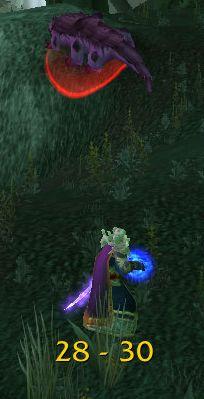
RangeDisplay
Estimated range display. Type /rangedisplay for configuration or /rangedisplay locked to lock/unlock the frames.

RangeDisplay is a simple range display addon. It is using spell range, item range and interact-distance based checks to determine the approximate range to your current target. Due to the whackyness of interact-distance based checks, recent versions only use those when spell/item based checks are not possible . The display can be configured in many ways (displaying only the max range, adding border and background, etc).
Currently you can set up RangeDisplay to show your current range to your target, focus, pet and mouseover units. The mouseover unit range can be anchored to the mouse or placed at a fixed position.
New in v3.8.0: It is possible to add sound notifications to "range sections" (similar to color setting). The sound will be played when entering the section. If two sections have the same sound file attached to them, then the sound is not played again if switching between the two sections.
This sound notification is enabled by default for the target unit's close range section.
Displaying max range only: if you want to display only the maxRange, you need to set Text to "%d" and tick the Reverse option for the section(s).
Comments

-

mitchnull Owner
-
View User Profile
-
Send Message
Posted Sep 25, 2026Can confirm that it works in WoW Forever.
-
View User Profile
-
Send Message
Posted Sep 17, 2026Thank you for your addon! Just wondering if it might be possible to add the option to anchor target range on the target's nameplate, with options to offset X and Y?
-
View User Profile
-
Send Message
Posted Aug 21, 2026Hi! I encountered a small compatibility issue when opening the RangeDisplay settings panel while Midnight World Markers was also enabled.
AceGUI failed while creating a checkbox with this error:
AceGUIWidget-CheckBox.lua:130: attempt to call a nil value
The stack trace happened to point to the AceGUI copy bundled with Midnight World Markers. However, RangeDisplay Options also appears to bundle CheckBox widget version 26, which uses the same global SetDesaturation() helper.
The current Ace3 CheckBox widget is version 27 and uses:
self.check:SetDesaturated(false)
Would it be possible to update the embedded Ace3 libraries in a future version? This may help avoid the issue regardless of which addon's AceGUI copy is registered first.
Thank you for maintaining RangeDisplay.
-
View User Profile
-
Send Message
Posted Aug 27, 2026In reply to Anno_FT:
I've created a new package now, hopefully that fixes the issue for you (v6.3.5)
-
View User Profile
-
Send Message
Posted Jul 29, 2026I loaded "LibRangeCheck-3.0" and it started working. There must be something wrong with the imbedded version.
-
View User Profile
-
Send Message
Posted Jul 29, 2026@athelwolf6511 how do you "load" the library? Ever since the major update to classic addons, I can no longer adjust my range settings and have them apply. I only get 0-8 yd and 8-28 yd. Nothing I tried is working.
-
View User Profile
-
Send Message
Posted Jul 30, 2026@user_zsbx4ev28afte1go "LibRangeCheck-3.0" is just another addon, load it just like you did with RangeDisplay. It's right here on curseforge.
-
View User Profile
-
Send Message
Posted Jul 22, 2026After the last update (classic era) it is not throwing errors on load, however it does not seem to be loading configs properly (the displayed ranges no longer match my spell ranges) and typing /rangedisplay fails to bring up the config window. Love this addon and hate playing casters without it.
-
View User Profile
-
Send Message
Posted Jul 21, 2026Please add an option to hide out of combat
-
View User Profile
-
Send Message
Posted May 30, 2026can u add an option to anchor the Range text to custom frames ?
-
View User Profile
-
Send Message
Posted Apr 23, 2026Not really consistent in arena, sometimes work on focus target but not my current target. Any plans to get this fixed? Any one recommended alternate options?
-
View User Profile
-
Send Message
Posted Apr 20, 2026Confirming that it does not work in BG's.
-
View User Profile
-
Send Message
Posted Apr 17, 2026Doesn't work for enemy target in arena. Friendly target and focus works though. Also doesn't work in Battlegrounds at all. Sad.
-
View User Profile
-
Send Message
Posted Apr 12, 2026It doesn't seem to work in Battlegrounds. I love it otherwise.
-
View User Profile
-
Send Message
Posted Apr 4, 2026Hey, since the addon seems to be in 5 to 5 increments, will there be a way to have them on just 1yard increments? it will be a massive help in order to set melee weaving distances.
-
View User Profile
-
Send Message
Posted Apr 5, 2026In reply to Irosh:
That is not possible with tne cuerent WoW API.
-
View User Profile
-
Send Message
Posted Apr 1, 2026I got so excited about this addon but unfortunately the 5 yard display that should be for melee range is showing for about 8 yards instead, so it ruins the function of showing melee range and you can't reduce it. It would've been so good otherwise
-
View User Profile
-
Send Message
Posted Mar 29, 2026Doesn't seem to work in battlegrounds for some reason.
-
View User Profile
-
Send Message
Posted Mar 10, 2026I very much like this addon and that it displays 35-36 as a range, how can I possibly make it show 23-24 or 20-24 instead of 20-25?
-
View User Profile
-
Send Message
Posted Feb 19, 2026Amazing addon. Maybe it's already been suggested, but being able to display spell/item icons at different ranges would be pretty cool