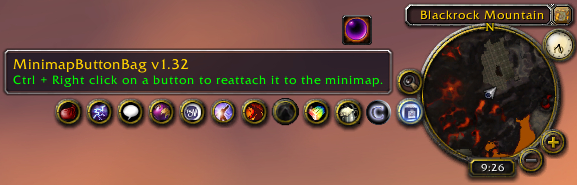
MBB
The Addon HidingBar supersedes MBB on all aspects and is continually updated.
https://www.curseforge.com/wow/addons/hidingbar
MBB reduces minimap buttons and makes them accessible through a pop out menu. Click the MBB button to expand the menu and display the buttons. Each button that is collapsed into the menu can be reattached to the minimap with Ctrl + Right Click. The MBB button can also be detached from minimap with Ctrl + Right Click.
Hot Key
- Ctrl + Right Click - detach / reattach a minimap button
Slash Commands
- /mbb - shows the MBB commands
- /mbb buttons - shows a list of all rfames in the MBB bar
- /mbb reset position - resets the position of the MBB button
- /mbb reset all - resets the MBB settings
Source Code and Issue Tracking
Comments


-

VallanTV Owner
-

Forge_User_75527174 Author
-

karlsnyder Author
-
View User Profile
-
Send Message
Posted Feb 5, 2009The conclusion: v0.62 & 0.63 add every minimap button inside MBB, although buttons are deactivated within the original addons or not.
MBB cause freezing the game only since Cartographer v2.3.8 (with Cartographer 3 it works) and mess up all minimap-buttons around the minimap. The stack overflow also seems only be with Cartographer > v2.3.6a.
My personally solution: MMB v.0.61 and Cartographer v2.3.6a.
-
View User Profile
-
Send Message
Posted Feb 2, 2009Moving icons in and out of MBB is buggy and some icons do not stay in or out. Until there is a fix, I manually set it by opening the saved variable file and exclude icons.
1. Get the names of any minimap icons that will not go in MBB. To help, move the mouse over an icon and type/paste this in chat.
/script DEFAULT_CHAT_FRAME:AddMessage("The mouse is over icon, " ..GetMouseFocus():GetName())
2. Logout of wow so we can modify the saved variable file properly.
3. Open the saved variable file,
\WTF\Account\...\...\...\SavedVariables\MBB.lua
4. Modify and add the names of icons to exclude. Use the names found in step 1. The comment on each line is a consequtive sequence, but optional. A sample is shown below.
MBB_Exclude = {
"MonkeyBuddyIconButton", -- [1]
"WakeMeUp_MapButton", -- [2]
"IEFMinimapButton", -- [3]
"HealBot_MMButton", -- [4]
}
5. Save the saved variable file and enter the game. Verify the icons are moved as expected.
-
View User Profile
-
Send Message
Posted Feb 2, 2009The MBB button should not be on top of bags and windows. It is currently set on HIGH instead of MEDIUM. See code in MBB.xml, and change HIGH to MEDIUM, where the line shows ...
Button name="MBB_MinimapButtonFrame" toplevel="true" frameStrata="MEDIUM" parent="Minimap" enableMouse="true" movable="true" hidden="false"
-
View User Profile
-
Send Message
Posted Feb 1, 2009-
View User Profile
-
Send Message
Posted Feb 1, 2009So if someone else wants to take it on be my guest. Just leave a message here.
-
View User Profile
-
Send Message
Posted Jan 31, 2009-
View User Profile
-
Send Message
Posted Feb 4, 2009today I downgraded to 0.60.
It works fine till now, and I don't have any short-term lags anymore.
If you'll give it a try: delete or rename your current \World of Warcraft\Interface\AddOns\MBB folder.
cu
-
View User Profile
-
Send Message
Posted Jan 31, 2009-
View User Profile
-
Send Message
Posted Jan 27, 2009-
View User Profile
-
Send Message
Posted Jan 30, 2009-
View User Profile
-
Send Message
Posted Jan 17, 2009http://www.wowinterface.com/downloads/info11312-Poisoner3.html
-
View User Profile
-
Send Message
Posted Jan 9, 2009-
View User Profile
-
Send Message
Posted Dec 31, 2008MBB\MBB.lua:431: stack overflow
MBB\MBB.lua:438: in function `ohide'
MBB\MBB.lua:438: in function `ohide'
MBB\MBB.lua:438: in function `ohide'
MBB\MBB.lua:438: in function `ohide'
MBB\MBB.lua:438: in function `ohide'
MBB\MBB.lua:438: in function `ohide'
MBB\MBB.lua:438: in function `ohide'
MBB\MBB.lua:438: in function `ohide'
MBB\MBB.lua:438: in function `ohide'
MBB\MBB.lua:438: in function `ohide'
MBB\MBB.lua:438: in function `ohide'
MBB\MBB.lua:438: in function `ohide'
...:
MBB\MBB.lua:438: in function `ohide'
MBB\MBB.lua:438: in function `ohide'
MBB\MBB.lua:438: in function `ohide'
MBB\MBB.lua:438: in function `ohide'
MBB\MBB.lua:438: in function `ohide'
MBB\MBB.lua:438: in function `ohide'
MBB\MBB.lua:438: in function `ohide'
MBB\MBB.lua:546: in function `MBB_AddButton'
MBB\MBB.lua:333: in function `MBB_OnEvent'
<string>:"*:OnEvent":1: in function <[string "*:OnEvent"]:1>
-
View User Profile
-
Send Message
Posted Dec 26, 2008-
View User Profile
-
Send Message
Posted Dec 23, 2008-
View User Profile
-
Send Message
Posted Dec 23, 2008the release of a new version of pitbull required updating some libs in Cartographer.. which, leads to stack overflow for MBB
-
View User Profile
-
Send Message
Posted Dec 20, 2008luv the addon. tried the others when this didn't work for awhile, but i came back.
Could you look at the strata for the button. It's on top of the bags.
also, I thought you had a post on the forum. I can't find it now.
-
View User Profile
-
Send Message
Posted Dec 9, 2008More explanation needed please.
-
View User Profile
-
Send Message
Posted Jan 26, 2009-
View User Profile
-
Send Message
Posted Jan 26, 2009Oh, and the bag itself exploded and my minimap's covered with buttons again'! argh