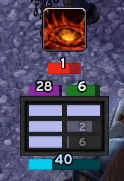
Compact Runes
Issues / Feedback
For enhancements or issues, please use the ticket tracker.
Description
Compact Runes is a re-write of DocsDebugRunes. It preserves the compact UI but adds additional features.
Configuration
To configure, type /crunes or use the game menu: Esc -> Interface -> AddOns (tab in top, left corner) -> Compact Runes. Next to the Compact Runes title on the right is a small plus sign that expands and provides more settings.
Features
It tracks the following items:
- Runes (shown horizontally or vertically) with an optional setting to show a numeric timer for each rune. Runes are sorted by the recharge timer but it can be disabled.
- Runic Power
- Diseases and time left.
- Sudden Doom, Shadow Infusion, Dark Transformation, Soul Reaper, Festering Wound, and Epidemic for Unholy.
- Rime/Freezing Fog, Killing Machine, Icy Talons, Razorice, and Remorseless Winter for Frost
- Death and Decay Bar for Blood and Unholy to show the buff for AoE.
- Blood Shield
- Vampiric Blood bar which shows the duration and cooldown.
- LDB/Minimap Icon Support
- RC Procs are indicated with a white border.
- RE procs, RC procs, and wasted Blood Charges tracking in the LDB tooltip.
- Crimson Scourge is shown as a proc.
- Out of melee range is indicated by a red border. This option can be disabled.
- An optional "Almost ready" rune state. The alpha can be adjusted independently for it.
- Cooldown Bars per spec. A configurable row of icons to show the cooldown on abilities and certain trinkets.
- Swing Timer (main hand).
Comments


-

Talryn Owner
-
View User Profile
-
Send Message
Posted Mar 19, 2013Hi talryn, thanks for the reply and I am glad to hear that it will soon be possible to move the other bars. For example I have a very small ui and the size "10" is still too big to adapt it to the rest.
-
View User Profile
-
Send Message
Posted Mar 17, 2013Good work, but is there a way to unlock the disease, and move to another location?
It would also be nice if you could scale the entire display even smaller
-
View User Profile
-
Send Message
Posted Mar 18, 2013I will soon be adding options to unlock the other bars and move them.
You can control the size of the rune bars and the rest of the UI scales based on that, by default. Does that not accomplish what you want?
-
View User Profile
-
Send Message
Posted Mar 12, 2013I love the new Disease power tracking function. No issues this time just wanted to say this is a great addon and I recommend it to every Death Knight i can
-
View User Profile
-
Send Message
Posted Mar 12, 2013Yes, as wide as the border. I've unlocked the rune and blood shield bar and butted them tight against the bottom of the addon, and it looks strange while in combate there is that gap between the sides of the bar and the edge of the addon (because of the border). In short, is there any plans to make the width of the bars adjustable?
-
View User Profile
-
Send Message
Posted Mar 12, 2013The width of the Runic Power Bar and Blood Shield Bar are dynamic at the moment. They are the size of two runes plus the gap between the runes so that it should span the same distance as the rune pairs.
I guess I could add an option that would switch it so it is as wide as the entire rune display. I've been trying to avoid too many options because it can make it fairly complex for people.
The disease timers are the same size as the rune bars so that is why the bottom two bars are also based on the rune bar width.
-
View User Profile
-
Send Message
Posted Mar 11, 2013Hey Talryn,
First off, I LOVE this addon. I have a small request, that basically stems from my ocd. Is there any way to make the addon -not- dim when you are out of combat? The fact that it dims has always bugged me since nothing else on my screen dims, but I've lived with it. I've been revamping a lot of my addons recently and figured I might as well ask. Also, is there any way to make the rune and blood shield bar wider so it matches the width of the group of runes? Thanks in advance!
-
View User Profile
-
Send Message
Posted Mar 12, 2013Thanks. You can control how dim it is using the OOC Alpha slider in the options. That controls the transparency out of combat. Just set it to 1.0.
I'm not positive on the second question. The sides of those bars should match up with the sides of the runes so that left side should be about where the left side of the left-most rune is. The right side is about where the right side of the right-most rune is. Are you asking if it is possible to have it extend the entire way across the rune display so it is as wide as the rune display (incuding the border)?
-
View User Profile
-
Send Message
Posted Mar 12, 2013Thanks a lot. I downloaded the alpha, it looks great. The one last thing I could add is kind of nit picky but if you could possbly have an option or something to have a feint black rectangle for the rune to fill up just like the old DDR. The visual feel of the rune filling something up rather than just expanding from the left feels more natural to me and it also lets you know when the rune is actually fully recharged.
Again thanks a lot.
-
View User Profile
-
Send Message
Posted Mar 12, 2013The latest alpha has the ability to choose the rune background. I think that's as much flexibilty as I think most will want. If you choose the rune color for the background, you can still adjust the alpha. Otherwise you can pick transparent or black.
http://www.wowace.com/addons/compact-runes/files/92-0-8-3-g0c142c6/
-
View User Profile
-
Send Message
Posted Mar 9, 2013Hey any chance you can make an option to take away the faint color of the rune under the rune when its on cooldown to make it look like the original DDR. I want to make the switch to your addon but I cannot get used to the faint color of the rune behind it.
-
View User Profile
-
Send Message
Posted Mar 10, 2013You can control the alpha (kind of the brightness) of recharging runes so you could make them dimmer. That is for all recharging runes. It might be that DDR made the second recharging rune in a pair even dimmer. I'd have to add some code to make that possible on my addon in the same way as DDR.
There is a concept of "almost ready" that I added for someone. It will change the alpha to another value when the rune will be ready in a certain time or less. You could set the Recharge Alpha very close to 0.0 for now then set the almost ready time to 4 seconds and the almost ready alpha to whatever you like. It would also be possible to make the almost ready time greater than 4 seconds if you edit the Lua settings file. That might approximate DDR better.
I'll have to look into it though. It sounds like you want the runes that have not started recharging to not be visible at all. It would only apply to the runes on right as runes on the left should always be recharging.
-
View User Profile
-
Send Message
Posted Mar 10, 2013What would be Ideal is if there wasnt any background color to any of the runes and only the color of the rune instelf and when its recharging there is only the black colour of the box behind it for both sets of runes not only the 2nd set because even if the first pair are always recharging the background color still stand outs.
To quote the creator of DDR. He encoutered the same problem about the feint color behind recharging runes and this is how he fixed it.
-
View User Profile
-
Send Message
Posted Mar 11, 2013I prefer to see the rune types myself. Removing the background doesn't allow me to see that. In order to support either playstyle I added two new options. One is Rune Background which lets you turn off the background. In that case there is no background at all. The second is the background alpha so if the background is enabled, you can control how bright it is.
You can try out the new alpha version here:
http://www.wowace.com/addons/compact-runes/files/88-0-8-1-gf1019f8/
I'll push a release of it in the next day or so.
-
View User Profile
-
Send Message
Posted Mar 3, 2013Love this addon. Can you make the HUD click-through? I often find myself clicking on the same spot where my HUD is to move my camera and nothing happens.
Thank you.
-
View User Profile
-
Send Message
Posted Mar 4, 2013I think there was a bug that caused that issue. I fixed it in the alpha. New release version will go out this Tuesday since it might be the patch and I will need to change the TOC.
-
View User Profile
-
Send Message
Posted Mar 4, 2013The rune power bar updates slowly out of combat because I didn't think it would matter and it takes a little more CPU to update it more often. I can change it though if people find it annoying.
The Runic Power bar not disabling correctly is a bug. I've fixed it in the alpha.
I'm not sure what you mean on the death runes. I've never noticed that.
I changed the OOR indicator to work out of combat and I added the missing rune orders in case people prefer them.
-
View User Profile
-
Send Message
Posted Mar 3, 2013Nice clean look. I like that. Alot of people don't seem to get the importance of simplicity.
Anyway here are some issues I have found:
- Runic power bar has rather slow update. Basicly out of combat number of runic power drops by 3 points while other addons are capable of doing it every 1 point.
- Disabling runic power bar works only till you relog. After relog even though setting is saved and marked in options as off, runic power bar appears again.
- Death runes seem to be messed up. Often I noticed when playing as blood after death striking that, first runes do not get recoloured as violet, even though there is death rune available because I am using it for siphon.
- Would be cool if possible to add out of range indicator even when out of combat.
- Not all formats of shuffling rune order are avaiable ex. frost,unholy,blood.
Thanks, nice work.
-
View User Profile
-
Send Message
Posted Mar 2, 2013I've made some changes that can be tested in the 0.7.4 alpha:
http://www.wowace.com/media/files/677/16/CompactRunes-0.7-4-g004bd1c.zip
It includes moving some of the UI elements via a new Layout section of the config.
The alphas have had disease strength tracking. I'm still looking for feedback from people who are focused on optimizing their DPS. Right now it just tells you if is re-applying would result in the same or stronger damage with yellow for stronger but red is even stronger above a configurable threshold.
I could also change it so the disease timers are red if the re-applying would result in less damage, white is the same, yellow is stronger, and green is stronger and over the user-configurable threshold.
This functionality duplicates the idea started in DKDots but tries to reduce the extra clutter on the screen.
-
View User Profile
-
Send Message
Posted Mar 1, 2013As for the rune regeneration, I will try reducing the Update as you said. Then again, it might be ME "over-dramatizing". I must admit I did not check DDR and compare your addon directly to see the difference.
As for the frames, yes, I've increased the width a little (by 20 pixels I guess). I can see it even on my widescreen but oh well, as you said it's low priority, it doesn't matter very much.
Thanks!