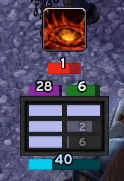
Compact Runes
Issues / Feedback
For enhancements or issues, please use the ticket tracker.
Description
Compact Runes is a re-write of DocsDebugRunes. It preserves the compact UI but adds additional features.
Configuration
To configure, type /crunes or use the game menu: Esc -> Interface -> AddOns (tab in top, left corner) -> Compact Runes. Next to the Compact Runes title on the right is a small plus sign that expands and provides more settings.
Features
It tracks the following items:
- Runes (shown horizontally or vertically) with an optional setting to show a numeric timer for each rune. Runes are sorted by the recharge timer but it can be disabled.
- Runic Power
- Diseases and time left.
- Sudden Doom, Shadow Infusion, Dark Transformation, Soul Reaper, Festering Wound, and Epidemic for Unholy.
- Rime/Freezing Fog, Killing Machine, Icy Talons, Razorice, and Remorseless Winter for Frost
- Death and Decay Bar for Blood and Unholy to show the buff for AoE.
- Blood Shield
- Vampiric Blood bar which shows the duration and cooldown.
- LDB/Minimap Icon Support
- RC Procs are indicated with a white border.
- RE procs, RC procs, and wasted Blood Charges tracking in the LDB tooltip.
- Crimson Scourge is shown as a proc.
- Out of melee range is indicated by a red border. This option can be disabled.
- An optional "Almost ready" rune state. The alpha can be adjusted independently for it.
- Cooldown Bars per spec. A configurable row of icons to show the cooldown on abilities and certain trinkets.
- Swing Timer (main hand).
Comments


-

Talryn Owner
-
View User Profile
-
Send Message
Posted Jul 2, 2015I love you <3
-
View User Profile
-
Send Message
Posted Jul 3, 2015It is in the latest alpha version.
I don't have T18 yet to test it but I believe the basic code should work. I couldn't verify the actual buffs and tier detection though.
It is an optional module that is disabled by default. Find Compact Runes in the settings and expand. It is "T18 Frost 2p". There are two buffs and you can enable and configure them separately. They are icons with a cooldown timer and sweep. You can move them via the X.Y coordinates or do the unselect Locked in the general settings and they are dragable.
Let me know if you see any issues. They are separate icons for now since it is an optional module. I wasn't sure what is the best way to display it. It is also possible to add it via the Proc Icon but then whenever that is up it could override what you see there.
-
View User Profile
-
Send Message
Posted Jul 3, 2015If you aren't familiar with it, the latest alpha is the most recent version listed here:
http://www.wowace.com/addons/compact-runes/
-
View User Profile
-
Send Message
Posted Jul 4, 2015I downloaded the latest alpha version. I tried everything, but i coudln't see icons. nothing changed in CR for me. I really tried to switch and change all options, but it doesn't work for me, at this moment.
-
View User Profile
-
Send Message
Posted Jun 24, 2015I've been getting:
20x CompactRunes\CompactRunes-6.2.0.lua:2689: attempt to perform arithmetic on field 'start' (a nil value)
CompactRunes\CompactRunes-6.2.0.lua:2689: in function `UpdateRuneCooldown'
CompactRunes\CompactRunes-6.2.0.lua:3503: in function `?'
...Ons\Ace3\CallbackHandler-1.0\CallbackHandler-1.0-6.lua:147: in function <...Ons\Ace3\CallbackHandler-1.0\CallbackHandler-1.0.lua:147>
[string "safecall Dispatcher[2]"]:4: in function <[string "safecall Dispatcher[2]"]:4>
[C]: ?
[string "safecall Dispatcher[2]"]:13: in function `?'
...Ons\Ace3\CallbackHandler-1.0\CallbackHandler-1.0-6.lua:92: in function `Fire'
Ace3\AceEvent-3.0\AceEvent-3.0-3.lua:120: in function <Ace3\AceEvent-3.0\AceEvent-3.0.lua:119>
Locals:
nil
and:
5x CompactRunes\CompactRunes-6.2.0.lua:2611: attempt to perform arithmetic on field 'start' (a nil value)
CompactRunes\CompactRunes-6.2.0.lua:2611: in function `UpdateRuneType'
CompactRunes\CompactRunes-6.2.0.lua:4081: in function `?'
...Ons\Ace3\CallbackHandler-1.0\CallbackHandler-1.0-6.lua:147: in function <...Ons\Ace3\CallbackHandler-1.0\CallbackHandler-1.0.lua:147>
[string "safecall Dispatcher[1]"]:4: in function <[string "safecall Dispatcher[1]"]:4>
[C]: ?
[string "safecall Dispatcher[1]"]:13: in function `?'
...Ons\Ace3\CallbackHandler-1.0\CallbackHandler-1.0-6.lua:92: in function `Fire'
Ace3\AceEvent-3.0\AceEvent-3.0-3.lua:120: in function <Ace3\AceEvent-3.0\AceEvent-3.0.lua:119>
Locals:
nil
since 6.2
-
View User Profile
-
Send Message
Posted Jun 28, 2015That problem was fixed in 6.2.1 which has been available.
-
View User Profile
-
Send Message
Posted May 2, 2015Hi, is there a way to remove the borders around the procs abilities?
-
View User Profile
-
Send Message
Posted Apr 28, 2015Hello, i dont see the Necroticblight Helper anywhere. Tried to look it up on the settings tab but nothing. Any ideas? I installed the addon via curse client, so im always up to date.
Tnx in adv.
-
View User Profile
-
Send Message
Posted Apr 28, 2015The Necroticblight options should be there. You will want to open the setting by hitting Esc to get the game menu, selecting Interface, then click the Addons tab, then click the small + button next to Compact Runes to expand the options. There are additional options there for some of the more advanced features and additional modules such as Necroticblight.
-
View User Profile
-
Send Message
Posted Apr 28, 2015You can change the dimensions of the individual runes and the spacing between them. It automatically resizes the UI based on that. I'm not sure exactly what you are trying to do but I believe all but one possibly spacing is set in the UI. I can check on adding that as a configuration option in the next alpha release although it may require some testing since it can impact the default look.
-
View User Profile
-
Send Message
Posted May 12, 2015This is what im refering too, when changing spacing the frame doesnt adjust.
-
View User Profile
-
Send Message
Posted Jun 10, 2015The latest alpha should add an extra option to control some of the spacing. See if that helps to get the layout you want.
-
View User Profile
-
Send Message
Posted Apr 26, 2015So, i don't like the spacing on this addon since it doesnt look good with my ui, but when i try to change it the entire box edges follows, any way to avoid that from happening?
-
View User Profile
-
Send Message
Posted Apr 5, 2015how to open it with / Slash Command???
-
View User Profile
-
Send Message
Posted Apr 6, 2015You can type /crunes to bring up the options. It is the same options if you bring up the System menu, select Interface and then the Addons tab.
-
View User Profile
-
Send Message
Posted Apr 6, 2015There is not currently. I'd have to add a new option and code to do it.
-
View User Profile
-
Send Message
Posted Mar 25, 2015Is there a way to make the addon show "when I have a target"?? (not just when I'm in combat)
-
View User Profile
-
Send Message
Posted Mar 17, 2015HI,
where can i alter the size of the rune window? currently the size of is fixed (at least i cant seem to find where). i would like to make the runes as wide as my character HP bar is to place it underneath. I found how i can do that with i.e. the rune power bar, but not the main frame itself.
-
View User Profile
-
Send Message
Posted Mar 17, 2015The window itself automatically adjusts base on the size of the runes. The other bars do the same unless you override them (as you probably did with the runic power bar). If you look under the Dimensions, you can set the rune dimensions for the horizontal or vertical layout. If you update that, it should adjust the size of the whole display.
-
View User Profile
-
Send Message
Posted Feb 28, 2015hi im user playing KR realm..
i think this addon is perfect!
but i cant use it bcuz it doesnt work NP stacks.. always 0..
i tried to fix it but i couldnt
i deleted all files but... plz help me!