ArkInventory
ArkInventory (for The War Within)
:boom: Please ensure you are using the latest alpha version if you have the War Within client.
ArkInventory (for Retail, Classic, and Cataclysm)
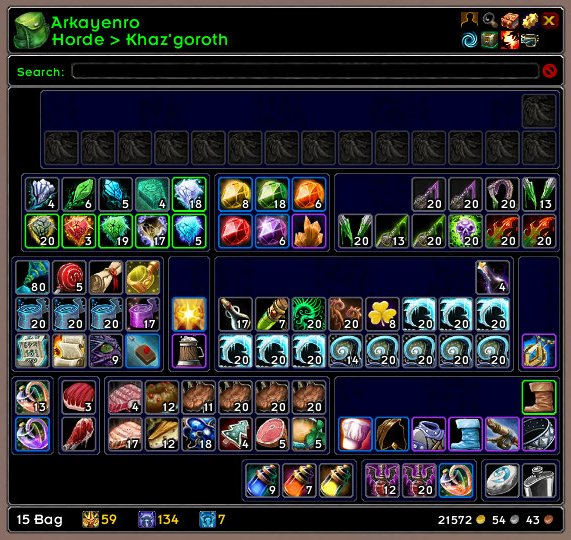
ArkInventory's display windows are built from "virtual bars", you assign categories to bars so that items in that category are displayed on the specific bars you want. There is no limit to the number of bars you can have inside a window but obviously you only have so much screen real estate before it becomes "too many".
ArkInventory uses several methods to assign a default category to an item such as what professions you have, tooltip scanning, basic type/subtype and PeriodicTable. You then assign those categories to a virtual bar.
You can also over-ride the default category by creating a rule that matches either a single or multiple items.
Overview:
- user configurable window width and height
- separate keybindings for each location for easy viewing
- assign items to a category of your choice (overrides the default assignment)
- assign categories to the bar of your choice
- unlimited number of bars (there are practical limits though before your screen becomes full)
- sort each bar differently if required
- user configurable bars per row
- sell junk items automatically or manually (delete available via a keybinding or right clicking when at a vendor)
- random pet and mount summons. can also assign a group of them to select from
Key Bindings:
- Press ESCAPE to bring up the blizzard menu
- click on Key Bindings
- scroll down to AddOns > ArkInventory
- bind the keys you want to use
Need Help?
:memo: Wiki
:memo: Frequently Asked Questions
:memo: Sorting
:memo: Rules
:memo: If you are having an issue the first step is to disable all other mods and test with only ArkInventory loaded
:memo: If the issue is still there, please check for an existing issue and create a new issue if required.
:memo: If the issue is gone, re-enable your other mods one by one until the issue comes back, then note the last mod you enabled in your issue as well as notifying the author of the other mod
See ChangeHistory.md for changes to the latest version. See VersionHistory.md for all previous changes.
:boom: The NoLib variant
it seems quite a few people are somehow getting the NoLib variant from their download client when they didn't specifically ask for it, instead of the full variant, and its causing issues as they don't have the required libraries installed separately. Please ensure you are downloading the full. if you see nolib in the filename then its the wrong variant, unless you are actually installing all of the required libraries separately as well. If you have to you can manually download the full variant from CurseForge, WoWInterface, or Wago.
:boom: Junk Sell getting blocked
While auto-destroy remains blocked, From 30960 onwards you can setup a Key Binding to manually sell and destroy your items. Note that blizzard require one keypress per item deletion, so if you have multiple items that need to be deleted you will need to press the Key Binding multiple times. A message will be output if you have remaining items that can still be deleted.
:warning: Ensure you have backup copies of your saved variables file
Sometimes you cannot revert back to a previous version without a backup, especially alpha or beta versions, so before upgrading please make sure you have made a backup of your saved variables file
Your saved variables file is normally located at ...\World of Warcraft\_client_\WTF\Account\yourwowaccountname\SavedVariables\ArkInventory.lua
It is your responsibility to ensure you have adequate backups of your saved variables file. You dont have to do them frequently, just after you've made major changes to your config is probably fine for most people, but you should get into the habit of making backups because when it does corrupt you wont have to reconfigure everything from scratch.
If you have your download client set to automatically download alpha/beta versions you should definitely have backups.
A simple way to back up the saved variables file is to just do a copy and paste then rename the new file (using the version number of ArkInventory or the date is a good idea), eg ArkInventory-30900.lua, or ArkInventory-20191228.lua
Comments

-

Arkayenro Owner
-
View User Profile
-
Send Message
Posted Feb 9, 2008Since the upgrade on 2/4, I am having problems with a constant message popping up about lag, "it was at 130 it's been reset to 2 for better efficiency" or something like that. Over and over and over again. It's getting a bit annoying. Happens when I go into my bag, my bank or the guild bank. Also, when I go into the guild bank, I get a message in the chat window that says, "You don't have permission to do that". Any help would be appreciated. Thanks!
-
View User Profile
-
Send Message
Posted Feb 11, 2008/ai misc alert disable
-
View User Profile
-
Send Message
Posted Feb 5, 2008Is this no longer updated on the WowAce SVN?
-
View User Profile
-
Send Message
Posted Feb 5, 2008got a new pc with vista64, had to reinstall everything and forgot about the svn client until i went to upload it
-
View User Profile
-
Send Message
Posted Jan 28, 2008Arkayenro- About two weeks ago, the items in my ArkInventory bag display stopped showing their cooldown status. I can still mouse over a specific item to see the tooltip text which includes the current cooldown status. However, the items no longer show as greyed-out through a "sweep" around the item when they are on cooldown and unavailable to use.
Everything worked fine until two weeks ago, which is - I think - when you issued the last update to ArkInventory.
I love this mod, and wish I had started using it much earlier. Thank you for your efforts.
-
View User Profile
-
Send Message
Posted Feb 4, 20082.26d has the cooldowns fixed
-
View User Profile
-
Send Message
Posted Jan 26, 2008I love this add on but....
im getting bad lag when i go to use the arkinventory n the guild bank but if i turn it off on the guild bank and use wow guild bank i am find can you fix this so it can be used with the guild bank?
And is there any way you can make a tab or button that will let you sell any item you put n to the trash rule all n one click?
Thanks...
-
View User Profile
-
Send Message
Posted Jan 25, 2008Bur Report:
I created "rule" for my bag using outfit(stuff) from outfitter. It work well in my bag, it work well in my bank.
I also set my bank to "bag" setting.
However, when I log into the game, my bank seem to behave normaly (with the bag profile) but the rule regarding outfitter doesn't appear to have been processed for the bank. hitting the "reload" option from ArkInventory fix the problem.
http://code.google.com/p/arkinventory/issues/detail?id=64&sort=-id
-
View User Profile
-
Send Message
Posted Jan 25, 2008Bug report:
The "alt" key doesn't work to quickly send stuff form inventory to mail or auction.
http://code.google.com/p/arkinventory/issues/detail?id=65&sort=-id
-
View User Profile
-
Send Message
Posted Feb 4, 2008use the right click (i think) seems to 'transfer' an item to an open window if possible
-
View User Profile
-
Send Message
Posted Jan 24, 2008How do you sort your Equipment by slot?
I can't seem to get this to work... the option is there but it says "not currently included in sort"...
-
View User Profile
-
Send Message
Posted Jan 23, 2008This is the best mod for inventory management. Thanks for all your hard work on it! One thing I would love to see added is the option to show multiples stacks of an item as one stack of an item. For instance, if I have 6 stacks of 20 reagents, I'd love it to show one stack of 120. This would really help cut down on the amount of screen the bags take up. Thanks!
-
View User Profile
-
Send Message
Posted Jan 21, 2008Hello.
Is it possible to make a rule which sorts items at lower levels in a own frame?
-
View User Profile
-
Send Message
Posted Jan 20, 2008-
View User Profile
-
Send Message
Posted Jan 22, 2008menu > actions > search
its needs to go somewhere else but i havent figured out where yet
-
View User Profile
-
Send Message
Posted Jan 17, 2008Hi
I have been using your mod for a while now, absolutely love the ability to sort stuff into visually separated categories (the number 1 reason i use this mod)
However, lately as i have been getting more and more categories, some of which at times have very few items in them, my arkinventory window has gotten wider and wider horizontally, but not vertically
My categories looks kinda like this:
| | | | | |
I see from your screenshot that it is possible to stack categories vertically, but i cant for the life of me figure out how to do this ? (ie making the inventory look more like : : : instead of | | | | | | )
-
View User Profile
-
Send Message
Posted Jan 22, 2008it depends on how wide the window is set to and how many bars per row you set. those two options basically configure how the items and bars are placed and your window should really grow upwards not outwards.
-
View User Profile
-
Send Message
Posted Jan 15, 2008I love this add on A+++++++++++++ all the way!!!!
i Was thinking is there a way to you can make a tab n the bag that you can sell all the trash with one click?
Like AutoProfitX - ACE. it would be a sweet thing to have n it .
here is the link to AutoProfitX - ACE http://wow.curse.com/downloads/details/10063/
-
View User Profile
-
Send Message
Posted Jan 15, 2008This is by far -the best- Inventory mod I've ever seen. Been waiting for this since BETA!
-
View User Profile
-
Send Message
Posted Jan 13, 2008Some kind of bug:
Cant see cooldown text on items, in the inventory since a couple of days (week or so). I'm using omnicc and it was showing up nicely before. Check it if you could pls.