SorhaQuestLog
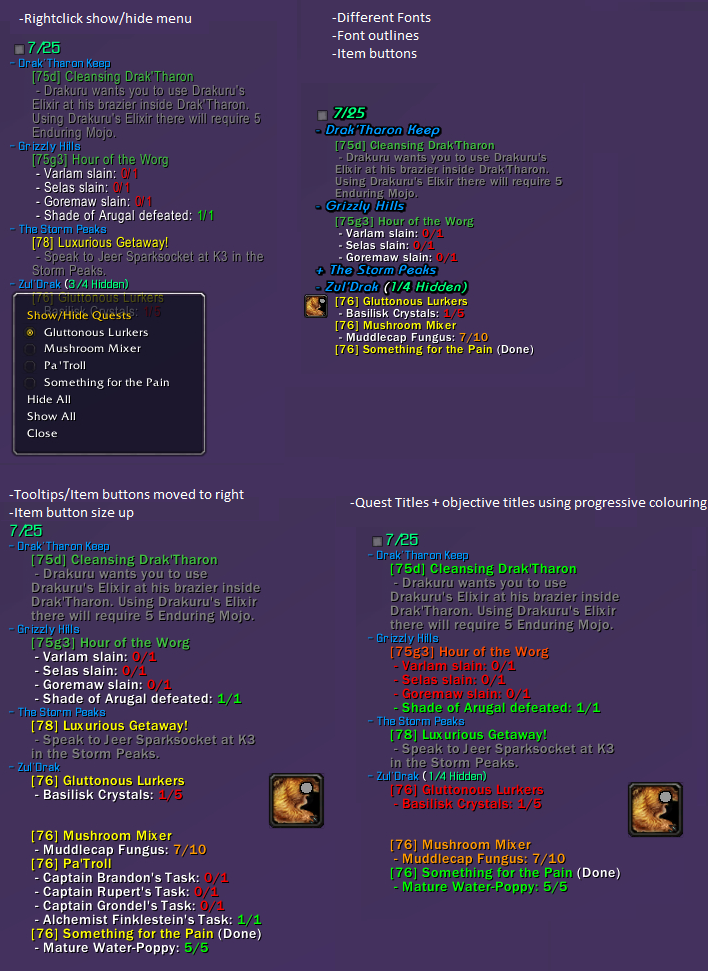
SorhaQuestLog is a basic Quest/Achievement addon similar to MonkeyQuest and nQuestLog.
It allows the display of quests and achievements on the screen in an configurable way.
Options panel is accessible using /sql or /sorhaquestlog
Quest Controls
Hidden Quests
- Click the square at the top of the tracker to show/hide hidden quests
- Right-click a quest to show or hide it.
Zones
- Left-click a zone to collapse/expand it
- Right-click a zone to open a menu to show/hide quests
- Alt + right-click a zone to open a menu to show/hide zones
Quests
- Left-click a quest to open quest text pane. (Alt-Left if you enable full log option)
- Alt + Left-click a quest to open quest in world map log (Left if you enable full log option)
- Control left-click a quest to set it as the active quest tracking
- Alt + Ctrl left-click a quest to abandon it. (Can disable confirm dialog in options)
Features
Core Features:
- Individual Minions for Quests, Achievements and Scenarios
- Auto Show/Hide options when entering instances, arenas, combat, pet battles, the outside world etc.
- Can hide the default blizzard quest frame
- Handles blizzards remote quests
- Borders and background for minions
- LDB Module
Quest Log Minion Features:
- Expandable/collapsible zone headers
- Auto collapsing/expanding zone headers as you change zones
- Hide Zone headers when all their quests are hidden
- Expand collapse menu available using alt-right-click on a zone
- Hide quests by right-clicking the quest or by selecting it from its zone headers right-click menu
- Hide completed objectives
- Can completely hide quest tracker when tracking no quests
- Hide or re-size item buttons
- Colour objective texts and statuses by completeness(gradual) , state(done/undone) or choose a custom colour
- Colour quest titles and level texts by level, completeness(gradual) , state(done/undone) or choose a custom colour
- Changeable fonts, font shadowing and font sizes for Zones, Quests and Objectives
- Adjustable indentation for quests and objectives
- Option to display only the quest details pane of the quest log when left-clicking a quest. (Alt left click to get the full quest log panel)
- Ctrl left-click a quest to set it as the active quest for blizzards minimap tracker, (Dugi arrow support)
- Alt + Ctrl left-click a quest to abandon it. (Can disable confirm dialog in options)
Achievement Minion Features:
- Customizable text by choosing fonts, sizes, shadowing and colours.
- Customizable textures for progress bars
- Optional progress status bars for the achievements that can have them
- Option to limit the number of tasks displayed per achievement
Notification Features:
- Customizable sounds for quest/objective complete and quest starting item picked up notifications.
- Choose custom sounds for quest completions and objective completions
- Re-direct the objective completion messages elsewhere with LibSink
Recent Changes
New since v1.4.8
- Track world quests
- Link Scenario and achievement minions to quest minion
Other Stuff >.>
Bug reporting and Suggestions
You can report bugs or suggestions using wowaces ticket system at:
http://www.wowace.com/addons/sorhaquestlog/tickets/
Localization
If you want to help localize SorhaQuestLog you can do so using the wowace localization section at:
http://www.wowace.com/addons/sorhaquestlog/localization/
Comments


-

Sorha2 Owner
-

humfras Author
-

unrealcrom96 Translator
-
View User Profile
-
Send Message
Posted Nov 11, 2014Sadly not a clue yet, no beta access so have had no chance to test those :(
-
View User Profile
-
Send Message
Posted Nov 11, 2014Hopefully you get a chance to look into it once Draenor is out? Only two days to go. :)
-
View User Profile
-
Send Message
Posted Nov 10, 2014Hi
In the achievement tracker, is there a way to show ONLY what's missing ? (for example : just missing pets in zones).
i always have the full list for each achievement to make, even the steps i already made...
(i use it on french game).
thanks.
-
View User Profile
-
Send Message
Posted Nov 12, 2014It should idealy only be displaying the uncompleted parts, if possilbe could you send me a screenshot of how the blizzard one looks when this ones not working right? :)
-
View User Profile
-
Send Message
Posted Nov 12, 2014It seems those buttons serve mostly to select the current 'tracked' quest, which has effects on the highlight 'its in this area' zones etc.
You can hold ctrl and click a quest in SQL to replicate that functionality currently.
Though it would be nice to have the same numbers so you can link them up to the ones on the minimap, I can definitely look into adding that to the addon in some form, though might be a little as things are very busy right now :(
-
View User Profile
-
Send Message
Posted Nov 12, 2014take your time! :)
You do a great job with this addon,
greets Mika
-
View User Profile
-
Send Message
Posted Nov 10, 2014Hi
2 weeks i asked a question about quest numbers before the quests like the blizz tracker has and you did a nice job bij making that happen in the next version, one option i diddent really meant but very nice!
I like yo have the numbers before the quests 1 2 3 4 or ? like the show on the worldmap also, i hope i explaned this well enough that you van understand what i mean
greets Mika
-
View User Profile
-
Send Message
Posted Nov 9, 2014Downloading and updating to the beta right now.
-
View User Profile
-
Send Message
Posted Nov 10, 2014So far, no more taint issues with the beta version that you posted. Keeping fingers crossed ;)
-
View User Profile
-
Send Message
Posted Nov 9, 2014I'm getting errors when using this addon, namely when I try to use a quest item by clicking the button in the tracker, I get an error which reads:
SorhaQuestLog has been blocked from an action only available to the Blizzard UI. You can disable this addon and reload the UI.
Any eta on a fix?
-
View User Profile
-
Send Message
Posted Nov 9, 2014Which version were you using, hopefully that was to be fixed in 1.4.2 beta1 :(
-
View User Profile
-
Send Message
Posted Nov 9, 2014Was it any particular quest?
'Hide Completed quests/goto Quests' works for me at least on completed ones, not sure on goto :(
-
View User Profile
-
Send Message
Posted Nov 9, 2014Hi Sorha,
I have update the german translation with your latest additions.
Furthermore I have noticed that the option "hide completed/goto quests" is not wokring. Tested with version 1.4.2 b1
-
View User Profile
-
Send Message
Posted Nov 10, 2014The feature did not worked at all in the following zones while questing:
It did work for most of the quests in Blad's Ede Mountains. I can't regognize any pattern. May it be an localization issue? I am on a german client.
Another question: Is it possible to let the quests in the zone sort by certain conditions like level, type, or even distance?
I am glad that you could spare some time to start the much needed acnhoring feature! Keep up the great work!
-
View User Profile
-
Send Message
Posted Nov 11, 2014If possible can you untick the hide blizzard quest log option and take a few screen shots of the quests (wish objectives) which don't work.
Might be able to fix localisation issues.. meybi >.<
-
View User Profile
-
Send Message
Posted Nov 9, 2014Hmm in 1.4.2 beta 1 questlog cuts off and hides the first tracked quest that has the item button. If I de-select in options showing item buttons, the questlog returns to normal.
-
View User Profile
-
Send Message
Posted Nov 9, 2014Is there no LUA errors raised?
If not could you send me a screenshot + name/location of the quest?
-
View User Profile
-
Send Message
Posted Nov 7, 2014If possible folk can I get some testing on r124+ on the quest item buttons ^_^
-
View User Profile
-
Send Message
Posted Nov 5, 2014Am trying to figure this one out, but its causing me a hell of a headache.
If anyone who has an idea on that please feel free to messageme ^_^
-
View User Profile
-
Send Message
Posted Nov 4, 2014Hi!
I got the following error when trying to use a quest item from the tracker:
Date: 2014-11-04 20:16:35
ID: 7
Error occured in: AddOn: SorhaQuestLog
Count: 12
Message: Error: AddOn SorhaQuestLog attempted to call a forbidden function (UseQuestLogSpecialItem()) from a tainted execution path.
Debug:
[C]: UseQuestLogSpecialItem()
..._ObjectiveTracker\Blizzard_QuestObjectiveTracker.lua:198:
..._ObjectiveTracker\Blizzard_QuestObjectiveTracker.lua:191
Locals:
None
AddOns:
SorhaQuestLog, r122
BlizRuntimeLib_enUS v6.0.3.60000 <none>
(ck=d91)