SmartRes2
SmartRes2
The ultimate addon for party and raid recovery after a partial or total wipe. There is a plethora of features, most functional, some are for roleplay.
A Short List of Features
Not every feature exits for every WoW version. For example, settings for mass resurrection spells are not available in Classic Era or Season of Discovery. I am still writing the code, which means there are features which are not done.
- SmartRes2 is lightweight and modular. You can enable or disable almost everything, up to and including entire plugins.
- Create your own random messages for printing to chat to entertain your group.
- Disable or remove chat messages you do not wish to use. There is a recycle bin to restore deleted messages.
- Customize the bar frame with borders, fonts, and more. Future ideas include supporting themes.
- Bind keys for one-click casting of your class resurrection spells, including Hunter pet spells (requires retail, crane and moth pets).
- Non-combat spells intelligently parse your group for dead characters, prioritizing healers, tanks, then DPS. The option to change the priority is being investigated.
- Non-combat resurrection spells, including mass resurrections, check if your cast is the fastest, and if anyone's spell is not the fastest, SmartRes2 can inform them of a collision.
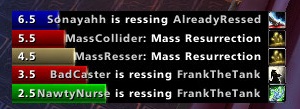
- A frame of colour-coded bars provides a visual display of resurrections. (Not ready as of June, 2024).
- If you have a combat res spell, there is an option to switch the manual target key bind to the spell during combat, and back to your regular res spell out of combat.
- SmartRes2 supports all WoW versions that have been released as of June, 2024. The War Within is planned, but I do not have access to the beta.
Translating
People can start localizing SmartRes2 via the Wowace web portal. As of June 6, 2024, the current words and phrases are set; however, there will be more added and those added later may change as development progresses.
API
Addon authors are welcome to write their own modules and plug their options into SmartRes2. There is a Public API which has the basics. More instructions will be added as development advances.
Preview Screenshots
These are not final, and are subject to change, especially as I add features.
Comments


-

Sygon_Paul Owner
-

_ForgeUser4646792 Tester
-
_ForgeUser9586121 Tester
-
View User Profile
-
Send Message
Posted Jul 24, 2010@DaemonSambe I will see if I can force both issues. There is a :SetPoint() in OnInit(), perhaps I need to duplicate it in the bar creation. Will check. Same with the :ShowIcon()
@Creepy_Inc Just use the custom message option.
-
View User Profile
-
Send Message
Posted Jul 22, 2010Any chance you can change the whisper to not mention my name to start with?
I mean the person can see the whisper is from me, doesn't need "xxxxx to: xxxx is rez. you."
-
View User Profile
-
Send Message
Posted Jul 22, 2010First, /sr cast and /smartres cast do not work at all, ever, for me.
When I use the keyboard hotkey, I can get it to rez people, but I get this:
Message: Interface\AddOns\SmartRes2\SmartRes2.lua:807: bad argument #1 to 'random' (interval is empty)
Time: Thu Jul 22 09:20:42 2010
Count: 2
Stack: (tail call): ?
[C]: in function `random'
Interface\AddOns\SmartRes2\SmartRes2.lua:807: in function `?'
...Ons\Ace3\CallbackHandler-1.0\CallbackHandler-1.0.lua:147: in function <...Ons\Ace3\CallbackHandler-1.0\CallbackHandler-1.0.lua:147>
[string "safecall Dispatcher[4]"]:4: in function <[string "safecall Dispatcher[4]"]:4>
[C]: ?
[string "safecall Dispatcher[4]"]:13: in function `?'
...Ons\Ace3\CallbackHandler-1.0\CallbackHandler-1.0.lua:92: in function `Fire'
...Ons\LibResComm-1.0\LibResComm-1.0\LibResComm-1.0.lua:147: in function `?'
...Ons\LibResComm-1.0\LibResComm-1.0\LibResComm-1.0.lua:48: in function <...Ons\LibResComm-1.0\LibResComm-1.0\LibResComm-1.0.lua:47>
Locals: (*temporary) = 0
-
View User Profile
-
Send Message
Posted Jul 24, 2010-
View User Profile
-
Send Message
Posted Jul 27, 2010-
View User Profile
-
Send Message
Posted Jul 21, 2010So i really dislike addons that store positioning data in layout-local.txt. It's annoying because if you load a session without the mod, it removes that positioning data, and the next time the mod loads it has to be reset.
This is the case with the resBar anchors in this mod. Even though you store the data in savedvariables, that's not what's used to create the new resBars session. That coordinate information is just ignored on init, and if there isn't any layout-local data, it goes to default, center of screen.
It so annoyed me that i went into the code to find out why and how to fix; only to realize that it's not a problem with the mod itself, but the outdated libBar. Or maybe not entirely outdated, but i can't figure out how to get the SetPoint to work on the bars. As far as i can tell, it just ignores the command. And like you, i went searching for some code info, but found nothing. The only mod i could find using LibBar was Skada, which works fine with the anchors, but uses libWindow to wrap the bars, and may even have modified libBar some.
Anyway, that's my gripe.
Oh. and the ShowIcon toggle, is also not observed on reload, which i think is just some missing check someplace, that i forgot to look into.
-
View User Profile
-
Send Message
Posted Jul 13, 2010-
View User Profile
-
Send Message
Posted Jul 12, 2010-
View User Profile
-
Send Message
Posted Jul 13, 2010Select "Group" which will switch between raid and party chat depending on your group size.
-
View User Profile
-
Send Message
Posted Jul 8, 2010Any bugs or comments please post to the tracker. Link is above, in the main description. I am especially wondering about cross-realm deaths, and if the auto res key and /sr cast works on those players now.
-
View User Profile
-
Send Message
Posted Jul 8, 2010-
View User Profile
-
Send Message
Posted Jul 4, 2010-
View User Profile
-
Send Message
Posted Jul 4, 2010-
View User Profile
-
Send Message
Posted Jul 4, 2010-
View User Profile
-
Send Message
Posted Jun 30, 2010This won't be a problem when the next beta comes along, btw. I am also working on getting the auto res button to work on cross-realm characters. There have been some code tweaks in the background; therefore nothing visible to users, but SmartRes2 should use less memory and CPU. Probably not a whole lot less, but still less.
-
View User Profile
-
Send Message
Posted Jun 30, 2010If you are alpha testing, please post bugs to the bug tracker (link in the description) and not to the comments, so as not to confuse people. What I really need is someone to test if the auto res key and /sr cast command work on cross-realm players.
Aside from the bug tracker, post any alpha-related comments in the official forum, and not on Curse.
Thank you. End of line. (If anyone knows that reference, I will give you recognition here on Curse)
-
View User Profile
-
Send Message
Posted Jul 1, 2010-
View User Profile
-
Send Message
Posted Jun 26, 2010-
View User Profile
-
Send Message
Posted Jun 26, 2010-
View User Profile
-
Send Message
Posted Jun 28, 2010Great addon. I'm very satisfied even without this feature.