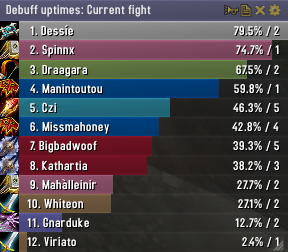
Skada Damage Meter
Skada Damage Meter
Skada is a modular damage meter for World of Warcraft with various viewing modes, segmented fights, and customizable windows. It is designed for efficiency with minimal memory and CPU impact.
"Skada" is Swedish for "Damage".
Midnight Edition (WoW 12.0+)
This version of Skada is updated for World of Warcraft: Midnight and uses Blizzard's new session-based combat systems.
Features
- Midnight Optimized: Uses Blizzard's internal session data for performance and accuracy.
- Combat Reliability: Handles modern combat data restrictions for a stable experience.
- Updated UI: Includes new presets with smooth animations, gradients, and textures.
- Dynamic Elements: Alternating row colors, highlight overlays, spark effects, and icon scaling.
- LDB Integration: Compatible with Data Broker displays such as Titan Panel, ChocolateBar, and ElvUI.
- Extensible Architecture: The API allows developers to create additional plugins.
Usage
Getting Started
A default window is created upon first load. Access the configuration menu by clicking the cog icon on the window title bar or via the minimap button. Select Configure to access settings.
Multiple Windows
Skada supports multiple windows. Create new ones under the Windows section of the configuration panel. Windows can be:
- Bar: The standard customizable meter.
- Inline: A horizontal line for custom UI setups.
- Data Text: For LDB displays and minimal setups.
Navigation
- Left-Click: View more detailed information.
- Right-Click: Return to the previous view.
- Mousewheel: Scroll through lists.
- Tooltips: Hover over bars to see additional context and shortcut keys (e.g., Shift-click for targets).
Themes
Manage window designs with the built-in Theme Engine. You can import and export themes by using theme strings.
Versions
- Midnight (Default): For WoW 12.0+ using the Native API.
- Classic Version: The version for older WoW releases.
Support
If you find Skada helpful, consider supporting its development through GitHub Sponsors.
Links
Comments


-

zarnivoop Owner
-
View User Profile
-
Send Message
Posted Feb 10, 2026In reply to zarnivoop: It's beautiful, thank you!
I seemed to have lost a bunch of settings (bars, fonts), but kept others (behaviour, layout, position). Did the savedvariables change a bit?
-
View User Profile
-
Send Message
Posted Feb 8, 2026i miss you
-
View User Profile
-
Send Message
Posted Feb 8, 2026Any news?
-
View User Profile
-
Send Message
Posted Jan 29, 2026Just had a look at Midnight. The built-in damage meter does look terrible. From what I read addons can no longer access the combat log though, which would likely limit Skada to whatever the built-in damage meter API provides. I will have a look this weekend.
-
View User Profile
-
Send Message
Posted Jan 27, 2026please update for 12.0.1 Midnight.
-
View User Profile
-
Send Message
Posted Jan 21, 2026This Addon is flagged as "Incompatible" in the in-game Addon list in Patch 12.0.0.
-
View User Profile
-
Send Message
Posted Jan 21, 2026Does anyone have a fix so it at least works until it's updated?, Thx.
-
View User Profile
-
Send Message
Posted Aug 9, 2025In the new version still the same problem. Bar direction from right to left, bar text not readable.
-
View User Profile
-
Send Message
Posted Jul 10, 2025no version for MOM MoP is not working. can you help me thank you very much for this beautiful addon♥
-
View User Profile
-
Send Message
Posted Jul 9, 2025Hi, i have this error
Message: Interface/AddOns/Skada/modules/Deaths.lua:336: attempt to call global 'GetSpellLink' (a nil value)
Time: Wed Jul 9 17:00:59 2025
Count: 2
Stack:
[Interface/AddOns/Skada/modules/Deaths.lua]:336: in function 'Update'
[Interface/AddOns/Skada/Skada.lua]:2558: in function 'AddSubviewToTooltip'
[Interface/AddOns/Skada/Skada.lua]:2633: in function 'ShowTooltip'
[Interface/AddOns/Skada/BarDisplay.lua]:178: in function <Interface/AddOns/Skada/BarDisplay.lua:174>
Locals:
self = <table> {
modules = <table> {
}
defaultModuleLibraries = <table> {
}
title = "Sevh's Death"
playerid = "Player-1427-0842EA2C"
scanned = true
enabledState = true
defaultModuleState = true
moduleName = "Death log"
metadata = <table> {
}
name = "Skada_Death log"
orderedModules = <table> {
}
}
win = <table> {
changed = false
metadata = <table> {
}
dataset = <table> {
}
usealt = true
history = <table> {
}
}
set = <table> {
healingabsorbed = 0
_playeridx = <table> {
}
auras = <table> {
}
ccbreaks = 0
time = 31
interrupts = 0
mobdone = 18817582
damagetaken = 18817582
damage = 5021742
players = <table> {
}
deaths = 1
mobs = <table> {
}
mobtaken = 5021742
power = <table> {
}
healing = 1734465
dispells = 0
shielding = 1290860
ffdamagedone = 0
starttime = 1752094390
name = "The Gobfather"
mobname = "The Gobfather"
overhealing = 0
mobhdone = 6011818
last_action = 1752094390
endtime = 1752094421
}
player = <table> {
last = 1752094859
healingabsorbed = 0
class = "WARRIOR"
damaged = <table> {
}
auras = <table> {
}
role = "NONE"
time = 29
interrupts = 0
maxhp = 17906440
dispells = 0
ccbreaks = 0
damage = 5021742
damagespells = <table> {
}
deaths = <table> {
}
damagetaken = 18817582
power = <table> {
}
id = "Player-1427-0842EA2C"
first = 1752094392
ffdamagedone = 0
damagetakenspells = <table> {
}
ffdamagedonespells = <table> {
}
name = "Sevh"
ffdamagedonetargets = <table> {
}
healed = <table> {
}
healing = 1734465
shielding = 1290860
overhealing = 0
healingspells = <table> {
}
}
nr = 2
winmax = 17906440
(for state) = <table> {
1 = <table> {
}
}
(for control) = 1
i = 1
death = <table> {
ts = 1752094420.599040
log = <table> {
}
maxhp = 17906440
}
maxhp = 17906440
(for state) = <table> {
1 = <table> {
}
2 = <table> {
}
3 = <table> {
}
4 = <table> {
}
5 = <table> {
}
6 = <table> {
}
7 = <table> {
}
8 = <table> {
}
9 = <table> {
}
10 = <table> {
}
11 = <table> {
}
12 = <table> {
}
13 = <table> {
}
14 = <table> {
}
15 = <table> {
}
pos = 5
}
(for control) = 2
j = 2
log = <table> {
ts = 1752094420.599030
amount = -2798530
srcname = "The Gobfather"
hp = 1
spellid = 1216577
}
diff = -0.000010
d = <table> {
id = 2
}
spellid = 1216577
spellname = "Bomb Voyage"
rspellname = nil
(*temporary) = nil
(*temporary) = 1216577
(*temporary) = "attempt to call global 'GetSpellLink' (a nil value)"
Skada = <table> {
defaults = <table> {
}
windowdefaults = <table> {
}
db = <table> {
}
total = <table> {
}
classcolors = <table> {
}
baseName = "Skada"
versions = <table> {
}
char = <table> {
}
defaultModuleState = true
orderedModules = <table> {
}
displays = <table> {
}
resetoptions = <table> {
}
modules = <table> {
}
options = <table> {
}
getsetlabel_fs = FontString {
}
enabledState = true
cleuFrame = Frame {
}
defaultModuleLibraries = <table> {
}
name = "Skada"
}
death_spell = 41220
L = <table> {
Toggles showing the minimap button. = "Toggles showing the minimap button."
Lines = "Lines"
CC = "CC"
The sound that will be played when your threat percentage reaches a certain point. = "The sound that will be played when your threat percentage reaches a certain point."
DamageTaken = "Damage Taken"
Rename window = "Rename window"
Whisper = "Whisper"
Choose which data feed to show in the DataBroker view. This requires an LDB display addon, such as Titan Panel. = "Choose which data feed to show in the DataBroker view. This requires
-
View User Profile
-
Send Message
Posted May 21, 2025In Classic the combat detection seems a bit off. When having the addon on "Current fight" it should be a new segment each time you leave/enter combat. Which it is most of the time. As an example, on my warrior if I use Bloodrage it puts me in combat which correctly cleans out the window for "Current fight". Same thing if I just enter combat by charge'ing a new mob. All good here no issues. However, if I kill a mob, leave combat the damage for the previous fight is visible until it gets cleared upon entering combat again. This is expected behaviour. But if I at this point enter combat again with a new mob by just walking up to it and hitting it. (in this example the initial melee hit is what puts me in combat, not aggroing the mob). The bar from this point wont update. Meaning I'm still seeing the segment from previous combat without any further tracking to it. Until it clear it by using charge or something on the next mob. Strange behaviour. I haven't tested this in raids or anything. Just something I noticed while running around in the open world. Maybe it has something to do with how combat is being tracked when combat starts from just auto swinging on a mob or something? In either case, outside of this I haven't noticed any issues with the addon.
-
View User Profile
-
Send Message
Posted Jul 7, 2025.
-
View User Profile
-
Send Message
Posted Jul 7, 2025.
-
View User Profile
-
Send Message
Posted May 12, 2025Hopefully the dev sticks around. I'd love to see a fully working modern version of this addon as a details alternative!
-
View User Profile
-
Send Message
Posted May 7, 2025How to modify the text sorting format
-
View User Profile
-
Send Message
Posted May 2, 2025workaround for numbers/text on the right merging together/no having enough space inbetween (damage/dps/percent) is to change the FONT
-
View User Profile
-
Send Message
Posted Apr 17, 2025Does this work in PvP? I am using Details! right now but the CC capture is not accurate.
-
View User Profile
-
Send Message
Posted Apr 16, 2025New update. Still the same problem. Bar direction from right to left. Text on bar not readable.
-
View User Profile
-
Send Message
Posted Apr 7, 2025'Send report' doesn't work. Please fix.
-
View User Profile
-
Send Message
Posted Apr 15, 2025In reply to mirima: This is fixed in 1.10.4.