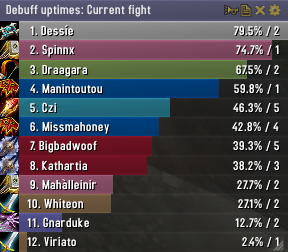
Skada Damage Meter
Skada Damage Meter
Skada is a modular damage meter for World of Warcraft with various viewing modes, segmented fights, and customizable windows. It is designed for efficiency with minimal memory and CPU impact.
"Skada" is Swedish for "Damage".
Midnight Edition (WoW 12.0+)
This version of Skada is updated for World of Warcraft: Midnight and uses Blizzard's new session-based combat systems.
Features
- Midnight Optimized: Uses Blizzard's internal session data for performance and accuracy.
- Combat Reliability: Handles modern combat data restrictions for a stable experience.
- Updated UI: Includes new presets with smooth animations, gradients, and textures.
- Dynamic Elements: Alternating row colors, highlight overlays, spark effects, and icon scaling.
- LDB Integration: Compatible with Data Broker displays such as Titan Panel, ChocolateBar, and ElvUI.
- Extensible Architecture: The API allows developers to create additional plugins.
Usage
Getting Started
A default window is created upon first load. Access the configuration menu by clicking the cog icon on the window title bar or via the minimap button. Select Configure to access settings.
Multiple Windows
Skada supports multiple windows. Create new ones under the Windows section of the configuration panel. Windows can be:
- Bar: The standard customizable meter.
- Inline: A horizontal line for custom UI setups.
- Data Text: For LDB displays and minimal setups.
Navigation
- Left-Click: View more detailed information.
- Right-Click: Return to the previous view.
- Mousewheel: Scroll through lists.
- Tooltips: Hover over bars to see additional context and shortcut keys (e.g., Shift-click for targets).
Themes
Manage window designs with the built-in Theme Engine. You can import and export themes by using theme strings.
Versions
- Midnight (Default): For WoW 12.0+ using the Native API.
- Classic Version: The version for older WoW releases.
Support
If you find Skada helpful, consider supporting its development through GitHub Sponsors.
Links
Comments


-

zarnivoop Owner
-
View User Profile
-
Send Message
Posted Aug 15, 2016Yep same, went and downloaded the 1.4-35 release instead, and its back to the good old look, and a working tooltip.
Now I have to make sure my curse client doesnt update this..
-
View User Profile
-
Send Message
Posted Aug 15, 2016Newest update makes my main Skada window lap over other tabs such my bags when I have them open; http://i.imgur.com/YPiuIfZ.png
Please revert it back so it doesn't go over the bags like that.
-
View User Profile
-
Send Message
Posted Aug 15, 2016There is an option to change the frame's strata now.
-
View User Profile
-
Send Message
Posted Aug 14, 2016Latest update changed the color, texture, and size of my primary skada window.
-
View User Profile
-
Send Message
Posted Aug 15, 2016Agreed... it also seems to have added a border, which I can't find any way to disable. I've always loved skada, but the border clashes with my UI :(
-
View User Profile
-
Send Message
Posted Aug 15, 2016The border, which should only affect new windows, can be turned off in the settings by either setting window border texture to "None", or settings border thickness to 0.
-
View User Profile
-
Send Message
Posted Aug 14, 2016http://prnt.sc/c5tcuy what happened to my skada window after i updated? Also it bugs when open menu 3x Skada\BarDisplay.lua:1114: attempt to index local 'c' (a nil value)
Skada\BarDisplay.lua:1114: in function `member'
-
View User Profile
-
Send Message
Posted Aug 15, 2016The error is fixed now. Not sure why your window changed; only new windows should be affected.
-
View User Profile
-
Send Message
Posted Aug 15, 2016This happened to my main skada window as well. Can't figure out how to change it back to the old window style without messing with every single option. Extremely frustrating, as I very much dislike the new look. :(
-
View User Profile
-
Send Message
Posted Aug 8, 2016Really really would love to see the ability to make the whole skada window clickthrough. At the moment the only clickthrough option is for the bars and it doesn't even make the bars clickthrough it only makes the window the bars are in click through. this is very bad for healing when where you're trying to cast a spell right where a bar is and it just starts changing settings on your bar.
im going back to recount, sadly, until this option is available.
-
View User Profile
-
Send Message
Posted Jul 28, 2016can we bring back healing+leech option please, it shouldn't be hard to fix, according to this info: https://mods.curse.com/addons/wow/skada-leech-trinket-tabs
-
View User Profile
-
Send Message
Posted Jul 28, 2016I love this addon but noticed that it still pops up in pet battles. I recall that this was fixed initially several versions ago but it seems to have come back and I could find no options to turn it off for pet battles when looking through the options.
-
View User Profile
-
Send Message
Posted Jul 27, 2016Greater Blessing of Might is currently showing up under the person the spell is cast on, instead of the casting Paladin. I believe the advance combat log shows who the casting paladin was so the damage can be attributed to the Paladin (warcraftlogs does this already). If its possible this would be super helpful!
-
View User Profile
-
Send Message
Posted Jul 28, 2016-
View User Profile
-
Send Message
Posted Jul 28, 2016True, hope it gets fixed soon, i was seeing stormlash being 3-4% of my total damage then checking on logs and it was around 12-13%.
-
View User Profile
-
Send Message
Posted Jul 27, 2016Comment for r632
Soul Effigy will be handled correct know
Thanks for this fix!
-
View User Profile
-
Send Message
Posted Jul 28, 2016I'm not sure it is fixed yet.
I keep showing Soul Effigy doing like 25-32K, at lvl 108. And that is is. No other spell shows up, unless I cast it directly on the boss.
I switched out of it and I was doing 97K - 127k.
Something is still not correct with its spell recordings.
-
View User Profile
-
Send Message
Posted Jul 27, 2016I'm not sure if this is a bug or if it has always been like this, but since the prepatch update Skada sits at a really high frame strata and covers anything below it. Before, it used to sit below other overlapping frames. Is there a fix for this, or at least an option to manually adjust the frame depth position?
-
View User Profile
-
Send Message
Posted Jul 25, 2016Hi, thanks for a great addon. I would like to suggest a feature that I would love to have if you could consider it. If you could implement options for "only show in party" & "only show in raid" that would be awesome. I like my raid frames in a different position than party because of how much more space they take up, so being able to have 2 different skada windows one that only shows in party and one that only shows in raid would be very beneficial. Thanks.
-
View User Profile
-
Send Message
Posted Jul 25, 2016The meter is picking up the damage on critters which skews the numbers by a lot. Can you either take out critter damage or have it as an option to disable that. Thank you!