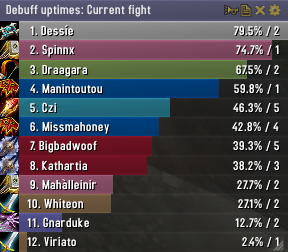
Skada Damage Meter
Skada Damage Meter
Skada is a modular damage meter for World of Warcraft with various viewing modes, segmented fights, and customizable windows. It is designed for efficiency with minimal memory and CPU impact.
"Skada" is Swedish for "Damage".
Midnight Edition (WoW 12.0+)
This version of Skada is updated for World of Warcraft: Midnight and uses Blizzard's new session-based combat systems.
Features
- Midnight Optimized: Uses Blizzard's internal session data for performance and accuracy.
- Combat Reliability: Handles modern combat data restrictions for a stable experience.
- Updated UI: Includes new presets with smooth animations, gradients, and textures.
- Dynamic Elements: Alternating row colors, highlight overlays, spark effects, and icon scaling.
- LDB Integration: Compatible with Data Broker displays such as Titan Panel, ChocolateBar, and ElvUI.
- Extensible Architecture: The API allows developers to create additional plugins.
Usage
Getting Started
A default window is created upon first load. Access the configuration menu by clicking the cog icon on the window title bar or via the minimap button. Select Configure to access settings.
Multiple Windows
Skada supports multiple windows. Create new ones under the Windows section of the configuration panel. Windows can be:
- Bar: The standard customizable meter.
- Inline: A horizontal line for custom UI setups.
- Data Text: For LDB displays and minimal setups.
Navigation
- Left-Click: View more detailed information.
- Right-Click: Return to the previous view.
- Mousewheel: Scroll through lists.
- Tooltips: Hover over bars to see additional context and shortcut keys (e.g., Shift-click for targets).
Themes
Manage window designs with the built-in Theme Engine. You can import and export themes by using theme strings.
Versions
- Midnight (Default): For WoW 12.0+ using the Native API.
- Classic Version: The version for older WoW releases.
Support
If you find Skada helpful, consider supporting its development through GitHub Sponsors.
Links
Comments


-

zarnivoop Owner
-
View User Profile
-
Send Message
Posted Jan 25, 2012Thank you!
you can change under the following content?
Menus.lua
target = { "Whisper Target", "whisper"},->target = { L["Whisper Target"], "whisper"},
whisperbox:SetLabel("Whisper Target")-> whisperbox:SetLabel(L["Whisper Target"])
Add language file
L["Whisper Target"] = "密语目标"
-
View User Profile
-
Send Message
Posted Jan 24, 2012@xingwang
Sorry about that, looks like I missed the case of saved healing spells. Try r378.
-
View User Profile
-
Send Message
Posted Jan 24, 2012@xingwang
Are you still seeing this? I thought my commit 3 days ago would have fixed it.
-
View User Profile
-
Send Message
Posted Jan 22, 201246x Skada-r376\modules\SkadaHealing\Healing.lua:50: attempt to perform arithmetic on field "absorbed" (a nil value) Skada-r376\modules\SkadaHealing\Healing.lua:50: in function <Skada\modules\SkadaHealing\Healing.lua:10> Skada-r376\modules\SkadaHealing\Healing.lua:81: in function "func" Skada\Skada-r376.lua:1402: in function <Skada\Skada.lua:1302> <string>:"safecall Dispatcher[19]":4: in function <string>:"safecall Dispatcher[19]":4 <in C code> <string>:"safecall Dispatcher[19]":13: in function "?" Libs\CallbackHandler-1.0\CallbackHandler-1.0-6.lua:92: in function "Fire"
-
View User Profile
-
Send Message
Posted Jan 20, 2012A: r375
4x SkadaHealing-r375\Healing.lua:50: attempt to perform arithmetic on field "absorbed" (a nil value)
SkadaHealing-r375\Healing.lua:50: in function <SkadaHealing\Healing.lua:10>
SkadaHealing-r375\Healing.lua:81: in function "func"
Skada\Skada-r375.lua:1402: in function <Skada\Skada.lua:1302>
<string>:"safecall Dispatcher[19]":4: in function <string>:"safecall Dispatcher[19]":4
<in C code>
<string>:"safecall Dispatcher[19]":13: in function "?"
Ace3-r1045\CallbackHandler-1.0\CallbackHandler-1.0-6.lua:92: in function "Fire"
Ace3-r1045\AceEvent-3.0\AceEvent-3.0-3.lua:120: in function <Ace3\AceEvent-3.0\AceEvent-3.0.lua:119>
Locals:
nil
-
View User Profile
-
Send Message
Posted Jan 18, 2012Skada version: r373
gave me this error when i did some fire on a dummy....
im an enhancement shaman if that helps
Only got it one time... during the raid finder it did not give me errors...
Message: Interface\AddOns\SkadaHealing\Healing.lua:27: attempt to perform arithmetic on field 'healingabsorbed' (a nil value)
Time: 01/18/12 10:35:01
Count: 21
Stack: (tail call): ?
Interface\AddOns\SkadaHealing\Healing.lua:27: in function <Interface\AddOns\SkadaHealing\Healing.lua:10>
Interface\AddOns\SkadaHealing\Healing.lua:81: in function `func'
Interface\AddOns\Skada\Skada.lua:1402: in function <Interface\AddOns\Skada\Skada.lua:1302>
[string "safecall Dispatcher[19]"]:4: in function <[string "safecall Dispatcher[19]"]:4>
[C]: ?
[string "safecall Dispatcher[19]"]:13: in function `?'
...ore\libs\CallbackHandler-1.0\CallbackHandler-1.0.lua:92: in function `Fire'
...\AddOns\DataStore\libs\AceEvent-3.0\AceEvent-3.0.lua:120: in function <...\AddOns\DataStore\libs\AceEvent-3.0\AceEvent-3.0.lua:119>
Locals: <none>
-
View User Profile
-
Send Message
Posted Jan 15, 2012Hi, is it possible, that i can change the option, so that i see in "dps at the moment" to see only the max DPS. That means i can change it so that i see only the highest DPS. My problem is i can't an won't see every timme to skada. Only after the fight i see to skada, but as firemage my dps is falling and get lower and i see no time, whats my highest dps. Ok i can show "dps for all" but thats not what i want. I need to see my highest dps at every fight.
Thanks
-
View User Profile
-
Send Message
Posted Jan 8, 2012The latest version of Skada seems to be behaving oddly with regards to bar sizing. If I leave it on Total it's fine, but any individual segment sometimes displays with correct (or at least plausible) damage done, dps, and ranking numbers, but the bars don't fill across the entire window and the ordering of the bars themselves is haywire. If I try to display the Current fight segment, it displays differently based on what I was looking at previously - sometimes it looks fine and other times it's doing the same bar sizing/ordering weirdness. I've got a saved variables file I can send you if that would help.
-
View User Profile
-
Send Message
Posted Jan 1, 2012I'm having some problems with skada - it does not record all of my dot ticks (as a Firemage). While comparing readings from both recount and Skada together for 5 minutes, Skada shows me to have done around 20,000 less damage than recount shows and therefore shows my DPS as higher. After testing using only living bomb on a raid target dummy, some of the living bombs that I applied would only have 1 tick of damage recorded by Skada (it does 5 ticks and an explosion with my level of haste). Though sometimes it would record all.
-
View User Profile
-
Send Message
Posted Dec 28, 2011I have had issues with Skada interfering with my game causing severe FPS drops during certain boss mechanics in Dragon Soul and elsewhere. Only if I run Skada to measure DPS (and possibly damage done, but I never use the damage done option).
-
View User Profile
-
Send Message
Posted Dec 25, 2011i cant get it i instal it and instal it but nothing happened and i see if i have addons but i had no addons :( can some ons say how??
-
View User Profile
-
Send Message
Posted Dec 24, 2011yes hi i left a ticket on curseforge + the FPS drop in raids since 4.3 mentioned below still happens sometimes :)
-
View User Profile
-
Send Message
Posted Dec 17, 2011Since the new content patch, skada is not storing any changes made in the window settings. that's quite annoying, cause i have to reconfigure skada windows on each wow startup.
any other settings (title, bars, ...) are saved correctly. is this a known bug, or does anyone has a hint, what i could do to get it working again?
-
View User Profile
-
Send Message
Posted Dec 15, 2011I usually keep my skada set on current fight, but now it keeps reseting itself to total everytime i relog, anyone know why this setting isn't staying saved anymore?
-
View User Profile
-
Send Message
Posted Dec 11, 2011Ah, It is really hard for me to see. Since I usually have the window locked I didn't see it before. Thanks, that works wonderfully.
-
View User Profile
-
Send Message
Posted Dec 7, 2011Is it possible to get the min/max bars functionality back? I understand that skada only displays 13 bars at a time and you can scroll down to view the additional bars. I however, use a trackball mouse and do not have a scroll wheel so I cannot view all 25 players in 25 man raids.
-
View User Profile
-
Send Message
Posted Dec 9, 2011You can make the window bigger by using the bottom right drag handle.
-
View User Profile
-
Send Message
Posted Dec 5, 2011Same here took off every add on then started one by one and it is skada for me that is droping me down in fps in org the fair you name it
-
View User Profile
-
Send Message
Posted Dec 5, 2011Missing
\locale\ptBR.lua
-
View User Profile
-
Send Message
Posted Dec 5, 2011Anyone had severe fps drop in 4.3? I had mine drop from 50-60fps to 3-5fps on entering combat with Skada enabled. And I have the most recent Skada version 1.3-1.0. Disabling Skada solves the problem. Please fix. Meanwhile I'll take a look if the same occurs with Recount, thank you.