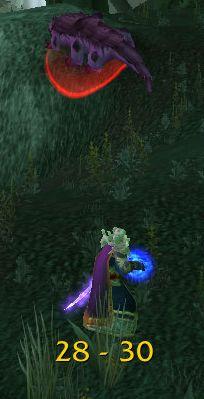
RangeDisplay
Estimated range display. Type /rangedisplay for configuration or /rangedisplay locked to lock/unlock the frames.

RangeDisplay is a simple range display addon. It is using spell range, item range and interact-distance based checks to determine the approximate range to your current target. Due to the whackyness of interact-distance based checks, recent versions only use those when spell/item based checks are not possible . The display can be configured in many ways (displaying only the max range, adding border and background, etc).
Currently you can set up RangeDisplay to show your current range to your target, focus, pet and mouseover units. The mouseover unit range can be anchored to the mouse or placed at a fixed position.
New in v3.8.0: It is possible to add sound notifications to "range sections" (similar to color setting). The sound will be played when entering the section. If two sections have the same sound file attached to them, then the sound is not played again if switching between the two sections.
This sound notification is enabled by default for the target unit's close range section.
Displaying max range only: if you want to display only the maxRange, you need to set Text to "%d" and tick the Reverse option for the section(s).
Comments

-

mitchnull Owner
-
View User Profile
-
Send Message
Posted Dec 20, 2020In Classic (yes RD works in Classic!) Is there anyway to extend the max range distance displayed? I'm thinking of my fire mage who has flame throwing and who can cast a fire spell at a mob further than 35 yards away. Thanks in advance.
-
View User Profile
-
Send Message
Posted Dec 22, 2020Unfortunately, the max range display was changed Blizzard-side between RangeDisplay releases, so this is likely impossible to fix now.
-
View User Profile
-
Send Message
Posted Dec 22, 2020In reply to spiralofhope:
Thanks anyway :) Happy holidays!
-
View User Profile
-
Send Message
Posted Oct 16, 2020Hoping for the Shadowland Update!!!
-
View User Profile
-
Send Message
Posted Oct 14, 2020If anyone was looking for sounds, I believe I was able to get sounds working by enabling lines 135 and 138 set to true.
line 135: bgEnabled = true,
line 138: bgTile= true,
I was able to start hearing the sound effects on my client again.
--Updated for a friend, if anyone still keeps the project live, please continue to support the sound effects portion :)
-
View User Profile
-
Send Message
Posted Oct 14, 20202x RangeDisplay\RangeDisplay-v4.9.3.lua:262: attempt to call method 'setDisplayColor' (a nil value)
[string "@RangeDisplay\RangeDisplay-v4.9.3.lua"]:262: in function `targetChanged'
[string "@RangeDisplay\RangeDisplay-v4.9.3.lua"]:800: in function <RangeDisplay\RangeDisplay.lua:799>
[string "=[C]"]: ?
[string "@TomTom\libs\CallbackHandler-1.0\CallbackHandler-1.0-7.lua"]:29: in function <...Tom\libs\CallbackHandler-1.0\CallbackHandler-1.0.lua:25>
[string "@TomTom\libs\CallbackHandler-1.0\CallbackHandler-1.0-7.lua"]:64: in function `Fire'
[string "@TomTom\libs\AceEvent-3.0\AceEvent-3.0-4.lua"]:120: in function <...aceTomTom\libs\AceEvent-3.0\AceEvent-3.0.lua:119>
[string "=[C]"]: in function `TargetUnit'
[string "@FrameXML\SecureTemplates.lua"]:496: in function `handler'
[string "@FrameXML\SecureTemplates.lua"]:654: in function `SecureActionButton_OnClick'
[string "@FrameXML\SecureTemplates.lua"]:694: in function <FrameXML\SecureTemplates.lua:686>
-
View User Profile
-
Send Message
Posted Oct 14, 2020I fixed it:
https://www.wowace.com/projects/range-display/issues/16
-
View User Profile
-
Send Message
Posted Oct 15, 2020In reply to spiralofhope:
Thank you so much for this! Now mine is working like it used to. :D
-
View User Profile
-
Send Message
Posted Oct 16, 2020In reply to spiralofhope:
Thank you! It works well now!
-
View User Profile
-
Send Message
Posted Oct 16, 2020In reply to spiralofhope:
Thank you! It works well now!
-
View User Profile
-
Send Message
Posted Jan 22, 2020Doesn't seem to work properly for Hunters.
So a hunter does melee from 0-5 yds.
Hunter autoshot is 8+ yards away.
Scatter shot is 0-21 yds.
So in Rangedisplay I set:
Close range limit to 5 yds
Short range limit to 8 yds
Medium range limit to 21 yds
I would expect it to show:
Close = 0 - 5
Short = 6 - 8
Medium = 9 - 21
etc...
But it never shows short. It only shows:
"0 - 5"
"5 - 20"
So the 8yd limit thing isn't even considered. What am I doing wrong here? The range library should be able to detect when my autoshot is available to know when I'm at 8 yds away...
-
View User Profile
-
Send Message
Posted Oct 12, 2019Sadly this addon doesn't showed up in twitch client, so everytime client refresh addon list, this addon is deleted by client.
Is there any suggestion of this?
-
View User Profile
-
Send Message
Posted Oct 13, 2019In reply to bolayeou:
Sorry, I have no idea what could go wrong with the twitch client. I don't use it at all... Maybe someone else can help you out
-
View User Profile
-
Send Message
Posted Oct 13, 2019In reply to mitchnull:
I think this is a version issue, it doesn't show up for me as well. I've seen people talk about this on other addons, and the solution is for the author to set the addon version to be available for WoW Classic versions (i.e. 1.13.x), so you might want to try doing that for the next release.
-
View User Profile
-
Send Message
Posted Oct 17, 2019In reply to bolayeou:
One reason I've found for addons being suddenly deleted, is if you have "Auto Uninstall" ticked via the sync settings within the Twitch Client. Untick that box, and you may find that non-Twitch addons won't be deleted anymore.
-
View User Profile
-
Send Message
Posted Oct 17, 2019In reply to bolayeou:
One reason I've found for addons being suddenly deleted, is if you have "Auto Uninstall" ticked via the sync settings within the Twitch Client. Untick that box, and you may find that non-Twitch addons won't be deleted anymore.
-
View User Profile
-
Send Message
Posted Sep 29, 2019The addon shows incorrect values, much smaller than the real ones. I think it's LibRangeCheck-2.0 problem.
-
View User Profile
-
Send Message
Posted Sep 30, 2019In reply to Forge_User_89483223:
what race/class/level have you tested with? is this on classic or retail? friendly or enemy targets?
thanks,
mitch
-
View User Profile
-
Send Message
Posted Sep 30, 2019In reply to mitchnull:
playing as hunter on classic. enemy target. its correct dispalay for 30+ range, but incorrect for melee aka blind zone
seems its always set to distance 5. no matter what numbers i'm entered
ps. sorry for multi post, something goes wrong..
-
View User Profile
-
Send Message
Posted Sep 30, 2019In reply to mitchnull:
Retail, Holy Paladin (It happens with more classes). Training dummy for example in Stormwind. LibRangeCheck says I'm in melee range. However I am very far out of range melee. THANK YOU!
https://imgur.com/a/QwsfvVj