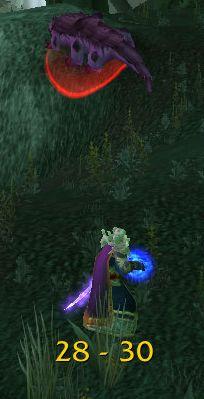
RangeDisplay
Estimated range display. Type /rangedisplay for configuration or /rangedisplay locked to lock/unlock the frames.

RangeDisplay is a simple range display addon. It is using spell range, item range and interact-distance based checks to determine the approximate range to your current target. Due to the whackyness of interact-distance based checks, recent versions only use those when spell/item based checks are not possible . The display can be configured in many ways (displaying only the max range, adding border and background, etc).
Currently you can set up RangeDisplay to show your current range to your target, focus, pet and mouseover units. The mouseover unit range can be anchored to the mouse or placed at a fixed position.
New in v3.8.0: It is possible to add sound notifications to "range sections" (similar to color setting). The sound will be played when entering the section. If two sections have the same sound file attached to them, then the sound is not played again if switching between the two sections.
This sound notification is enabled by default for the target unit's close range section.
Displaying max range only: if you want to display only the maxRange, you need to set Text to "%d" and tick the Reverse option for the section(s).
Comments

-

mitchnull Owner
-
View User Profile
-
Send Message
Posted Oct 5, 2019In reply to Forge_User_89483223:
Ah, now I understand :) I didn't know anyone was using those LibRangeCheck functions ;)
Anyway, back when those were created we didn't have any sub-5yd range checkers, so I assumed that melee range was 5yds. Now we have some items with smaller ranges and it turns out that the melee range is 2yds (if we take the other values as "correct")...
Now I've updated the MeleeRange constant to 2 yards, but I advice you to use a fallback mechanism just in case the 2yd checker is not available, like this:
local meleeChecker = rc:GetHarmMaxChecker(rc.MeleeRange) or rc:GetHarmMinChecker(rc.MeleeRange)
(the GetHarmMinChecker will find the closest higher checker in case a MaxChecker is not found)
-
View User Profile
-
Send Message
Posted Aug 30, 2019Addon works for Classic although you must go to /rangedisplay and disable settings for Focus. There is no focus frame for Classic.
-
View User Profile
-
Send Message
Posted Sep 3, 2019In reply to level12lobster:
thanks for the heads-up. I disabled arena and focus units in the latest alpha
-
View User Profile
-
Send Message
Posted Sep 7, 2019In reply to level12lobster:
I cannot get /rangedisplay to do anything. I type that in chat, and when I hit enter it does nothing (doesnt even try to enter the text). Like the enter key does not even work. Any suggestions?
-
View User Profile
-
Send Message
Posted Aug 27, 20193rd error:
Message: ...angeDisplay\libs\LibDualSpec-1.0\LibDualSpec-1.0.lua:74: attempt to call global 'GetNumSpecializationsForClassID' (a nil value)
Time: Tue Aug 27 07:33:45 2019
Count: 1
Stack: ...angeDisplay\libs\LibDualSpec-1.0\LibDualSpec-1.0.lua:74: attempt to call global 'GetNumSpecializationsForClassID' (a nil value)
...angeDisplay\libs\LibDualSpec-1.0\LibDualSpec-1.0.lua:74: in main chunk
Locals: MAJOR = "LibDualSpec-1.0"
MINOR = 17
lib = <table> {
registry = <table> {
}
options = <table> {
}
upgrades = <table> {
}
currentSpec = 0
eventFrame = <unnamed> {
}
mixin = <table> {
}
}
minor = nil
registry = <table> {
}
options = <table> {
}
mixin = <table> {
}
upgrades = <table> {
}
AceDB3 = <table> {
db_registry = <table> {
}
frame = <unnamed> {
}
New = <function> defined @Interface\AddOns\ElvUI\Libraries\Ace3\AceDB-3.0\AceDB-3.0.lua:709
}
AceDBOptions3 = <table> {
optionTables = <table> {
}
handlers = <table> {
}
GetOptionsTable = <function> defined @Interface\AddOns\AddOnSkins\Libs\Ace3\AceDBOptions-3.0\AceDBOptions-3.0.lua:442
}
AceConfigRegistry3 = <table> {
RegisterOptionsTable = <function> defined @Interface\AddOns\AddOnSkins\Libs\Ace3\AceConfig-3.0\AceConfigRegistry-3.0\AceConfigRegistry-3.0.lua:315
validated = <table> {
}
tables = <table> {
}
callbacks = <table> {
}
RegisterCallback = <function> defined @Interface\AddOns\ElvUI\Libraries\Ace3\CallbackHandler-1.0\CallbackHandler-1.0.lua:90
GetOptionsTable = <function> defined @Interface\AddOns\AddOnSkins\Libs\Ace3\AceConfig-3.0\AceConfigRegistry-3.0\AceConfigRegistry-3.0.lua:360
UnregisterCallback = <function> defined @Interface\AddOns\ElvUI\Libraries\Ace3\CallbackHandler-1.0\CallbackHandler-1.0.lua:153
IterateOptionsTables = <function> defined @Interface\AddOns\AddOnSkins\Libs\Ace3\AceConfig-3.0\AceConfigRegistry-3.0\AceConfigRegistry-3.0.lua:346
NotifyChange = <function> defined @Interface\AddOns\AddOnSkins\Libs\Ace3\AceConfig-3.0\AceConfigRegistry-3.0\AceConfigRegistry-3.0.lua:289
ValidateOptionsTable = <function> defined @Interface\AddOns\AddOnSkins\Libs\Ace3\AceConfig-3.0\AceConfigRegistry-3.0\AceConfigRegistry-3.0.lua:276
UnregisterAllCallbacks = <function> defined @Interface\AddOns\ElvUI\Libraries\Ace3\CallbackHandler-1.0\CallbackHandler-1.0.lua:174
}
_ = "Warlock"
_ = "WARLOCK"
classId = 9
(*temporary) = nil
(*temporary) = 9
(*temporary) = "attempt to call global 'GetNumSpecializationsForClassID' (a nil value)"
-
View User Profile
-
Send Message
Posted Aug 27, 2019Second Lua error:
Message: Interface\AddOns\RangeDisplay\RangeDisplay.lua:715: attempt to call method 'EnhanceDatabase' (a nil value)
Time: Tue Aug 27 07:33:45 2019
Count: 1
Stack: Interface\AddOns\RangeDisplay\RangeDisplay.lua:715: attempt to call method 'EnhanceDatabase' (a nil value)
Interface\AddOns\RangeDisplay\RangeDisplay.lua:715: in function <Interface\AddOns\RangeDisplay\RangeDisplay.lua:707>
[C]: ?
...s\ElvUI\Libraries\Ace3\AceAddon-3.0\AceAddon-3.0.lua:70: in function <...s\ElvUI\Libraries\Ace3\AceAddon-3.0\AceAddon-3.0.lua:65>
...s\ElvUI\Libraries\Ace3\AceAddon-3.0\AceAddon-3.0.lua:498: in function `InitializeAddon'
...s\ElvUI\Libraries\Ace3\AceAddon-3.0\AceAddon-3.0.lua:613: in function <...s\ElvUI\Libraries\Ace3\AceAddon-3.0\AceAddon-3.0.lua:605>
Locals: <none>
-
View User Profile
-
Send Message
Posted Aug 27, 2019Doesn't seem to load in Classic. Have not tried disabling other addons:
Message: Interface\AddOns\RangeDisplay\RangeDisplay.lua:780: attempt to index field 'db' (a nil value)
Time: Tue Aug 27 07:33:48 2019
Count: 1
Stack: Interface\AddOns\RangeDisplay\RangeDisplay.lua:780: attempt to index field 'db' (a nil value)
Interface\AddOns\RangeDisplay\RangeDisplay.lua:780: in function `applySettings'
Interface\AddOns\RangeDisplay\RangeDisplay.lua:764: in function <Interface\AddOns\RangeDisplay\RangeDisplay.lua:763>
[C]: ?
...s\ElvUI\Libraries\Ace3\AceAddon-3.0\AceAddon-3.0.lua:70: in function <...s\ElvUI\Libraries\Ace3\AceAddon-3.0\AceAddon-3.0.lua:65>
...s\ElvUI\Libraries\Ace3\AceAddon-3.0\AceAddon-3.0.lua:527: in function `EnableAddon'
...s\ElvUI\Libraries\Ace3\AceAddon-3.0\AceAddon-3.0.lua:620: in function <...s\ElvUI\Libraries\Ace3\AceAddon-3.0\AceAddon-3.0.lua:605>
[C]: in function `LoadAddOn'
Interface\FrameXML\UIParent.lua:353: in function `UIParentLoadAddOn'
Interface\FrameXML\UIParent.lua:424: in function `TimeManager_LoadUI'
Interface\FrameXML\UIParent.lua:693: in function <Interface\FrameXML\UIParent.lua:658>
Locals: <none>
-
View User Profile
-
Send Message
Posted Aug 29, 2019In reply to Homeguard3:
Looks like you have older versions os Ace3 and LibDualSpec loaded (possibly from some other addon). Please try RangeDisplay without other addons to see if the errors are still there.
-
View User Profile
-
Send Message
Posted Aug 31, 2019In reply to mitchnull:
I had to do a clean manual install of the addon for the options to even load. But it seems to be working now!
-
View User Profile
-
Send Message
Posted Aug 8, 2019Any hope for a Classic port?
-
View User Profile
-
Send Message
Posted Aug 13, 2019In reply to Forge_User_55739772:
latest release (v4.9.0) should be working (although probably not very accurate in classic, will try to improve that)
-
View User Profile
-
Send Message
Posted Aug 18, 2019In reply to mitchnull:
Thank you very much. Will test it once realms open up. Was dreading not knowing if I was walking towards/away from a mob that target macro selects, even with target markers.
-
View User Profile
-
Send Message
Posted Aug 19, 2019There is an issue with the v4.9.0 and Classic. (this was a duplicate comment that I can't delete!)
-
View User Profile
-
Send Message
Posted Aug 19, 2019In reply to mitchnull:
I've tested v4.9.0 on a 1.12.1 server (though I believe the official classic will be 1.13+). The major problem is that Libstub crashes when loaded - I think Libstub was written for Ace3 while all addons for 1.12 use Ace2. So I believe there must be some incompatibility with the Ace version & 1.12 :(
-
View User Profile
-
Send Message
Posted Aug 19, 2019In reply to Forge_User_86084452:
The crash comes from: \RangeDisplay\libs\Libstub-1.0\Libstub.lua:6 ---> attempt to index global "_G" (a nil value)
-
View User Profile
-
Send Message
Posted Aug 25, 2019In reply to Forge_User_86084452:
Yeah Classic addons will not work on 1.12.1 and vice versa. Classic is version 1.13.2.
-
View User Profile
-
Send Message
Posted Aug 1, 2018I'm using Range Display anchored to my mouse. Is there a way to bring the Range Display closer to my mouse pointer instead of 4" or so above the pointer?
-
View User Profile
-
Send Message
Posted Dec 31, 2018In reply to Kriid007:
mitch
-
View User Profile
-
Send Message
Posted Jul 29, 2018As of 8.0, the range numbers are always in the foreground, i.e. when I open my map I still see the distance numbers over the map. Is there any way to fix this problem?
-
View User Profile
-
Send Message
Posted Jul 31, 2018In reply to entlassen: