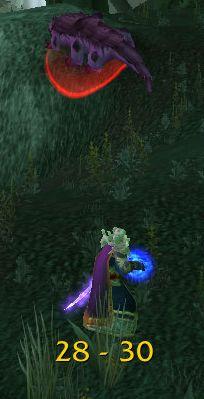
RangeDisplay
Estimated range display. Type /rangedisplay for configuration or /rangedisplay locked to lock/unlock the frames.

RangeDisplay is a simple range display addon. It is using spell range, item range and interact-distance based checks to determine the approximate range to your current target. Due to the whackyness of interact-distance based checks, recent versions only use those when spell/item based checks are not possible . The display can be configured in many ways (displaying only the max range, adding border and background, etc).
Currently you can set up RangeDisplay to show your current range to your target, focus, pet and mouseover units. The mouseover unit range can be anchored to the mouse or placed at a fixed position.
New in v3.8.0: It is possible to add sound notifications to "range sections" (similar to color setting). The sound will be played when entering the section. If two sections have the same sound file attached to them, then the sound is not played again if switching between the two sections.
This sound notification is enabled by default for the target unit's close range section.
Displaying max range only: if you want to display only the maxRange, you need to set Text to "%d" and tick the Reverse option for the section(s).
Comments

-

mitchnull Owner
-
View User Profile
-
Send Message
Posted Sep 26, 2012Still having the same issue. Could another mod be messing with it?
-
View User Profile
-
Send Message
Posted Sep 26, 2012Ah, then your issue is probably unrelated to that fix. :)
Make sure that you use a character specific Profile (instead of "Default") for each of your toons.
If all your characters use the same profile ("Default", for example) then changes made in one config will be visible on the other character's setup, too.
You can change the profile in the RangeDisplay Option's menu under the "Profiles" submenu.
cheers,
mitch
-
View User Profile
-
Send Message
Posted Sep 16, 2012must have addon
-
View User Profile
-
Send Message
Posted Aug 21, 2012Getting this error on MoP 5.0.4 (16004) build since something on this build broke something. Errors happen once ever second while its enabled.
218x libs\LibRangeCheck-2.0\LibRangeCheck-2.0-100115.lua:433: GetSpellName(): Invalid spell slot
<in C code>
libs\LibRangeCheck-2.0\LibRangeCheck-2.0-100115.lua:433: in function <libs\LibRangeCheck-2.0\LibRangeCheck-2.0.lua:430>
libs\LibRangeCheck-2.0\LibRangeCheck-2.0-100115.lua:461: in function <libs\LibRangeCheck-2.0\LibRangeCheck-2.0.lua:455>
libs\LibRangeCheck-2.0\LibRangeCheck-2.0-100115.lua:716: in function "init"
libs\LibRangeCheck-2.0\LibRangeCheck-2.0-100115.lua:942: in function "initialOnUpdate"
libs\LibRangeCheck-2.0\LibRangeCheck-2.0-100115.lua:996: in function <libs\LibRangeCheck-2.0\LibRangeCheck-2.0.lua:990>
Locals:
spellName = "Gift of the Naaru"
i = 184
GetSpellName = <func> =[C]:-1
BOOKTYPE_SPELL = "spell"
-
View User Profile
-
Send Message
Posted Aug 22, 2012Fixed in the latest alpha (r340).
cheers,
mitch
-
View User Profile
-
Send Message
Posted Jul 15, 2012wondering what happned to the max range only checkbox?
-
View User Profile
-
Send Message
Posted Jul 18, 2012see comment #262 below.
cheers,
mitch
-
View User Profile
-
Send Message
Posted Jul 5, 2012Hey , is there a way to tweak this addon so it displays yards betwean target like every yard ? 1.2.3.4.5.6.7 and so on , up to lets say 50 ? , now all i can see or manage , amybe i am just blind , it gives range bewean 2 numbers , 9-28 for an example .
If there was a way to make it display range as you move , and slightly more accurate , would be sweet .
-
View User Profile
-
Send Message
Posted Jul 6, 2012Hello,
What you ask is not possible in the general case, only for units in the same group with you, and even then not on every map / area, so this feature will not be included in RangeDisplay.
cheers,
mitch
-
View User Profile
-
Send Message
Posted Mar 27, 2012For some reason it wont show over 80, is there a way to increase it to at least 100? Ive maxed the distant bars to 100 but it still wont show it.
-
View User Profile
-
Send Message
Posted Mar 28, 2012Hello,
Only hunters have a 100yd range spell (Hunter's Mark), so the 100yd range is only reported for hunters. The largest range I could detect is via the item range of "Reinforced Net", which is 80 yards.
cheers,
mitch
-
View User Profile
-
Send Message
Posted Dec 5, 2011Is it possible to add range check for arena targets? arena#1, arena#2, etc
great mod btw!
-
View User Profile
-
Send Message
Posted Dec 6, 2011Hello,
Theoretically it would be possible, but this belongs into your unit-frame addon, IMO. LibRangeCheck can be used by unit frame mod authors to add the same information to unit frames. If you feel adventurous, you can try adding arena units (arena1, arena2, etc) to RangeDisplay:
add the units in the units table at around line 929 in RangeDisplay.lua:
and add the localizations for "arena1" etc to localizations.lua:
That should do the trick :)
good luck,
mitch
-
View User Profile
-
Send Message
Posted Dec 6, 2011OK! Im going to backup my folder and give this a try!
Thanks very much for the response!
edit: ok it's been updated, i will report back once the servers are up
-
View User Profile
-
Send Message
Posted Dec 9, 2011I added those lines into the appropriate spots.
arena#1, arena#2 and arena#3 all show up as options now in the config, and I made frames for them and everything. No errors reported. However, when I entered the arena no data showed up in the frames.
Something I entered wrong perhaps, or any other idea?
Thanks again for your help with this!
-
View User Profile
-
Send Message
Posted Dec 13, 2011Hello,
I checked the code, and there is an assumption that one event triggering a targetChange is used only by one unit, which breaks with arena targets. I'm working on a fix for that. Check the alpha versions on wowace for the progress.
cheers,
mitch
-
View User Profile
-
Send Message
Posted Dec 13, 2011Hi,
Please try this version: http://www.wowace.com/media/files/561/81/RangeDisplay-r336.zip.
After first load (if it doesn't error out :) issue the following chat command:
/script RangeDisplay.db.global.enableArena=true
then reload or relog.
cheers,
mitch
-
View User Profile
-
Send Message
Posted Sep 26, 2011-
View User Profile
-
Send Message
Posted Sep 28, 2011That option went away when I added free form range formating. Now you can set up any text display for the given section, that is interpreted as a format string with two parameters: minRange and maxRange, and there's an additional checkbox: Reverse, which will swap the two parameters.
So, if you want to display only the maxRange, you need to set Text to "%d" and tick the Reverse toggle.
hope this makes sense :)
cheers,
mitch
-
View User Profile
-
Send Message
Posted Sep 28, 2011Great addon btw, appreciate your work :)