Paste
Paste has been restarted and is active again!!
An update for TWW is out already!
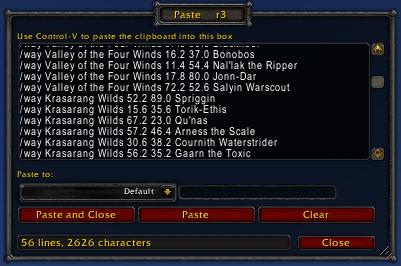
Paste is a small utility that enables multi-line/unlimited-length pasting of text or commands into WoW
If you've ever tried to paste a paragraph of text or a list of slash commands into WoW you've probably noticed that newlines are stripped and anything over 255 characters is silently truncated. The Paste addon solves this problem.
Usage:
- Open the Paste window via minimap icon, keybind, LDB or /paste show
- Paste your clipboard text into the box with control-v / command-v
- Press the "Paste" button and the entire contents will be sent to your selected channel, one message per line, with long lines automatically split.
- The "Default" channel can be used to execute a list of slash commands (eg TomTom /way commands)
- Options are available via "/paste config"
Fully compatible with WoW 7.x and all chat addons.
Featured on Hearthcast Podcast #177!!
Feature requests & Bug Reports. Bug reports in comments will be deleted.
Comments

-

AzerPUG Owner
-
View User Profile
-
Send Message
Posted Oct 23, 2026Hello, this addon has been a staple in my game over the years. Since Forever ships with the same addon API changes with Retail, is it possible to create a version for Forever as well?
-
View User Profile
-
Send Message
Posted Jul 6, 2026Is there a way to get this to work with Yapper? I use Paste primarily for large blocks of TomTom waypoints, but when Yapper is active Paste stops working.
-
View User Profile
-
Send Message
Posted Jan 31, 2026Update for 12.0.0 is out now!!
-
View User Profile
-
Send Message
Posted Jan 27, 2026please update for 12.0.1 Midnight.
-
View User Profile
-
Send Message
Posted Jan 31, 2026In reply to Mamzy: Update has gone out by now, sorry for the delay!
-
View User Profile
-
Send Message
Posted Jan 25, 2026To get this to work you can just update the Paste.toc file first line to:
## Interface: 120000
-
View User Profile
-
Send Message
Posted Jan 28, 2026In reply to viscousb1319: Thank you!!
-
View User Profile
-
Send Message
Posted Jan 25, 2026please update
-
View User Profile
-
Send Message
Posted Jan 25, 2026In reply to zandrassen:
you can just update the Paste.toc file first line to:
## Interface: 120000
-
View User Profile
-
Send Message
Posted Jan 31, 2026In reply to zandrassen: Update has gone out by now, sorry for the delay!
-
View User Profile
-
Send Message
Posted Jan 21, 2026Please update for 12.0 Midnight :((
-
View User Profile
-
Send Message
Posted Jan 22, 2026In reply to korgen63: hey, you can just update the Paste.toc file first line to:
## Interface: 120000
It seems to work just fine.
-
View User Profile
-
Send Message
Posted Dec 1, 2024it seems not to work in war within :(
-
View User Profile
-
Send Message
Posted Dec 19, 2024In reply to Aonaskull: It does for most people who we know that use it, including all of our testers.
If you join our Discord, we will collaborate with you to try to figure out what the issue is.
-
View User Profile
-
Send Message
Posted Sep 17, 2024As the original developer has abandoned all his projects over 8 years ago, we have asked CurseForge (who were amazing help in this process) to update the AddOn from now on so that it could live on and people could keep using it. We are already looking to fix all the issues that have risen with it for the last 8 years and are expecting an update later this week.
-
View User Profile
-
Send Message
Posted Aug 29, 2024I find it sad that this addon hasn't been updated in 8 years. Clearly it's been abandoned - and I'd very much love to see it brought up to date with the current expansion.
-
View User Profile
-
Send Message
Posted Aug 21, 2024thanks fixed it
-
View User Profile
-
Send Message
Posted Aug 18, 2024you can just do it on the begging of the core.lua:
local GetAddOnMetadata = C_AddOns.GetAddOnMetadata
-
View User Profile
-
Send Message
Posted Aug 26, 2024In reply to Ullwarth01: This worked. Thank you!
-
View User Profile
-
Send Message
Posted Aug 15, 2024Thx, it works.