Paste
Paste has been restarted and is active again!!
An update for TWW is out already!
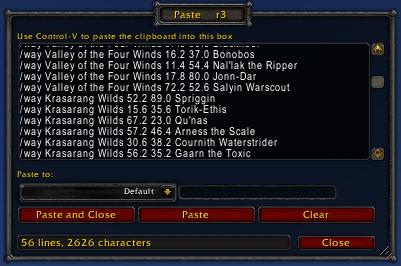
Paste is a small utility that enables multi-line/unlimited-length pasting of text or commands into WoW
If you've ever tried to paste a paragraph of text or a list of slash commands into WoW you've probably noticed that newlines are stripped and anything over 255 characters is silently truncated. The Paste addon solves this problem.
Usage:
- Open the Paste window via minimap icon, keybind, LDB or /paste show
- Paste your clipboard text into the box with control-v / command-v
- Press the "Paste" button and the entire contents will be sent to your selected channel, one message per line, with long lines automatically split.
- The "Default" channel can be used to execute a list of slash commands (eg TomTom /way commands)
- Options are available via "/paste config"
Fully compatible with WoW 7.x and all chat addons.
Featured on Hearthcast Podcast #177!!
Feature requests & Bug Reports. Bug reports in comments will be deleted.
Comments

-

AzerPUG Owner
-

_ForgeUser405586 Author
-
View User Profile
-
Send Message
Posted Jan 16, 2014Addon v1.2.1 adds instance chat output. Raid was already there but the dropdown was a little glitchy and sometimes didn't show it. Note the dropdown only shows channels currently available to you (must be in a raid/instance group, etc)
-
View User Profile
-
Send Message
Posted Jan 17, 2014Thank you
-
View User Profile
-
Send Message
Posted Dec 28, 2013I can copy text from a website to my clipboard, but 'Ctrl+V' isn't doing anything when I try pasting in-game.
-
View User Profile
-
Send Message
Posted Dec 28, 2013You need to have the paste window open with your cursor blinking in the edit box.
-
View User Profile
-
Send Message
Posted Nov 3, 2013Fixed in v1.1.8
-
View User Profile
-
Send Message
Posted Nov 3, 2013Thank you, looks all fine and dandy now!
-
View User Profile
-
Send Message
Posted Nov 1, 2013Seems like text area frame anchors are wrong.
http://img163.imageshack.us/img163/8748/t89x.jpg
-
View User Profile
-
Send Message
Posted Nov 3, 2013I'd like to understand your usage case more.
Paste can be used to execute a list of slash commands, it does not "save" its contents or create a macro. As such, it's mostly for "one off" operations like importing a list of /way commands or running a long slash command program from wowhead. I don't see the utility of macro comments for either scenario. The paste function works "as if" you'd typed in each line yourself, and if you type in a line starting with a # it gets spoken.
-
View User Profile
-
Send Message
Posted Oct 30, 2013Hi,
Pasted in a macro and the comment lines got said out loud. Not a terrible deal, but could we get the option to ignore lines that start with the # chracter?
(Used to use super duper macro, but that just got broken apparently... so now I'm rtying paste ;-) )
-
View User Profile
-
Send Message
Posted Oct 14, 2013I need a little help! I am new to macros and add-on. This paste things sounds really good. Downloaded it and was able to paste what I wanted. But it does not seem to work. Once I have pasted what I want, how do I make it work? I tried typing /way in the chat line, but it does not recognize the command. Any help would be appriciated. Thank you
-
View User Profile
-
Send Message
Posted Oct 14, 2013Paste just provides the means to easily paste in commands. If you want to use TomTom /way commands, you also need to install the TomTom addon. Sounds like that's what you're missing.
-
View User Profile
-
Send Message
Posted Oct 10, 2013Hehe, of COURSE this is one of oscarucb addons.
-
View User Profile
-
Send Message
Posted Sep 17, 2013Awesome addon, can't believe I've never thought of making this. This'll save me a ton of time. Nice job!
-
View User Profile
-
Send Message
Posted Jun 30, 2013thank you very much
-
View User Profile
-
Send Message
Posted Jun 27, 2013Sorry this is going to sound like a noob question. Maybe I don't understand.
How do you use this with tom tom?
Thank
-
View User Profile
-
Send Message
Posted Jun 27, 2013It can be used to directly import tomtom waypoint lists from wowhead or other sites. So if someone has posted a list of /way commands, you can paste them in using this addon. The only other way to import a long list of /way commands is to create and execute single-use macros, which is very tedious and error-prone.
-
View User Profile
-
Send Message
Posted Jun 19, 2013So Using this with Tomtom,
Will the way points be prioritized by the order of the lines you paste them as, or will it just point you to the closest to your currect location?
-
View User Profile
-
Send Message
Posted Jun 19, 2013In all cases, slash commands work exactly as if you had typed in each line yourself in the same order.
So for a list of TomTom /way commands, it adds each waypoint and with TomTom default settings leaves the arrow pointing to the last one entered (there is no "priority" in TomTom, only "current waypoint"). You can add a /cway command as the final line to additionally point the arrow to the closest waypoint.
-
View User Profile
-
Send Message
Posted Mar 28, 2013So very, very useful. Thanks for making this.
-
View User Profile
-
Send Message
Posted Jan 2, 2013Thank you SO MUCH for creating this. I use TomTom along with guides for finding things to resell, and there are a lot of waypoints that I use. This will make things easy - I can just remove the waypoints when I don't need them, and then bulk add them again.
Keep up the awesome work!