Elkano's BuffBars
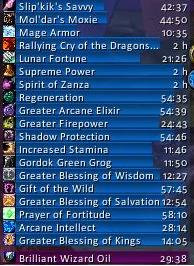
EBB provides groups of (mainly) statusbar style indicators to show (de)buffs currently affecting your char or some other units (focus, pet and target). For the player, it can also show indicators for temporary enchants placed on their weapons.
For over 20 years, EBB has been a mainstay for both long-term and returning players (at least some) and reports of its death have been greatly exaggerated.
Two-in-One Download
For Classic WoW, the addon uses its older 2.x code base, for Mainline WoW (Retail and Forever) it is now based on Blizzard's AuraContainer; all in the same download file.
2.x based on UnitAura
Version 2.x was a total recode, initially based on the Ace2 framework, later ported to Ace3, which became necessary in order to support some of the longtime wanted and suggested features. It has served well for ~19 years (since June '07) and made it possible to show different groups of bars which can be configured in many ways. Each group can be assigned an individual look and filter settings. After setting up a group, its anchor can be hidden by alt-left clicking a bar or the anchor itself in order to lock the group in place.
Due to changes Blizzard made with WoW 4.x it's no longer possible to cancel buffs without the use of secure frames.
EBB v2 thus limits cancelling of buffs to out-of-fight since using SecureAuraHeader would have required a major code restructuring.
This will be coming in a later version.
3.x based on AuraContainer
This is once again a complete artisanal rewrite, which became necessary due to Blizzard making auras secret in combat. This also gave me the push to include some features I already wanted but never included before. And you can cancel buffs in combat again.
Layouts can now be shared between groups, support multi-line/-column alignments, and give you way more options than before. But it can also just look the same as it used to.
What did suffer from the change of underlying technology are some of the filter options, as Blizzard has intentionally broken those.
And I haven't added localization to v3, yet. So most texts are in English besides a few strings reused from the game client.
Settings
The settings can be accessed via chat (/ebb), LDB icon, or simply via the game settings.
Other Infos
In order to get additional bar textures and fonts for EBB simply install e.g. SharedMedia which is available for download under https://www.curseforge.com/wow/addons/sharedmedia
If you have bug reports or feature request, create a ticket: https://www.curseforge.com/wow/addons/elkbuffbars/issues
Comments


-

Elkano Owner
-
View User Profile
-
Send Message
Posted Nov 7, 2026Thank you so much for your work!
In the Classic version, there was an option to make the bars expand upward from the title bar, but in the Forever version, I can't find that option anywhere. I'd appreciate any tips.
-
View User Profile
-
Send Message
Posted Nov 8, 2026@user_8awrh650uuykx4wu set a BOTTOM anchor point for your group (so its lower edge stays in position, a BOTTOM position for the title and a flow direction towards the TOP.
-
View User Profile
-
Send Message
Posted Nov 7, 2026anyone figure out how to change bar texture? i get no lua errors, and in the ebb config panel it updates correctly, but the bars themselves in the game doesnt change at all and keep the cyrlindlical bar that is default. i am specifically only using debuff bar in case that matters (and im trying to change to smooth / smooth v2 that comes with ellesmereui
-
View User Profile
-
Send Message
Posted Nov 8, 2026@Khelge Are you trying to change the preset layout? You will have to copy it first or simply save it as a new one. (just a guess that this might be the problem)
-
View User Profile
-
Send Message
Posted Nov 6, 2026does anyone know how to truncate spell names? some are really long and run way off the bar length
-
View User Profile
-
Send Message
Posted Nov 8, 2026@s4ntana not possible currently but already n my list to be looked at
-
View User Profile
-
Send Message
Posted Nov 5, 2026I've just tried installing the latest version in both Retail and Forever and I'm not able to make any changes to the styling/layout . Even when I'm swapping between the two default presets it's not changing either.
This is with a completely fresh configuration and I'm not seeing any errors in Bugsack.
-
View User Profile
-
Send Message
Posted Nov 6, 2026@bidaum Same. I just installed it and I can't edit any of the layout options.
-
View User Profile
-
Send Message
Posted Nov 6, 2026@bidaum Same here, can't edit. (Forever)
-
View User Profile
-
Send Message
Posted Nov 8, 2026@bidaum Are you trying to change the preset layout? You will have to copy it first or simply save it as a new one. (just a guess that this might be the problem)
-
View User Profile
-
Send Message
Posted Oct 27, 2026I know I am missing something, but I can not get the font to change. I get a huge list of choices, but none will stay after I choose them
-
View User Profile
-
Send Message
Posted Oct 31, 2026@ugluk340 Hard to tell, 3.0 on Retail is working fine for me.
So which version and game flavor are you using? Do you have an addon like BugSack installed that will show you errors?
-
View User Profile
-
Send Message
Posted Nov 1, 2026@Elkano Ok I got it to work, not sure how, but am glad you brought it back it was/is one of my favorite add-ons for many many years
-
View User Profile
-
Send Message
Posted Oct 21, 2026There is an aura filter for maximum duration. Would it be possible to add a filter for minimum duration and/or no duration (permanent)?
I'm trying to filter long duration auras (>2hrs & permanent) into a group with no duration bars. I don't see much use in having a duration bar on these.
-
View User Profile
-
Send Message
Posted Oct 21, 2026@GraywolfeTV Sadly Blizzard's API currently does not provide such an option, even though it would have been the logical complement.
-
View User Profile
-
Send Message
Posted Oct 22, 2026@Elkano That's a shame. Thanks for the response.
-
View User Profile
-
Send Message
Posted Oct 20, 2026We're now on r231 after fixing some more bugs and adding some more features. 🫣
That delivered on the two main things that were still missing in r227: some filter descriptions and spellId filters. 🎉
I'll give it a few days to see if someone still encounters some bugs but for now I consider this a strong release candidate (which also means I should finally rewrite the addon description after all these years as well 😅).
Thanks again for sticking around and enduring my tardiness!
-
View User Profile
-
Send Message
Posted Oct 14, 2026I don't know if i am doing something wrong but i tried to add weapon oil buff to the buff groups under
Groups - Buffs - Aura filters - incluedeSpellIDs and when i do the whole buff group disappear completely, going slithly off screen like some previos wip version of the addon.
If i create another group and switch the group setting for enchantment only it shows no problem but on another group detached from buff which i don't really like xD, any solution?
-
View User Profile
-
Send Message
Posted Oct 14, 2026@Dhisana No wait, it works now out of nowhere xD it doesn't seem to respect the sorting by duration but it's there..
Edit: no, it went away after a reload..
-
View User Profile
-
Send Message
Posted Oct 14, 2026@Dhisana weapon oil isn't a buff but a temporary enchantment, isn't it? So it won't show in the buff group.
Setting it as includeSpellIDs filter won't work as those only work on auras. But since a filter is set, all other buffs wont show.
If you don't have an enchantments group from the initial setup, just create a new group like you did. You can then adjust its anchor settings to attach it to another group.
Pre-r229/12.1.5 there was a limitation where I couldn't remove enchantments from a reused group (or rather aura container), so maybe that was what you were seeing; they however no longer mix with sorting, so even though aura container would allow to have them in one group (but split by type), I choose to limit groups to just one type: buffs, debuffs or enchantments.