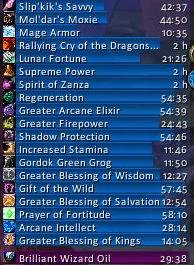
Elkano's BuffBars
EBB provides groups of statusbar style indicators to show (de)buffs currently affecting your char or some other units (currently focus, pet and target). For the player, it can also show indicators for temporary enchants place on it's weapons.
Due to changes Blizzard made with WoW 4.x it's no longer possible to cancel buffs without the use of secure frames. Currently EBB limits canceling of buffs to out-of-fight since using SecureAuraHeader would have required a major code restructuring. This will be coming in a later version.
Version 2.x is a total recode based on the Ace2 framework which became necessary in order to support some of the longtime wanted and suggested features. It's now possible to show different groups of bars which can be configured in many ways. Each group can be assigned an individual look and filter settings. EBB can be configured via a dropdown menu which is accessible via chat (/ebb config), FuBar plugin or (for the group settings) by right clicking the groups anchor. After setting up a group, its anchor can be hidden by alt-left clicking a bar or the anchor itself in order to lock the group in place.
In order to get additional bar textures and fonts for EBB simply install SharedMedia which is available for download under http://wow.curse.com/downloads/wow-addons/details/sharedmedia.aspx
If you have bug reports or feature request, create a ticket: http://www.wowace.com/projects/elkbuffbars/create-ticket/
You can also check my thread at the WoWAce forums: http://forums.wowace.com/showthread.php?t=5290
The most recent development version of EBB is available directly from the WoWAce SVN via http://www.wowace.com/projects/elkbuffbars/files/
Comments


-

Elkano Owner
-
View User Profile
-
Send Message
Posted Oct 22, 2016Been using EBB since well i really cant remember tbh as its always been part of my UI. However i cant remember not being able to cancel buffs. I stopped playing mid Cata, and missed panda and came back for WOD. Since then it seems ive never needed to cancel buffs up until now, I've only just noticed recently with the spam of Halloween wands and farming karazhan at the chess event not being able to cancel the playing chess piece buff. Its a dam shame, as its by far the best buffbar mod still out there. I remember upgraded from CT mod all them years ago! Do you have any plans on updating this in the near future? As it would be a shame to have to move back to the default buff bars again just for accessibility just to remove silly buffs mid combat =(
-
View User Profile
-
Send Message
Posted Oct 22, 2016In order to be able to cancel buffs in combat, you need secure action buttons, which in turn can't be relocated in combat. As a result, as sad as it is, EBB isn't able to cancel in fight since Cataclysm.
There is a way to create a buff display capable of in fight canceling, however you'll have limited sorting and filtering capabilities.
I do have an EBB v3 code base on my disk that does support this kind of groups since at least MoP (and other stuff like raid buffs that have been removed in Legion or a transition to Ace3 that now also happend for the v2 code base :/ ) but I never finished turning it into a full addon (stuff like e.g. options are missing). And due to working full-time by now, I don't know if/when I'll finish working on it.
If it's only a single buff you intend to cancel in fight, you can still use a simple macro to do so-
-
View User Profile
-
Send Message
Posted Oct 7, 2016Is there a way for the min/max time filter to use the current time left instead of the max buff duration? i.e. for moving a buff from a group of "long" buffs to a group of "short" buffs when its time starts running out.
And what about hiding the default blizzard (de)buffs on target frame, in addition to the current option for your own (de)buffs?
Just some minor issues, love the addon.
-
View User Profile
-
Send Message
Posted Oct 8, 2016In simple terms, EBB updates the groups only in response to UNIT_AURA events using static aura data, i.e. values that aren't dependent on time.
Since no such event fires at a given time left value, adding support for this would require some larger code reworks; not likely to happen anytime soon.
Hiding the auras on unit frames is something I haven't looked into so far since I'm not using the default frames.
-
View User Profile
-
Send Message
Posted Oct 9, 2016I see, thanks for the response and the addon.
-
View User Profile
-
Send Message
Posted Sep 22, 2016Is there anyway to display the debuffs of main tanks? currently (as a healer) i have it set up to look at the debuffs of focus and target, but i keep unclicking the target. i am a raid lead and often pug so i want to see if tanks are taunting correctly. is this possible? ty
-
View User Profile
-
Send Message
Posted Sep 22, 2016Besides the focus trick you already figured out, there's currently no explicit support for this.
-
View User Profile
-
Send Message
Posted Sep 22, 2016dang, ok. Thanks for such a prompt response! your addon is amazing i've been using it for a long time and know that someone in the world has so much appreciation for you keeping it up
-
View User Profile
-
Send Message
Posted Sep 14, 2016Any way to skin the icons with Masque? Would love for it to match the rest of my UI.
-
View User Profile
-
Send Message
Posted Sep 15, 2016There is no explicit support on my end, e.g. any code, so I don't think so.
And since I don't use Masque myself, I doubt that will change any time soon.
-
View User Profile
-
Send Message
Posted Sep 7, 2016For some reason, nomatter what I do, for some odd reason my bar I keep trying to set up just snaps to a certain position, over and over. If move my anchor anywhere near the space it snaps to that certain location and it cannot be moved near it in any place I'd like it or it auto jumps to this one location
Can't figureout what is wrong here but its been like this for months now
-
View User Profile
-
Send Message
Posted Sep 7, 2016It should only snap to other groups so maybe you've got an empty group sitting there?
-
View User Profile
-
Send Message
Posted Sep 6, 2016Is there a way to make the bars click-through?
-
View User Profile
-
Send Message
Posted Sep 6, 2016Did you try enabling the option?
-
View User Profile
-
Send Message
Posted Sep 6, 2016I can't find it :o
-
View User Profile
-
Send Message
Posted Sep 6, 2016The older versions have 'disable mouse' but since the new ones where the whole configuration window looks different, the options not there anymore.
-
View User Profile
-
Send Message
Posted Sep 6, 2016It is for me...
-
View User Profile
-
Send Message
Posted Sep 6, 2016oh... haha sorry that's embarassing :/
-
View User Profile
-
Send Message
Posted Aug 26, 2016Is it possible to somehow just automatically show ALL buff and debuff without filtering? Currently no new buffs show up unless after their first occurence I go 'Group settings' tab, filter, white list, and check all new unchecked name. Even thought below "self buffs' dropdown I have 'dont filter', it still uses the whitelist (it should just display all so maybe its a bug). In legion beta it was annoying to go there ocassionally and check all newly appeared unchecked buff and debuff (same with live wow).
-
View User Profile
-
Send Message
Posted Aug 27, 2016The white list filter will only apply if there is any buff checked. It will limit the display to exactly these buffs so showing new ones would hinder its purpose.
But if you uncheck all buffs, the filter is disabled and they should all show in the group including new ones.
Self cast buffs is a different filter that will limit the list to those buffs you either did (whitelist mode) or did not (blacklist mode) cast yourself.