Elkano's BuffBars
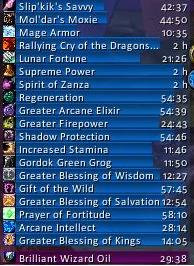
EBB provides groups of (mainly) statusbar style indicators to show (de)buffs currently affecting your char or some other units (focus, pet and target). For the player, it can also show indicators for temporary enchants placed on their weapons.
For over 20 years, EBB has been a mainstay for both long-term and returning players (at least some) and reports of its death have been greatly exaggerated.
Two-in-One Download
For Classic WoW, the addon uses its older 2.x code base, for Mainline WoW (Retail and Forever) it is now based on Blizzard's AuraContainer; all in the same download file.
2.x based on UnitAura
Version 2.x was a total recode, initially based on the Ace2 framework, later ported to Ace3, which became necessary in order to support some of the longtime wanted and suggested features. It has served well for ~19 years (since June '07) and made it possible to show different groups of bars which can be configured in many ways. Each group can be assigned an individual look and filter settings. After setting up a group, its anchor can be hidden by alt-left clicking a bar or the anchor itself in order to lock the group in place.
Due to changes Blizzard made with WoW 4.x it's no longer possible to cancel buffs without the use of secure frames.
EBB v2 thus limits cancelling of buffs to out-of-fight since using SecureAuraHeader would have required a major code restructuring.
This will be coming in a later version.
3.x based on AuraContainer
This is once again a complete artisanal rewrite, which became necessary due to Blizzard making auras secret in combat. This also gave me the push to include some features I already wanted but never included before. And you can cancel buffs in combat again.
Layouts can now be shared between groups, support multi-line/-column alignments, and give you way more options than before. But it can also just look the same as it used to.
What did suffer from the change of underlying technology are some of the filter options, as Blizzard has intentionally broken those.
And I haven't added localization to v3, yet. So most texts are in English besides a few strings reused from the game client.
Settings
The settings can be accessed via chat (/ebb), LDB icon, or simply via the game settings.
Other Infos
In order to get additional bar textures and fonts for EBB simply install e.g. SharedMedia which is available for download under https://www.curseforge.com/wow/addons/sharedmedia
If you have bug reports or feature request, create a ticket: https://www.curseforge.com/wow/addons/elkbuffbars/issues
Comments


-

Elkano Owner
-
View User Profile
-
Send Message
Posted Sep 6, 2016Is there a way to make the bars click-through?
-
View User Profile
-
Send Message
Posted Sep 6, 2016Did you try enabling the option?
-
View User Profile
-
Send Message
Posted Sep 6, 2016I can't find it :o
-
View User Profile
-
Send Message
Posted Sep 6, 2016The older versions have 'disable mouse' but since the new ones where the whole configuration window looks different, the options not there anymore.
-
View User Profile
-
Send Message
Posted Sep 6, 2016It is for me...
-
View User Profile
-
Send Message
Posted Sep 6, 2016oh... haha sorry that's embarassing :/
-
View User Profile
-
Send Message
Posted Aug 26, 2016Is it possible to somehow just automatically show ALL buff and debuff without filtering? Currently no new buffs show up unless after their first occurence I go 'Group settings' tab, filter, white list, and check all new unchecked name. Even thought below "self buffs' dropdown I have 'dont filter', it still uses the whitelist (it should just display all so maybe its a bug). In legion beta it was annoying to go there ocassionally and check all newly appeared unchecked buff and debuff (same with live wow).
-
View User Profile
-
Send Message
Posted Aug 27, 2016The white list filter will only apply if there is any buff checked. It will limit the display to exactly these buffs so showing new ones would hinder its purpose.
But if you uncheck all buffs, the filter is disabled and they should all show in the group including new ones.
Self cast buffs is a different filter that will limit the list to those buffs you either did (whitelist mode) or did not (blacklist mode) cast yourself.
-
View User Profile
-
Send Message
Posted Aug 27, 2016Thanks, I will uncheck all. But then the "dont'filter" dropdown setting is useless,I tought its for to enable applying the whitelist or just ignore filtering (showing all)
-
View User Profile
-
Send Message
Posted Aug 16, 2016Is there a way to disable a group without having to delete it?
-
View User Profile
-
Send Message
Posted Aug 16, 2016Answered my own question - create another profile without those groups. Duh...
-
View User Profile
-
Send Message
Posted Aug 12, 2016Is there a way to blacklist a buff by like shift-rightclicking or something similar?
-
View User Profile
-
Send Message
Posted Aug 13, 2016That's a really nice idea actually, please make it happen.
-
View User Profile
-
Send Message
Posted Aug 13, 2016Sometimes it's the small, obvious features you missed as a coder...
In latest alpha (r189), ctrl-leftclick should work for that :)
-
View User Profile
-
Send Message
Posted Aug 8, 2016Hello, I've got a question for you. I often switch between windowed and fullscreen mode in wow, which causes the groups to change their location due to change in resolution. The only solution I've found is to create two profiles, one for windowed and one for fullscreen. I was wandering if there's something else I can do to make it easier. I had a similar issue with bartender, but since it offers the option to set different anchor points (I.e bottom, bottomleft etc.) I was able to fix it. Is there a similar functionality in your addon? If not, would you consider adding it? Thank you.
-
View User Profile
-
Send Message
Posted Aug 4, 2016Hi, I can't see any of the tooltips for my buffs. Is there a way to fix this? Debuffs are fine. Thanks :)
-
View User Profile
-
Send Message
Posted Aug 4, 2016They are both handled by pretty much the same code and both are working fine for me.
Only idea I have would be that something is blocking the mouse from interacting with your buff group. So check if you disabled the mouse for that group or, using /framestack , if some other invisible frame is blocking.
-
View User Profile
-
Send Message
Posted Aug 6, 2016Ah, yes, I had an invisible frame on top of it, thanks so much! :)
-
View User Profile
-
Send Message
Posted Aug 3, 2016Is there a way just to display the Roll the Bones buffs for Rogue and then to have the bar hide when out of combat?
-
View User Profile
-
Send Message
Posted Aug 4, 2016There is currently no condition implemented based on combat status, so unless the buff fades on its own after combat, there isn't atm.