Elkano's BuffBars
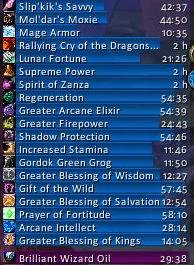
EBB provides groups of statusbar style indicators to show (de)buffs currently affecting your char or some other units (currently focus, pet and target). For the player, it can also show indicators for temporary enchants place on it's weapons.
Due to changes Blizzard made with WoW 4.x it's no longer possible to cancel buffs without the use of secure frames. Currently EBB limits canceling of buffs to out-of-fight since using SecureAuraHeader would have required a major code restructuring. This will be coming in a later version.
Version 2.x is a total recode based on the Ace2 framework which became necessary in order to support some of the longtime wanted and suggested features. It's now possible to show different groups of bars which can be configured in many ways. Each group can be assigned an individual look and filter settings. EBB can be configured via a dropdown menu which is accessible via chat (/ebb config), FuBar plugin or (for the group settings) by right clicking the groups anchor. After setting up a group, its anchor can be hidden by alt-left clicking a bar or the anchor itself in order to lock the group in place.
In order to get additional bar textures and fonts for EBB simply install SharedMedia which is available for download under http://wow.curse.com/downloads/wow-addons/details/sharedmedia.aspx
If you have bug reports or feature request, create a ticket: http://www.wowace.com/projects/elkbuffbars/create-ticket/
You can also check my thread at the WoWAce forums: http://forums.wowace.com/showthread.php?t=5290
The most recent development version of EBB is available directly from the WoWAce SVN via http://www.wowace.com/projects/elkbuffbars/files/
Comments


-

Elkano Owner
-
View User Profile
-
Send Message
Posted Nov 2, 2010Message: Interface\AddOns\ElkBuffBars\ElkBuffBars.lua:751: attempt to call upvalue 'GetTrackingTexture' (a nil value)
Time: 11/02/10 18:55:43
Count: 1
Stack: ...ddOns\ElkBuffBars\libs\AceAddon-2.0\AceAddon-2.0.lua:1055: in function `ManualEnable'
...ddOns\ElkBuffBars\libs\AceAddon-2.0\AceAddon-2.0.lua:552: in function <...ddOns\ElkBuffBars\libs\AceAddon-2.0\AceAddon-2.0.lua:545>
...ddOns\ElkBuffBars\libs\AceAddon-2.0\AceAddon-2.0.lua:674: in function `InitializeAddon'
...ddOns\ElkBuffBars\libs\AceAddon-2.0\AceAddon-2.0.lua:541: in function <...ddOns\ElkBuffBars\libs\AceAddon-2.0\AceAddon-2.0.lua:518>
[C]: ?
...ddOns\ElkBuffBars\libs\AceEvent-2.0\AceEvent-2.0.lua:298: in function `TriggerEvent'
...ddOns\ElkBuffBars\libs\AceEvent-2.0\AceEvent-2.0.lua:910: in function <...ddOns\ElkBuffBars\libs\AceEvent-2.0\AceEvent-2.0.lua:903>
Locals: <none>
-
View User Profile
-
Send Message
Posted Nov 2, 2010If you can't move it then okay... at least it works now, so thank you for that!
-
View User Profile
-
Send Message
Posted Nov 2, 2010Just to give you a visual example and a general idea of my setup for better understanding:
[Group1] [G2] [Group3]\
[Group4]/
Group1 - Self buffs (Racials, trinket procs, class cooldowns) Icons/time only
Group2 - Timeless buffs - Icons only
Group3 - All other buffs - Icons/time only
Group4 - Debuffs - Name/Icon/Time
Presently G3/G4 are anchored together. This generally works out as G3 typically is the longest; however, at times G3 is not and G4 overlaps with G1 and G2. I was hopeful that it would be possible to anchor G1+G2+G3 together to form a cluster and then anchor G4 vertically to it. This way G4 would begin after the longest group and in this case hopefully in the same spot as G3.
If this is possible I would be grateful to know how. If it is not possible would you please be willing to consider it in a future release? Thanks and thank you for the work on this addon.
-
View User Profile
-
Send Message
Posted Nov 2, 2010-
View User Profile
-
Send Message
Posted Nov 1, 2010I always have a specific buffgroup just to show if encounter relevant buffs/debuffs are active on me (plague on prof/LK etc.), but have to update the filter on each and every char of mine seperately (and of course that is only possible right after I "saw" it on that specific char).
Another use would be for arena specific debuffs and debuffs in general.
Something like "shared" buff group filters would be a great help.
Ideal would be if they appeared as "special" where "whitelist" and "blacklist are located. You'd create them with a unique name, select them for groups on chars where you want to use them and any change on one char would show up on all of them.
(A backup copy would be great though.)
-
View User Profile
-
Send Message
Posted Oct 31, 2010-
View User Profile
-
Send Message
Posted Oct 29, 2010-
View User Profile
-
Send Message
Posted Oct 30, 2010thats the reason theyve had to do that, because the normal way didnt work
-
View User Profile
-
Send Message
Posted Oct 30, 2010I would really like to see EBB do the same.
i like EBB much better for buffs and debuffs!
-
View User Profile
-
Send Message
Posted Oct 31, 2010The way EBB works, there's no real way to replicate the entire addon within secure handlers, which means we'll always need to have SOME sort of workaround, like the current "button-in-middle-of-screen".
Don't worry, there's a lot of work being done to try to change the way this works. I've already come up with a method to make it SEEM like it works exactly like the old way, and told Elkano about it. I'll have a test version avaliable in a few days and if Elkano gives me the OK, I'll put a link up here. Although if it works as well as I think it will, he'll probably just include it into the next version.
-
View User Profile
-
Send Message
Posted Oct 29, 2010lol, wrong part of curse there bud, and the link even says "bot" in it.
:P
-
View User Profile
-
Send Message
Posted Oct 28, 2010-
View User Profile
-
Send Message
Posted Oct 28, 2010I love your addon. Wouldn't want to play without it.
That said... Would it be possible to add Party1-Party4 to the list of "targets" that a buff frame can look at?
I would REALLY like to create 4 extra frames, one for each party member so I can get a bar-graph showing RENEW and other HoTs on each of them. I think I could use a different addon to do this, but it basically means I'd be loading two different complete buff indicator addons, yours and someone elses. I prefer yours. I prefer the way you handle configuration.
I already use two different frames for Player, (buffs over 1 minute, and buffs 1 min and under), one for my target, one for focus, etc. but I can't make one each for party members.
-
View User Profile
-
Send Message
Posted Oct 31, 2010-
View User Profile
-
Send Message
Posted Oct 28, 2010But it seems there is no way to remove Windfury Weapon, Flametounge Weapon and those sort of stuff... :(
-
View User Profile
-
Send Message
Posted Oct 28, 2010http://img225.imageshack.us/img225/2507/wowscrnshot102810194906.jpg
-
View User Profile
-
Send Message
Posted Oct 28, 2010-
View User Profile
-
Send Message
Posted Oct 28, 2010I encountered this bug last night while in ICC, and was wondering why I would often not turn without right-clicking 2 or 3 times. Eventually I learned that it was because where I tend to anchor my mouse for turning is the same spot where this window hides itself.
-
View User Profile
-
Send Message
Posted Oct 28, 2010try "/framestack" and mouse over the region
-
View User Profile
-
Send Message
Posted Oct 27, 2010