ArkInventory
ArkInventory (for The War Within)
:boom: Please ensure you are using the latest alpha version if you have the War Within client.
ArkInventory (for Retail, Classic, and Cataclysm)
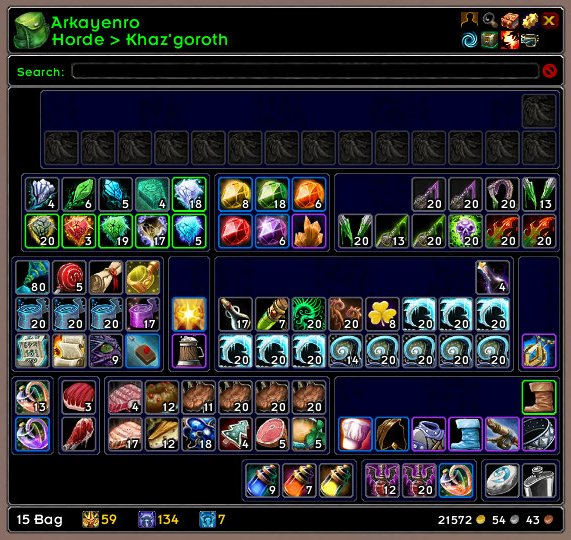
ArkInventory's display windows are built from "virtual bars", you assign categories to bars so that items in that category are displayed on the specific bars you want. There is no limit to the number of bars you can have inside a window but obviously you only have so much screen real estate before it becomes "too many".
ArkInventory uses several methods to assign a default category to an item such as what professions you have, tooltip scanning, basic type/subtype and PeriodicTable. You then assign those categories to a virtual bar.
You can also over-ride the default category by creating a rule that matches either a single or multiple items.
Overview:
- user configurable window width and height
- separate keybindings for each location for easy viewing
- assign items to a category of your choice (overrides the default assignment)
- assign categories to the bar of your choice
- unlimited number of bars (there are practical limits though before your screen becomes full)
- sort each bar differently if required
- user configurable bars per row
- sell junk items automatically or manually (delete available via a keybinding or right clicking when at a vendor)
- random pet and mount summons. can also assign a group of them to select from
Key Bindings:
- Press ESCAPE to bring up the blizzard menu
- click on Key Bindings
- scroll down to AddOns > ArkInventory
- bind the keys you want to use
Need Help?
:memo: Wiki
:memo: Frequently Asked Questions
:memo: Sorting
:memo: Rules
:memo: If you are having an issue the first step is to disable all other mods and test with only ArkInventory loaded
:memo: If the issue is still there, please check for an existing issue and create a new issue if required.
:memo: If the issue is gone, re-enable your other mods one by one until the issue comes back, then note the last mod you enabled in your issue as well as notifying the author of the other mod
See ChangeHistory.md for changes to the latest version. See VersionHistory.md for all previous changes.
:boom: The NoLib variant
it seems quite a few people are somehow getting the NoLib variant from their download client when they didn't specifically ask for it, instead of the full variant, and its causing issues as they don't have the required libraries installed separately. Please ensure you are downloading the full. if you see nolib in the filename then its the wrong variant, unless you are actually installing all of the required libraries separately as well. If you have to you can manually download the full variant from CurseForge, WoWInterface, or Wago.
:boom: Junk Sell getting blocked
While auto-destroy remains blocked, From 30960 onwards you can setup a Key Binding to manually sell and destroy your items. Note that blizzard require one keypress per item deletion, so if you have multiple items that need to be deleted you will need to press the Key Binding multiple times. A message will be output if you have remaining items that can still be deleted.
:warning: Ensure you have backup copies of your saved variables file
Sometimes you cannot revert back to a previous version without a backup, especially alpha or beta versions, so before upgrading please make sure you have made a backup of your saved variables file
Your saved variables file is normally located at ...\World of Warcraft\_client_\WTF\Account\yourwowaccountname\SavedVariables\ArkInventory.lua
It is your responsibility to ensure you have adequate backups of your saved variables file. You dont have to do them frequently, just after you've made major changes to your config is probably fine for most people, but you should get into the habit of making backups because when it does corrupt you wont have to reconfigure everything from scratch.
If you have your download client set to automatically download alpha/beta versions you should definitely have backups.
A simple way to back up the saved variables file is to just do a copy and paste then rename the new file (using the version number of ArkInventory or the date is a good idea), eg ArkInventory-30900.lua, or ArkInventory-20191228.lua
Comments

-

Arkayenro Owner
-
View User Profile
-
Send Message
Posted Nov 15, 2022latest patch causes multiple errors in TradeskillMaster :/
61x TradeSkillMaster/LibTSM/Util/Event.lua:97: assertion failed!
828x ...ceTradeSkillMaster/LibTSM/Util/TempTable.lua:41: Could not acquire temp table
6x ...eTradeSkillMaster/Core/UI/AuctionUI/Core.lua:248: assertion failed!
disabling Arkinventory fixes the issue
-
View User Profile
-
Send Message
Posted Nov 12, 2022Got this on logon with the latest update
1x Interface/AddOns/ArkInventory/Core/ArkInventory.lua:2950: Usage: RegisterBucket(event, interval, callback): 'callback' - method not found on target object.
[string "=[C]"]: ?
[string "@Interface/AddOns/Ace3/AceBucket-3.0-4/AceBucket-3.0.lua"]:142: in function <...nterface/AddOns/Ace3/AceBucket-3.0/AceBucket-3.0.lua:122>
[string "=(tail call)"]: ?
[string "@Interface/AddOns/ArkInventory/Core/ArkInventory.lua"]:2950: in function <Interface/AddOns/ArkInventory/Core/ArkInventory.lua:2899>
[string "=[C]"]: ?
[string "@Interface/AddOns/Ace3/AceAddon-3.0-13/AceAddon-3.0.lua"]:66: in function <Interface/AddOns/Ace3/AceAddon-3.0/AceAddon-3.0.lua:61>
[string "@Interface/AddOns/Ace3/AceAddon-3.0-13/AceAddon-3.0.lua"]:523: in function `EnableAddon'
[string "@Interface/AddOns/Ace3/AceAddon-3.0-13/AceAddon-3.0.lua"]:626: in function <Interface/AddOns/Ace3/AceAddon-3.0/AceAddon-3.0.lua:611>
-
View User Profile
-
Send Message
Posted Nov 14, 2022should be fixed in alpha 17
-
View User Profile
-
Send Message
Posted Nov 5, 2022duplicate
-
View User Profile
-
Send Message
Posted Nov 5, 2022The addons doesn't show how many of the items I have (and then, ofc, not where or on which toon). Is this a general problem or just by me?
I don't load Rules.
I have tried it with no other addon loaded.
Help - I'm an altoholic.
-
View User Profile
-
Send Message
Posted Nov 5, 2022config > general > tooltips > item counts
make sure thats enabled
-
View User Profile
-
Send Message
Posted Nov 6, 2022In reply to Arkayenro:
Thank you <3
-
View User Profile
-
Send Message
Posted Nov 4, 2022Quest mark "!" and border doesn't works in Status Icons/ Overlays>Quest.
-
View User Profile
-
Send Message
Posted Nov 5, 2022the quest border definitely works in retail. dont have an active quest to check the bang icon.
found a quest starter icon and i see what you mean. the border gets broken as well.
will be fixed in the next release.
-
View User Profile
-
Send Message
Posted Nov 5, 2022In reply to Arkayenro:
Any Darkmoon Faire item, "Soothsayer's Runes" etc are cheap on AH for testing ;)
Before prepatch all of them (unused) was with "!", now -- none. This is easiest way to test items that begin quest.
-
View User Profile
-
Send Message
Posted Nov 6, 2022try alpha 9 or 10
-
View User Profile
-
Send Message
Posted Nov 1, 2022While trying to upgrade PvP gear in Oribos and the upgrade fails:
1x [ADDON_ACTION_FORBIDDEN] AddOn 'ArkInventory' tried to call the protected function 'UpgradeItem()'.
[string "@Interface/AddOns/!BugGrabber/BugGrabber.lua"]:480: in function <Interface/AddOns/!BugGrabber/BugGrabber.lua:480>
[string "=[C]"]: in function `UpgradeItem'
[string "@Interface/AddOns/Blizzard_ItemUpgradeUI/Blizzard_ItemUpgradeUI.lua"]:104: in function `OnConfirm'
[string "@Interface/FrameXML/StaticPopup.lua"]:355: in function `OnAccept'
[string "@Interface/FrameXML/StaticPopup.lua"]:5269: in function `StaticPopup_OnClick'
[string "*StaticPopup.xml:24_OnClick"]:1: in function <[string "*StaticPopup.xml:24_OnClick"]:1>
-
View User Profile
-
Send Message
Posted Nov 6, 2022try alpha 9 or higher
-
View User Profile
-
Send Message
Posted Oct 31, 2022If you're getting the below error message, it is NOT caused by this addon, just a heads up.
NO QUALITY LOOT NIL, currencyIDnil, quantitynil, slotIndex3, isCoinnil
NO QUALITY LOOT NIL, currencyIDnil, quantitynil, slotIndex4, isCoinnil
-
View User Profile
-
Send Message
Posted Oct 29, 2022I had to disable ArkInventory to be able to deposit anima into my reservoir :(
Everytime the "arkinventory was blocked" popup appeared whenever i clicked the deposit button.
I also encountered another issue with using custom category.
I created a simple "Keep" category and assigned it to a bar.
I then assigned that custom category to some item,
But when I tried to remove the category from that item..
The category was actually removed from the bar, not from the item.
I could not find a way to remove the category from the item.
I'm playing retail prepatch and i'm using ArkInventory-3.10.03.zip
-
View User Profile
-
Send Message
Posted Nov 3, 2022to remove a category from an item you click on the item, and then click on the default category which will clear the manual assignment. it wont clear a rule assignment.
to put it more accurately, you dont want to remove the category, you want to reset it back to its default category.
in edit mode click on the item and then either click on the default category text, or when the menu pops up for that, click on assign
there is an error i just noticed in the tooltip text for those two options (they show the items current assignment, not its default) that will be fixed next release.
-
View User Profile
-
Send Message
Posted Oct 29, 2022Conflict with Peddler addon since ver 3.10.01 (WoTLK):
-
View User Profile
-
Send Message
Posted Oct 28, 2022Anyone else using Ark with TSM?
It seems that if you use them together at the AH, the UI disappears when posting on the AH or if you are collecting mail from the mail box. The only way to resolve this is to just blindly /reload,
1. Open AH (TSM Version) Ark bags open too
2. Scan AH
3. When Scanning is done Post on AH using the TSM Macro "ALT+Scroll"
4. At some random point the UI just disappears, and i mean the ENTIRE UI like you hit Alt+Z, but you can see that the FPS is still low as there is stuttering so this tells me it is still Posting on the AH
5. when the stuttering stops blindly type /reload
6. Reload screen appears
7. get back into game
8. Have to Scan AH again as it has now reset your original scan
9. Posting goes through as normal
10. Collect more items from Mailbox to repost
11. Go to Step 4 through to Step 7
12. Try post newly collected items on the AH Repeat from step 1 and enjoy the all the steps again.
I have disabled every other addon expect Ark and TSM,
However if i disable Ark, TSM work as intended.
-
View User Profile
-
Send Message
Posted Oct 27, 2022Keep getting a LUA error related to texture:
Message: Usage: self:SetNormalTexture(asset)
Time: Thu Oct 27 11:03:12 2022
Count: 11
Stack: Usage: self:SetNormalTexture(asset)
[string "=[C]"]: ?
[string "=[C]"]: in function `SetNormalTexture'
[string "@Interface/AddOns/AddOnSkins/Skins/AddOns/ArkInventory.lua"]:83: in function <...face/AddOns/AddOnSkins/Skins/AddOns/ArkInventory.lua:73>
[string "=[C]"]: in function `Frame_Item_Update_Border'
[string "@Interface/AddOns/ArkInventory/Core/ArkInventory.lua"]:9308: in function `Frame_Item_Update'
[string "@Interface/AddOns/ArkInventory/Core/ArkInventoryStorage.lua"]:2336: in function `ScanBag_Threaded'
[string "@Interface/AddOns/ArkInventory/Core/ArkInventoryStorage.lua"]:2058: in function <...ace/AddOns/ArkInventory/Core/ArkInventoryStorage.lua:2056>
-
View User Profile
-
Send Message
Posted Oct 27, 2022In reply to zanis_:
Disabled AddonSkins and appears to be working correctly.