ArkInventory
ArkInventory (for The War Within)
:boom: Please ensure you are using the latest alpha version if you have the War Within client.
ArkInventory (for Retail, Classic, and Cataclysm)
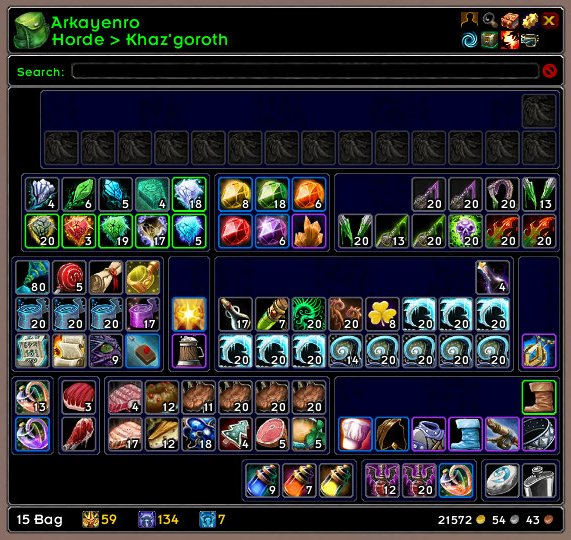
ArkInventory's display windows are built from "virtual bars", you assign categories to bars so that items in that category are displayed on the specific bars you want. There is no limit to the number of bars you can have inside a window but obviously you only have so much screen real estate before it becomes "too many".
ArkInventory uses several methods to assign a default category to an item such as what professions you have, tooltip scanning, basic type/subtype and PeriodicTable. You then assign those categories to a virtual bar.
You can also over-ride the default category by creating a rule that matches either a single or multiple items.
Overview:
- user configurable window width and height
- separate keybindings for each location for easy viewing
- assign items to a category of your choice (overrides the default assignment)
- assign categories to the bar of your choice
- unlimited number of bars (there are practical limits though before your screen becomes full)
- sort each bar differently if required
- user configurable bars per row
- sell junk items automatically or manually (delete available via a keybinding or right clicking when at a vendor)
- random pet and mount summons. can also assign a group of them to select from
Key Bindings:
- Press ESCAPE to bring up the blizzard menu
- click on Key Bindings
- scroll down to AddOns > ArkInventory
- bind the keys you want to use
Need Help?
:memo: Wiki
:memo: Frequently Asked Questions
:memo: Sorting
:memo: Rules
:memo: If you are having an issue the first step is to disable all other mods and test with only ArkInventory loaded
:memo: If the issue is still there, please check for an existing issue and create a new issue if required.
:memo: If the issue is gone, re-enable your other mods one by one until the issue comes back, then note the last mod you enabled in your issue as well as notifying the author of the other mod
See ChangeHistory.md for changes to the latest version. See VersionHistory.md for all previous changes.
:boom: The NoLib variant
it seems quite a few people are somehow getting the NoLib variant from their download client when they didn't specifically ask for it, instead of the full variant, and its causing issues as they don't have the required libraries installed separately. Please ensure you are downloading the full. if you see nolib in the filename then its the wrong variant, unless you are actually installing all of the required libraries separately as well. If you have to you can manually download the full variant from CurseForge, WoWInterface, or Wago.
:boom: Junk Sell getting blocked
While auto-destroy remains blocked, From 30960 onwards you can setup a Key Binding to manually sell and destroy your items. Note that blizzard require one keypress per item deletion, so if you have multiple items that need to be deleted you will need to press the Key Binding multiple times. A message will be output if you have remaining items that can still be deleted.
:warning: Ensure you have backup copies of your saved variables file
Sometimes you cannot revert back to a previous version without a backup, especially alpha or beta versions, so before upgrading please make sure you have made a backup of your saved variables file
Your saved variables file is normally located at ...\World of Warcraft\_client_\WTF\Account\yourwowaccountname\SavedVariables\ArkInventory.lua
It is your responsibility to ensure you have adequate backups of your saved variables file. You dont have to do them frequently, just after you've made major changes to your config is probably fine for most people, but you should get into the habit of making backups because when it does corrupt you wont have to reconfigure everything from scratch.
If you have your download client set to automatically download alpha/beta versions you should definitely have backups.
A simple way to back up the saved variables file is to just do a copy and paste then rename the new file (using the version number of ArkInventory or the date is a good idea), eg ArkInventory-30900.lua, or ArkInventory-20191228.lua
Comments

-

Arkayenro Owner
-
View User Profile
-
Send Message
Posted Feb 3, 2015did you isolate a bag so it only displays one window? or shift modes to money/log? you know you have to tick the override or ai wont display for that location? its ai thats overriding the default
blizzard vault bags or arkinventory windows on the right?
messily, you would have to find them in the saved variables file then paste them back in - reinstalling the addon shouldnt touch any of the saved variables (youd have to delete those manually to lose them)
-
View User Profile
-
Send Message
Posted Feb 7, 2015I finally got it to work by setting the Guild Bank to look like my Bank. How do I make a copy of this Default profile just in case? When I make a new profile, it goes back to your basic default look. I customized my Arkinventory A LOT over the years. =P
-
View User Profile
-
Send Message
Posted Jan 28, 2015Arky, you must've missed my edited problem down there.
None of my character's guild banks work under Arkinventory now. I had to Override them all to see my tab in the gbank (they gave me tab #7). Arkinventory opens wth the bags all on the right side of the main window - all blackened. Can't see anything in any guild bank tab.
If I have to reinstall your addon, how do I save my custom categories?
-
View User Profile
-
Send Message
Posted Feb 4, 2015item placement is bottom right centric so the sorting is essentially reversed to cater for that (which makes it hard to understand whats going on if you dont realise that)
set item anchor point to topleft
set sorting to name descending
empty slots go first alphabetically though which is usually the issue people have with this
-
View User Profile
-
Send Message
Posted Feb 4, 2015i'll add an option for people to chose where empty slots are sorted, first or last, that way it should work out how you (nd probably others) want
-
View User Profile
-
Send Message
Posted Jan 24, 2015I decided to leave Bagnon in favor of making a sense of the ever growing madness with categorization. Although the first impression wasn't the best one, I was not afraid to go in an hours long battle with configuration, because if it has the ability to do something I will make it do it no matter how deeply hidden the setting is.
All went well until I tried to enforce a left-to-right growing and ordering just like what Bagnon (and text and a lot more stuff) defaults to. It seems like that the anchor and sorting just undermines eachothers' purpose, something just always had to be reversed to mess up something else.
Finally I set the item anchor point to top left, started using "reversed" sorting logic and added >>> if i.h == nil then return "0" end <<< to ItemSortKeyGenerate to avoid the reversed "prioritization" of empty slots. That's the only way I found to enforce real top left anchoring which resulted in this: http://i.imgur.com/2y4oefI.png
Obviously I searched a lot before making such a change, but only https://code.google.com/p/arkinventory/issues/detail?id=645 seemed to be related. It would be great to know whether I just missed a setting or the addon is just so bottom right favoring by default that other options are not even totally implemented.
-
View User Profile
-
Send Message
Posted Jan 27, 2015I love this addon and have been using it as long as I can remember. And throughout that time I've always been mystified by the default sorting layout. It sorts from the bottom right and goes up and to the left. I've never been able to figure out how to just have it sort stuff from left to right, top to bottom, in alphabetical order.
-
View User Profile
-
Send Message
Posted Jan 23, 2015Hi, I love Arkinventory and I plan to use keep using it going forward, but I have one issue: I can't see stack sizes if ElvUI is enabled. If I disable ElvUI everything is perfect. Not sure where the bug is.
-
View User Profile
-
Send Message
Posted Jan 23, 2015last time someone had that issue they needed to update the skin they were using, then it worked.
-
View User Profile
-
Send Message
Posted Jan 23, 2015It worked! Thanks so much!
-
View User Profile
-
Send Message
Posted Jan 21, 2015My ArkInventory does not seem to interact at all with void storage, apart from tallying what is in it for tooltip counts. When I speak with the void bank NPC, it still uses default blizzard frames for it.
I don't have any lua errors, nor have I ever used anything other than the default blizzard pane, I'm just now starting to use the void storage extensively, and not having my typical Ark options/display is getting frustrating.
I've found one other comment with a similar issue, but I can't find the entire post, only a clip via the google search.
-
View User Profile
-
Send Message
Posted Jan 22, 2015void storage is read only - last time i looked it was painful to make AI interact with it, the whole deposit/withrawal thing didnt really fit in with the UI so left it as read only instead.
you can look at it offline, and it will show in item counts, but thats about it for the moment
-
View User Profile
-
Send Message
Posted Jan 22, 2015Thanks
-
View User Profile
-
Send Message
Posted Jan 21, 2015I followed your instructions and can't find the Guild Bank Override under Settings. Also can't see guild bank off-line when I hit Toggle Location either (never noticed that before). Everything says ERR in offline gbank mode. =(
e: today, my main can't see beyond the first tab in the guild bank. Never touched anything on this char, per Arkinventory settings. All the characters are affected now. Good thing you taught me about the override cuz I can't get anything out of the gbank except by going Blizz default. =/
e2: the Override button was under Controls, not Settings. Still wonky but at least I found the button! =)
-
View User Profile
-
Send Message
Posted Jan 21, 2015This is still my #1 favorite addon and everything been working great, except for my druid. Her bags are fine but when she opens the guild bank, it's the default Blizz window. Something is out of whack with just that one character. What file do I delete to make her gbank look like Arkinventory? Or did I mess up something in the lua file? Kinda did stuff in there long ago for some reason - can't remember what exactly. Was years ago. =P
-
View User Profile
-
Send Message
Posted Jan 21, 2015log in as that character, go into the config and under settings make sure that the guild bank has override enabled (its a per character setting so it can be different for each one)
-
View User Profile
-
Send Message
Posted Jan 22, 2015AI wasnt written to do the combined stack thing so it would have to be recoded to do that (which i dont want to do). although i have had an idea on how it might potentially work as is, more of a cludge but it might work (just dont get your hopes up on ever having this feature)
-
View User Profile
-
Send Message
Posted Jan 20, 2015I made the change from fambags due to a persistent glitch with the sorting, and finally spent some time to get ark to emulate what i am used to.
there is really only one thing that i miss (a lot) and someone a few years ago also aggreed and created ticket #607
i would like to have combined stacks. so if i had 2564 blackrock ore, i would just see one icon dispite actually having many stacks. and then a toggle when the rare moment comes up that i need to split up items to trade to people
thanks!
-
View User Profile
-
Send Message
Posted Jan 17, 2015Yet another question...
In a rule, is there a way to specify a type of mount, such as "ground", "flying", "underwater" etc. I'd like to set up the mounts window so that it splits them out into separate rows.
-
View User Profile
-
Send Message
Posted Jan 23, 2015Regarding mounts, there's the one oddball mount that I often go to as my default land mount. It's the Azure Water Strider. But because it is a water surface mount, it sort of lives in its own category. Are there any other water surface mounts available? I don't think there are. Anyway...
I know I can go into the AI config and change this mount to be categorized as a ground mount. But then it leaves the rather odd side effect of causing the mounts LDB menu to read "None Available" for the "Water Surface" category. I'd prefer to leave its category set to "Water Surface". But then there's no quick and easy way to summon the mount from the LDB addon. So here's what I'd like to suggest...
Currently in the AI LDB addon, a shift-left-click will summon the default ground mount and a left click will summon the default flying mount. How about adding something like ctrl-left-click to summon the water surface mount? Not a big deal. Just some extra polish to your wonderful addon.