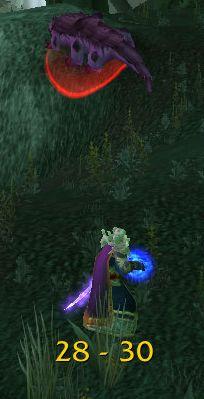
RangeDisplay
Estimated range display. Type /rangedisplay for configuration or /rangedisplay locked to lock/unlock the frames.

RangeDisplay is a simple range display addon. It is using spell range, item range and interact-distance based checks to determine the approximate range to your current target. Due to the whackyness of interact-distance based checks, recent versions only use those when spell/item based checks are not possible . The display can be configured in many ways (displaying only the max range, adding border and background, etc).
Currently you can set up RangeDisplay to show your current range to your target, focus, pet and mouseover units. The mouseover unit range can be anchored to the mouse or placed at a fixed position.
New in v3.8.0: It is possible to add sound notifications to "range sections" (similar to color setting). The sound will be played when entering the section. If two sections have the same sound file attached to them, then the sound is not played again if switching between the two sections.
This sound notification is enabled by default for the target unit's close range section.
Displaying max range only: if you want to display only the maxRange, you need to set Text to "%d" and tick the Reverse option for the section(s).
Comments

-

mitchnull Owner
-
View User Profile
-
Send Message
Posted Apr 4, 2026Hey, since the addon seems to be in 5 to 5 increments, will there be a way to have them on just 1yard increments? it will be a massive help in order to set melee weaving distances.
-
View User Profile
-
Send Message
Posted Apr 5, 2026In reply to Irosh:
That is not possible with tne cuerent WoW API.
-
View User Profile
-
Send Message
Posted Apr 1, 2026I got so excited about this addon but unfortunately the 5 yard display that should be for melee range is showing for about 8 yards instead, so it ruins the function of showing melee range and you can't reduce it. It would've been so good otherwise
-
View User Profile
-
Send Message
Posted Mar 29, 2026Doesn't seem to work in battlegrounds for some reason.
-
View User Profile
-
Send Message
Posted Mar 10, 2026I very much like this addon and that it displays 35-36 as a range, how can I possibly make it show 23-24 or 20-24 instead of 20-25?
-
View User Profile
-
Send Message
Posted Feb 19, 2026Amazing addon. Maybe it's already been suggested, but being able to display spell/item icons at different ranges would be pretty cool
-
View User Profile
-
Send Message
Posted Feb 19, 2026In reply to FinalSparkLux:
Most of the range checks are based on items that you probably don't even have on you, so this would not really work
-
View User Profile
-
Send Message
Posted Feb 20, 2026In reply to mitchnull: Oh, idk if I phrased it very well. Not like an actual check for items/spells, just the ability to display a selected icon at a certain range in place of the text. Like instead of the "%d - %d", being able to put the ID for an icon there
That being said, I just realized that I can just change the text I have for 0-8 to literally say Frost Nova :)
-
View User Profile
-
Send Message
Posted Feb 22, 2026In reply to FinalSparkLux:
I _think_ you can even add icon refs somehow in the text, but I'm not sure of the syntax
-
View User Profile
-
Send Message
Posted Mar 14, 2026In reply to mitchnull: |TtexturePath:width:height:offsetX:offsetY:texWidth:texHeight:cropLeft:cropRight:cropTop:cropBottom|t
|T
Interface\LFGFrame\LFGRole
:width
:height
:offsetX
:offsetY
:texWidth
:texHeight
:cropLeft
:cropRight
:cropTop
:cropBottom
|t
e.g. :
texDps = "|TInterface\\LFGFrame\\LFGRole:"..db.iconSize..":"..db.iconSize..":0:0:64:16:16:32:0:16|t"
here I selected the icon from the game file sprite sheet containing multiple icons (tank/healer/dps).
this icon only has one icon (copy by me)
texDpsGrey = "|TInterface\\AddOns\\DungeonHelper\\media\\dps_grey.tga:"..db.iconSize..":"..db.iconSize..":0:0|t"
-
View User Profile
-
Send Message
Posted Feb 13, 2026Got this error today while trying to do the holiday dungeon. It kept popping up until I disabled it:
102x ...Display/libs/LibRangeCheck-3.0-31/LibRangeCheck-3.0.lua:4028: attempt to perform boolean test on a secret boolean value (tainted by 'RangeDisplay')
[RangeDisplay/libs/LibRangeCheck-3.0-31/LibRangeCheck-3.0.lua]:4028: in function <...Display/libs/LibRangeCheck-3.0/LibRangeCheck-3.0.lua:4016>
[RangeDisplay/libs/LibRangeCheck-3.0-31/LibRangeCheck-3.0.lua]:4075: in function <...Display/libs/LibRangeCheck-3.0/LibRangeCheck-3.0.lua:4055>
[tail call]: ?
[RangeDisplay/RangeDisplay.lua]:425: in function 'update'
[RangeDisplay/RangeDisplay.lua]:487: in function <RangeDisplay/RangeDisplay.lua:482>
Locals:
unit = "playertarget"
noItems = nil
canAssist = false
(*temporary) = <no value>
(*temporary) = "pet"
(*temporary) = "playertarget"
(*temporary) = <no value>
(*temporary) = nil
(*temporary) = "attempt to perform boolean test on a secret boolean value (tainted by 'RangeDisplay')"
lib = <table> {
friendNoItemsRC = <table> {
}
harmNoItemsRC = <table> {
}
frame = Frame {
}
handSlotItem = "|cnIQ4:|Hitem:246647::::::::80:253::177:4:12239:13671:43:12297:1:28:3098:::::|h[Ascension Arrestor's Grips]|h|r"
miscRCInCombat = <table> {
}
friendRCInCombat = <table> {
}
MeleeRange = 2
friendNoItemsRCInCombat = <table> {
}
checkerCache_Spell = <table> {
}
miscRC = <table> {
}
petRC = <table> {
}
checkerCache_Item = <table> {
}
initialized = true
friendRC = <table> {
}
harmRC = <table> {
}
petRCInCombat = <table> {
}
resRC = <table> {
}
harmRCInCombat = <table> {
}
resRCInCombat = <table> {
}
failedItemRequests = <table> {
}
CHECKERS_CHANGED = "CHECKERS_CHANGED"
harmNoItemsRCInCombat = <table> {
}
}
-
View User Profile
-
Send Message
Posted Feb 15, 2026In reply to Kittywulfe:
I've tried to fix this in v6.3.2, please check
-
View User Profile
-
Send Message
Posted Feb 15, 2026In reply to mitchnull: I just did the holiday boss with no problem. Thanks for the quick fix!
-
View User Profile
-
Send Message
Posted Feb 7, 2026UPDATE:
Addon updated - v6.3.0 - contains this fix
Just download or update it via your addon manager of choice :)
Thanks to the author for the quick reaction.
_____________
I created a fix. Use at your own risk. UNOFFICIAL!
STEPS:
1. Open your WoW folder
2. Navigate to this folder: `\_retail_\Interface\AddOns\RangeDisplay`
3. Open this file: `RangeDisplay.lua`
- Use `notepad++`, `vscode`, or any text editor you want
4. On Line 231(confirm the function name), find this function: `local function = checkTarget(ud)`
5. Replace the whole function (lines 231-250) with this code: https://pastebin.com/3nKf7FJt
6. Lastly, open this file too: `RangeDisplay.toc`
7. Make sure these versions: `120000,120001` are listed on the `#Interface` line
Comments:
- I've tested this everywhere (inc inside dungeons). Zero errors. The addons works fine.
- I've submitted a PR on the addon's GitHub page for the author to review. If he likes it he can use it to publish an official release of the addon. Hopefully he reviews it soon. Here's a link to the PR (for ref): https://github.com/mitchnull/RangeDisplay/pull/9
Have a good one! o/
-
View User Profile
-
Send Message
Posted Feb 6, 2026doesnt show any ranges inside an instance... outside just fine
-
View User Profile
-
Send Message
Posted Feb 1, 202632x RangeDisplay/RangeDisplay.lua:233: attempt to perform boolean test on a secret value
[RangeDisplay/RangeDisplay.lua]:233: in function 'checkTarget'
[RangeDisplay/RangeDisplay.lua]:253: in function 'targetChanged'
[RangeDisplay/RangeDisplay.lua]:799: in function <RangeDisplay/RangeDisplay.lua:798>
[C]: ?
[Ace3/CallbackHandler-1.0-8/CallbackHandler-1.0.lua]:19: in function <...Ons/Ace3/CallbackHandler-1.0/CallbackHandler-1.0.lua:15>
[Ace3/CallbackHandler-1.0-8/CallbackHandler-1.0.lua]:54: in function 'Fire'
[Ace3/AceEvent-3.0-4/AceEvent-3.0.lua]:120: in function <Ace3/AceEvent-3.0/AceEvent-3.0.lua:119>
[C]: in function 'TurnOrActionStop'
[TURNORACTION]:4: in function <[string "TURNORACTION"]:1>
Locals:
ud = <table> {
sounds = <table> {
}
rangeFrameText = RangeDisplayFrameText_playertarget {
}
locked = true
useSound = false
lastMinRange = 28
name = "대상"
lastUpdate = 0.086000
unit = "playertarget"
isMoving = false
opts = Frame {
}
db = <table> {
}
optsId = 31
rangeFrame = RangeDisplayFrame_playertarget {
}
event = "PLAYER_TARGET_CHANGED"
mainFrame = RangeDisplayMainFrame_playertarget {
}
}
unit = "playertarget"
(*temporary) = <no value>
(*temporary) = "playertarget"
(*temporary) = "player"
(*temporary) = "attempt to perform boolean test on a secret value"
mute = true
-
View User Profile
-
Send Message
Posted Feb 1, 2026Probably one of my favourite addons. I decided to browse the options to see for a way to keep the range visible and I saw mouse over. Not ideal I thought at first till I saw I can set it to not anchor on the cursor and I could even move the position of it. So now I can simply glance at a target because I use Combat Mode addon, and see roughly how far the target is. For me this is great when running old instances with my DK to know when I'm in range to just use Howling Blast the targets
-
View User Profile
-
Send Message
Posted Jan 29, 2026Ver.6.2.7. Retail WoW. I was entering delve with Bran. Begun fight and got errors :
Message: Interface/AddOns/RangeDisplay/RangeDisplay.lua:233: attempt to perform boolean test on a secret value
Time: Thu Jan 29 20:16:36 2026
Count: 1
Stack:
[Interface/AddOns/RangeDisplay/RangeDisplay.lua]:233: in function 'checkTarget'
[Interface/AddOns/RangeDisplay/RangeDisplay.lua]:253: in function 'targetChanged'
[Interface/AddOns/RangeDisplay/RangeDisplay.lua]:799: in function <Interface/AddOns/RangeDisplay/RangeDisplay.lua:798>
[C]: ?
[Interface/AddOns/Altoholic/Libs/CallbackHandler-1.0/CallbackHandler-1.0.lua]:19: in function <...lic/Libs/CallbackHandler-1.0/CallbackHandler-1.0.lua:15>
[Interface/AddOns/Altoholic/Libs/CallbackHandler-1.0/CallbackHandler-1.0.lua]:54: in function 'Fire'
[Interface/AddOns/AskMrRobot/Libs/AceEvent-3.0/AceEvent-3.0.lua]:120: in function <...AddOns/AskMrRobot/Libs/AceEvent-3.0/AceEvent-3.0.lua:119>
Locals:
ud = <table> {
lastMaxRange = 8
sounds = <table> {
}
rangeFrameText = RangeDisplayFrameText_playertarget {
}
locked = true
useSound = false
lastMinRange = 0
name = "Цель"
lastUpdate = 0.084000
unit = "playertarget"
isMoving = false
opts = Frame {
}
db = <table> {
}
optsId = 29
rangeFrame = RangeDisplayFrame_playertarget {
}
event = "PLAYER_TARGET_CHANGED"
mainFrame = RangeDisplayMainFrame_playertarget {
}
}
unit = "playertarget"
(*temporary) = <no value>
(*temporary) = "playertarget"
(*temporary) = "player"
(*temporary) = "attempt to perform boolean test on a secret value"
mute = false
And next error:
Message: Interface/AddOns/RangeDisplay/RangeDisplay.lua:233: attempt to perform boolean test on a secret value
Time: Thu Jan 29 20:16:59 2026
Count: 1
Stack:
[Interface/AddOns/RangeDisplay/RangeDisplay.lua]:233: in function 'checkTarget'
[Interface/AddOns/RangeDisplay/RangeDisplay.lua]:253: in function 'targetChanged'
[Interface/AddOns/RangeDisplay/RangeDisplay.lua]:799: in function <Interface/AddOns/RangeDisplay/RangeDisplay.lua:798>
[C]: ?
[Interface/AddOns/Altoholic/Libs/CallbackHandler-1.0/CallbackHandler-1.0.lua]:19: in function <...lic/Libs/CallbackHandler-1.0/CallbackHandler-1.0.lua:15>
[Interface/AddOns/Altoholic/Libs/CallbackHandler-1.0/CallbackHandler-1.0.lua]:54: in function 'Fire'
[Interface/AddOns/AskMrRobot/Libs/AceEvent-3.0/AceEvent-3.0.lua]:120: in function <...AddOns/AskMrRobot/Libs/AceEvent-3.0/AceEvent-3.0.lua:119>
[C]: in function 'UseAction'
[Interface/AddOns/Blizzard_FrameXML/SecureTemplates.lua]:349: in function 'handler'
[Interface/AddOns/Blizzard_FrameXML/SecureTemplates.lua]:732: in function <...terface/AddOns/Blizzard_FrameXML/SecureTemplates.lua:710>
[Interface/AddOns/Blizzard_FrameXML/SecureTemplates.lua]:746: in function <...terface/AddOns/Blizzard_FrameXML/SecureTemplates.lua:739>
[Interface/AddOns/Blizzard_FrameXML/SecureTemplates.lua]:798: in function 'SecureActionButton_OnClick'
[Interface/AddOns/Blizzard_ActionBar/Shared/ActionButton.lua]:112: in function 'TryUseActionButton'
[Interface/AddOns/Blizzard_ActionBar/Shared/ActionButton.lua]:147: in function 'ActionButtonDown'
[ACTIONBUTTON5]:2: in function <[string "ACTIONBUTTON5"]:1>
Locals:
ud = <table> {
lastMaxRange = 8
sounds = <table> {
}
rangeFrameText = RangeDisplayFrameText_playertarget {
}
locked = true
useSound = false
lastMinRange = 0
name = "Цель"
lastUpdate = 0.084000
unit = "playertarget"
isMoving = false
opts = Frame {
}
db = <table> {
}
optsId = 29
rangeFrame = RangeDisplayFrame_playertarget {
}
event = "PLAYER_TARGET_CHANGED"
mainFrame = RangeDisplayMainFrame_playertarget {
}
}
unit = "playertarget"
(*temporary) = <no value>
(*temporary) = "playertarget"
(*temporary) = "player"
(*temporary) = "attempt to perform boolean test on a secret value"
mute = false
-
View User Profile
-
Send Message
Posted Jan 24, 2026Version: v6.2.6
Issue description:
“右击打开设置窗口” An error occurred after clicking.
```
1x ...ddOns/Blizzard_Settings_Shared/Blizzard_Settings.lua:144: bad argument #1 to 'OpenSettingsPanel' (outside of expected range -2147483648 to 2147483647 - Usage: C_SettingsUtil.OpenSettingsPanel([openToCategoryID, scrollToElementName]))
[Blizzard_Settings_Shared/Blizzard_Settings.lua]:144: in function 'OpenToCategory'
[RangeDisplay_Options/Options.lua]:49: in function 'openConfigDialog'
[RangeDisplay/RangeDisplay.lua]:879: in function <RangeDisplay/RangeDisplay.lua:871>
[tail call]: ?
[BagBrother/core/classes/brokerCarrousel.lua]:112: in function <...eBagBrother/core/classes/brokerCarrousel.lua:111>
Locals:
categoryID = "RangeDisplay"
scrollToElementName = nil
```
-
View User Profile
-
Send Message
Posted Jan 25, 2026In reply to desistdaydream: Version 4.2.15 has been fixed.