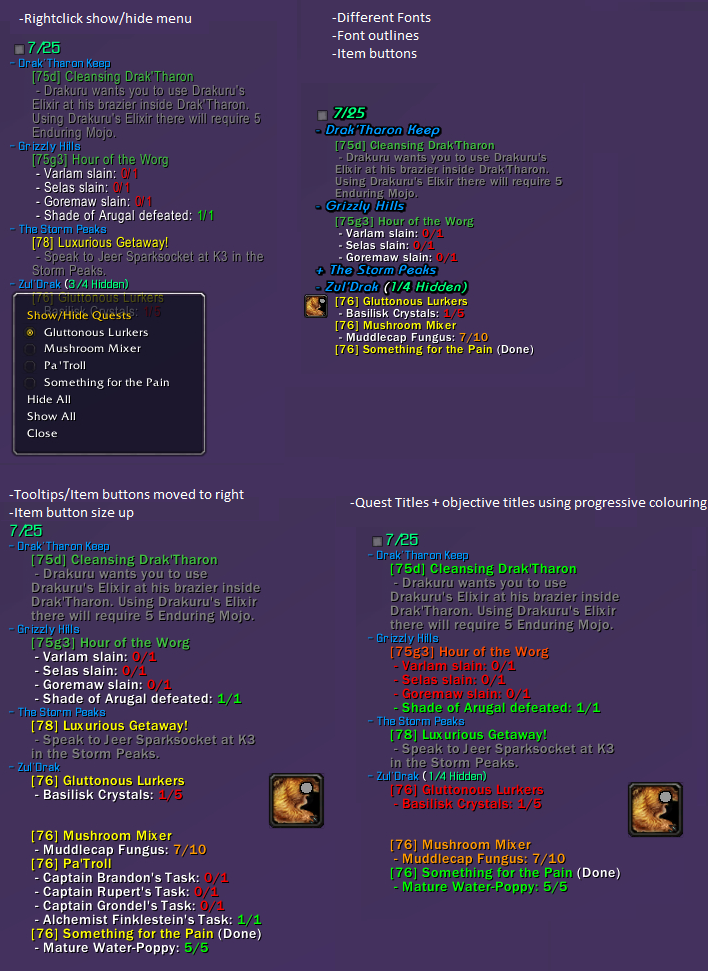
SorhaQuestLog
SorhaQuestLog is a basic Quest/Achievement addon similar to MonkeyQuest and nQuestLog.
It allows the display of quests and achievements on the screen in an configurable way.
Options panel is accessible using /sql or /sorhaquestlog
Quest Controls
Hidden Quests
- Click the square at the top of the tracker to show/hide hidden quests
- Right-click a quest to show or hide it.
Zones
- Left-click a zone to collapse/expand it
- Right-click a zone to open a menu to show/hide quests
- Alt + right-click a zone to open a menu to show/hide zones
Quests
- Left-click a quest to open quest text pane. (Alt-Left if you enable full log option)
- Alt + Left-click a quest to open quest in world map log (Left if you enable full log option)
- Control left-click a quest to set it as the active quest tracking
- Alt + Ctrl left-click a quest to abandon it. (Can disable confirm dialog in options)
Features
Core Features:
- Individual Minions for Quests, Achievements and Scenarios
- Auto Show/Hide options when entering instances, arenas, combat, pet battles, the outside world etc.
- Can hide the default blizzard quest frame
- Handles blizzards remote quests
- Borders and background for minions
- LDB Module
Quest Log Minion Features:
- Expandable/collapsible zone headers
- Auto collapsing/expanding zone headers as you change zones
- Hide Zone headers when all their quests are hidden
- Expand collapse menu available using alt-right-click on a zone
- Hide quests by right-clicking the quest or by selecting it from its zone headers right-click menu
- Hide completed objectives
- Can completely hide quest tracker when tracking no quests
- Hide or re-size item buttons
- Colour objective texts and statuses by completeness(gradual) , state(done/undone) or choose a custom colour
- Colour quest titles and level texts by level, completeness(gradual) , state(done/undone) or choose a custom colour
- Changeable fonts, font shadowing and font sizes for Zones, Quests and Objectives
- Adjustable indentation for quests and objectives
- Option to display only the quest details pane of the quest log when left-clicking a quest. (Alt left click to get the full quest log panel)
- Ctrl left-click a quest to set it as the active quest for blizzards minimap tracker, (Dugi arrow support)
- Alt + Ctrl left-click a quest to abandon it. (Can disable confirm dialog in options)
Achievement Minion Features:
- Customizable text by choosing fonts, sizes, shadowing and colours.
- Customizable textures for progress bars
- Optional progress status bars for the achievements that can have them
- Option to limit the number of tasks displayed per achievement
Notification Features:
- Customizable sounds for quest/objective complete and quest starting item picked up notifications.
- Choose custom sounds for quest completions and objective completions
- Re-direct the objective completion messages elsewhere with LibSink
Recent Changes
New since v1.4.8
- Track world quests
- Link Scenario and achievement minions to quest minion
Other Stuff >.>
Bug reporting and Suggestions
You can report bugs or suggestions using wowaces ticket system at:
http://www.wowace.com/addons/sorhaquestlog/tickets/
Localization
If you want to help localize SorhaQuestLog you can do so using the wowace localization section at:
http://www.wowace.com/addons/sorhaquestlog/localization/
Comments


-

Sorha2 Owner
-

humfras Author
-

unrealcrom96 Translator
-
View User Profile
-
Send Message
Posted Jun 24, 2017Hey! I love this addon, it's easily the best quest log simply because it works in a really minimalistic UI.
I have just one request for colour options: could we get one more color setting for 0%? I have locally changed the code so that my "0-24%" color is used for 0% and "25-49%" is used for >0%-49% instead. This way I can basically use 3 different colors for progress: red for 0%, yellow for anything in between, green (or hidden) for completed.
I like it this way because now I can easily see which objectives I've started doing - basically if all objectives are yellow, I know I'm running around in the correct location to complete the whole quest. If any of them is red, I know I should look for what I'm missing.
-
View User Profile
-
Send Message
Posted Jul 10, 2017Hi Genoidi,
Have split the 0% objectives off from the 0-24% range :)
Can test it in Alpha 212 or higher. Which hopefully I didn't derp :P
-
View User Profile
-
Send Message
Posted Jun 20, 2017Hi, just a small bug report. I have all the options checked that auto-hide or show quests on moving between zones, which works fine while logged in. Except on the initial load for each character where every quest is displayed until I zone, reloading or relogging doesn't work.
Another small issue - I cannot seem to manually override the auto hide/show when it sometimes doesn't recognise that I am in the quest area. e.g. if it thinks that the quest zone is where I took it, rather than where the objective is. I can try to provide an example next time it comes up if that's helpful.
I was also going to ask if you could make an option that allows me to have the scenario tracker auto disable in M+ dungeons - I will now try the alpha you added.
Thanks so much for your work on this phenomenal add on, the quest log in game had always been an eyesore and lacking in functionality. With your add on I've been able to get a minimalist style a la GottaGoFast - along with all the dynamic show/hide conditions - that have turned questing into a bit of a joy.
-
View User Profile
-
Send Message
Posted Jun 8, 2017Everytime i log in, the option "Hide all Sorha Questlog" is ticked.
Everytime i uncheck it - quiet annoying.
-
View User Profile
-
Send Message
Posted Jul 10, 2017I haven't been able to replicate this one yet. Do any other settings save?
And could I get a list of the other addons you have, might be able to find something colliding.
-
View User Profile
-
Send Message
Posted Jun 3, 2017Could you add an Option to hide the Quest Tracker when you use a Flight Master, Benik UI has a nice when in Flight Mode, but SQL is visible. Oh and i fixed the Tom Problem, i messed up the Keybindings a little^^
-
View User Profile
-
Send Message
Posted Jul 10, 2017Hihi, I have tried adding a tick box in the general settings to hide it during flightpaths.It is currently only in my Alpha 212 (Or higher)
I haven't tested it too extensively yet though :)
-
View User Profile
-
Send Message
Posted Oct 14, 2017Hey Sora, just wanted to say thanks for adding the Option to hide the Tracker on the FM.
Good job :)
-
View User Profile
-
Send Message
Posted Jun 2, 2017Hi guys, sorry for being MIA, still having RL troubles.
There is a new alpha up here on wowace, it might be a little derp, but should run. Will try improve on it soon, wish I could do more for you all :(
-I have added a Show in Dungeons option tickbox to the main options page that hopefully will only show the blizzard questlog in instances so you can see things like Angry Keystones. Have not had too much a chance to test it yet
-Have been fiddling with the group finder issue, not fun :(
Currently all I could do is make it display a box at the top of the tracker you click 2-3 times (Until its gone) to make it play nice. It possibly also will make the blizz UI throw an error on group join (Harmless but annoying)
Will be working on this when I get the chance, not happy with it.
-Ifirnja try Ctrl+Click on the quest, that's the one that changes the focused quest (minimap arrow etc), so hopefully will work for TomTom as well.
-
View User Profile
-
Send Message
Posted May 27, 2017Hello Sorha, could you pls check if there could be a conflift with TomTom, somehow Tom doesnt update the Arrow when i track a Quest, but with the default UI Tracker it works.
-
View User Profile
-
Send Message
Posted May 25, 2017For those wanting mythic plus chest timers, use gotta go fast. It allows a custom frame to show timers that you can locate anywhere. This means that SQL will still show timers but you can now have additional information on your screen. It allows you to customize the font and font size so it will be unobtrusive.
You do not need to disable the scenario tracker to have this work either.
It might just be the best solution until these timers can get integrated into SQL with addons like angry assignments.
-
View User Profile
-
Send Message
Posted May 14, 2017in m+ dungeons the scenario tracker progress bar doesn't show chest timers at all. pretty much makes the addon unusable for me right now.
-
View User Profile
-
Send Message
Posted May 13, 2017when i do some dungeons the scenario tracker just get's big for no reason when will this be fixed or is there a way for me to fix this?
-
View User Profile
-
Send Message
Posted May 12, 2017Love this quest addon, however not a fan of the scenario tracker for dungeons etc.
Id rather use another such as angry keystone... but they dont work together. When I disable the minion for the scenario tracker inside Sorha, it hides the defualt blizz one as well! :(
Am I missing something? or is there a way to split the minions into standalone objects.
-
View User Profile
-
Send Message
Posted May 9, 2017Is there an option to hide the grey square which toggles hidden quests?
If not, can you implement it? Please?
:)
Thanks!
-
View User Profile
-
Send Message
Posted May 1, 2017Hey! I really love this addon, as it cleans up the tracker a lot. But one small request: any chance to use mouse roll as a keybind for actions? Specifically I'd love to be able to use mouse roll to start/find a group, as WQGF does that (when clicking from map), and I'd like to use the same keybind for both.
-
View User Profile
-
Send Message
Posted Apr 30, 2017any possible way like transitbus said that there can be an icon on the world quest text insted of having to keybind click it? would love to have an icon like the default one has :)
-
View User Profile
-
Send Message
Posted Apr 27, 2017they added an option to the default quest tracker for finding groups for world quests/ bosses/ etc. Any possible way to incorporate that into SQL? I find i have to disable the addon to quickly find like world boss groups and would love if the find group button was integrated.
-
View User Profile
-
Send Message
Posted Apr 28, 2017It's built in. Go into the settings then into Quest Tracker. Bottom option allows you to set a hot key that you can use in the window to find/start a group. I have to hit refresh once the Window opens.
-
View User Profile
-
Send Message
Posted May 6, 2017Except that is now protected
1x [ADDON_ACTION_BLOCKED] AddOn 'SorhaQuestLog' tried to call the protected function 'Search()'.
!BugGrabber\BugGrabber.lua:573: in function <!BugGrabber\BugGrabber.lua:573>
[C]: in function `Search'
FrameXML\LFGList.lua:1708: in function `LFGListSearchPanel_DoSearch'
FrameXML\LFGList.lua:553: in function `LFGListCategorySelection_StartFindGroup'
FrameXML\LFGList.lua:352: in function `LFGListFrame_BeginFindQuestGroup'
FrameXML\LFGList.lua:3206: in function `LFGListUtil_FindQuestGroup'
SorhaQuestLog\Modules\Quests.lua:5224: in function `FindQuestGroup'
SorhaQuestLog\Modules\Quests.lua:5166: in function `?'
SorhaQuestLog\Modules\Quests.lua:5172: in function `HandleQuestClick'
SorhaQuestLog\Modules\Quests.lua:3919: in function <SorhaQuestLog\Modules\Quests.lua:3898>
Locals:
nil