SorhaQuestLog
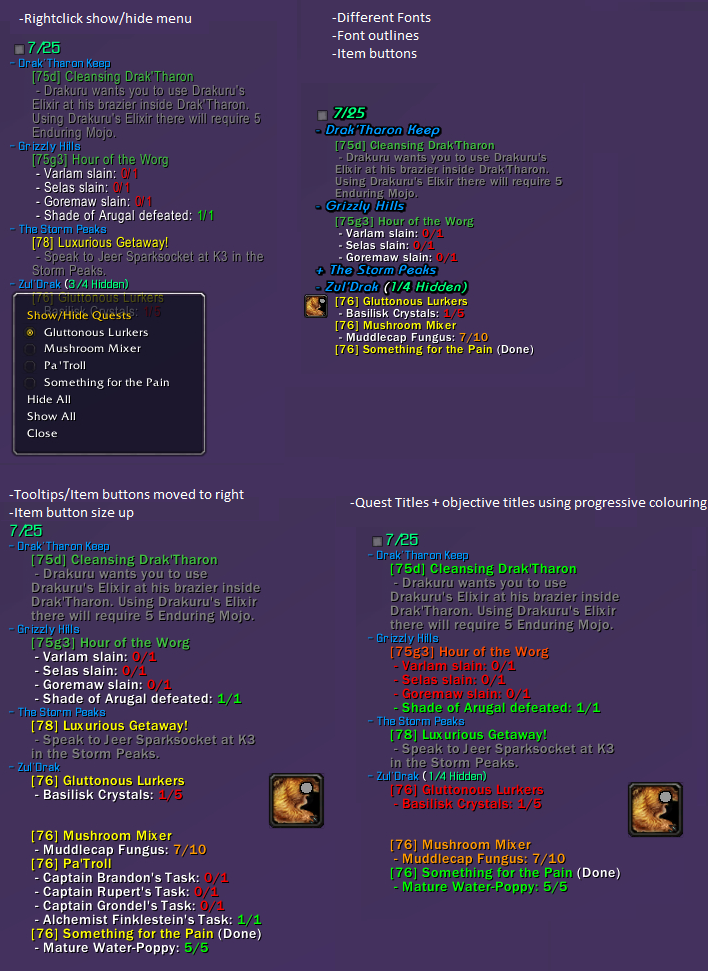
SorhaQuestLog is a basic Quest/Achievement addon similar to MonkeyQuest and nQuestLog.
It allows the display of quests and achievements on the screen in an configurable way.
Options panel is accessible using /sql or /sorhaquestlog
Quest Controls
Hidden Quests
- Click the square at the top of the tracker to show/hide hidden quests
- Right-click a quest to show or hide it.
Zones
- Left-click a zone to collapse/expand it
- Right-click a zone to open a menu to show/hide quests
- Alt + right-click a zone to open a menu to show/hide zones
Quests
- Left-click a quest to open quest text pane. (Alt-Left if you enable full log option)
- Alt + Left-click a quest to open quest in world map log (Left if you enable full log option)
- Control left-click a quest to set it as the active quest tracking
- Alt + Ctrl left-click a quest to abandon it. (Can disable confirm dialog in options)
Features
Core Features:
- Individual Minions for Quests, Achievements and Scenarios
- Auto Show/Hide options when entering instances, arenas, combat, pet battles, the outside world etc.
- Can hide the default blizzard quest frame
- Handles blizzards remote quests
- Borders and background for minions
- LDB Module
Quest Log Minion Features:
- Expandable/collapsible zone headers
- Auto collapsing/expanding zone headers as you change zones
- Hide Zone headers when all their quests are hidden
- Expand collapse menu available using alt-right-click on a zone
- Hide quests by right-clicking the quest or by selecting it from its zone headers right-click menu
- Hide completed objectives
- Can completely hide quest tracker when tracking no quests
- Hide or re-size item buttons
- Colour objective texts and statuses by completeness(gradual) , state(done/undone) or choose a custom colour
- Colour quest titles and level texts by level, completeness(gradual) , state(done/undone) or choose a custom colour
- Changeable fonts, font shadowing and font sizes for Zones, Quests and Objectives
- Adjustable indentation for quests and objectives
- Option to display only the quest details pane of the quest log when left-clicking a quest. (Alt left click to get the full quest log panel)
- Ctrl left-click a quest to set it as the active quest for blizzards minimap tracker, (Dugi arrow support)
- Alt + Ctrl left-click a quest to abandon it. (Can disable confirm dialog in options)
Achievement Minion Features:
- Customizable text by choosing fonts, sizes, shadowing and colours.
- Customizable textures for progress bars
- Optional progress status bars for the achievements that can have them
- Option to limit the number of tasks displayed per achievement
Notification Features:
- Customizable sounds for quest/objective complete and quest starting item picked up notifications.
- Choose custom sounds for quest completions and objective completions
- Re-direct the objective completion messages elsewhere with LibSink
Recent Changes
New since v1.4.8
- Track world quests
- Link Scenario and achievement minions to quest minion
Other Stuff >.>
Bug reporting and Suggestions
You can report bugs or suggestions using wowaces ticket system at:
http://www.wowace.com/addons/sorhaquestlog/tickets/
Localization
If you want to help localize SorhaQuestLog you can do so using the wowace localization section at:
http://www.wowace.com/addons/sorhaquestlog/localization/
Comments


-

Sorha2 Owner
-

humfras Author
-

unrealcrom96 Translator
-
View User Profile
-
Send Message
Posted Apr 12, 2017Sorry folks, been rather sick. Will try get some updates out soon, and thanks to oppizippy for tracking down that issue for me :)
-
View User Profile
-
Send Message
Posted Mar 30, 2017A modification is needed for Zone Font Settings: two Font Line Spacing sliders are needed, Font Line Spacing Above and Font Line Spacing Below.
The reason for this is simple and obvious: if one uses the existing slider, the Zone title is kept close to the previous zone's quests while distancing it from the quests within it, which is likely the reverse of what is desired. The only way currently to achieve something resembling the desired effect of spacing each block of zone quests from each other is to increase the Objective Font Line Spacing, which also has the undesirable effect of distancing objectives from their associated quests. It needs to work similar to the Achievement Padding.
There's also something odd going on with the "Info Text", but I'm at a loss how to describe it. The text is offset or disassociated from the background coloration.
-
View User Profile
-
Send Message
Posted Mar 29, 20177.2 mythic+ timer fix for the latest release version:
Change line number 2260 of Modules/Scenarios.lua to
-
View User Profile
-
Send Message
Posted Mar 31, 2017Can confirm this fixes the mythic plus issues
-
View User Profile
-
Send Message
Posted Apr 8, 2017What's the actual code that is getting replaced? Line 2260 is an "end" line for me.
-
View User Profile
-
Send Message
Posted Mar 27, 2017In mithyc + i cannot see bar with % of instance/mob completed?It depend by Sorha?If yes how can i re-see this ?
-
View User Profile
-
Send Message
Posted Feb 25, 2017can you please add the same indent and spacing/padding options that are in the quest log to the scenario tracker?
-
View User Profile
-
Send Message
Posted Feb 9, 2017I Love this quest tracker!!
thank you :)
wondering how to modify the spacing for the scenario frame and other modules not just the quest log
-
View User Profile
-
Send Message
Posted Jan 28, 2017How do I get it to stop auto-tracking World Quests? I have another addon that does that and don't need both.
-
View User Profile
-
Send Message
Posted Jan 19, 2017Hello !
Is there any way to make SQL works with worldQuestGroupFinder ?
(https://mods.curse.com/addons/wow/worldquestgroupfinder)
This addons allows to autocreate/join groups while middle-clicking on a worldquest. But this doesn't work with SQL (the middle clicking is not taken into account).
Would be a huge quality of life improvement to be able to use your addon and this feature toegether :)
-
View User Profile
-
Send Message
Posted Jan 20, 2017For me it works, just ALT + Left Click on the World Quest in the SQL tracker.
-
View User Profile
-
Send Message
Posted Jan 24, 2017Tripex2k (and anyone else) - Can you confirm that when you click as described it is actually grouping up through WQGF? I know that Blizz included a default "click on on tracked quests, find a group" feature in 7.1.5 if I am correct, so I just want to confirm that it is actually using WQGF not just the new default functionality.
For the record I too would like to see SQL fully support WQGF (and for that matter, the Blizzard group finding), as well as compatibility with other prominent mods like Pet Tracker (tracking pets), and Angry Keystones (enhanced Dungeon/Mythic/Scenario features), as others describe here. Would it be worth creating Issues for feature requests for thins like this?
Also, Sorha - Thank you for allowing the minions to anchor to each other! Clearly you've put a lot into developing the mod so thanks for your time :)
-
View User Profile
-
Send Message
Posted Mar 2, 2017The ALT + Click behaviour was there before Blizz introduced their function of group group finding, and it does still work as I described, ALT + click on the world quest and you queue up for the WQ with WQGF and not the Blizz one.
For the rest, I already asked Sorha for the Angry Keystone feature, maybe he has some news for us, maybe not, at the moment I combine feature of Angry Keystone with Mythic Plus Timer, since I need a good display for M+ dungeons.
-
View User Profile
-
Send Message
Posted Jan 6, 2017I like this addon except that it does not track battle pets. I am not sure how it works so please excuse me if I am asking for the impossible. I have the addon Pet tracker that adds a panel to the quest panel that shows how many pets I have what their quality is and what is missing. right now I just toggle between Dugi questing essential and SQL. Thank you for a great addon.
-
View User Profile
-
Send Message
Posted Dec 28, 2016I have a question, would it be possible to disable certain parts of SQL and reenable default Blizzard parts like the scenario tracker for Mythic+? I like your addon really but I use Angry Keystones addon for chesttimers and progression tracking and such stuff in M+ inis and therefore I would need the default scenario/mythic+ tracker from Blizzard. If not, no problem, there is another addon I can use, but I would prefer Angry Keystones. ;)
-
View User Profile
-
Send Message
Posted Jan 2, 2017SorhaQuestLog doesn't really touch the default tracker, so it should be possible to un-hide that and have the normal tracker work for Angry Keystones.
Have not got the game here atm, but from memory it is in the first main panel of options.
And if SQL is in the way it can be toggled by a keybind, the LDB module, or the following slash commands. Can used in macros if wanted:
Evertything:
/sql toggle
A module:
/sql toggle modulename
Modules: quest scenario achievement remote
-
View User Profile
-
Send Message
Posted Jan 5, 2017Uhm, I think the problem is something else when I can say it that way: I use ElvUi and the original Quest tracker from Blizzard keeps poping up all the time so I use the Force Hide option in SQL for the default Blizzard frames. But I don't want to hide all the Blizzard standard frames, i.e. in Mythic+ dungeons I want the original Blizzard Mythic+ tracker to show up instead of SQLs scenario tracker.
Thats because Angry Keystones adds some features to the Blizzard tracker for Mythic+ like chesttimers and shrinks the affix icons and deathtrackers and some other small enhancements.
I still can go with three other addons (A M+ tracker, a keystone link extender and an addon for showing how much % a mob gives in M+ for progression.), but Angry Keystones combines all features of three addons in one but with the problem that it uses the standard Blizzard Mythic+ tracker.
Get the idea behind it? Any idea if this is doable? If not, no problem, I can still stick with my 2-3 other addons. ^^
-
View User Profile
-
Send Message
Posted Jan 5, 2017Yeah the blizzard tracker is all tied into that one frame that the Quest/Achievement/Dungeon etc sections show up in. Makes it painful to fool about with.
Will try installing AngryKeystones tomorrow and see what I can find though.
-
View User Profile
-
Send Message
Posted Jan 6, 2017Are you EU or US? If you are EU I can spend a keystone I don't need so you can play around. Wasn't going to do that Arcway +6 anyway -.-
-
View User Profile
-
Send Message
Posted Jan 11, 2017Sorry trip, life went rather wrong last week, have not really had a chance to look into it just yet :(