SmartRes2
SmartRes2
The ultimate addon for party and raid recovery after a partial or total wipe. There is a plethora of features, most functional, some are for roleplay.
A Short List of Features
Not every feature exits for every WoW version. For example, settings for mass resurrection spells are not available in Classic Era or Season of Discovery. I am still writing the code, which means there are features which are not done.
- SmartRes2 is lightweight and modular. You can enable or disable almost everything, up to and including entire plugins.
- Create your own random messages for printing to chat to entertain your group.
- Disable or remove chat messages you do not wish to use. There is a recycle bin to restore deleted messages.
- Customize the bar frame with borders, fonts, and more. Future ideas include supporting themes.
- Bind keys for one-click casting of your class resurrection spells, including Hunter pet spells (requires retail, crane and moth pets).
- Non-combat spells intelligently parse your group for dead characters, prioritizing healers, tanks, then DPS. The option to change the priority is being investigated.
- Non-combat resurrection spells, including mass resurrections, check if your cast is the fastest, and if anyone's spell is not the fastest, SmartRes2 can inform them of a collision.
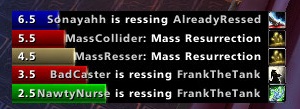
- A frame of colour-coded bars provides a visual display of resurrections. (Not ready as of June, 2024).
- If you have a combat res spell, there is an option to switch the manual target key bind to the spell during combat, and back to your regular res spell out of combat.
- SmartRes2 supports all WoW versions that have been released as of June, 2024. The War Within is planned, but I do not have access to the beta.
Translating
People can start localizing SmartRes2 via the Wowace web portal. As of June 6, 2024, the current words and phrases are set; however, there will be more added and those added later may change as development progresses.
API
Addon authors are welcome to write their own modules and plug their options into SmartRes2. There is a Public API which has the basics. More instructions will be added as development advances.
Preview Screenshots
These are not final, and are subject to change, especially as I add features.
Comments


-

Sygon_Paul Owner
-

_ForgeUser4646792 Tester
-
_ForgeUser9586121 Tester
-
View User Profile
-
Send Message
Posted May 23, 2010I downgraded to solve my immediate problem and I just upgraded to r116 - I am glad to report that the problem is gone for me.
-
View User Profile
-
Send Message
Posted May 23, 2010-
View User Profile
-
Send Message
Posted May 25, 2010-
View User Profile
-
Send Message
Posted May 26, 2010-
View User Profile
-
Send Message
Posted May 26, 2010FYI, the Clamp To Screen, Lock, and Unlock are hidden commands, and not user configurable. They should, however, fix a rare bug where updating SR2 resets the bar position, yet leaves the rest of the options intact.
-
View User Profile
-
Send Message
Posted May 14, 2010Can you make it so we can add / remove our own lines to the random chat wihout having ti edit the LUA files. Rather than just setting 1 custom message to be displayed over and over
-
View User Profile
-
Send Message
Posted May 16, 2010-
View User Profile
-
Send Message
Posted May 6, 2010-
View User Profile
-
Send Message
Posted May 8, 2010-
View User Profile
-
Send Message
Posted Apr 11, 2010I will add you as an author. You must be familiar with svn, and if you commit Betas or Releases, they must also be updated on wowinterface.
I will be back as soon as I can, but I do not know when that is for now.
-
View User Profile
-
Send Message
Posted Apr 13, 2010-
View User Profile
-
Send Message
Posted Apr 1, 2010-
View User Profile
-
Send Message
Posted Apr 11, 2010-
View User Profile
-
Send Message
Posted Apr 11, 2010-
View User Profile
-
Send Message
Posted Mar 14, 2010thx for let me knowing about this
hmmmmmmm... dunno( i have no clue about programming ;-) ) just an idea.... maybe the de/de client just doesn't support %s rather than %p /%t !?!
-
View User Profile
-
Send Message
Posted Mar 14, 2010xevilgrin, I haven't been able to duplicate your ticket, as it works correctly for me in enUS. I'm still checking.
Just wanted to give you an update.
Oh, and ckeurk, thank you for fixing lots of the frFR. :)
-
View User Profile
-
Send Message
Posted Mar 13, 2010@ckeurk
if you're able to tell myrroddin that the french translation is horrible ;-) so it seems like your able to understand french and this is quite perfect cauz he doesn't (just as me) ...and heres the workaround!!! ... feel free to correct it via the translation tool right up here at the menu topbar under the button localization...
i guess a "cool" way to show "respect" to the author
-
View User Profile
-
Send Message
Posted Mar 10, 2010-
View User Profile
-
Send Message
Posted Mar 11, 2010-
View User Profile
-
Send Message
Posted Mar 11, 2010As for Whisper + Party/Raid, that is on the "todo" list.