SmartRes2
SmartRes2
The ultimate addon for party and raid recovery after a partial or total wipe. There is a plethora of features, most functional, some are for roleplay.
A Short List of Features
Not every feature exits for every WoW version. For example, settings for mass resurrection spells are not available in Classic Era or Season of Discovery. I am still writing the code, which means there are features which are not done.
- SmartRes2 is lightweight and modular. You can enable or disable almost everything, up to and including entire plugins.
- Create your own random messages for printing to chat to entertain your group.
- Disable or remove chat messages you do not wish to use. There is a recycle bin to restore deleted messages.
- Customize the bar frame with borders, fonts, and more. Future ideas include supporting themes.
- Bind keys for one-click casting of your class resurrection spells, including Hunter pet spells (requires retail, crane and moth pets).
- Non-combat spells intelligently parse your group for dead characters, prioritizing healers, tanks, then DPS. The option to change the priority is being investigated.
- Non-combat resurrection spells, including mass resurrections, check if your cast is the fastest, and if anyone's spell is not the fastest, SmartRes2 can inform them of a collision.
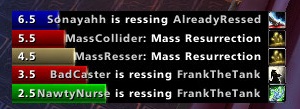
- A frame of colour-coded bars provides a visual display of resurrections. (Not ready as of June, 2024).
- If you have a combat res spell, there is an option to switch the manual target key bind to the spell during combat, and back to your regular res spell out of combat.
- SmartRes2 supports all WoW versions that have been released as of June, 2024. The War Within is planned, but I do not have access to the beta.
Translating
People can start localizing SmartRes2 via the Wowace web portal. As of June 6, 2024, the current words and phrases are set; however, there will be more added and those added later may change as development progresses.
API
Addon authors are welcome to write their own modules and plug their options into SmartRes2. There is a Public API which has the basics. More instructions will be added as development advances.
Preview Screenshots
These are not final, and are subject to change, especially as I add features.
Comments


-

Sygon_Paul Owner
-

_ForgeUser4646792 Tester
-
_ForgeUser9586121 Tester
-
View User Profile
-
Send Message
Posted Jun 4, 20101x SmartRes2-Beta 2.0\SmartRes2.lua:810: attempt to call global 'Print' (a nil value) CallbackHandler-1.0-5:146: in function <...ist\libs\CallbackHandler-1.0\CallbackHandler-1.0.lua:146> <string>:"safecall Dispatcher[4]":4: in function <[string "safecall Dispatcher[4]"]:4> <in C code>: ? <string>:"safecall Dispatcher[4]":13: in function `?' CallbackHandler-1.0-5:91: in function `Fire' LibResComm-1.0-90048:143: in function `?' LibResComm-1.0-90048:48: in function <...adowedUF_Resurrect\LibResComm-1.0\LibResComm-1.0.lua:47>
I did delete the old folder and prefs. Still getting errors.
-
View User Profile
-
Send Message
Posted Jun 4, 2010As it was a LFD PUG I simply rummaged through my spellbook and ressed them manually for the sake of expedience, so I haven't done any type of "extensive testing" on it or anything. Just giving you the heads-up.
-
View User Profile
-
Send Message
Posted Jun 5, 2010For players on your realm, you will never see that message unless they are, in fact, alive.
-
View User Profile
-
Send Message
Posted Jun 6, 2010-
View User Profile
-
Send Message
Posted Jun 7, 2010-
View User Profile
-
Send Message
Posted Jun 3, 2010-
View User Profile
-
Send Message
Posted Jun 3, 2010Aoife, reset the profile to default settings, or delete your saved variables, and tell me if it is still happening.
Just asking because it works correctly for me.
-
View User Profile
-
Send Message
Posted Jun 2, 2010-
View User Profile
-
Send Message
Posted Jun 2, 2010Notes: I will not be adding support for Engineering res devices unless they are added to LibResComm-1.0 ... Also, I looked at LibBars-1.0 and did not see any way to make the bars clickable. Suggestions based on those will not be implemented, sorry.
-
View User Profile
-
Send Message
Posted Jun 2, 2010Finally!!! No errors in game, tried no-lib and embedded. Everything works afaik.
-
View User Profile
-
Send Message
Posted Jun 2, 2010Snarl, grip, bitch, moan, etc. Testing something, and maybe Torhal is on to something about the escape codes.
-
View User Profile
-
Send Message
Posted Jun 2, 2010I flagged ticket 43 missing translation as invalid, as the line numbers referenced have been changed, along with the translation key. I am trying to rebuild the localization for the bugged one from scratch.
-
View User Profile
-
Send Message
Posted Jun 1, 2010Still getting the following errors
1x AceLocale-3.0: SmartRes2: Missing entry for 'Add messages to the random message output table.: Usage: %%p%% (optional) for yourself, %%t%% (manatory) for your target.: They can be in any order.': SmartRes2-r121\SmartRes2.lua:415: in function <SmartRes2\SmartRes2.lua:102> (tail call): ?: <in C code>: ? <string>:"safecall Dispatcher[1]":9: in function <[string "safecall Dispatcher[1]"]:5> (tail call): ?: AceAddon-3.0-5:510: in function `InitializeAddon' AceAddon-3.0-5:622: in function <...s\AckisRecipeList\libs\AceAddon-3.0\AceAddon-3.0.lua:615>
-
View User Profile
-
Send Message
Posted Jun 1, 2010Very strange. That translation is added, and still throws a missing. I'm asking Torhal for help on it, as I don't know why it doesn't work.
-
View User Profile
-
Send Message
Posted Jun 1, 2010What I want to know is with a no-lib install, is anyone getting an error, and the multiselect folder is not installing correctly with the Curse Client? If so, I may need to hard-embed it until the addon DB gets updated.
-
View User Profile
-
Send Message
Posted Jun 1, 2010Probably because I was silly, and added the translation AFTER the commit, and so r119 did not pick up the line.
I'm about to commit r120 which *should* be final before the next beta. I can hope, anyway.
-
View User Profile
-
Send Message
Posted Jun 1, 2010Yes, the below error happens consistently 100% of the time at logon with r119.
-
View User Profile
-
Send Message
Posted May 31, 20101x AceLocale-3.0: SmartRes2: Missing entry for 'Add messages to the random message output table.: Usage: %%p%% (optional) for yourself, %%t%% (manatory) for your target.: They can be in any order.': SmartRes2-r119\SmartRes2.lua:441: in function <SmartRes2\SmartRes2.lua:129> (tail call): ?: <in C code>: ? <string>:"safecall Dispatcher[1]":9: in function <[string "safecall Dispatcher[1]"]:5> (tail call): ?: AceAddon-3.0-5 (Ace3):510: in function `InitializeAddon' AceAddon-3.0-5 (Ace3):622: in function <Ace3\AceAddon-3.0\AceAddon-3.0.lua:615>
on latest build
-
View User Profile
-
Send Message
Posted May 17, 2010Showed the anchor and dragged it back to the center of the screen, but resing or starting the test bars snaps it back to the top-right corner again.
-
View User Profile
-
Send Message
Posted May 21, 2010