SmartRes2
SmartRes2
The ultimate addon for party and raid recovery after a partial or total wipe. There is a plethora of features, most functional, some are for roleplay.
A Short List of Features
Not every feature exits for every WoW version. For example, settings for mass resurrection spells are not available in Classic Era or Season of Discovery. I am still writing the code, which means there are features which are not done.
- SmartRes2 is lightweight and modular. You can enable or disable almost everything, up to and including entire plugins.
- Create your own random messages for printing to chat to entertain your group.
- Disable or remove chat messages you do not wish to use. There is a recycle bin to restore deleted messages.
- Customize the bar frame with borders, fonts, and more. Future ideas include supporting themes.
- Bind keys for one-click casting of your class resurrection spells, including Hunter pet spells (requires retail, crane and moth pets).
- Non-combat spells intelligently parse your group for dead characters, prioritizing healers, tanks, then DPS. The option to change the priority is being investigated.
- Non-combat resurrection spells, including mass resurrections, check if your cast is the fastest, and if anyone's spell is not the fastest, SmartRes2 can inform them of a collision.
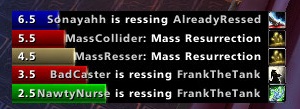
- A frame of colour-coded bars provides a visual display of resurrections. (Not ready as of June, 2024).
- If you have a combat res spell, there is an option to switch the manual target key bind to the spell during combat, and back to your regular res spell out of combat.
- SmartRes2 supports all WoW versions that have been released as of June, 2024. The War Within is planned, but I do not have access to the beta.
Translating
People can start localizing SmartRes2 via the Wowace web portal. As of June 6, 2024, the current words and phrases are set; however, there will be more added and those added later may change as development progresses.
API
Addon authors are welcome to write their own modules and plug their options into SmartRes2. There is a Public API which has the basics. More instructions will be added as development advances.
Preview Screenshots
These are not final, and are subject to change, especially as I add features.
Comments


-

Sygon_Paul Owner
-

_ForgeUser4646792 Tester
-
_ForgeUser9586121 Tester
-
View User Profile
-
Send Message
Posted Sep 8, 2012I have some problems with this addon. I can see the other rezzer´s bars but not my one. I´m able to rezz with the hotkey but nothing to see.
-
View User Profile
-
Send Message
Posted Sep 12, 2012Thank you for the head's up. I have a feeling it is related to a bug Blizzard introduced, but I'll poke around.
-
View User Profile
-
Send Message
Posted Aug 12, 2012The latest version is for the MoP Beta, and it is version 2.00 of SmartRes2. It won't look any different to users, but several back end things were improved or changed out of necessity. This WILL NOT WORK on live servers. You can find the download in Other Downloads above. For some reason, it didn't show up in the main file list.
Arnen, if the bars keep changing size, let me know, as that means there is a bug in LibBars, and I will need help to find and fix it, because it is not my addon.
I expect bugs, because I cannot thoroughly test it on the beta. I'm not in a guild and have way too much other work to get into one, let alone run instances and raids. That is where you guys come in. If you find bugs, please go to the WowAce project page (in the description and main data) and look for, update, or create bug tickets. Preferably with either BugSack or Swatter. Screen shots help too.
Good luck!
-
View User Profile
-
Send Message
Posted Sep 4, 2012It is indeed still refusing to properly display the bar size I have saved in my settings.
-
View User Profile
-
Send Message
Posted Jul 19, 2012This seems to mostly work, but for some reason every time I log in or reload my UI, the size of the bar changes from the setting I want. If I open the options, it SHOWS the correct value, but I have to actually click on it to reset it. Not a HUGE deal, but mildly annoying if I forget to fix it each time I log in and suddenly have a bar stretching halfway across my screen.
-
View User Profile
-
Send Message
Posted Jul 16, 2012Please make an update !!!!!!!!!!!!!!!!!!!!!
-
View User Profile
-
Send Message
Posted Mar 30, 2012I absolutly love this addon but alpha build or anything else nmot working properly, i have no problem making a donation for a working copy.
-
View User Profile
-
Send Message
Posted Dec 15, 2011In 10 mins of play -
306x SmartRes2\SmartRes2-r201.lua:582: Usage: SetOverrideBindingClick(owner, isPriority, "KEY", "buttonName"[, "mouseButton"]) <in C code> SmartRes2\SmartRes2-r201.lua:582: in function "BindKeys" SmartRes2\SmartRes2-r201.lua:556: in function "?" Libs\CallbackHandler-1.0\CallbackHandler-1.0-6.lua:146: in function <Libs\CallbackHandler-1.0\CallbackHandler-1.0.lua:146> <string>:"safecall Dispatcher[1]":4: in function <string>:"safecall Dispatcher[1]":4 <in C code> <string>:"safecall Dispatcher[1]":13: in function "?" Libs\CallbackHandler-1.0\CallbackHandler-1.0-6.lua:91: in function "Fire" Archy-1.8.9\Libs\AceEvent-3.0\AceEvent-3.0-3.lua:120: in function <Archy\Libs\AceEvent-3.0\AceEvent-3.0.lua:119>
Locals: nil
-
View User Profile
-
Send Message
Posted Dec 16, 2011Does r202 have the same problem?
-
View User Profile
-
Send Message
Posted Dec 15, 2011Sorry for the headaches, oh glorious alpha testers! Does r202 load and run properly? It fixes the misspelled GetSpellInfo. My biggest problem is I can't log into WoW to test directly, and the free play stops at level 20, which is a long way away from 85.
I love bug reports, especially since without being able to load the game directly they are vital. If you guys can, and are willing, please install both BugSack and BugGrabber, even short-term, to catch the errors. Those addons give an infinitely better error report than Blizzard's built-in feature, although I do suggest turning said feature on anyway, even with BG and BS.
Also, please post any errors on the WoWAce project page in order to keep them all in one place. And to keep the comments section clear for, um, comments LOL.
Thank you all for your time and support (and bug reports!) and once done, enjoy!
-
View User Profile
-
Send Message
Posted Dec 14, 2011The errors here with latest version are due to a mispelled GetSpellInfo .. it is in the code as GetspellInfo simply fixing this typo in the current latest build will fix the errors in the addon.
-
View User Profile
-
Send Message
Posted Dec 14, 2011Yea, it would be nice for a fix soon because my bugsack is reporting around 30 reports or more whilst inside an LFR raid, its pretty bad.
-
View User Profile
-
Send Message
Posted Dec 14, 2011Getting error reports all the time in raid, and in update r201 it no longer announces who I am rezzing.
-
View User Profile
-
Send Message
Posted Dec 13, 2011Got this on loggin today after downloaded the latest updates -
1x SmartRes2\SmartRes2-r201.lua:249: attempt to index field "rez_bars" (a nil value) SmartRes2\SmartRes2-r201.lua:249: in function <SmartRes2\SmartRes2.lua:238> (tail call): ? <in C code> <string>:"safecall Dispatcher[1]":9: in function <string>:"safecall Dispatcher[1]":5 (tail call): ? Archy-1.8.9\Libs\AceAddon-3.0\AceAddon-3.0-11.lua:543: in function "EnableAddon" Archy-1.8.9\Libs\AceAddon-3.0\AceAddon-3.0-11.lua:636: in function <Archy\Libs\AceAddon-3.0\AceAddon-3.0.lua:621> <in C code> LUI-r437\modules\micromenu.lua:936: in function "SetMicroMenu" LUI-r437\modules\micromenu.lua:1449: in function <LUI\modules\micromenu.lua:1448> (tail call): ? <in C code> <string>:"safecall Dispatcher[1]":9: in function <string>:"safecall Dispatcher[1]":5 (tail call): ? Archy-1.8.9\Libs\AceAddon-3.0\AceAddon-3.0-11.lua:543: in function "EnableAddon" Archy-1.8.9\Libs\AceAddon-3.0\AceAddon-3.0-11.lua:556: in function "EnableAddon" Archy-1.8.9\Libs\AceAddon-3.0\AceAddon-3.0-11.lua:636: in function <Archy\Libs\AceAddon-3.0\AceAddon-3.0.lua:621> <in C code> FrameXML\UIParent.lua:274: in function "UIParentLoadAddOn" FrameXML\UIParent.lua:348: in function "TimeManager_LoadUI" FrameXML\UIParent.lua:614: in function <FrameXML\UIParent.lua:582>
Locals: nil
-
View User Profile
-
Send Message
Posted Dec 13, 2011Same here. Maybe a change caused by Ace3?
-
View User Profile
-
Send Message
Posted Dec 14, 2011I doubt it is Ace3. It is more likely a bug in my alpha code. Unfortunately, the error code posted doesn't tell me much, other than the bar code isn't loading. It would help greatly if this was a BugSack or Swatter error report. The built in error reporting tool is next to useless :(
In future, could you also please read the instructions and NOT post error code into the comment section? Thanks.
-
View User Profile
-
Send Message
Posted Dec 4, 2011been useing this addon for a while now and been loving it the whole time. just wanted to say there is one random message i always add when i have to reDL this. "%%p%% belives in second chances. %%p%% also belives %%t%% is well beyond there second." use it or not idc.
-
View User Profile
-
Send Message
Posted Dec 6, 2011If you keep your settings, it won't matter how many times you download the addon, it will save your phrase. It could be added as a hard-coded, but that would then require translation.
... Wait, are you adding the phrase in the options screen, or writing it into SmartRes2.lua? Add it into the options screen, because if you edit SmartRes2.lua, that explains why your phrase isn't being saved.
-
View User Profile
-
Send Message
Posted Dec 4, 2011Hi,
This has been an issue for awhile, and I reported it some time ago, I use one profile for smartres2, but the bar size and positioning save independantly for each toon, even though Im using the same profile.
It it possible to use one profile and have positioning of the bars and size to dave for each of my alts? Because I right now I configure the addon, and everything saves apart from bar size and positioning. Thanks.
-
View User Profile
-
Send Message
Posted Dec 6, 2011I can look, but with no active WoW account, it may be hard for me to test. I have an idea, however. See how it goes.