SmartRes2
SmartRes2
The ultimate addon for party and raid recovery after a partial or total wipe. There is a plethora of features, most functional, some are for roleplay.
A Short List of Features
Not every feature exits for every WoW version. For example, settings for mass resurrection spells are not available in Classic Era or Season of Discovery. I am still writing the code, which means there are features which are not done.
- SmartRes2 is lightweight and modular. You can enable or disable almost everything, up to and including entire plugins.
- Create your own random messages for printing to chat to entertain your group.
- Disable or remove chat messages you do not wish to use. There is a recycle bin to restore deleted messages.
- Customize the bar frame with borders, fonts, and more. Future ideas include supporting themes.
- Bind keys for one-click casting of your class resurrection spells, including Hunter pet spells (requires retail, crane and moth pets).
- Non-combat spells intelligently parse your group for dead characters, prioritizing healers, tanks, then DPS. The option to change the priority is being investigated.
- Non-combat resurrection spells, including mass resurrections, check if your cast is the fastest, and if anyone's spell is not the fastest, SmartRes2 can inform them of a collision.
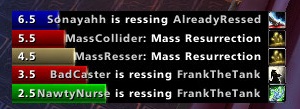
- A frame of colour-coded bars provides a visual display of resurrections. (Not ready as of June, 2024).
- If you have a combat res spell, there is an option to switch the manual target key bind to the spell during combat, and back to your regular res spell out of combat.
- SmartRes2 supports all WoW versions that have been released as of June, 2024. The War Within is planned, but I do not have access to the beta.
Translating
People can start localizing SmartRes2 via the Wowace web portal. As of June 6, 2024, the current words and phrases are set; however, there will be more added and those added later may change as development progresses.
API
Addon authors are welcome to write their own modules and plug their options into SmartRes2. There is a Public API which has the basics. More instructions will be added as development advances.
Preview Screenshots
These are not final, and are subject to change, especially as I add features.
Comments


-

Sygon_Paul Owner
-

_ForgeUser4646792 Tester
-
_ForgeUser9586121 Tester
-
View User Profile
-
Send Message
Posted Jul 1, 2011@tednik
yes, i replaced that file with the revision - no more error! :) Thanks!
-
View User Profile
-
Send Message
Posted Jul 1, 2011http://www.wowace.com/addons/librescomm-1-0/files/57-r79/
REVISON 79 removes the error
-
View User Profile
-
Send Message
Posted Jun 30, 2011In 4.2.0, error on log in is being generated by this addon because of an error with LibResComm-1.0 (where a ticket has been opened).
-
View User Profile
-
Send Message
Posted Jun 29, 2011An alpha update was released 2 hours before this post.
http://www.wowace.com/addons/librescomm-1-0/
-
View User Profile
-
Send Message
Posted Jun 29, 2011-
View User Profile
-
Send Message
Posted Jun 28, 2011(tail call): ?:
<in C code>: ?
<string>:"safecall Dispatcher[1]":9: in function <[string "safecall Dispatcher[1]"]:5>
(tail call): ?:
AceAddon-3.0-10 (Ace3):543: in function `EnableAddon'
AceAddon-3.0-10 (Ace3):635: in function <Ace3\AceAddon-3.0\AceAddon-3.0.lua:621>
<in C code>: in function `LoadAddOn'
Interface\FrameXML\UIParent.lua:259: in function `UIParentLoadAddOn':
Interface\FrameXML\UIParent.lua:333: in function `TimeManager_LoadUI':
Interface\FrameXML\UIParent.lua:556: in function <Interface\FrameXML\UIParent.lua:531>:
-
View User Profile
-
Send Message
Posted May 4, 2011I change the width for the default profile and this width doesn't save when I log onto another character. Also when I go back to the character I just changed the width for the width doesnt apply. The settings are the same but the width doesn't apply.
Is there a way that one profile saves for all characters? Like bar height/width and even the position of the bar? I have to set the potion for every character.
Thanks.
-
View User Profile
-
Send Message
Posted May 5, 2011-
View User Profile
-
Send Message
Posted Mar 2, 2011-
View User Profile
-
Send Message
Posted Mar 4, 2011-
View User Profile
-
Send Message
Posted Mar 6, 2011this makes it not happen haha.
-
View User Profile
-
Send Message
Posted Feb 16, 2011-
View User Profile
-
Send Message
Posted Feb 18, 2011-
View User Profile
-
Send Message
Posted Feb 10, 2011Release 1.2.5 will include his fixes.
-
View User Profile
-
Send Message
Posted Feb 9, 2011ID: 2
Error occured in: Global
Count: 1
Message: ..\AddOns\SmartRes2\SmartRes2.lua line 72:
Cannot find a library instance of "LibResComm-1.0".
Debug:
[C]: ?
[C]: error()
!Swatter\Support\LibRevision.lua:47: GetLibrary()
SmartRes2\SmartRes2.lua:72: in main chunk
SmartRes2, v1.2.3
so i'm guessing it wasnt actually fixed yet...
-
View User Profile
-
Send Message
Posted Feb 9, 2011-
View User Profile
-
Send Message
Posted Feb 10, 20112x LibResComm-1.0-90072:320: bad argument #1 to 'match' (string expected, got nil)
LibResComm-1.0-90072:320: in function `worldFrameOnMouseDown'
LibResComm-1.0-90072:374: in function <...ibs\LibResComm-1.0\LibResComm-1.0\LibResComm-1.0.lua:373>
<in C code>: ?
-
View User Profile
-
Send Message
Posted Feb 10, 2011-
View User Profile
-
Send Message
Posted Feb 10, 2011http://wow.curse.com/downloads/wow-addons/details/librescomm-1-0.aspx
Errors are the same and all LibRescom.
-
View User Profile
-
Send Message
Posted Feb 9, 20111x SmartRes2-1.2.3\SmartRes2.lua:72: Cannot find a library instance of "LibResComm-1.0".
FlyoutButtonCustom-1.85\libs\libstub\LibStub.lua:40: in function `GetLibrary'
SmartRes2-1.2.3\SmartRes2.lua:72: in main chunk
Locals:
self =
NewLibrary = <function> @ FlyoutButtonCustom\libs\libstub\LibStub.lua:22:
minors =
minor = 3
IterateLibraries = <function> @ FlyoutButtonCustom\libs\libstub\LibStub.lua:48:
GetLibrary = <function> @ FlyoutButtonCustom\libs\libstub\LibStub.lua:38:
libs =
}
major = "LibResComm-1.0"
silent = nil
---