SmartRes2
SmartRes2
The ultimate addon for party and raid recovery after a partial or total wipe. There is a plethora of features, most functional, some are for roleplay.
A Short List of Features
Not every feature exits for every WoW version. For example, settings for mass resurrection spells are not available in Classic Era or Season of Discovery. I am still writing the code, which means there are features which are not done.
- SmartRes2 is lightweight and modular. You can enable or disable almost everything, up to and including entire plugins.
- Create your own random messages for printing to chat to entertain your group.
- Disable or remove chat messages you do not wish to use. There is a recycle bin to restore deleted messages.
- Customize the bar frame with borders, fonts, and more. Future ideas include supporting themes.
- Bind keys for one-click casting of your class resurrection spells, including Hunter pet spells (requires retail, crane and moth pets).
- Non-combat spells intelligently parse your group for dead characters, prioritizing healers, tanks, then DPS. The option to change the priority is being investigated.
- Non-combat resurrection spells, including mass resurrections, check if your cast is the fastest, and if anyone's spell is not the fastest, SmartRes2 can inform them of a collision.
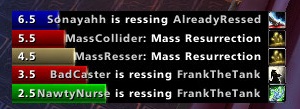
- A frame of colour-coded bars provides a visual display of resurrections. (Not ready as of June, 2024).
- If you have a combat res spell, there is an option to switch the manual target key bind to the spell during combat, and back to your regular res spell out of combat.
- SmartRes2 supports all WoW versions that have been released as of June, 2024. The War Within is planned, but I do not have access to the beta.
Translating
People can start localizing SmartRes2 via the Wowace web portal. As of June 6, 2024, the current words and phrases are set; however, there will be more added and those added later may change as development progresses.
API
Addon authors are welcome to write their own modules and plug their options into SmartRes2. There is a Public API which has the basics. More instructions will be added as development advances.
Preview Screenshots
These are not final, and are subject to change, especially as I add features.
Comments


-

Sygon_Paul Owner
-

_ForgeUser4646792 Tester
-
_ForgeUser9586121 Tester
-
View User Profile
-
Send Message
Posted Feb 9, 2011-
View User Profile
-
Send Message
Posted Feb 9, 2011-
View User Profile
-
Send Message
Posted Feb 9, 2011But after taking a quick look at LibResComm-1.0.lua, where the error was before. I don't think it will work with another locale than the default. Those assignments to "L" doesn't really look right... well at least not consistent.
-
View User Profile
-
Send Message
Posted Feb 9, 2011Glad that is finally fixed. What surprises me is that it worked for enUS and enUK the old way for months. Yet nobody cried foul on other locales, but suddenly patch 4.0.6 messed it all up.
-
View User Profile
-
Send Message
Posted Feb 9, 2011Another problem might be if you, for example, have the locale "esES" and try to look up the translation for "Use Soulstone" you will in worst case get an undefined value back or an empty string. As you are reassigning the whole L array for every locale. If I've missed some "obvious" LUA quirk/feature here then forget I said anything ;)
-
View User Profile
-
Send Message
Posted Feb 9, 2011As for untranslated strings, it should default back to English, and if not, nil error. In which case, that gives a coder incentive to add a translation.
None of this impacts SmartRes2, because SR2 doesn't use LibResComm-1.0's "how/can the user self-res" code.
GridStatusRes and Grid2StatusRes, however, do, I believe. So it is good I was forced to fix the lib, even if it wasn't necessary for SmartRes2.
-
View User Profile
-
Send Message
Posted Feb 9, 2011-
View User Profile
-
Send Message
Posted Feb 5, 2011Akmaud, I read your ticket, and declined, with an explanation. You can read the particulars here.
-
View User Profile
-
Send Message
Posted Jan 15, 2011Priest:
#showtooltip Resurrection
/sr cast
Shaman:
#showtooltip Ancestral Spirit
/sr cast
--------------------
Situation: Dead people in the party.
I click the macro and nothing happens.
Only while solo I do get a message "you are not in a party". But while I am in a party, the smartres macro does not seem to work. Using 1.2.1
-
View User Profile
-
Send Message
Posted Jan 18, 2011-
View User Profile
-
Send Message
Posted Jan 20, 2011While in a party I do not receive any messages. Not even errors.
Only while soloing. The the macro works solo, but in a party it does nothing and i cannot figure out why (and it's hard to find some people for death tests). The bars for people being ressed do show up.
-
View User Profile
-
Send Message
Posted Jan 21, 2011-
View User Profile
-
Send Message
Posted Jan 21, 2011-
View User Profile
-
Send Message
Posted Feb 5, 2011The keybinding works most of the time. If it doesn't work the cursor is holding the spell (turns blue with the rez spell) and you need to click the unit frame to activate it.
Clearing the target and trying again doesn't work.
-
View User Profile
-
Send Message
Posted Feb 5, 2011Right now, I am not playing WoW; my account is in vacation mode, so I will have to pass the ticket to Torhal or Morgalm.
Thank you.
-
View User Profile
-
Send Message
Posted Dec 25, 2010I have only had a very small amount of time to test it, but it seems that the alpha has fixed the errors. Thanks!
-
View User Profile
-
Send Message
Posted Dec 23, 2010Does the latest alpha fix your issues, Josh?
-
View User Profile
-
Send Message
Posted Dec 22, 2010Yep, it is Google Chrome displaying the code as one big long line, rather than nicely formatted.
-
View User Profile
-
Send Message
Posted Dec 19, 2010Hm, it is from BugGrabber. I pasted it as code on here. Perhaps your browser is not displaying it correctly? Anyway, I will make a ticket and just paste the errors as text.
-
View User Profile
-
Send Message
Posted Dec 18, 2010Josh, it is great you posted the error, but the format is useless to me. Please install BugGrabber and BugSack or Swatter, capture the error, and post it into the ticket tracker.