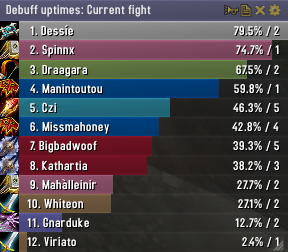
Skada Damage Meter
Skada Damage Meter
Skada is a modular damage meter for World of Warcraft with various viewing modes, segmented fights, and customizable windows. It is designed for efficiency with minimal memory and CPU impact.
"Skada" is Swedish for "Damage".
Midnight Edition (WoW 12.0+)
This version of Skada is updated for World of Warcraft: Midnight and uses Blizzard's new session-based combat systems.
Features
- Midnight Optimized: Uses Blizzard's internal session data for performance and accuracy.
- Combat Reliability: Handles modern combat data restrictions for a stable experience.
- Updated UI: Includes new presets with smooth animations, gradients, and textures.
- Dynamic Elements: Alternating row colors, highlight overlays, spark effects, and icon scaling.
- LDB Integration: Compatible with Data Broker displays such as Titan Panel, ChocolateBar, and ElvUI.
- Extensible Architecture: The API allows developers to create additional plugins.
Usage
Getting Started
A default window is created upon first load. Access the configuration menu by clicking the cog icon on the window title bar or via the minimap button. Select Configure to access settings.
Multiple Windows
Skada supports multiple windows. Create new ones under the Windows section of the configuration panel. Windows can be:
- Bar: The standard customizable meter.
- Inline: A horizontal line for custom UI setups.
- Data Text: For LDB displays and minimal setups.
Navigation
- Left-Click: View more detailed information.
- Right-Click: Return to the previous view.
- Mousewheel: Scroll through lists.
- Tooltips: Hover over bars to see additional context and shortcut keys (e.g., Shift-click for targets).
Themes
Manage window designs with the built-in Theme Engine. You can import and export themes by using theme strings.
Versions
- Midnight (Default): For WoW 12.0+ using the Native API.
- Classic Version: The version for older WoW releases.
Support
If you find Skada helpful, consider supporting its development through GitHub Sponsors.
Links
Comments


-

zarnivoop Owner
-
View User Profile
-
Send Message
Posted Nov 2, 2009-
View User Profile
-
Send Message
Posted Oct 27, 20091. If I logoff or DC midfight I lose the ability to see damage done to particular enemies. It displays total damage done and damage done by ability fine, but the damage done to enemies is blank.
2. Sometimes when I hover over someone it displays the info for someone else.
Anyone else run into these issues?
-
View User Profile
-
Send Message
Posted Oct 17, 2009Thanks
-
View User Profile
-
Send Message
Posted Oct 26, 2009Hope it gets fixed!!! Sooooooooon!!! :)
-
View User Profile
-
Send Message
Posted Oct 13, 2009-
View User Profile
-
Send Message
Posted Oct 11, 2009Was looking promising for a while but it now seems quite static, remaining unchanged despite there being a couple of annoying bugs...
... such as the fact that when I use Skada's threat display, quite often it will display threat bars for everyone except myself. Whether this happens or not appears to be quite random.
-
View User Profile
-
Send Message
Posted Oct 13, 2009-
View User Profile
-
Send Message
Posted Oct 9, 2009Still a good addon though ;)
-
View User Profile
-
Send Message
Posted Oct 6, 2009-
View User Profile
-
Send Message
Posted Oct 4, 2009Also, for ALL THESE KIND OF MESSAGES:
''I find a automatic mining addon
www.*WILLNOTPOSTLINK.cn
I appreciate all the hard work you've put into it.Very simple.''
is KEYLOGGERS and SPYWARE. Do NOT go to these websites, they tell you ''addons'' wich are temptating to download. But infact, there is no addons, just a file wich will ruin YOUR work.
-
View User Profile
-
Send Message
Posted Oct 4, 2009I have the same issue as Kelem, it conflicts with the hide as solo option, either one on their own works fine but with both skada comes up in pvp
-
View User Profile
-
Send Message
Posted Sep 29, 2009-
View User Profile
-
Send Message
Posted Sep 13, 2009autohide in pvp works fine for me, what puzzles me tho is that skada consistently reports around 200-500dps less than recount, the percentages are the same but the dps is always lower why is this ? i don;t wanna go back to that memory hog which recount is. also that would mean installing omen again and no mode switching D:
-
View User Profile
-
Send Message
Posted Sep 9, 2009-
View User Profile
-
Send Message
Posted Oct 3, 2009http://static.wowace.com/content/files/379/752/Skada-r271.zip
-
View User Profile
-
Send Message
Posted Sep 7, 2009[2009/09/07 20:11:15-362-x1]: Skada-1.2-21\Skada.lua:618: bad argument #2 to 'format' (string expected, got nil)
Skada-1.2-21\Skada.lua:618: in function `Report'
Skada-1.2-21\Skada.lua:1178: in function `func'
Interface\FrameXML\UIDropDownMenu.lua:563: in function `UIDropDownMenuButton_OnClick':
<string>:"*:OnClick":1: in function <[string "*:OnClick"]:1>
-
View User Profile
-
Send Message
Posted Sep 7, 2009Just me or does it not auto hide and stay that way during pvp for anyone else?
-
View User Profile
-
Send Message
Posted Sep 7, 2009Hey Zarnivoop,
first at all -> Great Addon =)
But for alle UI-costumizer ... you have forgotten to add the window names to your skada windows... so, all users who wants to parent or anchor the skada frame to their kgpanels(for example) ... wont work :\
I hope you read this and we can cheer up with the next hotfix to find an windowname of the skada windows :)
-
View User Profile
-
Send Message
Posted Sep 3, 2009I play a Disc Priest and it's actually a decent portion of my healing, and people take a look at Total Healing and neglect Absorbs.
-
View User Profile
-
Send Message
Posted Sep 2, 2009Also, it would be great if we could mouseover the line of the Death log and get a tooltip of the full text: my window is not wide enough to see it all and I don't want to expand it just to handle 10% of its functionality.
Overall, I love the combination of Omen, Recount, and Grim! I'll never go back.