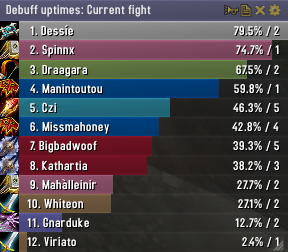
Skada Damage Meter
Skada Damage Meter
Skada is a modular damage meter for World of Warcraft with various viewing modes, segmented fights, and customizable windows. It is designed for efficiency with minimal memory and CPU impact.
"Skada" is Swedish for "Damage".
Midnight Edition (WoW 12.0+)
This version of Skada is updated for World of Warcraft: Midnight and uses Blizzard's new session-based combat systems.
Features
- Midnight Optimized: Uses Blizzard's internal session data for performance and accuracy.
- Combat Reliability: Handles modern combat data restrictions for a stable experience.
- Updated UI: Includes new presets with smooth animations, gradients, and textures.
- Dynamic Elements: Alternating row colors, highlight overlays, spark effects, and icon scaling.
- LDB Integration: Compatible with Data Broker displays such as Titan Panel, ChocolateBar, and ElvUI.
- Extensible Architecture: The API allows developers to create additional plugins.
Usage
Getting Started
A default window is created upon first load. Access the configuration menu by clicking the cog icon on the window title bar or via the minimap button. Select Configure to access settings.
Multiple Windows
Skada supports multiple windows. Create new ones under the Windows section of the configuration panel. Windows can be:
- Bar: The standard customizable meter.
- Inline: A horizontal line for custom UI setups.
- Data Text: For LDB displays and minimal setups.
Navigation
- Left-Click: View more detailed information.
- Right-Click: Return to the previous view.
- Mousewheel: Scroll through lists.
- Tooltips: Hover over bars to see additional context and shortcut keys (e.g., Shift-click for targets).
Themes
Manage window designs with the built-in Theme Engine. You can import and export themes by using theme strings.
Versions
- Midnight (Default): For WoW 12.0+ using the Native API.
- Classic Version: The version for older WoW releases.
Support
If you find Skada helpful, consider supporting its development through GitHub Sponsors.
Links
Comments


-

zarnivoop Owner
-
View User Profile
-
Send Message
Posted Sep 30, 2011-
View User Profile
-
Send Message
Posted Sep 27, 2011http://www.wowace.com/addons/skada/files/
-
View User Profile
-
Send Message
Posted Sep 25, 2011-
View User Profile
-
Send Message
Posted Sep 27, 2011-
View User Profile
-
Send Message
Posted Sep 19, 2011Lately, however, it has been doing something very annoying. I always want the damage meters set to show current fight, but it defaults to total whenever I log in. This started very recently and is bothersome to the point that I may uninstall Skada if a solution to this can't be found. I've already looked through the addon options but found nothing pertaining to defaults for how the information is displayed.
Thank you for your time.
-
View User Profile
-
Send Message
Posted Sep 20, 2011-
View User Profile
-
Send Message
Posted Sep 27, 2011I'd really like to be able to move skada outside the visible area.
-
View User Profile
-
Send Message
Posted Sep 19, 2011i would like to drag the skada window outside of the visible area of my monitor like the previous skada version allowed to.
Is this still possible somehow?
Thank you very much
-
View User Profile
-
Send Message
Posted Sep 13, 2011-
View User Profile
-
Send Message
Posted Sep 13, 2011I dont wanna go back to Recount, but looks like I might have to, no one wants BG stats...
-
View User Profile
-
Send Message
Posted Sep 10, 2011Message: Interface\AddOns\SkadaDamage\Damage.lua:316: attempt to index local 'player' (a nil value)
Time: 09/10/11 12:11:59
Count: 4
Stack: Interface\AddOns\SkadaDamage\Damage.lua:316: in function `Enter'
Interface\AddOns\Skada\Skada.lua:1901: in function `AddSubviewToTooltip'
Interface\AddOns\Skada\BarDisplay.lua:145: in function <Interface\AddOns\Skada\BarDisplay.lua:122>
Interface\AddOns\Skada\BarDisplay.lua:251: in function <Interface\AddOns\Skada\BarDisplay.lua:251>
Locals: self =
SetDefaultModuleLibraries = <function> defined @Interface\AddOns\BigWigs\Libs\AceAddon-3.0\AceAddon-3.0.lua:383
Enable = <function> defined @Interface\AddOns\BigWigs\Libs\AceAddon-3.0\AceAddon-3.0.lua:315
NewModule = <function> defined @Interface\AddOns\BigWigs\Libs\AceAddon-3.0\AceAddon-3.0.lua:256
Update = <function> defined @Interface\AddOns\SkadaDamage\Damage.lua:320
EnableModule = <function> defined @Interface\AddOns\BigWigs\Libs\AceAddon-3.0\AceAddon-3.0.lua:348
modules =
}
GetModule = <function> defined @Interface\AddOns\BigWigs\Libs\AceAddon-3.0\AceAddon-3.0.lua:231
IterateEmbeds = <function> defined @Interface\AddOns\BigWigs\Libs\AceAddon-3.0\AceAddon-3.0.lua:458
IsModule = <function> defined @Interface\AddOns\BigWigs\Libs\AceAddon-3.0\AceAddon-3.0.lua:238
title = "Cairee's Damaged mobs"
defaultModuleLibraries =
}
playerid = "0x05000000024DEC22"
scanned = true
SetEnabledState = <function> defined @Interface\AddOns\BigWigs\Libs\AceAddon-3.0\AceAddon-3.0.lua:440
defaultModuleState = true
enabledState = true
baseName = "SkadaDamage"
Disable = <function> defined @Interface\AddOns\BigWigs\Libs\AceAddon-3.0\AceAddon-3.0.lua:330
moduleName = "Damaged mobs"
GetName = <function> defined @Interface\AddOns\BigWigs\Libs\AceAddon-3.0\AceAddon-3.0.lua:300
metadata =
}
Enter = <function> defined @Interface\AddOns\SkadaDamage\Damage.lua:313
IterateModules = <function> defined @Interface\AddOns\BigWigs\Libs\AceAddon-3.0\AceAddon-3.0.lua:453
name = "Skada_Damaged mobs"
SetDefaultModulePrototype = <function> defined @Interface\AddOns\BigWigs\Libs\AceAddon-3.0\AceAddon-3.0.lua:425
IsEnabled = <function> defined @Interface\AddOns\BigWigs\Libs\AceAddon-3.0\AceAddon-3.0.lua:467
orderedModules =
}
SetDefaultModuleState = <function> defined @Interface\AddOns\BigWigs\Libs\AceAddon-3.0\AceAddon-3.0.lua:403
DisableModule = <function> defined @Interface\AddOns\BigWigs\Libs\AceAddon-3.0\AceAddon-3.0.lua:366
}
win =
changed = false
selectedmode =
}
selectedset = 1
history =
}
metadata =
}
bargroup = SkadaBarWindowSkada {
}
display =
}
usealt = true
dataset =
}
db =
}
}
id = "0x05000000024DEC22"
label = "Yukio"
player = nil
(*temporary) =
SetDefaultModuleLibraries = <function> defined @Interface\AddOns\BigWigs\Libs\AceAddon-3.0\AceAddon-3.0.lua:383
Enable = <function> defined @Interface\AddOns\BigWigs\Libs\AceAddon-3.0\AceAddon-3.0.lua:315
NewModule = <function> defined @Interface\AddOns\BigWigs\Libs\AceAddon-3.0\AceAddon-3.0.lua:256
Update = <function> defined @Interface\AddOns\SkadaDamage\Damage.lua:320
EnableModule = <function> defined @Interface\AddOns\BigWigs\Libs\AceAddon-3.0\AceAddon-3.0.lua:348
modules =
}
GetModule = <function> defined @Interface\AddOns\BigWigs\Libs\AceAddon-3.0\AceAddon-3.0.lua:231
IterateEmbeds = <function> defined @Interface\AddOns\BigWigs\Libs\AceAddon-3.0\AceAddon-3.0.lua:458
IsModule = <function> defined @Interface\AddOns\BigWigs\Libs\AceAddon-3.0\AceAddon-3.0.lua:238
title = "Cairee's Damaged mobs"
defaultModuleLibraries =
}
playerid = "0x05000000024DEC22"
scanned = true
SetEnabledState = <function> defined @Interface\AddOns\BigWigs\Libs\AceAddon-3.0\AceAddon-3.0.lua:440
defaultModuleState = true
enabledState = true
baseName = "SkadaDamage"
Disable = <function> defined @Interface\AddOns\BigWigs\Libs\AceAddon-3.0\AceAdd
-
View User Profile
-
Send Message
Posted Sep 14, 2011-
View User Profile
-
Send Message
Posted Sep 9, 2011-
View User Profile
-
Send Message
Posted Sep 6, 2011mb i'm bit stupid - but i tirned off skada window by kross & now i can't get it back on - could u help me, /command or some how else. cuz i tried & checked all options & could not get it back on! so pissed off of it.
Thanx, hope on soonest replay.
-
View User Profile
-
Send Message
Posted Sep 2, 2011Date: 2011-09-02 16:15:07
ID: 1
Error occured in: Global
Count: 1
Message: ..\AddOns\Skada\Skada.lua line 1245:
attempt to index local 'set' (a nil value)
Debug:
(tail call): ?
[C]: ?
Skada\Skada.lua:1245: get_player()
GTFO\GTFO_Skada.lua:30:
GTFO\GTFO_Skada.lua:28
GTFO\GTFO_Skada.lua:264: GTFO_RecordSkada()
GTFO\GTFO.lua:1790: GTFO_RecordStats()
GTFO\GTFO.lua:825: GTFO_OnEvent()
[string "*:OnEvent"]:1:
[string "*:OnEvent"]:1
-
View User Profile
-
Send Message
Posted Sep 4, 2011-
View User Profile
-
Send Message
Posted Sep 5, 2011I have updated GTFO in the next version to account for this situation.
-
View User Profile
-
Send Message
Posted Sep 1, 2011-
View User Profile
-
Send Message
Posted Sep 1, 2011-
View User Profile
-
Send Message
Posted Sep 1, 2011