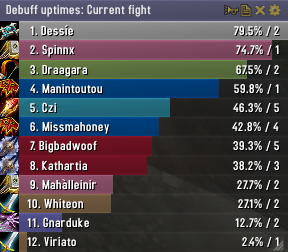
Skada Damage Meter
Skada Damage Meter
Skada is a modular damage meter for World of Warcraft with various viewing modes, segmented fights, and customizable windows. It is designed for efficiency with minimal memory and CPU impact.
"Skada" is Swedish for "Damage".
Midnight Edition (WoW 12.0+)
This version of Skada is updated for World of Warcraft: Midnight and uses Blizzard's new session-based combat systems.
Features
- Midnight Optimized: Uses Blizzard's internal session data for performance and accuracy.
- Combat Reliability: Handles modern combat data restrictions for a stable experience.
- Updated UI: Includes new presets with smooth animations, gradients, and textures.
- Dynamic Elements: Alternating row colors, highlight overlays, spark effects, and icon scaling.
- LDB Integration: Compatible with Data Broker displays such as Titan Panel, ChocolateBar, and ElvUI.
- Extensible Architecture: The API allows developers to create additional plugins.
Usage
Getting Started
A default window is created upon first load. Access the configuration menu by clicking the cog icon on the window title bar or via the minimap button. Select Configure to access settings.
Multiple Windows
Skada supports multiple windows. Create new ones under the Windows section of the configuration panel. Windows can be:
- Bar: The standard customizable meter.
- Inline: A horizontal line for custom UI setups.
- Data Text: For LDB displays and minimal setups.
Navigation
- Left-Click: View more detailed information.
- Right-Click: Return to the previous view.
- Mousewheel: Scroll through lists.
- Tooltips: Hover over bars to see additional context and shortcut keys (e.g., Shift-click for targets).
Themes
Manage window designs with the built-in Theme Engine. You can import and export themes by using theme strings.
Versions
- Midnight (Default): For WoW 12.0+ using the Native API.
- Classic Version: The version for older WoW releases.
Support
If you find Skada helpful, consider supporting its development through GitHub Sponsors.
Links
Comments


-

zarnivoop Owner
-
View User Profile
-
Send Message
Posted Jul 20, 2014Today i decided to install skada instead of recount, which i have used for years.
however, with skada as soon as i get into combat WoW gets a crit error and closes. No matter which character i use, upon entering any kind of combat i get kicked out of the game with a crit error.
I removed skada and not had a crit error since.
any suggestions? i wanted to change to skada so i can have both damage done and healing showing during raids.
Thanks.
-
View User Profile
-
Send Message
Posted Jul 10, 2014Is there any way to get Skada to show damage taken minus self healing? Would be good for evaluating raid members' survivability skill usage.
-
View User Profile
-
Send Message
Posted Jul 12, 2014I have the same question. If it's not possible, I'll have to switch back to Recount :-/
-
View User Profile
-
Send Message
Posted Jul 9, 2014How do I make skada show healing ticks? For example Recount shows that over a fight my Healing rain ticked say 800 times, but I can't figure this out on Skada
-
View User Profile
-
Send Message
Posted Jul 6, 2014Not too long ago I switched from Recount to Skada and I have been loving the change. One thing, though: On the bars, Recount used to show the player's realm name next to their character's name. Skada does not do that, sadly. If the author of this addon sees this or if someone out there who knows how to write this stuff would be so kind, I would *really* like to see that functionality added one day.
-
View User Profile
-
Send Message
Posted Jul 5, 2014Woot! it's working ;)
Actually before I did my first post I was looking in wow files if I could find the "saved data" of Skada but I couldn't! thx Oscarucb!
-
View User Profile
-
Send Message
Posted Jul 3, 2014Yo,
Alors j'ai un "petit" problème avec Skada depuis plusieurs mois qui fait que je l'utilise plus mais je voudrais m'y remettre:
A chaque fois que je me connecte sur un de mes persos j'ai le message suivant " Votre ordinateur n’a pas assez de mémoire pour charger les paramètres de l’add-on suivant. Veuillez désactiver quelques add-ons" en parlant de Skada bien sûr. J'ai trouvé un post qui explique ce problème mais pas tellement comment le résoudre http://eu.battle.net/wow/fr/forum/topic/7713901834
Avant tout fonctionnait bien et du jour au lendemain j'ai eu ce message. A savoir qu'à chaque reconnection tout ce que j'ai modifié juste avant n'est pas sauvegardé, j'ai beau faire des raz de données, quand je me reconnecte je peux encore voir le dps de fights que j'ai fait y'a 5 mois...
J'ai test avec et sans les autres addons que j'utilise (Elvui, gatherer, weakauras, recount, dbm etc) ca ne change rien, même quand skada est mon seul addon j'ai ce message...bug or what?
-
View User Profile
-
Send Message
Posted Jul 3, 2014Sounds like a corrupted SavedVariables file.
If you're using Curse Client, logout, right-click the addon and choose "Delete Settings".
Otherwise, logout and Delete the files:
World of Warcraft/WTF/Account/<name>/SavedVariables/Skada.lua
World of Warcraft/WTF/Account/<name>/<server>/<character>/SavedVariables/Skada.lua
-
View User Profile
-
Send Message
Posted Jul 2, 2014I switched from Recount to Skada ages ago, and imo it is far superior.
I like how you have rolled most of the individual parts into the one core.
The only request I could make is to inclued the Skada Jump module.
-
View User Profile
-
Send Message
Posted Jul 13, 2014This bug is fixed in r566
-
View User Profile
-
Send Message
Posted Jun 29, 2014hello, depuis quelques jours je n'arrive plus à éditer sur le canal raid ou groupe le dps de chacun, j'ai un message d'erreur qui s'affiche.
hello, since a few days I can no longer link to the raid channel (or group or else ) the dps of everyone, I have an error message that appears.
-
View User Profile
-
Send Message
Posted Jun 25, 2014Hi, for the past few weeks (not sure exactly when it started) I've been unable to access the modes column. When I right click on the title bar all the way down to Fights and select any of the options, the next screen (Modes) is completely blank. I can't select Damage, DPS, Healing Done, Deaths, etc; there's just nothing there. I can still change the mode by clicking the icon in the title bar but that defeats the purpose of the fancy menus as well as it being slower.
This occurs even when Skada is the only running addon and it still occurs when I downgraded to a previous version of Skada. Not sure what's going on- if I'm just being dumb or if the addon doesn't like me anymore :(
Edit: I have since discovered that Skada works as intended on one of my realms but the problem above occurs on my other realm. What could possibly be different between them? I've reinstalled and this still persists :(
-
View User Profile
-
Send Message
Posted Jul 3, 2014Sounds like a corrupted SavedVariables file.
If you're using Curse Client, logout, right-click the addon and choose "Delete Settings".
Otherwise, logout and Delete the files:
World of Warcraft/WTF/Account/<name>/SavedVariables/Skada.lua
World of Warcraft/WTF/Account/<name>/<server>/<character>/SavedVariables/Skada.lua
-
View User Profile
-
Send Message
Posted Jun 20, 2014I really like the idea of this add on and its customization... I can't seem to get it to stay put. I've locked the window, tried different positions, but the thing is wiley I'm telling ya... can it be clamped to the screen?
I will even have a treat in my hand when I play if I could get it to stay for me... LOL
-
View User Profile
-
Send Message
Posted Jun 22, 2014Should be fixed in r564
-
View User Profile
-
Send Message
Posted Jun 23, 2014The positioning is broken in r564.
I am using ElvUI, with the "ElvUI AddonSkins" plugin, and using its 'Dual Embed' feature to show 2 Skada windows (dmg & heals) side by side, and docked to the lower right corner of the window.
Skada r654 breaks this functionality - it worked fine in r563 and earlier.
-
View User Profile
-
Send Message
Posted Jun 23, 2014Do you use the same profile on multiple chars with different positions by any chance?
-
View User Profile
-
Send Message
Posted Jun 23, 2014I am using seperate (per character) profiles for every addon.
-
View User Profile
-
Send Message
Posted Jun 10, 2014Is there a way of placing the Skada meter ontop of the action bar. By this I mean, have it sitting on a layer above the action bar so I can see the skada data. I use the default action bars and there is a part of it with no spells which is where I'd like Skada to sit, but unfortunately all I can see is the stone griffin and the skada information hidden underneith.
-
View User Profile
-
Send Message
Posted Jun 9, 2014then i change the bars font size and then i relogg the game it goes back to std size.. anyone knows the problem?