Simple Item Levels
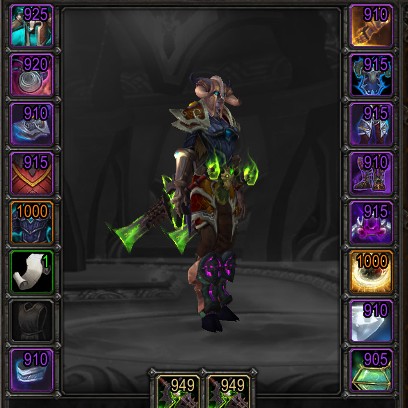
Show item levels on:
- The character panel
- The inspect panel
- Loot windows
- The equipment-picker flyout
- Weapons, armor, and artifact relics in bags (built in, bagnon, baggins, inventorian)
- Tooltips (in classic)
I'm open to adding them in more places.
Also shows:
- An upgrade arrow on items in your bags which you can use whose item level is higher than whatever you currently have equipped.
- A soulbound indicator, so you can see whether something is soulbound, bind-on-equip, or warbound-until-equipped
- Missing enchants and gems
Simple configuration
For a summary of settings:
/simpleilvl
To toggle a place to display item levels:
/simpleilvl [type]
…where type is bags, character, or inspect.
To disable the upgrade arrow:
/simpleilvl upgrades
To change whether the text is colored by item quality or just left white:
/simpleilvl color
Comments

-

Kemayo Owner
-
View User Profile
-
Send Message
Posted Sep 13, 2025Unusable. can only enable when needed otherwise it randomly but eventually crashes the game (MoP Classic).
-
View User Profile
-
Send Message
Posted Sep 14, 2025In reply to BumbleBeTunuh: What kind of timeframe are we talking about? (Minutes? Over an hour?) Is there any sort of error message that the game gives you?
-
View User Profile
-
Send Message
Posted Aug 29, 2025100x bad argument #1 to '?' (Usage: local name, id, timeLimit, texture, backgroundTexture, mapID = C_ChallengeMode.GetMapUIInfo(mapChallengeModeID))
[ItemInfoOverlay/ChatLink.lua]:115: in function <ItemInfoOverlay/ChatLink.lua:13>
[C]: in function 'gsub'
[ItemInfoOverlay/ChatLink.lua]:169: in function 'filterFunc'
[Blizzard_ChatFrameBase/Mainline/ChatFrame.lua]:1416: in function 'ChatFrame_MessageEventHandler'
[Blizzard_ChatFrameBase/Mainline/ChatFrame.lua]:902: in function 'ChatFrame_OnEvent'
[Blizzard_ChatFrameBase/Mainline/FloatingChatFrame.lua]:97: in function <...lizzard_ChatFrameBase/Mainline/FloatingChatFrame.lua:96>
Locals:
itemLink = "|cnIQ4:|Hitem:138019::::::::10:269:::::::::|h[Mythic Keystone]|h|r"
color = "nIQ4:"
metaData = "138019::::::::10:269:::::::::"
itemName = "[Mythic Keystone]"
sourceItemName = "Mythic Keystone"
sourceItemNameWithoutIcon = "Mythic Keystone"
name = "Mythic Keystone"
_ = "|cnIQ4:|Hitem:138019::::::::80:66:::::::::|h[Mythic Keystone]|h
-
View User Profile
-
Send Message
Posted Aug 29, 2025In reply to merthalde:
That seems to be about an addon called ItemInfoOverlay, not this one.
-
View User Profile
-
Send Message
Posted Aug 21, 2025This addon, in its MoP Classic version, keeps crashing my game. I've carefully tested it by enabling and disabling the other addons until I've isolated the problem. So I'm permanently disabling it. Sorry.
-
View User Profile
-
Send Message
Posted Aug 21, 2025In reply to Transiberian: when you’re doing anything in particular?
-
View User Profile
-
Send Message
Posted Aug 13, 2025Hi, I don't know if this feature is already here, but is it possible to see each group member's item level in one place? Like a hover-over minimap button? For a raid group would be hectic, but for an m+ group would be great
-
View User Profile
-
Send Message
Posted Aug 4, 2025weird question but is it possible to make this addon show itemlevel and armor type in itemlinks in chat without having to click them - sort of like that addon ItemLinkLevel ( https://www.curseforge.com/wow/addons/itemlinklevel - it hasnt been updated for a while)
-
View User Profile
-
Send Message
Posted Aug 2, 2025Hey just wanted to say that you cant see inspect avg item level atm because it is hidden behind their weapons
-
View User Profile
-
Send Message
Posted Aug 9, 2025In reply to Smekolini: This has been fixed.
-
View User Profile
-
Send Message
Posted Aug 2, 2025Yo, not a big deal really, but thought it would be good to know, You can't see other players item level when inspecting, it goes under the weapon slots instead of going above it as it does when inspecting yourself :) https://imgur.com/a/0mpU2GD
-
View User Profile
-
Send Message
Posted Aug 9, 2025In reply to Malmqvist1: This has been fixed.
-
View User Profile
-
Send Message
Posted Jul 28, 2025Hi! I’m trying to use a custom upgrade icon in SimpleItemLevel. In addon.lua I changed
button.simpleilvlup:SetAtlas("poi-door-arrow-up")toif button.simpleilvlup then button.simpleilvlup:SetTexture("Interface\\Icons\\UP.tga") button.simpleilvlup:SetTexCoord(0, 1, 0, 1) end. This works perfectly in the character paper doll and in the equipment slot pop-up — my new icon shows up fine there. However, when using the Baganator bag addon, the upgrade arrow in the bag still shows the original icon from SimpleItemLevel. Is there any way to also change the icon for the bag display? Or maybe a simpler method, like overriding a single Icons/UP.tga file that would work everywhere? Thanks!-
View User Profile
-
Send Message
Posted Aug 9, 2025In reply to runningcatstone: At the top of the addon.lua file there's a line `ns.upgradeAtlas = "..."` which you'd need to change. The place you did change it is somewhere that I forgot to update to using that instead, so I've just put up an alpha doing that.
-
View User Profile
-
Send Message
Posted Jul 24, 2025Hey! Not a big deal but addon doesn't work correctly with the old gear - https://imgur.com/6fYAzkc
-
View User Profile
-
Send Message
Posted Aug 9, 2025In reply to Amberian: Amusingly, this is a case where it used to work but Blizzard did something helpful that I didn't notice and so now it doesn't. They added a thing that actually flags the type of line in tooltips that contains the item level, and that made my scanning for it fail to actually detect it. I'll get a fix up now.
-
View User Profile
-
Send Message
Posted Jul 12, 2025Classic Anniversary error [SimpleItemLevel/addon.lua]:503: in function <SimpleItemLevel/addon.lua:498>
126x ...d_InspectUI/Classic/InspectPaperDollFrame_Shared.lua:116: Usage: GetInventoryItemTexture(unit, slot)
[Blizzard_InspectUI/Classic/InspectPaperDollFrame_Shared.lua]:116: in function <...d_InspectUI/Classic/InspectPaperDollFrame_Shared.lua:114>
[C]: in function 'InspectPaperDollItemSlotButton_Update'
[Blizzard_InspectUI/Classic/InspectPaperDollFrame_Shared.lua]:26: in function <...d_InspectUI/Classic/InspectPaperDollFrame_Shared.lua:25>
[C]: in function 'InspectPaperDollFrame_UpdateButtons'
[SimpleItemLevel/addon.lua]:503: in function <SimpleItemLevel/addon.lua:498>
Locals:
button = InspectHeadSlot {
subicon = InspectHeadSlotSubIconTexture {
}
backgroundTextureName = 136516
IconOverlay = Texture {
}
checkRelic = false
Count = InspectHeadSlotCount {
}
IconBorder = Texture {
}
searchOverlay = InspectHeadSlotSearchOverlay {
}
icon = InspectHeadSlotIconTexture {
}
}
unit = nil
-
View User Profile
-
Send Message
Posted Jul 12, 2025In reply to Phantomololo: Huh. Looks like it's very timing-dependent, and I can't even trigger it on a regular classic-era server. I can get a patch up that'll fix it, though.
-
View User Profile
-
Send Message
Posted Jul 6, 2025I hope to add an optional text for gear durability
-
View User Profile
-
Send Message
Posted Jul 5, 2025If just two things could be added to the addon—enchants and gem slots—it would cover the basic essentials that players need to be aware of.
Item level alone isn’t taken seriously once a group leader inspects and sees missing enchants or gems.