In the latest alpha (r59) you can shift-click items/spells directly to the search box. I know there already is the Question Mark + #showtooltip, but hopefully it will be useful for those other cases
Howdy! I have a slight issue... so far this has worked flawlessly for my macros & equipment manager, but, it doesn't work for my guild bank tabs. I've not gotten any lua errors (they are enabled) and I have tried disabling (and completely removing) any addons that manipulate frames (such as MoveAnything & BlizzMove), as well as removed onebank and such, all with no difference.
I didn't mention this on the addon description (sorry), but it technically isn't possible to add the search box for guild bank tabs, the Blizzard UI code doesn't allow it :(
Sorry for still not having it updated for search functionality after a month. Work is under way, but it has been difficult, considering performance and memory usage
I'm trying to use only the search functionality from LibAdvancedIconSelector, while still showing the Blizzard icon selection frame instead of the LibAIS one
I also use Macro Toolkit, which has recently been updated, but it calls the standard macro selection window instead of your Larger window when clicking "Change Name/Icon" or "New". Is that something that you can change (and would be willing to change), or would the MT author have to enable that functionality?
It's not a huge deal, as I can create the macro in MT and just use the default macro UI to open your frame and pick a different icon afterwards if I want.
Thanks for trying to wrangle Blizzard's icons for us!
It looks like Macro Toolkit uses its own frame for showing icons
The author could increase the amount of icons in there, or use the default Blizzard icons popup frame (if possible), then it should show the bigger macro icons window
Otherwise I don't mind to make simple changes the author requests to make it work together
I'm the author of Macro Toolkit. I'm not sure how much there is to be gained from making it compatible with this addon, but I'll have a go if there's demand.
Macro Toolkit already uses LibAdvancedIconSelector, though I've heavily modified it since the author stopped updating it.
The search is still there, but it's limited to icon names - I've abandoned the keyword thing. For reference, there is a FileDataID lookup here but it's well over a meg in size.
I've made a cut down version for Macro Toolkit which you are free to use if it's of any use (Macro Toolkit\modules\textures.lua) but it's far from ideal (or complete). I've removed paths and unneccesary text to get the file size down to just over 400k - still very big though.
Sounds like a hot mess all around! Thanks to the both of you for making macros/icons a bit easier to deal with anyway. I've actually started using Edit Macro Icons in addition to LMIS and MT. It's probably a little faster for me to open up Wowhead's icon search and find the ID I want and plug it into one of the EMI commands. It's a shame that the WoW icon database is so ponderous that going to a website and then pasting data into a command is the fast way to set an icon!
All 3 of these addons help in different ways. Thanks again!
I'm the author of Macro Toolkit. I'm not sure how much there is to be gained from making it compatible with this addon, but I'll have a go if there's demand.
[...]
Sorry for assuming that you weren't using LibAdvancedIconSelector, I will look into using the modified version of the library
Not sure if it's better to support the texture names, or rather the cut down version from your \modules\textures.lua
Seriously though, excellent job. I have been looking for something like this for eons. I had tried to use AdvancedIconSelector and had some issues. Now it's completely broken...
I second the request.... make a search able option, pretty please?!?
I'm glad about addon as is. At least we have more icons at once than pitty 15 icons shown in original UI. In fact why Advanced Icon Selector is broken even I'm able patch it to work with Legion is lack of possibility to search icons by name. Guess why?
Because someone on Blizzard did decide to have identify texture by TextureID instead of real texture name. So make "search" to works someone must to do data mining and create table with relation from TextureID to TextureName. Actually in WoW API there is no function where is possible convert TextureID to TextureName as far as I do know.
It's possible to add a (very basic) search bar, but not as advanced as AdvancedIconSelector
The first problem is that in Legion the macro icon texture paths were changed into FileDataIDs so there needs to be a library for that
The second problem is, we would then only be able to do a simple search on texture paths, unlike AdvancedIconSelector which also makes icons searchable with custom keywords
The third problem is, well... I'm an idiot. This is all new to me
I was hoping AdvancedIconSelector could get patched up. But it suffers the same FileDataIDs problem and incomplete keywords data, while the author seems to be MIA
TL;DR a (very basic) search box for texture paths could be added, but we need that (standalone?) library
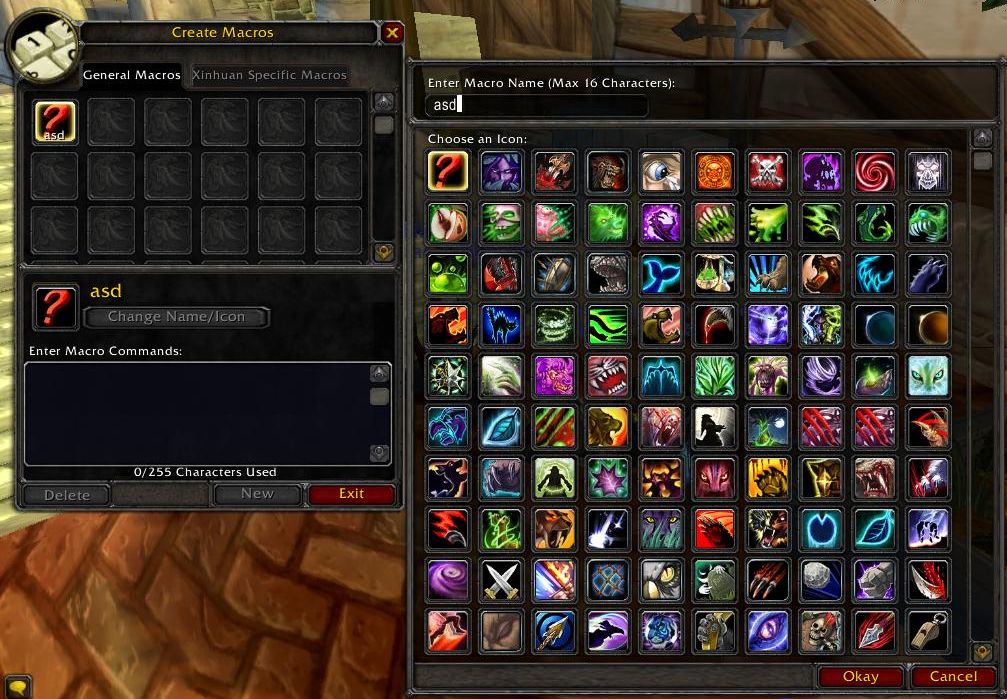


-
View User Profile
-
Send Message
Posted Mar 10, 2017(edit) that seems to be from the BetterIconSelect addon
-
View User Profile
-
Send Message
Posted Oct 25, 2016In the latest alpha (r59) you can shift-click items/spells directly to the search box. I know there already is the Question Mark + #showtooltip, but hopefully it will be useful for those other cases
https://gfycat.com/AnguishedPalatableBetafish
-
View User Profile
-
Send Message
Posted Oct 24, 2016Howdy! I have a slight issue... so far this has worked flawlessly for my macros & equipment manager, but, it doesn't work for my guild bank tabs. I've not gotten any lua errors (they are enabled) and I have tried disabling (and completely removing) any addons that manipulate frames (such as MoveAnything & BlizzMove), as well as removed onebank and such, all with no difference.
(Sept 10 build).
Any suggestions? Thank you!
-
View User Profile
-
Send Message
Posted Oct 24, 2016I didn't mention this on the addon description (sorry), but it technically isn't possible to add the search box for guild bank tabs, the Blizzard UI code doesn't allow it :(
https://www.wowace.com/addons/larger-macro-icon-selection/tickets/7-guild-vault-no-search-bar/
-
View User Profile
-
Send Message
Posted Aug 28, 2016add pls spellID search...
-
View User Profile
-
Send Message
Posted Aug 29, 2016Searching for IDs has now been added :)
https://gfycat.com/WarmThankfulGrouper
Any of the following examples will work
-
View User Profile
-
Send Message
Posted Sep 12, 2016Curse comments need an upvote system. :D
-
View User Profile
-
Send Message
Posted Aug 27, 2016There is a search box now for Macro and Equipment Manager icons
https://gfycat.com/WaterloggedNeighboringBorderterrier
It's not technically possible to add the search box for the Guild Bank though
Note: there is a Blizzard bug, for anyone using a custom icon pack
(Edit 8/31) Applied a workaround fix for icon packs in v1.1.2
-
View User Profile
-
Send Message
Posted Aug 27, 2016OMG, I love you! Thanks so much for implementing this!
-
View User Profile
-
Send Message
Posted Aug 27, 2016Awesome!
-
View User Profile
-
Send Message
Posted Aug 25, 2016Sorry for still not having it updated for search functionality after a month. Work is under way, but it has been difficult, considering performance and memory usage
I'm trying to use only the search functionality from LibAdvancedIconSelector, while still showing the Blizzard icon selection frame instead of the LibAIS one
-
View User Profile
-
Send Message
Posted Jul 23, 2016I also use Macro Toolkit, which has recently been updated, but it calls the standard macro selection window instead of your Larger window when clicking "Change Name/Icon" or "New". Is that something that you can change (and would be willing to change), or would the MT author have to enable that functionality?
It's not a huge deal, as I can create the macro in MT and just use the default macro UI to open your frame and pick a different icon afterwards if I want.
Thanks for trying to wrangle Blizzard's icons for us!
-
View User Profile
-
Send Message
Posted Jul 23, 2016It looks like Macro Toolkit uses its own frame for showing icons
The author could increase the amount of icons in there, or use the default Blizzard icons popup frame (if possible), then it should show the bigger macro icons window
Otherwise I don't mind to make simple changes the author requests to make it work together
(Edit) He could use LibAdvancedIconSelector instead, there is an updated version of it in Bear in Mind
-
View User Profile
-
Send Message
Posted Aug 15, 2016Hi,
I'm the author of Macro Toolkit. I'm not sure how much there is to be gained from making it compatible with this addon, but I'll have a go if there's demand.
Macro Toolkit already uses LibAdvancedIconSelector, though I've heavily modified it since the author stopped updating it.
The search is still there, but it's limited to icon names - I've abandoned the keyword thing. For reference, there is a FileDataID lookup here but it's well over a meg in size.
I've made a cut down version for Macro Toolkit which you are free to use if it's of any use (Macro Toolkit\modules\textures.lua) but it's far from ideal (or complete). I've removed paths and unneccesary text to get the file size down to just over 400k - still very big though.
-
View User Profile
-
Send Message
Posted Aug 15, 2016Sounds like a hot mess all around! Thanks to the both of you for making macros/icons a bit easier to deal with anyway. I've actually started using Edit Macro Icons in addition to LMIS and MT. It's probably a little faster for me to open up Wowhead's icon search and find the ID I want and plug it into one of the EMI commands. It's a shame that the WoW icon database is so ponderous that going to a website and then pasting data into a command is the fast way to set an icon!
All 3 of these addons help in different ways. Thanks again!
-
View User Profile
-
Send Message
Posted Aug 16, 2016-
View User Profile
-
Send Message
Posted Jul 23, 2016Thank you. I love you. Can I have your baby?
Seriously though, excellent job. I have been looking for something like this for eons. I had tried to use AdvancedIconSelector and had some issues. Now it's completely broken...
I second the request.... make a search able option, pretty please?!?
-
View User Profile
-
Send Message
Posted Jul 23, 2016I'm glad about addon as is. At least we have more icons at once than pitty 15 icons shown in original UI. In fact why Advanced Icon Selector is broken even I'm able patch it to work with Legion is lack of possibility to search icons by name. Guess why?
Because someone on Blizzard did decide to have identify texture by TextureID instead of real texture name. So make "search" to works someone must to do data mining and create table with relation from TextureID to TextureName. Actually in WoW API there is no function where is possible convert TextureID to TextureName as far as I do know.
-
View User Profile
-
Send Message
Posted Jul 23, 2016It's possible to add a (very basic) search bar, but not as advanced as AdvancedIconSelector
The first problem is that in Legion the macro icon texture paths were changed into FileDataIDs so there needs to be a library for that
The second problem is, we would then only be able to do a simple search on texture paths, unlike AdvancedIconSelector which also makes icons searchable with custom keywords
The third problem is, well... I'm an idiot. This is all new to me
I was hoping AdvancedIconSelector could get patched up. But it suffers the same FileDataIDs problem and incomplete keywords data, while the author seems to be MIA
TL;DR a (very basic) search box for texture paths could be added, but we need that (standalone?) library
-
View User Profile
-
Send Message
Posted Jul 23, 2016