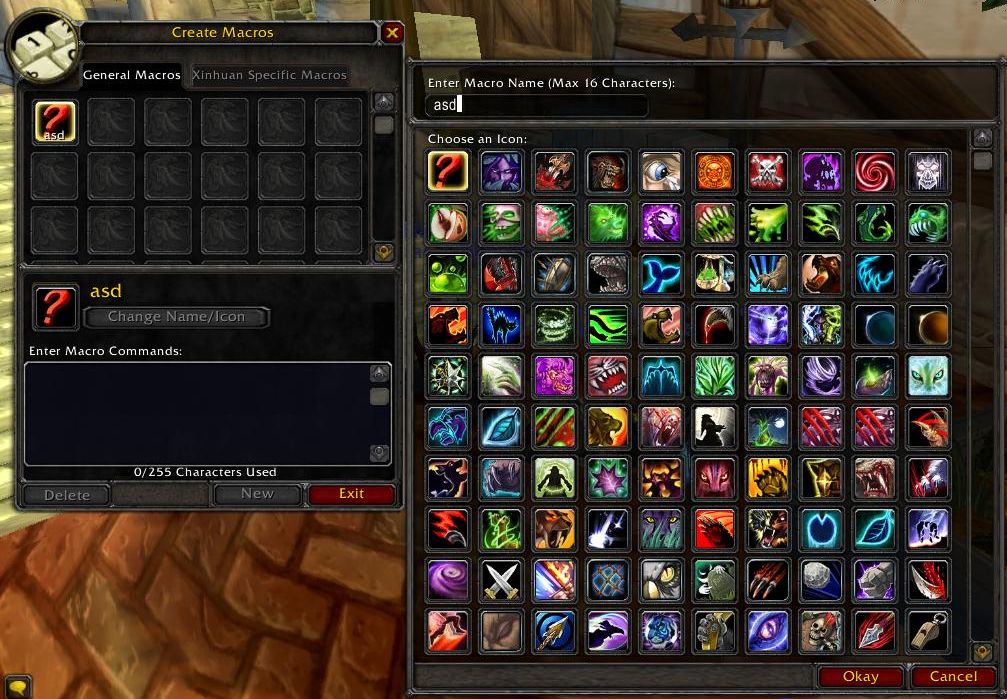
It's possible to add a (very basic) search bar, but not as advanced as AdvancedIconSelector
The first problem is that in Legion the macro icon texture paths were changed into FileDataIDs so there needs to be a library for that
The second problem is, we would then only be able to do a simple search on texture paths, unlike AdvancedIconSelector which also makes icons searchable with custom keywords
The third problem is, well... I'm an idiot. This is all new to me
I was hoping AdvancedIconSelector could get patched up. But it suffers the same FileDataIDs problem and incomplete keywords data, while the author seems to be MIA
TL;DR a (very basic) search box for texture paths could be added, but we need that (standalone?) library
^^The person that updated AdvancedIconSelector for WoD has recently said the same thing. Looks like he/she is *maybe* going to try to create a custom dictionary of IDs <==> names/keywords, but it sounds like long, tedious work.
It's a shame that Blizzard has made it even more difficult to parse and find icons, considering their icon library is only getting more massive with each patch.
Seriously wish you would pick up working on this addon again, it's awesome but way out of date :/
Like others have mentioned, the window does not have all the new icons which is a real shame and as requested by others as well, I would love to see your improvet icon window for equipment sets, guild bank tabs, etc. etc.
Will this be updated for 5.04? Icons are missing now. There are a lot of new ones for Mists of Pandaria that were added. Also, it seems that there are a lot of icons that are appearing in duplicate and/or triplicate in the default view. So, maybe all of this has changed how the icons appear with the addon installed.
LOVE this :D Please please make an option to rescale all other icon selection windows too tho, such as equipment set icons, bank tab icons, etc etc etc
For anyone having issues after 4.3 you have to replace lines 93-105 in the lua with the code below...
starting at line 93...
local numMacroIcons = #(GetMacroIcons()); local macroPopupIcon, macroPopupButton; local macroPopupOffset = FauxScrollFrame_GetOffset(MacroPopupScrollFrame); local index; local texture;
for i=1, NUM_MACRO_ICONS_SHOWN do macroPopupIcon = _G["MacroPopupButton"..i.."Icon"]; macroPopupButton = _G["MacroPopupButton"..i]; index = (macroPopupOffset * NUM_ICONS_PER_ROW) + i; texture = GetSpellorMacroIconInfo(index); if ( index <= numMacroIcons and texture ) then macroPopupIcon:SetTexture("INTERFACE\\ICONS\\"..texture);
That worked perfectly! The only difference is that mine wasn't on those lines.
For anyone else wanting to fix this on their own, look for the lines:
local function Hooked_MacroPopupFrame_Update()
and
macroPopupButton:Hide();
Place the update info posted by JudFromHud between those two lines and save the lua file. Mine started working immediately upon opening my macros, even though I was still in the game when I changed it.


-
View User Profile
-
Send Message
Posted Jul 23, 2016It's a shame that Blizzard has made it even more difficult to parse and find icons, considering their icon library is only getting more massive with each patch.
-
View User Profile
-
Send Message
Posted Apr 19, 2014Seriously wish you would pick up working on this addon again, it's awesome but way out of date :/
Like others have mentioned, the window does not have all the new icons which is a real shame and as requested by others as well, I would love to see your improvet icon window for equipment sets, guild bank tabs, etc. etc.
In any case, awesome addon ;)
-
View User Profile
-
Send Message
Posted Jan 26, 2014Love the addon wish you would update :)
-
View User Profile
-
Send Message
Posted Oct 20, 2012I just installed this after 5.0.4, did commandsto no avail (get chat message saying 'Type /help for a listing...
/lmis 10 10
/lmis 10,10
/lmis width 10 height 10
-
View User Profile
-
Send Message
Posted Aug 31, 2012Will this be updated for 5.04? Icons are missing now. There are a lot of new ones for Mists of Pandaria that were added. Also, it seems that there are a lot of icons that are appearing in duplicate and/or triplicate in the default view. So, maybe all of this has changed how the icons appear with the addon installed.
Other than that, great addon!
-
View User Profile
-
Send Message
Posted Jul 8, 2012Just found this great addon. Takes a bit of the frustration away when creating macros & searching for the correct spell icon.
I wondered the same though... is it possible for you to make it work with the item sets icon selection window?
-
View User Profile
-
Send Message
Posted Jun 7, 2012@Twopro
Aah, I knew about that one but haven't checked it out. Thanks!
-
View User Profile
-
Send Message
Posted Mar 21, 2012LOVE this :D
Please please make an option to rescale all other icon selection windows too tho, such as equipment set icons, bank tab icons, etc etc etc
-
View User Profile
-
Send Message
Posted Feb 29, 2012@spiralofhope
advancediconselector, advancediconselector[keyworddata]
http://www.wowinterface.com/downloads/info20821-AdvancedIconSelector.html
-
View User Profile
-
Send Message
Posted Jan 27, 2012Could you please make same for item set selection menu? :3
-
View User Profile
-
Send Message
Posted Dec 3, 2011@Twopro
No, what's it called?
-
View User Profile
-
Send Message
Posted Dec 3, 2011um did u know there is already an addon that does this but you can resize your window scale frame?
-
View User Profile
-
Send Message
Posted Dec 2, 2011For anyone having issues after 4.3 you have to replace lines 93-105 in the lua with the code below...
starting at line 93...
local numMacroIcons = #(GetMacroIcons());
local macroPopupIcon, macroPopupButton;
local macroPopupOffset = FauxScrollFrame_GetOffset(MacroPopupScrollFrame);
local index;
local texture;
for i=1, NUM_MACRO_ICONS_SHOWN do
macroPopupIcon = _G["MacroPopupButton"..i.."Icon"];
macroPopupButton = _G["MacroPopupButton"..i];
index = (macroPopupOffset * NUM_ICONS_PER_ROW) + i;
texture = GetSpellorMacroIconInfo(index);
if ( index <= numMacroIcons and texture ) then
macroPopupIcon:SetTexture("INTERFACE\\ICONS\\"..texture);
-
View User Profile
-
Send Message
Posted Jan 31, 2013@JudFromHud
That worked perfectly! The only difference is that mine wasn't on those lines.
For anyone else wanting to fix this on their own, look for the lines:
local function Hooked_MacroPopupFrame_Update()
and
macroPopupButton:Hide();
Place the update info posted by JudFromHud between those two lines and save the lua file. Mine started working immediately upon opening my macros, even though I was still in the game when I changed it.
-
View User Profile
-
Send Message
Posted Oct 27, 2011i love it. but it would be nice if we could get the same benefit on the other icon selection screens in game, specifically, the guild bank tabs.
thanks for the great addon.
-
View User Profile
-
Send Message
Posted Nov 28, 2011Love it and agree with the previous commenter about possible support for the guild bank tabs.
-
View User Profile
-
Send Message
Posted Aug 15, 2011although mostly use #tooltip
thanks.
-
View User Profile
-
Send Message
Posted May 4, 2011will still try it out.
-
View User Profile
-
Send Message
Posted May 4, 2011buttons at the top of the icon window:
warrior warlock rogue mage hunter deathknight druid shaman priest paladin and Misc
-
View User Profile
-
Send Message
Posted Apr 6, 2011