Elkano's BuffBars
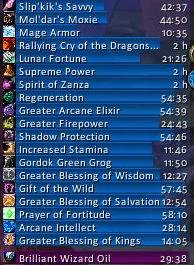
EBB provides groups of statusbar style indicators to show (de)buffs currently affecting your char or some other units (currently focus, pet and target). For the player, it can also show indicators for temporary enchants place on it's weapons.
Due to changes Blizzard made with WoW 4.x it's no longer possible to cancel buffs without the use of secure frames. Currently EBB limits canceling of buffs to out-of-fight since using SecureAuraHeader would have required a major code restructuring. This will be coming in a later version.
Version 2.x is a total recode based on the Ace2 framework which became necessary in order to support some of the longtime wanted and suggested features. It's now possible to show different groups of bars which can be configured in many ways. Each group can be assigned an individual look and filter settings. EBB can be configured via a dropdown menu which is accessible via chat (/ebb config), FuBar plugin or (for the group settings) by right clicking the groups anchor. After setting up a group, its anchor can be hidden by alt-left clicking a bar or the anchor itself in order to lock the group in place.
In order to get additional bar textures and fonts for EBB simply install SharedMedia which is available for download under http://wow.curse.com/downloads/wow-addons/details/sharedmedia.aspx
If you have bug reports or feature request, create a ticket: http://www.wowace.com/projects/elkbuffbars/create-ticket/
You can also check my thread at the WoWAce forums: http://forums.wowace.com/showthread.php?t=5290
The most recent development version of EBB is available directly from the WoWAce SVN via http://www.wowace.com/projects/elkbuffbars/files/
Comments


-

Elkano Owner
-
View User Profile
-
Send Message
Posted Oct 8, 2026@Angelus2k26 For classic it's still in like it used to be. You'll need to have seen the aura this session though for it to show in options.
-
View User Profile
-
Send Message
Posted Oct 7, 2026How do I make the buff bar grow upward? everything I configure in forever makes the bar grow down. I tried every option and anything I add just makes buffs show either at the top or bottom of the buff bar but it always grows downward.
-
View User Profile
-
Send Message
Posted Oct 8, 2026@Trilesnik it's currently not as intuitive/straight forward/clear as it used to be:
- set the anchor point for the group to one of the BOTTOM points
- set the flow direction to one of the TOP ones
- unless you set the flow to wrap, it doesn't matter which of the values you choose, otherwise you'll want opposing ones (e.g. BOTTOMLEFT and TOPRIGHT)
That way your bottom stays fixed and the auras will stack upwards.
-
View User Profile
-
Send Message
Posted Oct 6, 2026Hi Elkano, I've loved this addon back in the old days of WoW. Coming back for Forever and wanted to use it again. It seems to work (r227) but when I go to the layout options to adjust bar lengths etc.. I get LUA errors and none of the changes seem to do anything. I disabled all other addons and just ran Elkanos but still same issue. Any thoughts?
-
View User Profile
-
Send Message
Posted Oct 4, 2026I just published r227, which should be mostly feature complete as initial version for both Midnight/12.1.x and Forever/1.60.x 🎉
It's currently still marked as alpha, but unless I'm seeing any (bigger) problems reported, I'll likely flag it as beta or even release later on. 🫣
It will convert existing legacy configs and now safe any further changes. While you can restore your old legacy config, it will be immediately converted again. So this version may break your old profile (but shouldn't).
I'm not 100% happy with how the settings turned out, as they are more complex than they used to be, and some things now require changing multiple settings. On the positive side, they allow a bunch of thinks not possible before (some of which no one sane would want though 🤪).
I'm especially not happy with the aura filter settings, yet. I'll likely add at least some explanations via tooltips and reorder them, but postponed that for now.
Filtering on spells (by spell id) is also not implemented, yet. There is no reliable way to convert old spell name based settings and I'll have to code new settings controls. So I've cut it for now.
Anyway, happy testing and keep the feedback coming!
-
View User Profile
-
Send Message
Posted Oct 4, 2026@Elkano So far so good Elkano, thank you for your work! Just did some change in settings, it was saved. Seen 3 groups properly as they were made years earlier!
-
View User Profile
-
Send Message
Posted Oct 4, 2026@Elkano Elkano, thank you so much for keeping this addon going. It has been a cornerstone buff tracker for me for years.
I have to ask though, is the ability to return anchoring your bar groups to one another present currently in the addon?
I used to have my Buff bars group with the Debuff bars group anchored under them, and Tench under Debuff, so the three would always go downward, connected to one another, but never would overlay, and it does not appear to exist here in the current installment.
Lastly, I am very VERY glad to hear you're intent to return a specific spell filtering setting again. It was an absolute blessing..no pally-pun intended, getting to keep those certain "oh look this proc activated for all of 3 seconds" pop-up buffs from making a row of buff bars constantly dance between half a screen long, and being maybe 5 bars and nothing else. Lol.
Here is to the wonderful work and the dedication to a great addon, my good man! Thank you!
-
View User Profile
-
Send Message
Posted Oct 5, 2026@Vx_Odessa_xV You can still anchor groups to each other but you have to set it via options. There currently is no snapping as I cant use the actual size of the groups for detecting whether you are near one.
Having the three groups anchored to each other is what I'm using as well and it's also the default for new installs.
The spell filter will have the limitations Blizzard put on it, so buffs on friendlies and debuffs on enemies (and some exceptions that work on both).
But I'll have to plan and design some settings components for that first, so I delayed it for now.
-
View User Profile
-
Send Message
Posted Oct 8, 2026@Elkano - Oh, thank you for the explanation, I found it now, the group anchoring.
And what I meant by the filtering, was like previously, that you could choose what specific would show, that could be followed. Like how originally I had a group for my paladin here, that would only show me activations and procs of things like Divine Purpose, Avenging Wrath, Freedom, Divine Steed, my trinket procs/uses and so on, and nothing else.
That was what I meant in regards to filtering it for what would show specifically, while not showing all those other things like weapon procs, and other trivial buffs like weapon procs and so on.
That was what I meant by a spell filter, as you previously had with the addon, just to clarify. I am glad to hear its a component planned for the future, and will be making a return. Thank you again for the anchoring explanation. Here is to the updates to come!
-
View User Profile
-
Send Message
Posted Oct 3, 2026我使用了最新的版本 但浮動提示的ui會不起作用 導致在看buff的說明文字時 字會小到快看不到
-
View User Profile
-
Send Message
Posted Oct 2, 2026If anyone is keen to be using this with Forever Beta's most recent patch (the one that increased the level cap), open the 2 main files that end in .tok (ElkBuffBars.toc and ElkBuffBars_Mainline.toc) with your prefered txt editor, and replace the first line with:
## Interface: 16001
I applied this after having to do it with Titan Panel, as blizzard seem to have set some new rules.
It may cause some interface issues (havent encountered any yet), but if like me Elkano's BB are one of your needed UI addons, I was desperate.
-
View User Profile
-
Send Message
Posted Oct 1, 2026Using latest Alpha v226, disabled that new (to me) 'Show Icon Dispel Border', but it seems setting not saved, even with a /reload set back.
Fixed in v227 Alpha version!
-
View User Profile
-
Send Message
Posted Sep 29, 2026I decided to play after many years of hiatus and this is one of the first mods I came looking for. So very much looking forward to using this in Forever. Thank you for keeping it going!
-
View User Profile
-
Send Message
Posted Sep 27, 2026any plans to update this for WOW Forever?
-
View User Profile
-
Send Message
Posted Sep 27, 2026@SANDOR_THEHOUND_CLEGANE Forever is using the "same" code as 12.1, so the new code will likely also work with Forever. 😄 Iirc, some users already tested the latest alphas and they were working (but of cause still missing the settings UI as I stated; r226 has settings for layouts, groups is next).
-
View User Profile
-
Send Message
Posted Oct 2, 2026@Elkano After the recent beta server update you have to edit the .toc files to 16001. But my real question is how do I get the bars to grow upwards instead of downwards? Older version iirc had a grow up option. I see the buff options are split into 6 tabs now. ALso you are awesome, I have used this addon for like 15 years. thanks so much.
-
View User Profile
-
Send Message
Posted Sep 26, 2026So happy to see this addon is still being worked on! Been using it for nearly 20 years, so I'm excited to be able to start using it again soon. Having to hover over a ton of icons with the Blizzard frames to see what's what is so clunky.
1 thing I'm having issues with in the current alpha versions is trying to get the frames to fade when out of combat. I used to use King Kong frame fader for this, but since 12.0 it doesn't work anymore. The buff and debuff frames all show as <noname> and can't be configured to fade anymore. If possible, I'd like to request 1 of 2 things:
- Configure the frames with a persistent global name so UI element faders can work with them
or
- Add the ability to adjust the fading within the addon. The rest of my UI fades out of combat to about 30% opacity to save my OLED from burn-in, and I'd love to be able to configure this to fade as well.
Thanks so much!
-
View User Profile
-
Send Message
Posted Sep 27, 2026@Phaethar persistent global names likely not due to haw I handle the groups but I think I'll (later) at least look into allowing different alpha settings during combat and on mouse over, which should work for your use case (i.e. default would be faded and the other two simply apply/fade to a different alpha value). But I'll try to get the addon in a fully functional state first before digging to much into rabbit holes 🙊 (already did again for the SharedMedia controls with preview 😅)
-
View User Profile
-
Send Message
Posted Sep 25, 2026Hey, with the lastest update to both either r225-alpha or r224-alpha it stopped working for me altogether.
I can't edit anything in the options and when it tracks a buff on a target (which is the only thing I want to track), the buffs stays and won't go away. '
And switching back to r220-alpha (which used to work until yesterday) isn't working as well, because the addon isn't appearing in the addon list.
-
View User Profile
-
Send Message
Posted Sep 23, 2026Ok so, with last update to r224-alpha i can now see only the elkano debuff frame which seems to be working properly (i haven't yet tested it into instanced environment)
But the elkanos buff frame is gone; upon my first log in today i had the default blizzard buff frame, i tried disable all addons but elkano and LibSharedMedia-3.0
I used the script provided in another commend and:
"/print LibStub("AceAddon-3.0"):GetAddon("ElkBuffBars").db.profile.hidebuffframe" was not recognized as valid so it did nothing
"/script LibStub("AceAddon-3.0"):GetAddon("ElkBuffBars").db.profile.hidebuffframe = true" did nothing apparently but it was recognized as valid by game(?)
As stated by DarkLimpan below i used the "/dump LibStub("AceAddon-3.0"):GetAddon("ElkBuffBars").db.profile.hidebuffframe " and the result was:
"Dump: value=LibStub("AceAddon-3.0"):GetAddon("ElkBuffBars").db.profile.hidebuffframe[1]=true", still nothing happened, i still don't see buff frame, not the elkano's one nor the blizzard default one, either with only elkano's addon enabled nor with all my other addons..