Elkano's BuffBars
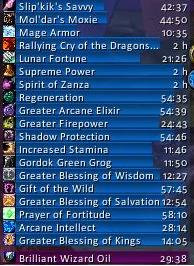
EBB provides groups of (mainly) statusbar style indicators to show (de)buffs currently affecting your char or some other units (focus, pet and target). For the player, it can also show indicators for temporary enchants placed on their weapons.
For over 20 years, EBB has been a mainstay for both long-term and returning players (at least some) and reports of its death have been greatly exaggerated.
Two-in-One Download
For Classic WoW, the addon uses its older 2.x code base, for Mainline WoW (Retail and Forever) it is now based on Blizzard's AuraContainer; all in the same download file.
2.x based on UnitAura
Version 2.x was a total recode, initially based on the Ace2 framework, later ported to Ace3, which became necessary in order to support some of the longtime wanted and suggested features. It has served well for ~19 years (since June '07) and made it possible to show different groups of bars which can be configured in many ways. Each group can be assigned an individual look and filter settings. After setting up a group, its anchor can be hidden by alt-left clicking a bar or the anchor itself in order to lock the group in place.
Due to changes Blizzard made with WoW 4.x it's no longer possible to cancel buffs without the use of secure frames.
EBB v2 thus limits cancelling of buffs to out-of-fight since using SecureAuraHeader would have required a major code restructuring.
This will be coming in a later version.
3.x based on AuraContainer
This is once again a complete artisanal rewrite, which became necessary due to Blizzard making auras secret in combat. This also gave me the push to include some features I already wanted but never included before. And you can cancel buffs in combat again.
Layouts can now be shared between groups, support multi-line/-column alignments, and give you way more options than before. But it can also just look the same as it used to.
What did suffer from the change of underlying technology are some of the filter options, as Blizzard has intentionally broken those.
And I haven't added localization to v3, yet. So most texts are in English besides a few strings reused from the game client.
Settings
The settings can be accessed via chat (/ebb), LDB icon, or simply via the game settings.
Other Infos
In order to get additional bar textures and fonts for EBB simply install e.g. SharedMedia which is available for download under https://www.curseforge.com/wow/addons/sharedmedia
If you have bug reports or feature request, create a ticket: https://www.curseforge.com/wow/addons/elkbuffbars/issues
Comments


-

Elkano Owner
-
View User Profile
-
Send Message
Posted Oct 14, 2020In reply to Elkano:
In the UpdateAnchor() function prototype, just use the following:
			self.frames.anchor = CreateFrame("Button", nil, self.frames.container, "BackdropTemplate")
			self.frames.anchor.backdropInfo = anchor_backdrop
			self.frames.anchor:ApplyBackdrop()
Basically SetBackdrop as changed and "BackdropTemplate" needs to be set explicitly.
-
View User Profile
-
Send Message
Posted Oct 14, 2020In reply to Elkano:
Awesome to hear, thank you!! <3
-
View User Profile
-
Send Message
Posted Oct 14, 2020In reply to Elkano:
Awesome, thank you!!
-
View User Profile
-
Send Message
Posted Oct 14, 2020In reply to Elkano:
Awesome thank you!!
-
View User Profile
-
Send Message
Posted Oct 15, 2020keep up the amazing work but take your time. i'm using buffbars since 2011, i would miss it badly.
-
View User Profile
-
Send Message
Posted Oct 15, 2020In reply to Elkano:
keep up the amazing work but take your time. i'm using buffbars since 2011, i would miss it badly.
-
View User Profile
-
Send Message
Posted Oct 15, 2020In reply to Elkano:
keep up the amazing work but take your time. i'm using buffbars since 2011, i would miss it badly.
-
View User Profile
-
Send Message
Posted Oct 14, 2020Hello!
I really hope there will be a SL update for this addon. My whole UI is dependant on it 😰
-
View User Profile
-
Send Message
Posted Oct 13, 2020Edit: Had some issues where some debuffs were not appearing in the whitelisted options but has since resolved itself on logging out.
-
View User Profile
-
Send Message
Posted Oct 4, 2020Is there some way to skin the buff bar icon with Masque? I'm not a big fan of Blizzard's default icon borders :/
-
View User Profile
-
Send Message
Posted Sep 23, 2020Which version of the addon are you working with? I'm using 2.6.0 0 - r 196. I've tried that update and getting the below error. No other addon loaded except for Ace 3.
Message: ...\AddOns\ElkBuffBars\libs\LibQTip-1.0\LibQTip-1.0.lua:519: attempt to call method 'SetBackdrop' (a nil value)
Time: Wed Sep 23 22:30:35 2020
Count: 1
Stack: ...\AddOns\ElkBuffBars\libs\LibQTip-1.0\LibQTip-1.0.lua:519: attempt to call method 'SetBackdrop' (a nil value)
[string "@Interface\AddOns\ElkBuffBars\libs\LibQTip-1.0\LibQTip-1.0.lua"]:519: in function <...\AddOns\ElkBuffBars\libs\LibQTip-1.0\LibQTip-1.0.lua:513>
[string "@Interface\AddOns\ElkBuffBars\libs\LibQTip-1.0\LibQTip-1.0.lua"]:126: in function `Acquire'
[string "@Interface\AddOns\ElkBuffBars\ElkBuffBars.lua"]:149: in function `OnEnter'
[string "@Interface\AddOns\ElkBuffBars\libs\LibDBIcon-1.0\LibDBIcon-1.0.lua"]:77: in function <...Ons\ElkBuffBars\libs\LibDBIcon-1.0\LibDBIcon-1.0.lua:60>
Locals: tooltip = <unnamed> {
0 = <userdata>
scrollChild = <unnamed> {
}
scrollFrame = <unnamed> {
}
}
key = "ElkBuffBars"
backdrop = <table> {
backdropColor = <table> {
}
edgeSize = 16
tileEdge = true
backdropBorderColor = <table> {
}
tileSize = 16
edgeFile = "Interface/Tooltips/UI-Tooltip-Border"
tile = true
bgFile = "Interface/Tooltips/UI-Tooltip-Background"
insets = <table> {
}
}
(*temporary) = nil
(*temporary) = <unnamed> {
0 = <userdata>
scrollChild = <unnamed> {
}
scrollFrame = <unnamed> {
}
}
(*temporary) = <table> {
backdropColor = <table> {
}
edgeSize = 16
tileEdge = true
backdropBorderColor = <table> {
}
tileSize = 16
edgeFile = "Interface/Tooltips/UI-Tooltip-Border"
tile = true
bgFile = "Interface/Tooltips/UI-Tooltip-Background"
insets = <table> {
}
}
(*temporary) = "attempt to call method 'SetBackdrop' (a nil value)"
GameTooltip = GameTooltip {
BottomLeftCorner = <unnamed> {
}
OnBackdropLoaded = <function> defined @Interface\SharedXML\Backdrop.lua:205
textLeft1Font = "GameTooltipHeaderText"
GetBackdropColor = <function> defined @Interface\SharedXML\Backdrop.lua:443
SetCurrencyToken = <function> defined =[C]:-1
SetBackdropBorderColor = <function> defined @Interface\SharedXML\Backdrop.lua:475
RightEdge = <unnamed> {
}
textRight2Font = "GameTooltipText"
ApplyBackdrop = <function> defined @Interface\SharedXML\Backdrop.lua:347
SetBackdrop = <function> defined @Interface\SharedXML\Backdrop.lua:382
ClearBackdrop = <function> defined @Interface\SharedXML\Backdrop.lua:335
TopOverlay = <unnamed> {
}
GetBackdropBorderColor = <function> defined @Interface\SharedXML\Backdrop.lua:462
GetBackdrop = <function> defined @Interface\SharedXML\Backdrop.lua:400
SetUnitDebuff = <function> defined =[C]:-1
SetBorderBlendMode = <function> defined @Interface\SharedXML\Backdrop.lua:319
comparing = false
SetUnitBuff = <function> defined =[C]:-1
BottomRightCorner = <unnamed> {
}
shoppingTooltips = <table> {
}
TextLeft1 = GameTooltipTextLeft1 {
}
0 = <userdata>
ItemTooltip = <unnamed> {
}
SetupTextureCoordinates = <function> defined @Interface\SharedXML\Backdrop.lua:267
OnBackdropSizeChanged = <function> defined @Interface\SharedXML\Backdrop.lua:235
BottomOverlay = <unnamed> {
}
Center = <unnamed> {
}
HasBackdropInfo = <function> defined @Interface\SharedXML\Backdrop.lua:331
textRight1Font = "GameTooltipHeaderText"
BottomEdge = <unnamed> {
}
GetEdgeSize = <function> defined @Interface\SharedXML\Backdrop.lua:241
updateTooltip = 0.117000
textLeft2Font = "GameTooltipText"
TopEdge = <unnamed> {
}
TextRight2 = GameTooltipTextRight2 {
}
TextLeft2 = GameTooltipTextLeft2 {
}
SetUnitAura = <function> defined =[C]:-1
TopRightCorner = <unnamed> {
}
TopLeftCorner = <unnamed> {
}
backdropInfo = <table> {
}
needsReset = true
SetupPieceVisuals = <function> defined @Interface\SharedXML\Backdrop.lua:299
SetBackdropColor = <function> defined @Interface\SharedXML\Backdrop.lua:452
LeftEdge = <unnamed> {
}
TextRight1 = GameTooltipTextRight1 {
}
}
AcquireTable = <function> defined @Interface\AddOns\ElkBuffBars\libs\LibQTip-1.0\LibQTip-1.0.lua:493
labelProvider = <table> {
cells = <table> {
}
cellMetatable = <
-
View User Profile
-
Send Message
Posted Oct 14, 2020In reply to roweboy1974:
The line with SetBackdrop needs to be replaced by the following:
and make sure that you have the BackdropTemplate on the immediate preceding CreateFrame
-
View User Profile
-
Send Message
Posted Sep 23, 2020Tried this. I must have done something wrong. I see 1 entry in EBB_Bar and 2 in both EBB_BarGroup, and ElkBuffBars
Is that correct?
-
View User Profile
-
Send Message
Posted Sep 3, 2020Guess this is abandoned. That's too bad. I loved this mod.
-
View User Profile
-
Send Message
Posted Sep 4, 2020In reply to roweboy1974:
While I haven't been actively playing much the past months, I'm still around... (but as lazy as ever 🙈)
-
View User Profile
-
Send Message
Posted Sep 5, 2020In reply to Elkano:
LOL... I feel you! Hopefully Shadowlands will motivate you!
-
View User Profile
-
Send Message
Posted Sep 9, 2020In reply to Elkano:
I'm still using your addon and it works for me. Thanks!
-
View User Profile
-
Send Message
Posted Oct 13, 2020In reply to Elkano:
Playing Warlock in the PrePatch and seems the whitelisting is missing debuffs such as Agony and Corruption. Are you planning to do an update or can we add these ourselves to the code? Thanks
-
View User Profile
-
Send Message
Posted Oct 14, 2020In reply to SHOWT1M3TV:
The settings for black-/whitelist only show spell effects/auras you encountered that session. So engage an enemy or a target dummy and they should show up (unless something changed with the patch, wasn't able to test, yet).
-
View User Profile
-
Send Message
Posted Sep 19, 2020In reply to roweboy1974:
It works fine in the Shadowlands beta if you add
at the end of the CreateFrame calls in EBB_Bar, EBB_BarGroup, and ElkBuffBars lua files, just before the closing bracket.