Elkano's BuffBars
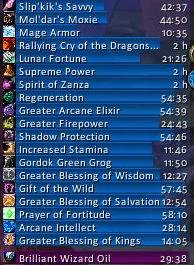
EBB provides groups of statusbar style indicators to show (de)buffs currently affecting your char or some other units (currently focus, pet and target). For the player, it can also show indicators for temporary enchants place on it's weapons.
Due to changes Blizzard made with WoW 4.x it's no longer possible to cancel buffs without the use of secure frames. Currently EBB limits canceling of buffs to out-of-fight since using SecureAuraHeader would have required a major code restructuring. This will be coming in a later version.
Version 2.x is a total recode based on the Ace2 framework which became necessary in order to support some of the longtime wanted and suggested features. It's now possible to show different groups of bars which can be configured in many ways. Each group can be assigned an individual look and filter settings. EBB can be configured via a dropdown menu which is accessible via chat (/ebb config), FuBar plugin or (for the group settings) by right clicking the groups anchor. After setting up a group, its anchor can be hidden by alt-left clicking a bar or the anchor itself in order to lock the group in place.
In order to get additional bar textures and fonts for EBB simply install SharedMedia which is available for download under http://wow.curse.com/downloads/wow-addons/details/sharedmedia.aspx
If you have bug reports or feature request, create a ticket: http://www.wowace.com/projects/elkbuffbars/create-ticket/
You can also check my thread at the WoWAce forums: http://forums.wowace.com/showthread.php?t=5290
The most recent development version of EBB is available directly from the WoWAce SVN via http://www.wowace.com/projects/elkbuffbars/files/
Comments


-

Elkano Owner
-
View User Profile
-
Send Message
Posted Dec 17, 2006hey there, just read through the comments, but. Will you support separate debuff frames and buff frames so we can have them on different spots on the screen?
Thanks :)
-
View User Profile
-
Send Message
Posted Dec 16, 2006Dude love your mod, it's very neat and simple to use. If there any plans to include pets debuffs? like a Pet Buffbar just below the character? that would be nice!
-
View User Profile
-
Send Message
Posted Dec 12, 2006Hi, I'm trying to find out which command will make the bars grow upwards, if there is'nt can you maybe make one ? Thank you.
-
View User Profile
-
Send Message
Posted Dec 11, 2006@jfkaess: next major release will support that ^^ but since it's a totla recode, it will still take a while @whtwskr: did you have a look at Chronometer?
-
View User Profile
-
Send Message
Posted Dec 9, 2006This is the best buff timer mod available, and I wanted to thank you for designing it.
I was wondering if maybe, just maybe, you'd ever think of doing a spell timer mod with the same format? Those are few and far between with the ones available being not so streamlined.
-
View User Profile
-
Send Message
Posted Dec 9, 2006Just started using your mod afte abandoning all CT mods. Its great, but i'm wondering ig it would be possible to just show the icon with no text and also show the timer, then adjust the width doen under 100. That gives me all the info I need, and takes up less space.
Thanks
-
View User Profile
-
Send Message
Posted Dec 5, 2006Thank you for the WoW 2.0 update. I was getting worried it might not be updated. ;)
-
View User Profile
-
Send Message
Posted Dec 5, 2006well, 2.0. would have broken it, but releasing it before patch day would surely have caused some "new version doesn't work" posts ^^
-
View User Profile
-
Send Message
Posted Dec 5, 2006Yeah, I think it was just the lack of "refined code for XYZ" that most mods get. But hey, yours wansn't broke so why fix it? =)
Either way. 3 Cheers for updating.
-
View User Profile
-
Send Message
Posted Dec 5, 2006well, it wasn't broken before so there wasn't much need to update :) But I would be stupid to not update it for 2.0 since so many people like it :)
-
View User Profile
-
Send Message
Posted Dec 5, 2006To think I thought this wasn't being updated so I just removed it from my fav's and downloaded another buff bar mod =)
Re-added to Fav's
-
View User Profile
-
Send Message
Posted Nov 20, 2006I've got the same problem. The bars can be moved as intended, but the standard Blizz UI buffs remain. Known problem? Would be great if it could be solved ^^
-
View User Profile
-
Send Message
Posted Mar 10, 2011-
View User Profile
-
Send Message
Posted Nov 2, 2006Anyone know how to stop the default buffs from showing? The buffs that show in the upper right hand part of the screen, blizzard default setting.
-
View User Profile
-
Send Message
Posted Oct 14, 2006what Gaysha said below!!
-
View User Profile
-
Send Message
Posted Oct 13, 2006Hey, First of all, wonderful addon, I love it to bits... but there's a slight problem. Whenever I reload the UI it seems to reset the anchoring to TOPLEFT, which is kinda annoying. I want it in the bottom right corner, and when it's anchored there (/eeb anchor -> BOTTOMRIGHT) it just won't work properly after that reload. If I then do /ebb anchor BOTTOMLEFT followed by /ebb anchor BOTTOMRIGHT it will once again work properly.
Oh, and the way you show poison charges... it's nothing short of fantastic. ;D
-
View User Profile
-
Send Message
Posted Oct 2, 2006I'd like to have a warning written to chat window when a buff is about to expire, that's about everything I miss from other addons, apart from that, this is the best buff bar by far.
-
View User Profile
-
Send Message
Posted Sep 26, 2006@ Lothrok i found that if your using CTBuffmod that it conflicts with Elkano thats why i got the normal buff frame aswell if ur using CTBuffmod either disable it or delete it from ur addons folder
-
View User Profile
-
Send Message
Posted Sep 24, 2006"Could it be possible to separate frames for buffs and debuffs ? I would love having two different frames, in order to position buffs and debuffs at different places of my interface." This is a good idea ^^
-
View User Profile
-
Send Message
Posted Sep 24, 2006I love this mod but I can't figure out how to turn off the standard in-game buff display. I don't want both showing. Any ideas?