Elkano's BuffBars
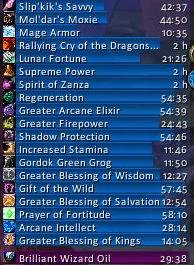
EBB provides groups of statusbar style indicators to show (de)buffs currently affecting your char or some other units (currently focus, pet and target). For the player, it can also show indicators for temporary enchants place on it's weapons.
Due to changes Blizzard made with WoW 4.x it's no longer possible to cancel buffs without the use of secure frames. Currently EBB limits canceling of buffs to out-of-fight since using SecureAuraHeader would have required a major code restructuring. This will be coming in a later version.
Version 2.x is a total recode based on the Ace2 framework which became necessary in order to support some of the longtime wanted and suggested features. It's now possible to show different groups of bars which can be configured in many ways. Each group can be assigned an individual look and filter settings. EBB can be configured via a dropdown menu which is accessible via chat (/ebb config), FuBar plugin or (for the group settings) by right clicking the groups anchor. After setting up a group, its anchor can be hidden by alt-left clicking a bar or the anchor itself in order to lock the group in place.
In order to get additional bar textures and fonts for EBB simply install SharedMedia which is available for download under http://wow.curse.com/downloads/wow-addons/details/sharedmedia.aspx
If you have bug reports or feature request, create a ticket: http://www.wowace.com/projects/elkbuffbars/create-ticket/
You can also check my thread at the WoWAce forums: http://forums.wowace.com/showthread.php?t=5290
The most recent development version of EBB is available directly from the WoWAce SVN via http://www.wowace.com/projects/elkbuffbars/files/
Comments


-

Elkano Owner
-
View User Profile
-
Send Message
Posted Jan 9, 2008Since the totems themselves aren't buffs this data isn't available, especialy not via the buff API. So no, EBB doesn't display these. But there are some other mods that do.
-
View User Profile
-
Send Message
Posted Jan 9, 2008ya i seen those other ones, but to be honest don't really like any of them lol closest one was one that has bars much like EBB but it would just be one more thing on my screen. also i just recently noticed, not sure if it existed pre 2.3.2 but "timeless buffs" dont FILL up the buff far it goes to about 9/10 but i can still see the background color. its not a spacing option (i checked) it just simply doesn't show the bar FULL (i changed the color of the bar and the background color as well if that helps) other than that, love it love it love it
-
View User Profile
-
Send Message
Posted Jan 6, 2008Great addon , i just have 1 problem.
How can i remove the tracking type bar ?
I can hide the minimap button but i can't hide that bar :(
Thx
-
View User Profile
-
Send Message
Posted Jan 7, 2008Simply uncheck the "tracking" type in group 1's filters.
-
View User Profile
-
Send Message
Posted Jan 7, 2008Done , thank you very much.
Keep up with the great job !
-
View User Profile
-
Send Message
Posted Dec 30, 2007Hi, ive been using 2.0 version of this addon and worked perfectly for me, but when i upgraded to 2.1 default blizzard's buff frames were shown and im not able to hide them. Any idea?
-
View User Profile
-
Send Message
Posted Dec 19, 2007i love this addon!
however, i can't seem to ignore the fact that sometimes the debuff status bar would come off as blue instead of red, with a red background color still. and it irritates me sometimes to glance at my buffbars and think that i dont have any debuffs i need to be aware of.
what can i do to fix this?
-
View User Profile
-
Send Message
Posted Dec 20, 2007debuffs are colored according to the debuff type by default: magic is blue, poison green, deseases yellow and curses purple. if you don't like that simply disable it in the settings for the bar group:
Group x -> Bar Layout -> Bar -> Debuff Coloring
-
View User Profile
-
Send Message
Posted Dec 15, 2007How do I enable default blizzard buffs/debuffs when still using this addon?
-
View User Profile
-
Send Message
Posted Dec 10, 2007Hey. I've been using EBB for as long as I can remember, and only recently I've been having this problem.
I switched to Buffalo for a few weeks, and since switching back to EBB the other day, I've noticed that the buff bars don't quite fill up, even when at maximum duration.
Screenshot: http://i5.photobucket.com/albums/y164/hettbeans/ebbproblem.jpg
As you can see there, my MOTW and OoC are at full time, but the bars are not. I've tried three different versions of EBB and all were the same.
-
View User Profile
-
Send Message
Posted Dec 19, 2007The problem is that when the bar is filled, it doesn't check to see if icons are shown and it only fills up to where the icon ends. I will look through the code and see if I can find where it is and develop a fix. Anyone else that is comfortable with lua should take a look as well so we can get this problem solved.
-
View User Profile
-
Send Message
Posted Nov 30, 2007Type /ebb hide off
from there you can config it through the minimap icon.
-
View User Profile
-
Send Message
Posted Nov 25, 2007I got my bars where i wanted them, so I hid the movable icon. Then i realized debuffs show up below and go into my chat box. now I can't get that movable icon back or move the bars. How do i do this?
-
View User Profile
-
Send Message
Posted Nov 24, 2007Hi, first of all, i love this mod, and now to the question
It seems you have given a chance to rename buffs ect, but when i try to do that, the tooltip says "Usage : none" or something... so basicly, what do i must enable so i can use my own custom named buffs?
Thanks.
-
View User Profile
-
Send Message
Posted Nov 23, 2007That's what different groups are for. And debuff coloring should color the bar (not the background) according to the type of the debuff if it's known.
-
View User Profile
-
Send Message
Posted Dec 20, 2007The way that I have my interface set up I need to have it all in one line. If i put then on the same side they will run over eachother. I'm fine with having two seperate bars, but is there anyway to connect them or put one on top of the other?
-
View User Profile
-
Send Message
Posted Dec 20, 2007move the anchor of the 2nd group close to the first group and they will stick together.
-
View User Profile
-
Send Message
Posted Nov 23, 2007I can't seem to adequately separate buffs and debuffs in the same group. Checking/unchecking debuff coloring doesn't seem to do anything. I would also like to be able to sort buffs and debuffs seperately in the same group. The old version seemed to do this just fine while I can't seem to get it to work in this one.
-
View User Profile
-
Send Message
Posted Nov 23, 2007Elkano
One of my favourite mods. Thanks for the update, great work.
-
View User Profile
-
Send Message
Posted Nov 21, 2007why should I? you can access the menu via a right-click on the EBB tracking bar, too. so there still is no need for the button to show up on the minimap, too.