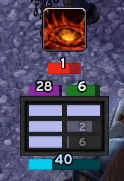
Compact Runes
Issues / Feedback
For enhancements or issues, please use the ticket tracker.
Description
Compact Runes is a re-write of DocsDebugRunes. It preserves the compact UI but adds additional features.
Configuration
To configure, type /crunes or use the game menu: Esc -> Interface -> AddOns (tab in top, left corner) -> Compact Runes. Next to the Compact Runes title on the right is a small plus sign that expands and provides more settings.
Features
It tracks the following items:
- Runes (shown horizontally or vertically) with an optional setting to show a numeric timer for each rune. Runes are sorted by the recharge timer but it can be disabled.
- Runic Power
- Diseases and time left.
- Sudden Doom, Shadow Infusion, Dark Transformation, Soul Reaper, Festering Wound, and Epidemic for Unholy.
- Rime/Freezing Fog, Killing Machine, Icy Talons, Razorice, and Remorseless Winter for Frost
- Death and Decay Bar for Blood and Unholy to show the buff for AoE.
- Blood Shield
- Vampiric Blood bar which shows the duration and cooldown.
- LDB/Minimap Icon Support
- RC Procs are indicated with a white border.
- RE procs, RC procs, and wasted Blood Charges tracking in the LDB tooltip.
- Crimson Scourge is shown as a proc.
- Out of melee range is indicated by a red border. This option can be disabled.
- An optional "Almost ready" rune state. The alpha can be adjusted independently for it.
- Cooldown Bars per spec. A configurable row of icons to show the cooldown on abilities and certain trinkets.
- Swing Timer (main hand).
Comments


-

Talryn Owner
-
View User Profile
-
Send Message
Posted Aug 26, 2015Sweet, great work. Thanks.
-
View User Profile
-
Send Message
Posted Aug 25, 2015Legendary rings are added in the lastest alphas. Should be in the released version soon.
-
View User Profile
-
Send Message
Posted Aug 19, 2015Awesome mod, my favourite rune ui by far.
Do you think it would be possible to add the legendary rings to the cooldown bars? Similar to how it can track trinket actives.
-
View User Profile
-
Send Message
Posted Aug 24, 2015it's an icon of soul reaper who spawn on the middle of my screen when i uncheck the soul reaper cd he diseapear and at each reload he comes back and i need to check/uncheck to remove him
-
View User Profile
-
Send Message
Posted Aug 19, 2015I've a little bug since the last maj every time i reload the soul reaper cd appear but i've disabled this option
-
View User Profile
-
Send Message
Posted Aug 19, 2015I cannot duplicate the issue.
The Soul Reaper CD is a new icon that appears to the left of the Proc icon. It shows the CD on Soul Reaper while it is active. It will be the Soul Reaper icon with a countdown of 5 to 0. It doesn't control the Proc icon showing that Soul Reaper is available.
If we're talking about the same thing and it is still occuring for you, you may need to give me more details.
-
View User Profile
-
Send Message
Posted Aug 25, 2015The SR indicators should be fixed in the latest alpha. For some reason a line of code was commented out that should not have been.
-
View User Profile
-
Send Message
Posted Aug 19, 2015The T18 2pc tracking was working for me. I released a new version 6.2.3 which should have the latest version of the code. There was a bug in an earlier version. Please re-check it and see if that resolves the issue.
-
View User Profile
-
Send Message
Posted Aug 17, 2015I'm pretty sure I've tried everything, including messing with the alphas for the T18 2p buff tracking, but can't seem to get it to work. It's a huge pain trying to track it at the top of my screen, with all my other buffs procing on and off.
Is there anything you could suggest that might help get this to work? Or maybe an alternative for tracking the T18 2p buffs?
Any help is greatly appreciated!
-
View User Profile
-
Send Message
Posted Aug 6, 2015Great Addon!
I'm having an issue that the "hide Blizzard Runes" option isnt working. I have it checked and I have reloaded then restarted and The blizzard runes are still there. Any idea?
Thanks!
-
View User Profile
-
Send Message
Posted Aug 11, 2015Hi, I just verified the "HIde Blizzard Runes" work correctly. I disabled all addons but Compact Runes. I started the game and the runes were shown when "HIde Blizzard Runes" was not checked. I then checked it, reloaded, and the runes went away. I restarted the game to double check and they were still not shown.
You either have a very old version or there is some other addon that is affecting it. One solution is to disable everything but Compact Runes. Verify the Blizzard runes are removed. Then re-enable addons until you find the culprit. Unfortunately, there isn't a better way to troubleshoot.
If you're using a unit frame replacement, you'd need to check there too as they often add their own runes and that is something different from the standard Blizzard UI runes.
-
View User Profile
-
Send Message
Posted Aug 14, 2015It was in fact another addon causing the issue,
Thanks!
-
View User Profile
-
Send Message
Posted Jul 21, 2015Hello, call me stupid but I cant find any button to lock the necroblight symbol which counts from 10 to 0. the lock button for the ui in "general options-" doesnt work for me. Greetings
-
View User Profile
-
Send Message
Posted Jul 30, 2015Yes, this is a bug. I have a fix for it that will be in the next alpha/release.
-
View User Profile
-
Send Message
Posted Jul 6, 2015"T18 Frost 2p" should work just after switiching to "Enable"?
-
View User Profile
-
Send Message
Posted Jul 6, 2015It should work after you switch either or both of the buffs to Enabled. You may want to set the out of combat alpha on it to 1.0 and verify if the icons show up. It's possible there is a bug in the T18 detection code or perhaps the buff detection code. I don't have the T18 to fully test it yet.
-
View User Profile
-
Send Message
Posted Jul 7, 2015There isn't a way to change the proc icons to a different icon. The icon shown for Killing Machine should be the actual KM icon and not Obliterate or Frost Strike.
-
View User Profile
-
Send Message
Posted Jul 4, 2015Hey guys, great addon! I'm playing Dual Wield Frost and can't find a way to change the default Killing Machine proc icon from Obliterate to Frost Strike. Is there a way to do that?
-
View User Profile
-
Send Message
Posted Jul 1, 2015Are you planning to add something that will track buffs from Frost T18 2p?
-
View User Profile
-
Send Message
Posted Jul 2, 2015Yes, I've started working on it. I'll have an alpha version soon.