ArkInventory
ArkInventory (for The War Within)
:boom: Please ensure you are using the latest alpha version if you have the War Within client.
ArkInventory (for Retail, Classic, and Cataclysm)
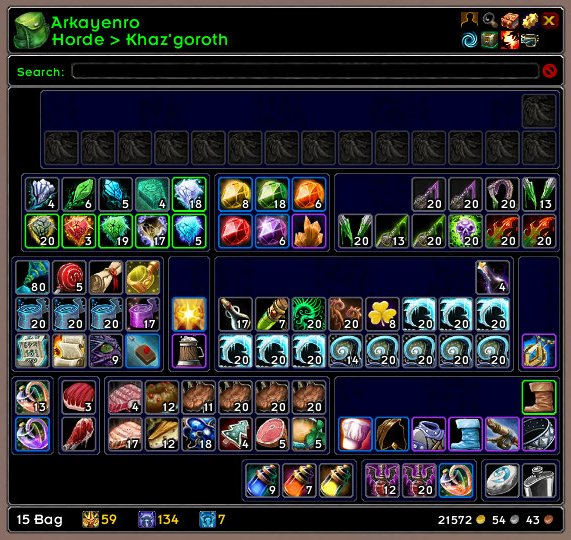
ArkInventory's display windows are built from "virtual bars", you assign categories to bars so that items in that category are displayed on the specific bars you want. There is no limit to the number of bars you can have inside a window but obviously you only have so much screen real estate before it becomes "too many".
ArkInventory uses several methods to assign a default category to an item such as what professions you have, tooltip scanning, basic type/subtype and PeriodicTable. You then assign those categories to a virtual bar.
You can also over-ride the default category by creating a rule that matches either a single or multiple items.
Overview:
- user configurable window width and height
- separate keybindings for each location for easy viewing
- assign items to a category of your choice (overrides the default assignment)
- assign categories to the bar of your choice
- unlimited number of bars (there are practical limits though before your screen becomes full)
- sort each bar differently if required
- user configurable bars per row
- sell junk items automatically or manually (delete available via a keybinding or right clicking when at a vendor)
- random pet and mount summons. can also assign a group of them to select from
Key Bindings:
- Press ESCAPE to bring up the blizzard menu
- click on Key Bindings
- scroll down to AddOns > ArkInventory
- bind the keys you want to use
Need Help?
:memo: Wiki
:memo: Frequently Asked Questions
:memo: Sorting
:memo: Rules
:memo: If you are having an issue the first step is to disable all other mods and test with only ArkInventory loaded
:memo: If the issue is still there, please check for an existing issue and create a new issue if required.
:memo: If the issue is gone, re-enable your other mods one by one until the issue comes back, then note the last mod you enabled in your issue as well as notifying the author of the other mod
See ChangeHistory.md for changes to the latest version. See VersionHistory.md for all previous changes.
:boom: The NoLib variant
it seems quite a few people are somehow getting the NoLib variant from their download client when they didn't specifically ask for it, instead of the full variant, and its causing issues as they don't have the required libraries installed separately. Please ensure you are downloading the full. if you see nolib in the filename then its the wrong variant, unless you are actually installing all of the required libraries separately as well. If you have to you can manually download the full variant from CurseForge, WoWInterface, or Wago.
:boom: Junk Sell getting blocked
While auto-destroy remains blocked, From 30960 onwards you can setup a Key Binding to manually sell and destroy your items. Note that blizzard require one keypress per item deletion, so if you have multiple items that need to be deleted you will need to press the Key Binding multiple times. A message will be output if you have remaining items that can still be deleted.
:warning: Ensure you have backup copies of your saved variables file
Sometimes you cannot revert back to a previous version without a backup, especially alpha or beta versions, so before upgrading please make sure you have made a backup of your saved variables file
Your saved variables file is normally located at ...\World of Warcraft\_client_\WTF\Account\yourwowaccountname\SavedVariables\ArkInventory.lua
It is your responsibility to ensure you have adequate backups of your saved variables file. You dont have to do them frequently, just after you've made major changes to your config is probably fine for most people, but you should get into the habit of making backups because when it does corrupt you wont have to reconfigure everything from scratch.
If you have your download client set to automatically download alpha/beta versions you should definitely have backups.
A simple way to back up the saved variables file is to just do a copy and paste then rename the new file (using the version number of ArkInventory or the date is a good idea), eg ArkInventory-30900.lua, or ArkInventory-20191228.lua
Comments

-

Arkayenro Owner
-
View User Profile
-
Send Message
Posted Aug 24, 2018-
View User Profile
-
Send Message
Posted Aug 17, 2018Message: Invalid quest item in SetQuestLogItem("type", index [, questID])
Time: Fri Aug 17 14:10:13 2018
Count: 1
Stack: Invalid quest item in SetQuestLogItem("type", index [, questID])
[C]: ?
[C]: in function `?'
...nterface\AddOns\ArkInventory\ArkInventoryTooltip.lua:1368: in function `ReloadTooltipSetGeneric'
...nterface\AddOns\ArkInventory\ArkInventoryTooltip.lua:1437: in function <...nterface\AddOns\ArkInventory\ArkInventoryTooltip.lua:1407>
Locals: (*temporary) = WorldMapTooltipTooltip {
0 = <userdata>
SetCurrencyByID = <function> defined =[C]:-1
SetText = <function> defined =[C]:-1
SetHyperlink = <function> defined =[C]:-1
SetGuildBankItem = <function> defined =[C]:-1
SetVoidItem = <function> defined =[C]:-1
SetVoidDepositItem = <function> defined =[C]:-1
SetVoidWithdrawalItem = <function> defined =[C]:-1
ClearLines = <function> defined =[C]:-1
IsEmbedded = true
ARKTTD = <table> {
}
TopOverlay = <unnamed> {
}
SetItemByID = <function> defined =[C]:-1
SetLootItem = <function> defined =[C]:-1
SetQuestItem = <function> defined =[C]:-1
SetToyByItemID = <function> defined =[C]:-1
SetQuestLogSpecialItem = <function> defined =[C]:-1
comparing = false
CIMI_tooltipWritten = false
SetInboxItem = <function> defined =[C]:-1
SetQuestCurrency = <function> defined =[C]:-1
shoppingTooltips = <table> {
}
SetQuestLogItem = <function> defined =[C]:-1
SetMerchantItem = <function> defined =[C]:-1
SetMerchantCostItem = <function> defined =[C]:-1
SetBackpackToken = <function> defined =[C]:-1
BottomOverlay = <unnamed> {
}
FadeOut = <function> defined =[C]:-1
SetTradePlayerItem = <function> defined =[C]:-1
SetAuctionItem = <function> defined =[C]:-1
SetSendMailItem = <function> defined =[C]:-1
SetHeirloomByItemID = <function> defined =[C]:-1
updateTooltip = 0.2
SetInventoryItem = <function> defined =[C]:-1
SetRecipeReagentItem = <function> defined =[C]:-1
SetTradeTargetItem = <function> defined =[C]:-1
SetLootRollItem = <function> defined =[C]:-1
SetBuybackItem = <function> defined =[C]:-1
SetAuctionSellItem = <function> defined =[C]:-1
SetBagItem = <function> defined =[C]:-1
needsReset = true
SetCurrencyToken = <function> defined =[C]:-1
SetCurrencyTokenByID = <function> defined =[C]:-1
SetQuestLogCurrency = <function> defined =[C]:-1
SetRecipeResultItem = <function> defined =[C]:-1
}
(*temporary) = "reward"
(*temporary) = 1
(*temporary) = 50497
-
View User Profile
-
Send Message
Posted Aug 19, 2018-
View User Profile
-
Send Message
Posted Aug 20, 2018In reply to Arkayenro:
-
View User Profile
-
Send Message
Posted Aug 17, 2018Something broke with the last update. My bank bags seem to have partially reset on all characters when it comes to size and order of rules. Before, I had all items on the screen, now the bank is smaller at the sides, I have to scroll and the reagent bank doesn't show seperately anymore (reagents seem to be ordered by rule instead by bag/reagent tab).
-
View User Profile
-
Send Message
Posted Aug 18, 2018-
View User Profile
-
Send Message
Posted Aug 18, 2018In reply to Arkayenro:
-
View User Profile
-
Send Message
Posted Aug 16, 2018Having a problem where all the rules fall out of place and the bag gets mixed up when I change spec or upon receiving, crafting or changing certain items.
-
View User Profile
-
Send Message
Posted Aug 18, 2018thankyou, the spec change helped to narrow it down and i think its fixed (at least it no longer happens after a spec change any more)
-
View User Profile
-
Send Message
Posted Aug 16, 2018Would it be possible for an addon to be compatible with both TSM3 and TSM4 with some kind of a switch? There are still so many things not working in TSM4 and people are rerolling back. With most recent version or ArkInventory it is not possible for rules to be using TSM3 groups. Could you make a switch somewhere in the options or somehow detect TSM version and have it work both ways?
For now I am just using older 3.08.05 ArkInventory version.
Great addon as always btw.
-
View User Profile
-
Send Message
Posted Aug 18, 2018maybe, tsm3/4 are different enough that i might be able to make it automatic
easier than i thought, will be in the next alpha/release
-
View User Profile
-
Send Message
Posted Aug 18, 2018In reply to Arkayenro:
-
View User Profile
-
Send Message
Posted Aug 21, 2018In reply to Arkayenro:
-
View User Profile
-
Send Message
Posted Aug 15, 2018I use ArkInventory on my main only, and I also use "Can I Mog it?" addon on all my toons, which shows a small icon on the items in my bags which shows if I have unlocked the transmog or not for that piece. It was working well together even yesterday, seeing those icons on my items within the ArkInventory screen.
I updated ArkInventory today, and now the icon showing my transmog collection status from "Can I Mog it?" no longer shows on items when glancing in my bags. I have Controls - Bank - Override as unchecked so I keep the default bank UI. When I open my bank, the transmog icon is again visible on my items, including on the items visible within my bags' inventory through the ArkInventory display. I can walk away and play and keep the icons visible, but if I reload my UI, the icons on my items are gone again.
Do you know how I can get those icons visible in the ArkInventory display by default like I had it before?
-
View User Profile
-
Send Message
Posted Aug 18, 2018-
View User Profile
-
Send Message
Posted Aug 18, 2018In reply to Arkayenro:
-
View User Profile
-
Send Message
Posted Aug 15, 2018Can someone tell me wether all rules are active now for all profiles or how i can determine which ones are active for which profiles?
because when i choose "options" go to the top tab "options" then "categories" under "category set" i choose one and then go to the tab "rules" they ALL seem to be active and i can neither activate or deactivate them. but if i create a new rule it wont work. just wont be treated as if it even existed or worked, even though i am sure there is no error in the rule.
-
View User Profile
-
Send Message
Posted Aug 14, 20183.08.11
create new rule
itemstring( ID )
seems like ALL the rules are ACTIVE now for ALL profiles...
but the new ones don't work
don't know if they are either active or not, if all are active now for all profiles or why the new ones just wont work.
tried relogging, restarting...
cant find a fix
just create itemstring rule and try it, help plz
-
View User Profile
-
Send Message
Posted Aug 13, 2018On latest version, 3.08.11. No errors be announced at this moment. However, in the last update, new items would not directly got to assigned groups in bag (until after some unknown time, 5 minutes or 20, i don't know). And on this update, about half of my items i keep in my bag at all times is not in the properly assigned groups, just hanging out in the general group. Not sure if this is helpful since i don't have any error code to share, but maybe this will ring true with something you've been trying to sort out.
Thanks for working on this add-on. It's very useful, and am glad to not have to settle for a replacement. Keep up the good work :)
-
View User Profile
-
Send Message
Posted Aug 14, 2018In reply to Jaynith: