ArkInventory
ArkInventory (for The War Within)
:boom: Please ensure you are using the latest alpha version if you have the War Within client.
ArkInventory (for Retail, Classic, and Cataclysm)
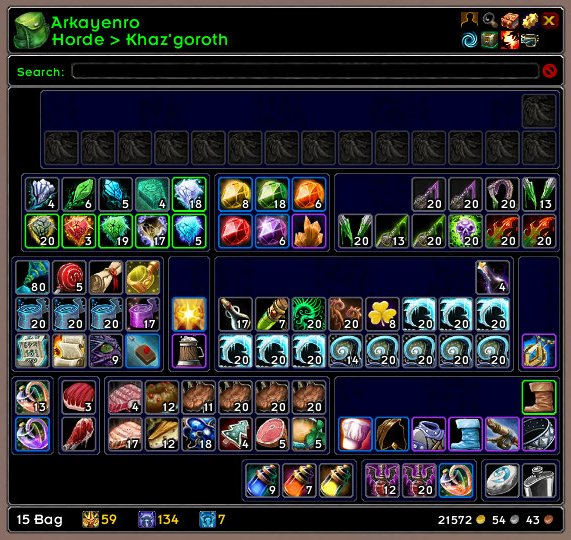
ArkInventory's display windows are built from "virtual bars", you assign categories to bars so that items in that category are displayed on the specific bars you want. There is no limit to the number of bars you can have inside a window but obviously you only have so much screen real estate before it becomes "too many".
ArkInventory uses several methods to assign a default category to an item such as what professions you have, tooltip scanning, basic type/subtype and PeriodicTable. You then assign those categories to a virtual bar.
You can also over-ride the default category by creating a rule that matches either a single or multiple items.
Overview:
- user configurable window width and height
- separate keybindings for each location for easy viewing
- assign items to a category of your choice (overrides the default assignment)
- assign categories to the bar of your choice
- unlimited number of bars (there are practical limits though before your screen becomes full)
- sort each bar differently if required
- user configurable bars per row
- sell junk items automatically or manually (delete available via a keybinding or right clicking when at a vendor)
- random pet and mount summons. can also assign a group of them to select from
Key Bindings:
- Press ESCAPE to bring up the blizzard menu
- click on Key Bindings
- scroll down to AddOns > ArkInventory
- bind the keys you want to use
Need Help?
:memo: Wiki
:memo: Frequently Asked Questions
:memo: Sorting
:memo: Rules
:memo: If you are having an issue the first step is to disable all other mods and test with only ArkInventory loaded
:memo: If the issue is still there, please check for an existing issue and create a new issue if required.
:memo: If the issue is gone, re-enable your other mods one by one until the issue comes back, then note the last mod you enabled in your issue as well as notifying the author of the other mod
See ChangeHistory.md for changes to the latest version. See VersionHistory.md for all previous changes.
:boom: The NoLib variant
it seems quite a few people are somehow getting the NoLib variant from their download client when they didn't specifically ask for it, instead of the full variant, and its causing issues as they don't have the required libraries installed separately. Please ensure you are downloading the full. if you see nolib in the filename then its the wrong variant, unless you are actually installing all of the required libraries separately as well. If you have to you can manually download the full variant from CurseForge, WoWInterface, or Wago.
:boom: Junk Sell getting blocked
While auto-destroy remains blocked, From 30960 onwards you can setup a Key Binding to manually sell and destroy your items. Note that blizzard require one keypress per item deletion, so if you have multiple items that need to be deleted you will need to press the Key Binding multiple times. A message will be output if you have remaining items that can still be deleted.
:warning: Ensure you have backup copies of your saved variables file
Sometimes you cannot revert back to a previous version without a backup, especially alpha or beta versions, so before upgrading please make sure you have made a backup of your saved variables file
Your saved variables file is normally located at ...\World of Warcraft\_client_\WTF\Account\yourwowaccountname\SavedVariables\ArkInventory.lua
It is your responsibility to ensure you have adequate backups of your saved variables file. You dont have to do them frequently, just after you've made major changes to your config is probably fine for most people, but you should get into the habit of making backups because when it does corrupt you wont have to reconfigure everything from scratch.
If you have your download client set to automatically download alpha/beta versions you should definitely have backups.
A simple way to back up the saved variables file is to just do a copy and paste then rename the new file (using the version number of ArkInventory or the date is a good idea), eg ArkInventory-30900.lua, or ArkInventory-20191228.lua
Comments

-

Arkayenro Owner
-
View User Profile
-
Send Message
Posted Nov 22, 2025In reply to Broeselchen: It was working fine on beta before the last update. I believe they pushed the change that the version has to specifically state 12.0 or it won't load. I think as soon as the version is updated to include 12.0 it will work again.
-
View User Profile
-
Send Message
Posted Dec 13, 2025In reply to Seleukos: I'm posting a guide to fix mismatches in a comment above so everyone can see it for any of their addons to make sure they still work in 12.0, it will apply to these comments too.
-
View User Profile
-
Send Message
Posted Nov 16, 2025Why do my set settings stay the same for different profiles? IO.E.-I have a Druid and maintain one tab as a DPS set, and 1 set as dps. I have a different profile for this character thanb I doi for a Rogue alt. However when I go to Rogue-the DPS and Tank set that I use for the Druid profile show. I thought these would be xclusive of weach other if the Profiles were different?
-
View User Profile
-
Send Message
Posted Nov 8, 2025Hiya-been using your Addon forever-love love it. Recently I wanted to try a Druid with 2 different sets of gear. I have created 2 different tabs, but I am unable to fill the "Color Background" to a different color. I have created 2 tabs-one is DPS the Other is Tank. I was able to color one (background) in but not the other. It's sort of random if it fills, and when it does hitting "ok" in color configurator just erases it. I am able to change the outline colors and the Text colors. I would be happy if there was a way to make the "outline" box thicker and color it, that would achieve the same effect for me to identify the tab box. Any suggestions would be greatly appreciated
FIXED-I just used a couple of new boxes and wit worked.
-
View User Profile
-
Send Message
Posted Oct 28, 2025For the record, this is still happening even after the newest patch is installed, on retail, trying to buy a personal bank tab. My bug report is identical.
-
View User Profile
-
Send Message
Posted Oct 15, 2025I added my voice to yours. I missed it because I was looking for people mentioning Legion thinking it was Remix specific.
-
View User Profile
-
Send Message
Posted Oct 11, 2025New error on Remix - I can't buy a bank slot at all. It offers me one, but when I go to buy it, I get an error that says [ADDON_ACTION_FORBIDDEN] AddOn 'ArkInventory' tried to call the protected function 'PurchaseBankTab()'. [Blizzard_StaticPopup_Game/GameDialog.lua]:27: in function <...faceBlizzard_StaticPopup_Game/GameDialog.lua:25>
I'm on 3.12.04 on Retail/Legion Remix.
-
View User Profile
-
Send Message
Posted Oct 14, 2025In reply to eboethrasher: See below my message #7383784.
-
View User Profile
-
Send Message
Posted Oct 9, 2025Just had a very strange problem whereby I could not replace an 8 slot bag with a 16 slot netherweave bag. There was just an error sound but no message. I emptied the bag completely but still the same. I removed the bag and tried to put the netherweave in to the empty bag slot but still no go. I restarted the game but the same problem. I then disabled Arkinventory and reloaded the UI and used the Blizard bag interface. Here it installed the netherweave without any issues and it even swapped the bag out, completely replacing it. he only difference was that it asked in a popup about binding the bag as soulbound to me which it didn't when trying to install the bag with Arkiventory... I'm running the latest version 3.12.04 on MoP Classic...
-
View User Profile
-
Send Message
Posted Oct 7, 2025Temporary fix for the errors:
Interface/Addons/ArkInventory/Core/ArkInventory.lua14545: attempt to compare number with boolean
Interface/Addons/ArkInventory/Core/ArkInventory.lua14383: attempt to compare number with boolean
Open that file in a text editor, go to those line numbers, and replace this:
if ( p.istimerunner or 0 ) > 0 then
with this:
if ( tonumber(p.istimerunner) or 0 ) > 0 then
I am not a lua developer and do not know if there are other implications to this, but I have achieved stability with this change. There is similar code elsewhere in the file that MAY also benefit from being similarly changed, but I have not encountered errors beyond these 2 line numbers.
-
View User Profile
-
Send Message
Posted Oct 7, 2025I'm getting errors with the new patch:
Interface/Addons/ArkInventory/Core/ArkInventory.lua14545: attempt to compare number with boolean
and:
Interface/Addons/ArkInventory/Core/ArkInventory.lua14383: attempt to compare number with boolean
-
View User Profile
-
Send Message
Posted Oct 7, 2025In reply to gothnate: also getting spammed constantly with this error
1x ArkInventory/Core/ArkInventory.lua:14389: attempt to compare number with boolean
[Ace3/AceAddon-3.0-13/AceAddon-3.0.lua]:523: in function 'EnableAddon'
[Ace3/AceAddon-3.0-13/AceAddon-3.0.lua]:626: in function <Ace3/AceAddon-3.0/AceAddon-3.0.lua:611>
Locals:
self = <table> {
initializequeue = <table> {
}
statuses = <table> {
}
embeds = <table> {
}
frame = AceAddon30Frame {
}
addons = <table> {
}
enablequeue = <table> {
}
}
addon = <table> {
Action = <table> {
}
modules = <table> {
}
db = <table> {
}
Codex = <table> {
}
Lib = <table> {
}
hooks = <table> {
}
Table = <table> {
}
baseName = "ArkInventory"
acedb = <table> {
}
Search = <table> {
}
Tools = <table> {
}
LDB = <table> {
}
Tradeskill = <table> {
}
orderedModules = <table> {
}
Const = <table> {
}
Collection = <table> {
}
Localise = <table> {
}
name = "ArkInventory"
Debug = <table> {
}
API = <table> {
}
defaultModuleState = true
Util = <table> {
}
ENUM = <table> {
}
CrossClient = <table> {
}
enabledState = true
Config = <table> {
}
defaultModuleLibraries = <table> {
}
Global = <table> {
}
MailRecipients = <table> {
}
}
AceAddon = <table> {
initializequeue = <table> {
}
statuses = <table> {
}
embeds = <table> {
}
frame = AceAddon30Frame {
}
addons = <table> {
}
enablequeue = <table> {
}
}
-
View User Profile
-
Send Message
Posted Oct 2, 2025Trying to buy a usual personal bank slot (on a low level alt).
And getting error:
1x [ADDON_ACTION_FORBIDDEN] AddOn 'ArkInventory' tried to call the protected function 'PurchaseBankTab()'.
[Blizzard_StaticPopup_Game/GameDialog.lua]:27: in function <...faceBlizzard_StaticPopup_Game/GameDialog.lua:25>
Locals:
self = StaticPopup1Button1 {
baseWidth = 128
Text = StaticPopup1Button1Text {
}
desiredWidth = 120
Flash = Texture {
}
useScaleWeight = true
baseHeight = 21
PulseAnim = AnimationGroup {
}
}
clickButton = "LeftButton"
down = false
dialog = StaticPopup1 {
TopSpacer = FontString {
}
dirty = false
visibleButtons = <table> {
}
CoverFrame = Frame {
}
minimumWidth = 420
previousRegionKey = "ButtonContainer"
data = <table> {
}
widthPadding = 0
ProgressBarSpacer = Texture {
}
DarkOverlay = Frame {
}
timeleft = 0
ButtonContainer = Frame {
}
dialogInfo = <table> {
}
which = "CONFIRM_BUY_BANK_TAB"
hideOnEscape = 1
ItemFrame = Frame {
}
MoneyInputFrame = StaticPopup1MoneyInputFrame {
}
AlertIcon = Texture {
}
ProgressBarFill = Texture {
}
ExtraButton = StaticPopup1ExtraButton {
}
Buttons = <table> {
}
BG = Frame {
}
EditBox = StaticPopup1EditBox {
}
ProgressBarBorder = Texture {
}
Dropdown = Button {
}
SubText = FontString {
}
heightPadding = 16
Spinner = Frame {
}
numButtons = 2
MoneyFrame = StaticPopup1MoneyFrame {
}
Text = StaticPopup1Text {
}
CloseButton = StaticPopup1CloseButton {
}
Separator = Texture {
}
}
If the owner can reproduce this, then it would be nice to fix.
EDIT: Same for buying slot in warband bank.
-
View User Profile
-
Send Message
Posted Oct 6, 2025In reply to AlexL1118: I have the same bug.
-
View User Profile
-
Send Message
Posted Oct 15, 2025In reply to AlexL1118: I have the same problem.
-
View User Profile
-
Send Message
Posted Dec 13, 2025In reply to AlexL1118: I can see that in the changelog, it says that the option was removed altogether? Buying a tab still works in MoP. But indeed the error still happens in retail. Although the option to try to buy it is still there, even though it seems to insinuate that the option was entirely removed. I don't like them making it protected, they are trying to shut down bag mods now too? C'mon Blizz.
-
View User Profile
-
Send Message
Posted Sep 16, 2025Hello. How do I turn off ArkInv asking me if I want to buy the final warbank tab?
-
View User Profile
-
Send Message
Posted Aug 24, 2025Hi, I have a question about the addon. Is there a way to make it expand from the bottom right out? What I mean is that if I move the inventory window to the bottom right of the screen (next to the action bars) and get new items, the window will expand downward and go over the action bars. Is there a way to make it expand upward instead? Thanks!
-
View User Profile
-
Send Message
Posted Aug 23, 2025Good day. Have a question about bank tab item assigning - I put checkmarks for Reagents and profession goods for 1 tab, but when I right-click a reagent in my inventory with an open bank, it auto-deposits into the first available slot of the first tab, ignoring the tab for resources.
Do I need to assigne all the other tabs something, or like, exclude the reagents from them somehow to make it work like before the banking wow update, when I right-clicked on the item and it went into the reagent bank and not into the main? Thank you for any advice beforehand.
-
View User Profile
-
Send Message
Posted Aug 20, 2025Is there a way to blacklist items from being restacked? I like using restack to deposit crafting materials in my war bank but don't want certain items pulled from my bags and put into the warbank such as Goblin Gliders and things like Inky Black Potions or Portions of Tongues.