ArkInventory
ArkInventory (for The War Within)
:boom: Please ensure you are using the latest alpha version if you have the War Within client.
ArkInventory (for Retail, Classic, and Cataclysm)
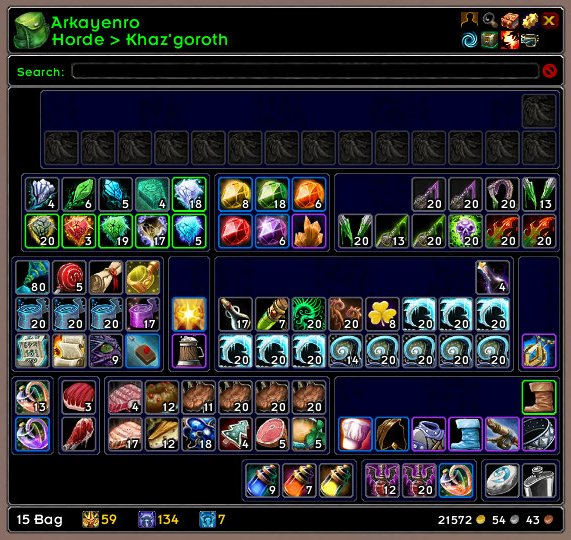
ArkInventory's display windows are built from "virtual bars", you assign categories to bars so that items in that category are displayed on the specific bars you want. There is no limit to the number of bars you can have inside a window but obviously you only have so much screen real estate before it becomes "too many".
ArkInventory uses several methods to assign a default category to an item such as what professions you have, tooltip scanning, basic type/subtype and PeriodicTable. You then assign those categories to a virtual bar.
You can also over-ride the default category by creating a rule that matches either a single or multiple items.
Overview:
- user configurable window width and height
- separate keybindings for each location for easy viewing
- assign items to a category of your choice (overrides the default assignment)
- assign categories to the bar of your choice
- unlimited number of bars (there are practical limits though before your screen becomes full)
- sort each bar differently if required
- user configurable bars per row
- sell junk items automatically or manually (delete available via a keybinding or right clicking when at a vendor)
- random pet and mount summons. can also assign a group of them to select from
Key Bindings:
- Press ESCAPE to bring up the blizzard menu
- click on Key Bindings
- scroll down to AddOns > ArkInventory
- bind the keys you want to use
Need Help?
:memo: Wiki
:memo: Frequently Asked Questions
:memo: Sorting
:memo: Rules
:memo: If you are having an issue the first step is to disable all other mods and test with only ArkInventory loaded
:memo: If the issue is still there, please check for an existing issue and create a new issue if required.
:memo: If the issue is gone, re-enable your other mods one by one until the issue comes back, then note the last mod you enabled in your issue as well as notifying the author of the other mod
See ChangeHistory.md for changes to the latest version. See VersionHistory.md for all previous changes.
:boom: The NoLib variant
it seems quite a few people are somehow getting the NoLib variant from their download client when they didn't specifically ask for it, instead of the full variant, and its causing issues as they don't have the required libraries installed separately. Please ensure you are downloading the full. if you see nolib in the filename then its the wrong variant, unless you are actually installing all of the required libraries separately as well. If you have to you can manually download the full variant from CurseForge, WoWInterface, or Wago.
:boom: Junk Sell getting blocked
While auto-destroy remains blocked, From 30960 onwards you can setup a Key Binding to manually sell and destroy your items. Note that blizzard require one keypress per item deletion, so if you have multiple items that need to be deleted you will need to press the Key Binding multiple times. A message will be output if you have remaining items that can still be deleted.
:warning: Ensure you have backup copies of your saved variables file
Sometimes you cannot revert back to a previous version without a backup, especially alpha or beta versions, so before upgrading please make sure you have made a backup of your saved variables file
Your saved variables file is normally located at ...\World of Warcraft\_client_\WTF\Account\yourwowaccountname\SavedVariables\ArkInventory.lua
It is your responsibility to ensure you have adequate backups of your saved variables file. You dont have to do them frequently, just after you've made major changes to your config is probably fine for most people, but you should get into the habit of making backups because when it does corrupt you wont have to reconfigure everything from scratch.
If you have your download client set to automatically download alpha/beta versions you should definitely have backups.
A simple way to back up the saved variables file is to just do a copy and paste then rename the new file (using the version number of ArkInventory or the date is a good idea), eg ArkInventory-30900.lua, or ArkInventory-20191228.lua
Comments

-

Arkayenro Owner
-
View User Profile
-
Send Message
Posted Nov 20, 2022In reply to dmeister406:
im also having this BIG stutter with AI, happens when u loot or when u open the Guild Bank.
-
View User Profile
-
Send Message
Posted Nov 18, 2022I am running the latest version, and the "Restack" cleanup button is not depositing anything into my Reagent Bank. I am standing at the bank with both inventorys open. I have checked "Deposit All Reagents (Reagent Bank)" and given the Reagent Bank fill priority. But clicking Restack doesn't deposit anything. It cleans up split stacks etc. but no depositing occurs. If I instead right-click the Restack button and click the separate "Deposit All Reagents"-button, the deposit happens.
-
View User Profile
-
Send Message
Posted Nov 17, 2022I reported this before
https://www.curseforge.com/wow/addons/ark-inventory?comment=9707
no mention was made as to the problem,
Updated to 3.10.05 and the same thing happens AND opening the AH while TSM is enabled, BOTH AH windows open Blizzard Default and TSM version.
Part way through posting on the AH with TSM the UI just disappears.
Disabled EVERY addon except TSM and Ark, and it still does it
Disable Ark and have every other addon running. No problem
Tried to update to 3.10.05-alpha-2 Problem still exists.
version 3.10.04 did not have this problem
also noticed for a while, closing the mailbox or AH windows no longer closes the bag, or is that a setting i lost as i have AUTO OPEN/CLOSE all set to YES
EDIT...... so it seams that is you select ALWAYS then it works.... well that's just a mess No Yes and Always.... why is YES not ALWAYS?
-
View User Profile
-
Send Message
Posted Nov 18, 2022the tsm issue is fixed in 3.10.05 alpha 3
the UI disappearing is typically due to massive amounts of errors that arent showing
yes/no/always = read the tooltip text for the differences.
-
View User Profile
-
Send Message
Posted Nov 18, 2022In reply to Arkayenro:
Testing the new 3.10.05 alpha 3 now as it type this
EDIT:-- Nope it is not fixed :-(
EDIT 2 - Wife is not using TSM and her UI just disappeared while opening an Innkeeper to sell junk from her bags.
Either going to drop back to 3.10.04, or just disable Ark for now. It is very late my side of the world, and i just need to get my AH done :-(
yes/no/always = read the tooltip text for the differences.
everything was set to YES, so when i opened the AH the bags opened, but when i closed the AH the bags did not close.
So now i have set everything to ALWAYS, now it works.
-
View User Profile
-
Send Message
Posted Nov 17, 2022Hi there,
Since 10.0.0.2 Arkinventory cause a "lag spikes" or better say VERY high CPU and Memory usage while any Arkinventory Window is visible.
I also cleared already all Data, except Settings and Rules ofc. and increased the Thread (co-routines) timings but makes no difference :/
Pretty sure this is caused by the "Tooltip Rules" but i need more time for testing while not destroy my rules ^^
This was not the case in 10.0.0.0 and also not before!
Edit:
hmm, seems it's not the tooltip rules
will test it now with a "full" reset of all settings and will report again
Edit2:
At Default settings (deleted the Arkinventory.lua settings file) the "lag-spikes" last way shoter but they are still there :(
-
View User Profile
-
Send Message
Posted Nov 18, 2022what version are you running?
-
View User Profile
-
Send Message
Posted Nov 18, 2022In reply to Arkayenro:
hi,
im using Version 3.10.05 now
Did further testing:
Sorting for all my Bags, Bank, Guildbank, etc. is already set to "manualy" for years now, because it caused some trouble in Draenor? if i remember right and so i get used to it to manually click the "Refresh" button if it's needed :D
But the "lags" occur on every Skill use but "only" if the Arkinventory Bag is Visible.
There is also an exception, if i "Buy" any item from a Vendor it also causes a lag, no matter if the Bag Window is Visible or not.
little demonstration Video here, if interested:
If Arkinventory is disabled, everything works fine... except Arkinventory is gone :(
-
View User Profile
-
Send Message
Posted Nov 19, 2022update to 3.10.06 and let me know if its still happening
-
View User Profile
-
Send Message
Posted Nov 19, 2022In reply to Arkayenro:
well, im now at Version 3.10.07
it seems much better now but still not "perfect" as it was before.
mostly if an item changes in the bag, like Loot something, Buy something, Sell something or Destroy anything it is still updating anything "behind the scene" but my Sorting is set to "Manually" for every Bag.
I've also disabled all "Automatic" Action like Mail or Junk and all "Tracking"
So i don't know why there is any Background Action when i open the Bag, except the Tooltips maybe?
i've also enabled your Debug mode and made some "Tests" here:
Open Vendor Window and sell something:
[Vendor] Repaired all equipment for 30
ArkInventory: DEBUG> PlayerInteraction [5] [1] [PLAYER_INTERACTION_HOOK]
ArkInventory: DEBUG> EVENT: MERCHANT_ENTER - PLAYER_INTERACTION_HOOK
ArkInventory: DEBUG> set draw status for 1 to [4] (SET)
ArkInventory: DEBUG> EVENT: PLAYER_INTERACTION_MANAGER_FRAME_SHOW, 5
ArkInventory: DEBUG> PlayerInteraction [5] [1] [PLAYER_INTERACTION_MANAGER_FRAME_SHOW]
ArkInventory: DEBUG> EVENT: MERCHANT_ENTER - PLAYER_INTERACTION_MANAGER_FRAME_SHOW
ArkInventory: DEBUG> EVENT: ITEM_LOCK_CHANGED, 0, 10
[Vendor] Sold [Ice Chunks] for 59   (Poor Items)
ArkInventory: DEBUG> EVENT: ITEM_LOCK_CHANGED, 1, 28
[Vendor] Sold [Aqueous Speck] for 1  58   (Poor Items)
[Vendor] Sold 2 items for 2  17
ElvUI: Your items have been repaired for: 30 28
ArkInventory: DEBUG> EVENT: BAG_UPDATE, { [1]=1, [0]=1 }
ArkInventory: DEBUG> ScanBag( 1 )
ArkInventory: DEBUG> ScanBag( 0 )
ArkInventory: DEBUG> ScanBag( 5 )
ArkInventory: DEBUG> EVENT: { [PLAYER_MONEY]=3 }
ArkInventory: DEBUG> EVENT: LOCATION_SCANNED, { [1]=1 }
ArkInventory: DEBUG> EVENT: CHANGER_UPDATE, { [1]=2 }
ArkInventory: DEBUG> EVENT: LOCATION_DRAW, { [1]=1 }
ArkInventory: DEBUG> EVENT: LOCATION_SCANNED, { [1]=2 }
ArkInventory: DEBUG> EVENT: LOCATION_DRAW, { [1]=1 }
Close Vendor Window
You gained: 1 87 28
ArkInventory: DEBUG> PlayerInteraction [5] [2] [PLAYER_INTERACTION_HOOK]
ArkInventory: DEBUG> EVENT: PLAYER_INTERACTION_MANAGER_FRAME_HIDE, 5
ArkInventory: DEBUG> PlayerInteraction [5] [2] [PLAYER_INTERACTION_MANAGER_FRAME_HIDE]
ArkInventory: DEBUG> PlayerInteraction [0] [2] [PLAYER_INTERACTION_HOOK]
ArkInventory: DEBUG> EVENT: PLAYER_INTERACTION_MANAGER_FRAME_HIDE, 0
ArkInventory: DEBUG> PlayerInteraction [0] [2] [PLAYER_INTERACTION_MANAGER_FRAME_HIDE]
ArkInventory: DEBUG> EVENT: MERCHANT_LEAVE - { [PLAYER_INTERACTION_MANAGER_FRAME_HIDE]=1, [PLAYER_INTERACTION_HOOK]=1 }
Entering Combat
ArkInventory: DEBUG> EVENT: PLAYER_REGEN_DISABLED
ArkInventory: DEBUG> EVENT: BAG_UPDATE, { [1]=1 }
ArkInventory: DEBUG> ScanBag( 1 )
ArkInventory: DEBUG> ScanBag( 5 )
ArkInventory: DEBUG> EVENT: { [UNIT_INVENTORY_CHANGED]=1 }
ArkInventory: DEBUG> IGNORED - IN COMBAT
ArkInventory: DEBUG> EVENT: LOCATION_SCANNED, { [1]=2 }
ArkInventory: DEBUG> EVENT: LOCATION_DRAW, { [1]=1 }
ArkInventory: DEBUG> EVENT: BAG_UPDATE, { [1]=2, [0]=2 }
ArkInventory: DEBUG> ScanBag( 1 )
ArkInventory: DEBUG> ScanBag( 0 )
ArkInventory: DEBUG> ScanBag( 5 )
ArkInventory: DEBUG> EVENT: { [UNIT_INVENTORY_CHANGED]=2 }
ArkInventory: DEBUG> IGNORED - IN COMBAT
ArkInventory: DEBUG> EVENT: LOCATION_SCANNED, { [1]=1 }
ArkInventory: DEBUG> EVENT: LOCATION_SCANNED, { [1]=1 }
ArkInventory: DEBUG> EVENT: LOCATION_DRAW, { [1]=2 }
ArkInventory: DEBUG> EVENT: CHANGER_UPDATE, { [1]=2 }
ArkInventory: DEBUG> EVENT: LOCATION_SCANNED, { [1]=1 }
ArkInventory: DEBUG> EVENT: LOCATION_DRAW, { [1]=1 }
Leave Combat
ArkInventory: DEBUG> EVENT: PLAYER_REGEN_ENABLED
ArkInventory: DEBUG> ScanLocation( 6 )
ArkInventory: DEBUG> EVENT: LOCATION_SCANNED, { [6]=1 }
ArkInventory: DEBUG> EVENT: LOCATION_DRAW, { [6]=1 }
Loot Corpses (Out of Combat)
ArkInventory: DEBUG> EVENT: PLAYER_REGEN_ENABLED
ArkInventory: DEBUG> EVENT: BAG_UPDATE, { [0]=1 }
ArkInventory: DEBUG> ScanBag( 0 )
ArkInventory: DEBUG> ScanBag( 5 )
ArkInventory: DEBUG> EVENT: LOCATION_SCANNED, { [1]=2 }
ArkInventory: DEBUG> EVENT: LOCATION_DRAW, { [1]=1 }
ArkInventory: DEBUG> EVENT: CHANGER_UPDATE, { [1]=1 }
Loot Corpses (In of Combat)
ArkInventory: DEBUG> EVENT: PLAYER_REGEN_DISABLED
ArkInventory: DEBUG> EVENT: BAG_UPDATE, { [1]=2 }
ArkInventory: DEBUG> ScanBag( 1 )
ArkInventory: DEBUG> ScanBag( 5 )
ArkInventory: DEBUG> EVENT: { [UNIT_INVENTORY_CHANGED]=1 }
ArkInventory: DEBUG> IGNORED - IN COMBAT
ArkInventory: DEBUG> EVENT: LOCATION_SCANNED, { [1]=2 }
ArkInventory: DEBUG> EVENT: LOCATION_DRAW, { [1]=1 }
ArkInventory: DEBUG> EVENT: CHANGER_UPDATE, { [1]=1 }
ArkInventory: DEBUG> EVENT: BAG_UPDATE, { [1]=1 }
ArkInventory: DEBUG> ScanBag( 1 )
ArkInventory: DEBUG> ScanBag( 5 )
ArkInventory: DEBUG> EVENT: { [UNIT_INVENTORY_CHANGED]=1 }
ArkInventory: DEBUG> IGNORED - IN COMBAT
ArkInventory: DEBUG> EVENT: LOCATION_SCANNED, { [1]=1 }
ArkInventory: DEBUG> EVENT: LOCATION_DRAW, { [1]=1 }
ArkInventory: DEBUG> EVENT: LOCATION_SCANNED, { [1]=1 }
ArkInventory: DEBUG> EVENT: LOCATION_DRAW, { [1]=1 }
ArkInventory: DEBUG> EVENT: CHANGER_UPDATE, { [1]=1 }
Change any Equipment
ArkInventory: DEBUG> EVENT: ITEM_LOCK_CHANGED, 2, 8
ArkInventory: DEBUG> EVENT: ITEM_LOCK_CHANGED, 6, nil
ArkInventory: DEBUG> EVENT: BAG_UPDATE, { [2]=1 }
ArkInventory: DEBUG> ScanBag( 2 )
ArkInventory: DEBUG> ScanBag( 5 )
ArkInventory: DEBUG> EVENT: { [UNIT_INVENTORY_CHANGED]=1, [PLAYER_EQUIPMENT_CHANGED]=1 }
ArkInventory: DEBUG> ScanLocation( 6 )
ArkInventory: DEBUG> EVENT: { [PLAYER_AVG_ITEM_LEVEL_UPDATE]=4 }
ArkInventory: DEBUG> set draw status for 1 to [4] (SET)
ArkInventory: DEBUG> EVENT: CHANGER_UPDATE, { [1]=1 }
ArkInventory: DEBUG> EVENT: LOCATION_SCANNED, { [1]=2 }
ArkInventory: DEBUG> EVENT: LOCATION_DRAW, { [1]=1 }
ArkInventory: DEBUG> EVENT: LOCATION_SCANNED, { [6]=1 }
ArkInventory: DEBUG> EVENT: CHANGER_UPDATE, { [6]=1 }
maybe this will help the figure out something?
as i can see there is a "BAG_UPDATE" Event on "entering combat" but it seems not ignored in combat?
-
View User Profile
-
Send Message
Posted Nov 17, 2022only Arkinventory loaded all item in bag display corectly
https://freeimage.host/i/H9Sn3YP
load other addons bugs my slots
any sugestion how to find what cause this ?
https://freeimage.host/i/arkinventory.H98PkrP
-
View User Profile
-
Send Message
Posted Nov 18, 2022scrap can cause that as it hasnt been updated yet
-
View User Profile
-
Send Message
Posted Nov 16, 2022In Classic I can't use keys from the keyring. It throws an error: ArkInventory has been blocked from an action only available to the Blizzard UI. You can disable this addon and reload the UI.
This is the error the SpartanUI grabs:
1x [ADDON_ACTION_FORBIDDEN] AddOn 'ArkInventory' tried to call the protected function 'UseContainerItem()'.
[string "@SpartanUI\libs\bug-grabber\BugGrabber.lua"]:544: in function <...aceSpartanUI\libs\bug-grabber\BugGrabber.lua:543>
[string "=[C]"]: in function `UseContainerItem'
[string "@FrameXML\ContainerFrame_Shared.lua"]:1247: in function <FrameXML\ContainerFrame_Shared.lua:1207>
[string "=(tail call)"]: ?
[string "*:OnMouseUp"]:1: in function <[string "*:OnMouseUp"]:1>
-
View User Profile
-
Send Message
Posted Nov 17, 2022disable everything except arkinventory and use a key to check if it gets blocked by itself.
you can try and find the source of the taint with this https://github.com/arkayenro/arkinventory/wiki/Taint-and-ADDON_ACTION_BLOCKED
-
View User Profile
-
Send Message
Posted Nov 18, 2022In reply to Arkayenro:
I disabled everything and re-enabled AI only and it still failed. This is my taint file (which pretty much matches what SpartanUI posted):
11/18 16:42:50.961 An action was blocked because of taint from ArkInventory - UseContainerItem()
11/18 16:42:50.961 Interface\FrameXML\ContainerFrame_Shared.lua:1247
11/18 16:42:50.961 ARKINV_Frame2ScrollContainerBag1Item2:OnMouseUp()
Ran it a 2nd time and got this:
11/18 16:51:25.122 Global variable ArkInventory tainted by ArkInventory - Interface\AddOns\ArkInventory\Core\ArkInventoryConst.lua:10
11/18 16:51:25.122 Execution tainted by ArkInventory while reading ArkInventory - Interface\AddOns\ArkInventory\Core\ArkInventoryTooltip.lua:2211 TooltipAddItemCount()
11/18 16:51:25.122 Interface\AddOns\ArkInventory\Core\ArkInventoryTooltip.lua:1494 HookTooltipSetGeneric()
11/18 16:51:25.122 Interface\AddOns\ArkInventory\Core\ArkInventoryTooltip.lua:1556
11/18 16:51:25.122 SetInventoryItem()
11/18 16:51:25.122 Interface\AddOns\ArkInventory\Core\ArkInventory.lua:8535 ARKINV_Frame2ScrollContainerBag1Item2:UpdateTooltip()
11/18 16:51:25.122 Interface\FrameXML\GameTooltip.lua:431
11/18 16:51:25.122 An action was blocked because of taint from ArkInventory - UseContainerItem()
11/18 16:51:25.122 Interface\FrameXML\ContainerFrame_Shared.lua:1247
11/18 16:51:25.122 ARKINV_Frame2ScrollContainerBag1Item2:OnMouseUp()
-
View User Profile
-
Send Message
Posted Nov 16, 2022re: the new wearable() rule, on my paladin, using that rule puts WANDS into the container.
Also unusable items (level, type) seem to not be tinting even tho I have the option enabled.
-
View User Profile
-
Send Message
Posted Nov 17, 2022im seeing a wand as unwearable on my paladin (its got red text on it and its not picked up by the rule)
go into edit mode and double check what category the item has been assigned. it should not be your unwearable rule unless you have more in there than just unwearable.
-
View User Profile
-
Send Message
Posted Nov 15, 2022latest patch causes multiple errors in TradeskillMaster :/
61x TradeSkillMaster/LibTSM/Util/Event.lua:97: assertion failed!
828x ...ceTradeSkillMaster/LibTSM/Util/TempTable.lua:41: Could not acquire temp table
6x ...eTradeSkillMaster/Core/UI/AuctionUI/Core.lua:248: assertion failed!
disabling Arkinventory fixes the issue
-
View User Profile
-
Send Message
Posted Nov 12, 2022Got this on logon with the latest update
1x Interface/AddOns/ArkInventory/Core/ArkInventory.lua:2950: Usage: RegisterBucket(event, interval, callback): 'callback' - method not found on target object.
[string "=[C]"]: ?
[string "@Interface/AddOns/Ace3/AceBucket-3.0-4/AceBucket-3.0.lua"]:142: in function <...nterface/AddOns/Ace3/AceBucket-3.0/AceBucket-3.0.lua:122>
[string "=(tail call)"]: ?
[string "@Interface/AddOns/ArkInventory/Core/ArkInventory.lua"]:2950: in function <Interface/AddOns/ArkInventory/Core/ArkInventory.lua:2899>
[string "=[C]"]: ?
[string "@Interface/AddOns/Ace3/AceAddon-3.0-13/AceAddon-3.0.lua"]:66: in function <Interface/AddOns/Ace3/AceAddon-3.0/AceAddon-3.0.lua:61>
[string "@Interface/AddOns/Ace3/AceAddon-3.0-13/AceAddon-3.0.lua"]:523: in function `EnableAddon'
[string "@Interface/AddOns/Ace3/AceAddon-3.0-13/AceAddon-3.0.lua"]:626: in function <Interface/AddOns/Ace3/AceAddon-3.0/AceAddon-3.0.lua:611>
-
View User Profile
-
Send Message
Posted Nov 14, 2022should be fixed in alpha 17