ArkInventory
ArkInventory (for The War Within)
:boom: Please ensure you are using the latest alpha version if you have the War Within client.
ArkInventory (for Retail, Classic, and Cataclysm)
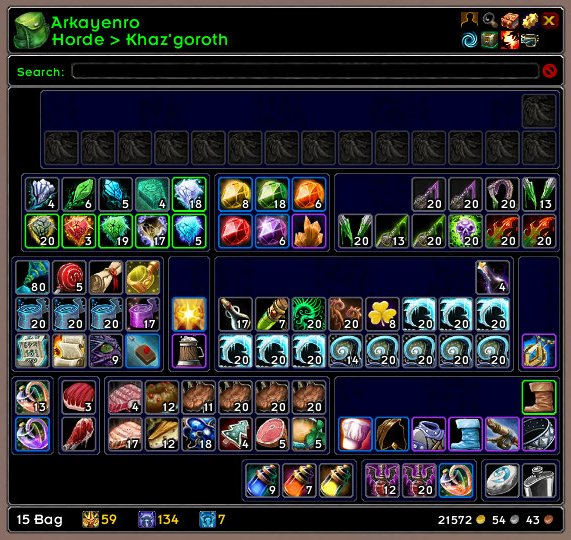
ArkInventory's display windows are built from "virtual bars", you assign categories to bars so that items in that category are displayed on the specific bars you want. There is no limit to the number of bars you can have inside a window but obviously you only have so much screen real estate before it becomes "too many".
ArkInventory uses several methods to assign a default category to an item such as what professions you have, tooltip scanning, basic type/subtype and PeriodicTable. You then assign those categories to a virtual bar.
You can also over-ride the default category by creating a rule that matches either a single or multiple items.
Overview:
- user configurable window width and height
- separate keybindings for each location for easy viewing
- assign items to a category of your choice (overrides the default assignment)
- assign categories to the bar of your choice
- unlimited number of bars (there are practical limits though before your screen becomes full)
- sort each bar differently if required
- user configurable bars per row
- sell junk items automatically or manually (delete available via a keybinding or right clicking when at a vendor)
- random pet and mount summons. can also assign a group of them to select from
Key Bindings:
- Press ESCAPE to bring up the blizzard menu
- click on Key Bindings
- scroll down to AddOns > ArkInventory
- bind the keys you want to use
Need Help?
:memo: Wiki
:memo: Frequently Asked Questions
:memo: Sorting
:memo: Rules
:memo: If you are having an issue the first step is to disable all other mods and test with only ArkInventory loaded
:memo: If the issue is still there, please check for an existing issue and create a new issue if required.
:memo: If the issue is gone, re-enable your other mods one by one until the issue comes back, then note the last mod you enabled in your issue as well as notifying the author of the other mod
See ChangeHistory.md for changes to the latest version. See VersionHistory.md for all previous changes.
:boom: The NoLib variant
it seems quite a few people are somehow getting the NoLib variant from their download client when they didn't specifically ask for it, instead of the full variant, and its causing issues as they don't have the required libraries installed separately. Please ensure you are downloading the full. if you see nolib in the filename then its the wrong variant, unless you are actually installing all of the required libraries separately as well. If you have to you can manually download the full variant from CurseForge, WoWInterface, or Wago.
:boom: Junk Sell getting blocked
While auto-destroy remains blocked, From 30960 onwards you can setup a Key Binding to manually sell and destroy your items. Note that blizzard require one keypress per item deletion, so if you have multiple items that need to be deleted you will need to press the Key Binding multiple times. A message will be output if you have remaining items that can still be deleted.
:warning: Ensure you have backup copies of your saved variables file
Sometimes you cannot revert back to a previous version without a backup, especially alpha or beta versions, so before upgrading please make sure you have made a backup of your saved variables file
Your saved variables file is normally located at ...\World of Warcraft\_client_\WTF\Account\yourwowaccountname\SavedVariables\ArkInventory.lua
It is your responsibility to ensure you have adequate backups of your saved variables file. You dont have to do them frequently, just after you've made major changes to your config is probably fine for most people, but you should get into the habit of making backups because when it does corrupt you wont have to reconfigure everything from scratch.
If you have your download client set to automatically download alpha/beta versions you should definitely have backups.
A simple way to back up the saved variables file is to just do a copy and paste then rename the new file (using the version number of ArkInventory or the date is a good idea), eg ArkInventory-30900.lua, or ArkInventory-20191228.lua
Comments

-

Arkayenro Owner
-
View User Profile
-
Send Message
Posted Nov 21, 2020Seems as though each time WoW patches/updates this poor addon ceases to function. Hope it gets updated quickly. I can't stand the other bag addons. No idea what's caused it as there are no ArkInventory bugs in Bugsack after Oct 31st. I will keep an eye and hopefully catch what's causing it tno to work.
-
View User Profile
-
Send Message
Posted Nov 21, 2020in what ay doesnt it work? im not having any issues with it
-
View User Profile
-
Send Message
Posted Nov 21, 2020In reply to Arkayenro:
For me, whwever there's an update to wow adn I update all myaddons (arkinventory included) my bags never work anymore. The crappy blizzard default bags open. And yes, I have arkinventory enabled in my addons.
-
View User Profile
-
Send Message
Posted Nov 22, 2020are there any errors?
does it still happen if arkinventory is the only thing loaded?
what do you do to fix it?
-
View User Profile
-
Send Message
Posted Nov 22, 2020In reply to TheZeldrak:
Do you have "Load out of date addons" checked? If not, try it.
-
View User Profile
-
Send Message
Posted Nov 20, 2020Hi, right clicking an item in edit mode to remove a custom category from that item removes it from the bar instead.
I created a custom category (do not vendor) and assigned that category to a bar that has no other assignment. Then I started adding the category to individual items, which worked fine and they went into the bar as expected. However I can't remove the custom category now from any individual item in that bar. Doing so simply removes the category from the bar, as if I am right clicking on the bar to edit it instead of the item.
-
View User Profile
-
Send Message
Posted Nov 21, 2020are you using the remove sub menu option? thats for removing it from the bar (which is stated in the description) - every option in that sub menu is about the category, not the item
if you want to remove a custom category from an item you have to click on its default category (the one in pale yellow) to reset it back to its default category
-
View User Profile
-
Send Message
Posted Nov 21, 2020In reply to Arkayenro:
Yes, I saw that description (the tooltip thing on mouseover?) and I assumed that too was evidence of a bug - was about to send a screenshot. Is there a reason for the options on the Item menu relating to the Bars? Far as I can tell all the functions are possible through the Bar sub menus.
-
View User Profile
-
Send Message
Posted Nov 22, 2020everything in the top level relates to the item, there isnt much more you need there
previously there was no menu off those category options. i added the category/bar menus just for convenience sake.
-
View User Profile
-
Send Message
Posted Nov 7, 2020Dev team: Is there a way to mix priority between built-in rules and custom rules? I want to set one bar to have all my junk, another to have all my soul bound equipment, and a third to have all my soul bound non-equipment. Because of the division of Eq and non-Eq, I use rules for soulbound and type(armor,weapon) and soulbound and not type(..) but now all the junk that is soulbound shows up in the soulbound bar and not the junk bar. I can't find any way to designate that I want all the junk to be collected first and then run the rest of the equipment through the rest of the rules. Any guidance? I've read the wiki, faq, and other links here.
D
-
View User Profile
-
Send Message
Posted Nov 8, 2020In reply to father0fnine:
you can use the quality function by putting " and (not q(0)) ", you write this after the rule you create.
this mean quality is not grey (0)
https://github.com/arkayenro/arkinventory/wiki/RuleFunction_Quality
-
View User Profile
-
Send Message
Posted Nov 8, 2020> Is there a way to mix priority between built-in rules and custom rules?
not at this point. working on a way to let people order all of them as they like but i need to completely rebuild a bunch of stuff
> I want to set one bar to have all my junk
junk has a specific meaning (grey trash or junk enabled categories/rules), what do you mean by junk?
i dont see why you cant do what you want so i must be missing something
> Because of the division of Eq and non-Eq, I use rules for soulbound and type(armor,weapon) and soulbound and not type(..) but now all the junk that is soulbound shows up in the soulbound bar and not the junk bar
you'll have to spell out the rules you have and which system, or custom, categories you are using, so i can try and work out why its not working the way you want it to..
-
View User Profile
-
Send Message
Posted Nov 8, 2020In reply to Arkayenro:
when you create a rule on top there is a number, usualy it's 100, thats the priority of other rules
-
View User Profile
-
Send Message
Posted Nov 8, 2020In reply to Arkayenro:
Well.. In bar 20, I have the categories set to 0402 "system->junk" which used to collect all the grey objects. Then in bar 2, I set the category to 409 "system->bound" and 1009 "custom rule" which is soulbound() and not type( "armor", "weapon" ). Not all grey items but some of the grey items started showing up in bar 2. I tried collecting some grey items around Stormwind real quick but none of them replicated the error. I'll get on later tonight to play for real but I wanted to answer your message as quickly as I could, but I think your first point answered my question.
-
View User Profile
-
Send Message
Posted Nov 9, 2020it should be ok to just add and not junk() to your rule(s) so they dont collect any junk items, eg
soulbound() and not type( "armor", "weapon" ) and not junk()
you can also create a rule, with a priority of 1 (or wahtever number is needed to make it first), and a formula of junk(), to ensure that all junk items are collected out before they hit any other rule you may have
-
View User Profile
-
Send Message
Posted Oct 30, 2020Two things.
1) Since the new patch shenanigans, I am getting a bit of spam from ArkInventory not identifying items and rescanning. Once upon a time it had problems of this nature before, but I assume you eventually riddled out those troubles along the way. But, now they are back again. Other than that, I have have had no problems that have affected me at this point.
2) Thank you very much for maintaining a very relevant addon! I've used & dabbled with bag addons in the past, but I find this one most useful in constant organization of all the crap Blizz gives me. Don't want to think what I would do without it! Putting my money where my mouth is... perhaps others can rise to the occasion and support your efforts as well.
-
View User Profile
-
Send Message
Posted Oct 30, 2020> Once upon a time it had problems of this nature before, but I assume you eventually riddled out those troubles along the way. But, now they are back again
funnily enough i didnt change the code to handle items having that issue, its typically a game caching issue that i cannot do anything about (and its annoying)
you can try moving the problematic items to a different slot (sometimes that helps), but eventually the game should return non zero data for the item and the warning will stop
-
View User Profile
-
Send Message
Posted Oct 24, 2020Just wanted to take a moment to mention how much I love the new Paragon notices! TY!
-
View User Profile
-
Send Message
Posted Oct 24, 2020Hello! Not sure why, but the most recent version 3.09.43 doesn't work for me - it just opens regular bags instead. Reverting to 3.09.42 fixes the problem. If there are errors, I don't see them, but not like i see any errors aside from the message "your addons spam too many errors, disable them plx".
-
View User Profile
-
Send Message
Posted Oct 24, 2020you can manually delete the arkinventory folders, then reinstall manually, see if that helps
or can you (temporarily) install BugGrabber and BugSack to capture the errors